
1. Ważne instrukcje bezpieczeństwa
Please read this manual thoroughly before use and retain it for future reference. Always follow basic safety precautions when using electrical appliances to reduce the risk of fire, electric shock, and injury.
- Do not place the humidifier on wet surfaces or near heat sources.
- Use only clean, purified, or distilled water to prevent mineral buildup and ensure optimal performance.
- Przechowywać w miejscu niedostępnym dla dzieci i zwierząt domowych.
- Przed czyszczeniem lub napełnianiem nawilżacza należy go odłączyć od zasilania.
2. Schemat produktu
Familiarize yourself with the components of your DREO HM409S Humidifier.

Image: The DREO HM409S humidifier shown next to a smartphone displaying its control app. The humidifier features a translucent top section that glows with an RGB light, a digital display showing humidity, and touch controls.
- Wylot mgły: Miejsce, w którym uwalniana jest chłodna mgła.
- Zbiornik na wodę: 3L capacity for water.
- Panel sterowania/Wyświetlacz: Digital screen and touch buttons for operation.
- Opierać: Contains the ultrasonic atomizer and electronics.
- Przewód zasilający: Do podłączenia do gniazdka elektrycznego.
3. Konfiguracja i pierwsze użycie
3.1 Rozpakowanie
- Ostrożnie usuń wszystkie materiały opakowaniowe.
- Inspect the humidifier for any damage. Do not use if damaged.
- Nawilżacz należy ustawić na stabilnej, płaskiej i wodoodpornej powierzchni w odległości co najmniej 15 cm od ścian i urządzeń.
3.2 Napełnianie zbiornika na wodę

Image: A hand pouring water directly into the top opening of the DREO HM409S humidifier, demonstrating its top-fill design.
- Upewnij się, że nawilżacz jest odłączony od zasilania.
- Zdejmij górną pokrywę.
- Pour clean, purified, or distilled water directly into the water tank up to the MAX fill line. Avoid overfilling.
- Załóż dokładnie górną pokrywę.
3.3 Włączanie
- Podłącz przewód zasilający do gniazdka elektrycznego 120 V AC.
- Press the Power button on the control panel to turn on the humidifier.
3.4 Połączenie aplikacji (opcjonalnie)
For smart features and remote control, download the DREO app from your smartphone's app store. Follow the in-app instructions to connect your humidifier to your Wi-Fi network. The humidifier is compatible with Alexa and Google Home for voice control.

Image: The DREO HM409S humidifier with a smartphone displaying its smart control interface, alongside logos for DREO, Alexa, and Hey Google, indicating smart home compatibility.
4. Instrukcja obsługi
4.1 Regulacja wydajności mgły
Press the Mist Level button to cycle through different mist output settings (Low, Medium, High). The current setting will be displayed on the screen.
4.2 Automatyczna kontrola wilgotności
The humidifier features a built-in humidistat. Press the Auto Mode button to activate. The humidifier will automatically adjust mist output to maintain your desired humidity level (e.g., 45-55% for optimal comfort).
4.3 RGB Night Light and Sleep Routine Trainer
The humidifier offers over 1500 customizable RGB light options. Use the Light button on the unit or the DREO app to select colors, brightness, and special modes.
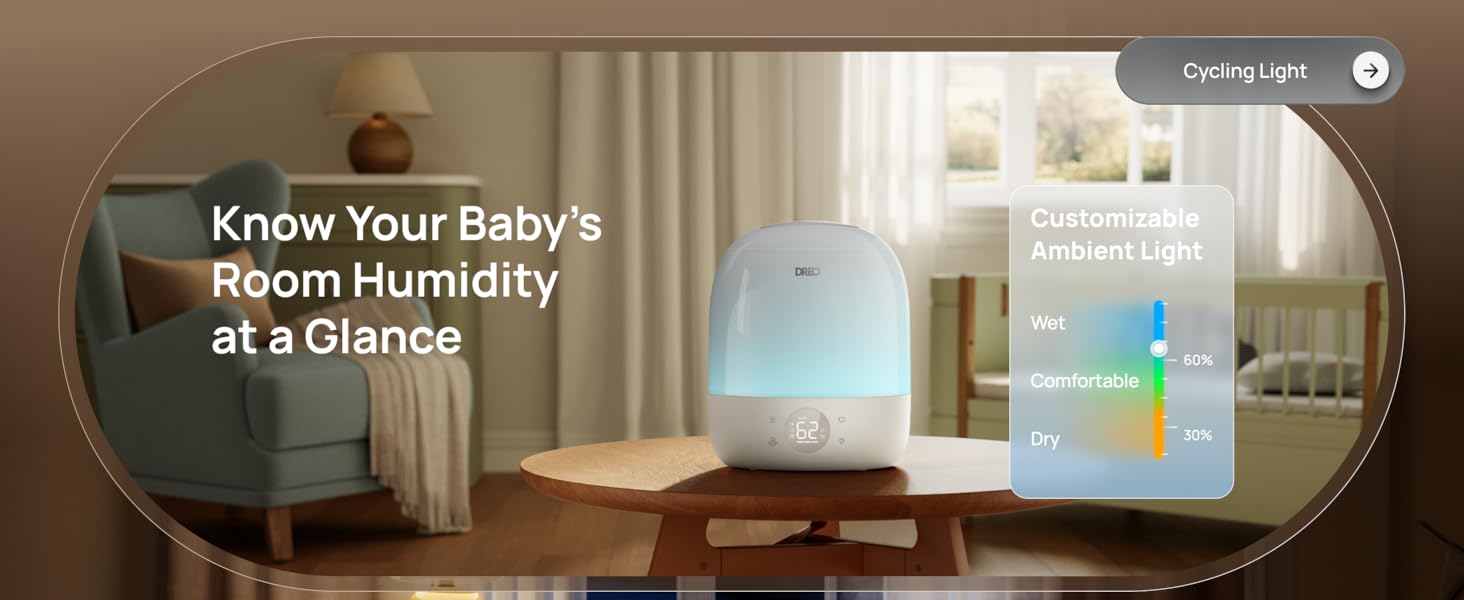
Image: The DREO HM409S humidifier with a smartphone displaying the customizable RGB lighting interface within the DREO app, showing a color wheel and various light modes.
- Sleep Routine Trainer: This feature uses light cues to guide sleep habits. The light dims at night to promote rest and brightens in the morning for waking.
- Oddychające światło: A gentle pulsing light for relaxation.
- Cycling Light: Cycles through various colors.
- Kontrolka wilgotności: Changes color to indicate current humidity levels (e.g., blue for wet, green for comfortable, orange for dry).
4.4 Funkcja timera
Set the humidifier to operate for a specific duration using the Timer button or the DREO app. The timer can be set for up to 24 hours.
4.5 Dyfuzor zapachowy
Add a few drops of essential oil to the designated aroma pad in the base of the humidifier for a personalized atmosphere. Do not add essential oils directly into the water tank.
4.6 Tiltable Nozzle
The mist nozzle can be tilted up to 30 degrees to direct the mist flow as needed.
5. Konserwacja
Regularne czyszczenie i konserwacja są niezbędne dla optymalnej pracy i długiej żywotności nawilżacza powietrza.
5.1 Czyszczenie nawilżacza
- Przed czyszczeniem nawilżacza należy zawsze odłączyć go od zasilania.
- Zdejmij górną pokrywę i wylej pozostałą wodę ze zbiornika i podstawy.
- Wipe the inside of the water tank and base with a soft cloth. For mineral buildup, use a solution of white vinegar and water (1:1 ratio) and let it soak for 15-20 minutes before scrubbing gently with the provided cleaning brush.
- Rinse all components thoroughly with clean water and dry completely before reassembly.
5.2 Cartridge Replacement (Optional)
The DREO HM409S supports optional demineralization and clean mist cartridges to reduce limescale and maintain mist purity. The DREO app will provide reminders when it's time to replace cartridges (typically every 600 hours of use).

Image: The DREO HM409S humidifier with a smartphone displaying a filter life indicator and reminder for cartridge replacement.
6. Rozwiązywanie Problemów
Jeśli napotkasz jakiekolwiek problemy z nawilżaczem powietrza, zapoznaj się z poniższymi typowymi problemami i ich rozwiązaniami:
| Problem | Możliwa przyczyna | Rozwiązanie |
|---|---|---|
| Brak mgły lub jej mała ilość | Low water level; Mineral buildup; Mist outlet blocked. | Refill water tank; Clean the humidifier, especially the atomizer; Ensure mist outlet is clear. |
| Nieprzyjemny zapach | Stagnant water; Zbiornik na brudną wodę. | Empty and clean the water tank regularly; Use fresh water daily. |
| Humidifier not connecting to app | Nieprawidłowe hasło Wi-Fi; Router jest za daleko; Sieć Wi-Fi 5 GHz. | Ensure correct password; Move humidifier closer to router; Ensure you are connecting to a 2.4GHz Wi-Fi network. |
| Nadmierny hałas | Unit not on a flat surface; Water level too low. | Place on a stable, flat surface; Refill water tank. |
If the problem persists, please contact DREO Customer Support.
7. Specyfikacje
- Marka: Dreo
- Nazwa modelu: DR-HHM009S
- Tryb działania: Ultradźwiękowy
- Pojemność zbiornika na wodę: 3 litrów
- Maksymalny obszar zasięgu: 300 stóp kwadratowych
- Maksymalny czas działania: Do 30 godzin
- Poziom hałasu: 28 dB (cichy jak szept)
- Tomtage: 120 wolty
- Cotage: 29 watów
- Cechy szczególne: Adjustable Humidity Control, Aroma Diffuser, Auto Shut Off, Digital Display, Humidistat, RGB Night Light, Sleep Routine Trainer, Smart App Control (Wi-Fi), Alexa/Google Home Compatible, Top-Fill Design, 30° Tiltable Nozzle, BPA-Free Materials.
- Zawartość zestawu: 1 × Dreo 3L Humidifier, 1 × Quick Start Guide, Cleaning Brush, User Manual.
8. Gwarancja i wsparcie
DREO products are manufactured with high-quality materials and craftsmanship. For warranty information and customer support, please refer to the official DREO webstronie internetowej lub karcie gwarancyjnej dołączonej do produktu.
Aby uzyskać dalszą pomoc, zapoznaj się również z oficjalną instrukcją obsługi w formacie PDF: DREO HM409S User Manual (PDF)
DREO is committed to providing excellent customer service. If you experience any issues, please contact their support team for prompt assistance.