
1. Wprowadzenie
The COLMI R02 Smart Ring is a compact, wearable device designed to monitor various health and activity metrics directly from your finger. It provides continuous tracking of heart rate, blood oxygen levels, sleep patterns, and daily activity without requiring a subscription fee. This manual will guide you through the setup, operation, and maintenance of your smart ring to ensure optimal performance.
2. Ważne informacje dotyczące bezpieczeństwa
- The COLMI R02 Smart Ring is not a medical device. Data obtained from this device is for reference only and should not be used for clinical diagnosis, medical research, diagnostic, or treatment purposes.
- Consult a healthcare professional before making any decisions based on the data provided by the ring.
- Przechowuj urządzenie i jego akcesoria poza zasięgiem dzieci.
- Avoid exposing the ring to extreme temperatures or direct sunlight for prolonged periods.
- Nie należy podejmować prób demontażu lub modyfikacji urządzenia, gdyż spowoduje to utratę gwarancji i może spowodować uszkodzenia.
3. Co znajduje się w pudełku
Upon opening your COLMI R02 Smart Ring package, you should find the following items:
- 1 x COLMI R02 Smart Ring
- 1 x przenośny futerał ładujący
- 1 x kabel ładujący
- 1 x Instrukcja obsługi (ten dokument)
4. Przewodnik po rozmiarach
Choosing the correct ring size is crucial for comfort and accurate data tracking. We recommend using a sizing kit or carefully measuring your finger circumference.
4.1. Measuring Your Finger
To measure your finger, you can use a non-elastic rope or paper strip. Wrap it snugly around your finger, mark the junction, and then measure the length with a ruler. Repeat this process multiple times for accuracy.

Figure 4.1: Visual guide for measuring finger circumference using a paper strip.
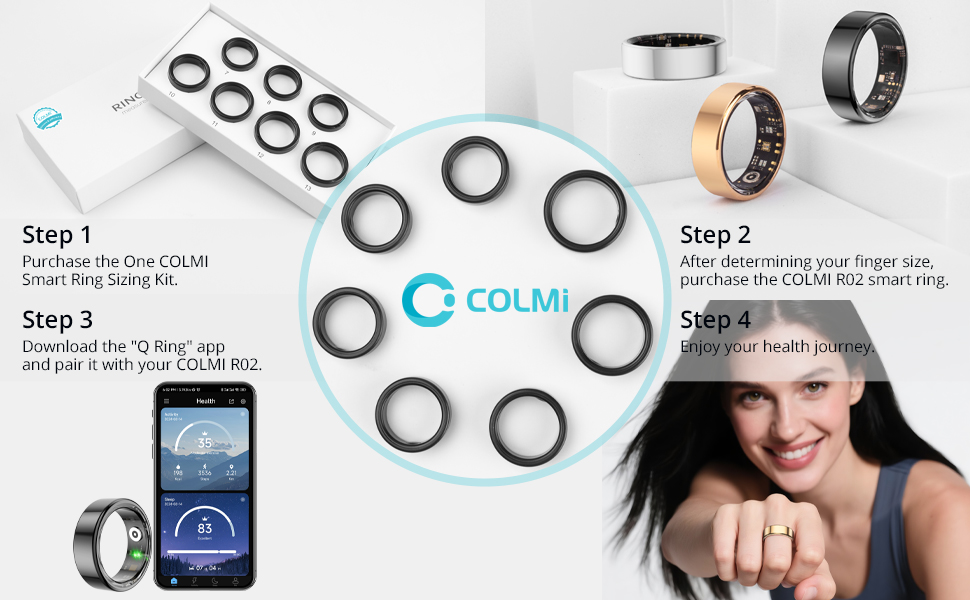
Figure 4.2: The COLMI Smart Ring Sizing Kit, recommended for precise size determination.
4.2. Ring Size Chart
| Rozmiar | Inner Diameter (inch) | Obwód (cale) | Obwód (cm) |
|---|---|---|---|
| 7# | 0.69 | 2.17~2.26 | 5.5~5.74 |
| 8# | 0.72 | 2.26~2.36 | 5.75~6 |
| 9# | 0.75 | 2.36~2.47 | 6.01~6.27 |
| 10# | 0.79 | 2.47~2.57 | 6.28~6.53 |
| 11# | 0.82 | 2.57~2.67 | 6.54~6.77 |
| 12# | 0.85 | 2.67~2.77 | 6.78~7.03 |
| 13# | 2.77~2.83 | 7.04~7.2 |
Note: The above dimensions have a measurement tolerance of ± 0.2mm/0.0078inch. The ring size refers to the inner diameter, not the outer diameter.
4.3. Sizing Video Guide
Video 4.1: A detailed video guide on how to measure your finger for the correct ring size.
5. Przewodnik konfiguracji
5.1. Pierwsze ładowanie i aktywacja
Before first use, ensure your COLMI R02 Smart Ring is fully charged and activated.
- Remove the insulation film from the ring.
- Place the smart ring into the portable charging case.
- Connect the charging cable to the charging case and a 5V DC USB power supply. The indicator light on the case will show charging status.
- Once fully charged, the ring is activated and ready for use.
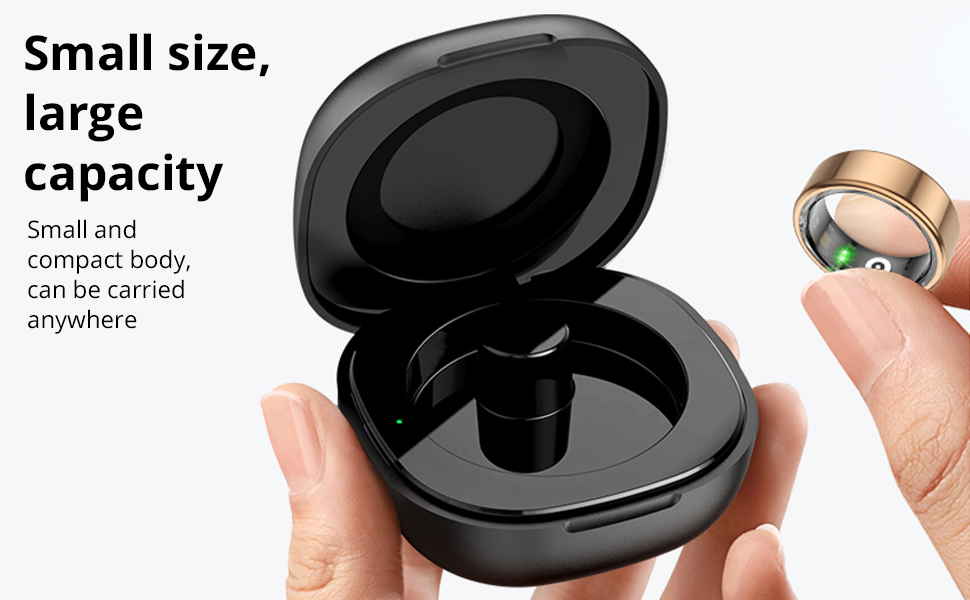
Figure 5.1: The COLMI R02 Smart Ring charging in its portable case. The case provides convenient charging on the go.
5.2. Pobieranie i parowanie aplikacji
To access and manage your health data, download the companion 'Q Ring' app and pair it with your smart ring.
- Download the 'Q Ring' app from the App Store (iOS) or Google Play Store (Android).
- Upewnij się, że Bluetooth jest włączony w Twoim smartfonie.
- Open the 'Q Ring' app and follow the on-screen instructions to search for and bind your COLMI R02 Smart Ring.
- The app will automatically synchronize data from the ring once connected.

Figure 5.2: The COLMI R02 Smart Ring and its companion app displaying various health metrics.
6. Obsługa inteligentnego pierścienia
The COLMI R02 Smart Ring continuously tracks your health data. Ensure the ring is worn correctly for accurate readings.
6.1. Monitorowanie tętna
The ring features a high-performance heart rate sensor that automatically collects heart rate data every 30 minutes. You can view your heart rate status and monitor for abnormalities in the app.
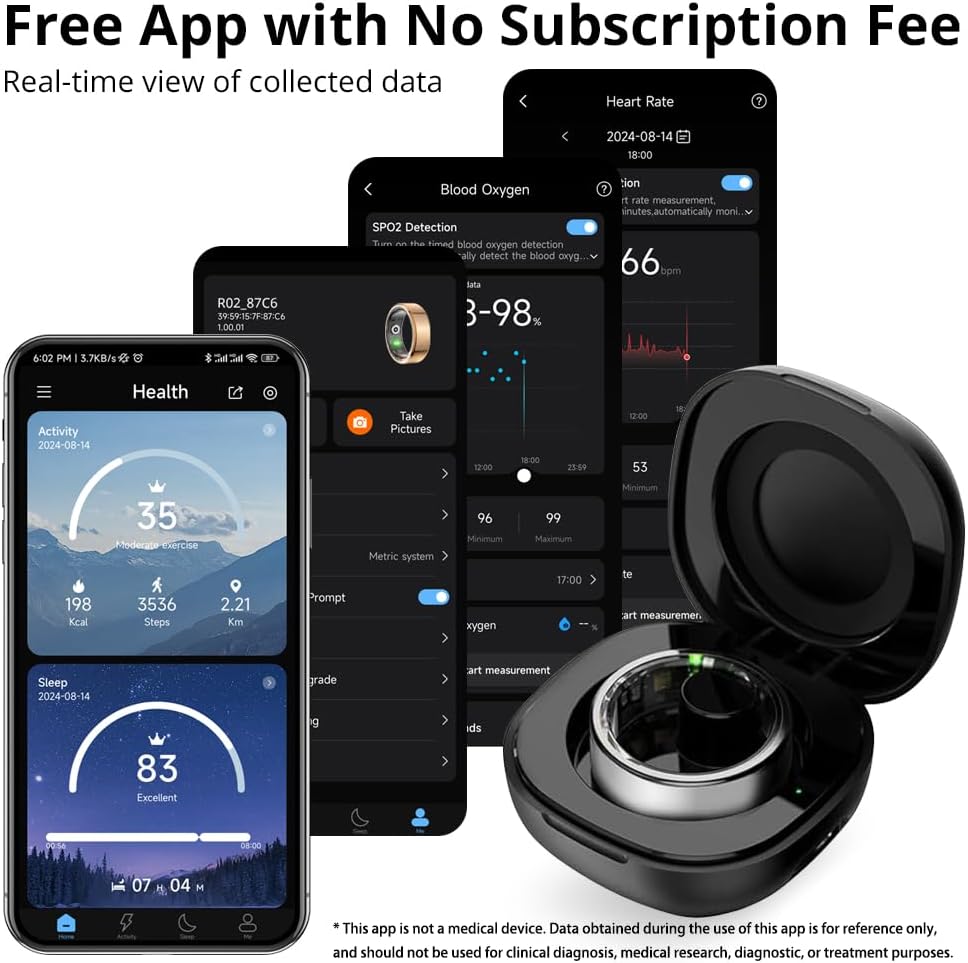
Figure 6.1: The app displays your heart rate data, including scheduled measurements and real-time readings.
6.2. Blood Oxygen Monitoring (SpO2)
The COLMI R02 records your blood oxygen data, an important indicator of human health. This data is accessible through the app.

Figure 6.2: The app provides a detailed view of your blood oxygen levels over time.
6.3. Monitorowanie snu
The ring detects when you fall asleep and wake up, monitoring your sleep quality and duration. It generates concise reports to help you understand and improve your sleep patterns.
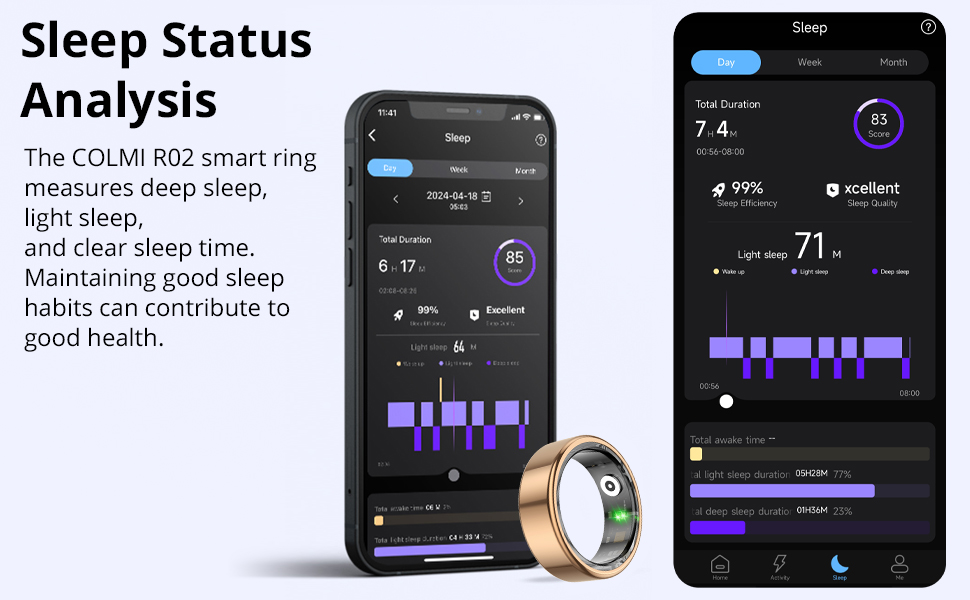
Figure 6.3: The app provides a comprehensive analysis of your sleep stagi jakość.
6.4. Śledzenie aktywności
Track your daily steps, distance traveled, and calories burned to stay motivated and monitor your fitness progress.

Figure 6.4: The app displays your daily activity metrics, including steps, distance, and calories.
6.5. Photo Control
Utilize the remote camera control function in the app. Simply flick your finger while wearing the ring to remotely capture photos on your paired smartphone.
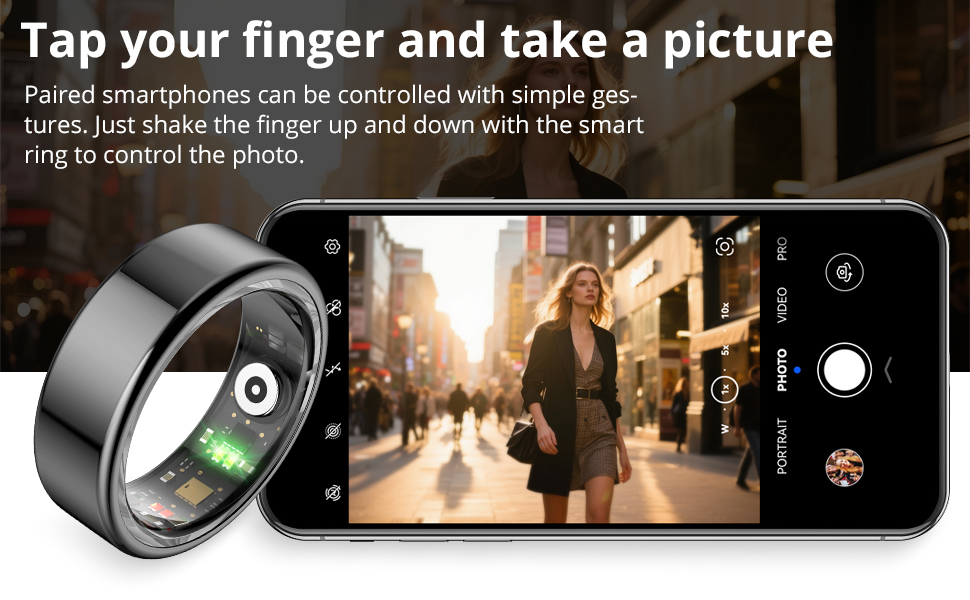
Figure 6.5: The smart ring allows for convenient remote control of your smartphone's camera.
7. Konserwacja
7.1. Cleaning Your Ring
To maintain optimal performance and hygiene, regularly clean your COLMI R02 Smart Ring. Use a soft, damp cloth to wipe the surface of the ring. Avoid using harsh chemicals or abrasive materials, as these can damage the device.
7.2. Pielęgnacja etui ładującego
Keep the charging case clean and dry. Ensure the charging contacts inside the case are free from dust or debris to ensure proper charging of your ring.
8. Rozwiązywanie Problemów
8.1. Ring Not Connecting to App
- Ensure the ring is charged and activated.
- Sprawdź, czy w smartfonie jest włączona funkcja Bluetooth.
- Restart the 'Q Ring' app and try pairing again.
- If the issue persists, try restarting your smartphone.
8.2. Inaccurate Data Readings
- Upewnij się, że pierścionek dobrze przylega do palca i że czujniki mają dobry kontakt ze skórą.
- Avoid excessive movement during measurements, especially for real-time heart rate or blood oxygen readings.
- Clean the sensors on the inside of the ring regularly.
8.3. Krótki czas pracy baterii
- Przed użyciem upewnij się, że pierścień jest całkowicie naładowany.
- Frequent real-time monitoring (e.g., heart rate every 5 minutes) can shorten battery life. Adjust monitoring frequency in the app settings.
- Close unnecessary background apps on your phone that might be constantly trying to sync with the ring.
8.4. Heart Rate Measurement Settings Video
Video 8.1: This video demonstrates how to adjust heart rate measurement settings within the app to optimize data collection and battery life.
9. Specyfikacje
| Funkcja | Szczegół |
|---|---|
| Nazwa modelu | COLMI R02 |
| Zgodność z systemem operacyjnym | Android, iPhone (iOS) |
| Technologia łączności | Bluetooth |
| Standard komunikacji bezprzewodowej | Bluetooth |
| Cechy specjalne | Heart rate monitoring, Photo Control, Sleep Measurement |
| Mierzone metryki | Heart Rate, Sleep Duration, Blood Oxygen |
| Pojemność baterii | 15 mlnamp Godziny |
| Skład ogniw baterii | Polimer litowy |
| Tworzywo | Stal nierdzewna |
| Poziom wodoodporności | Wodoodporny |
| Waga przedmiotu | 100 gram |
| Producent | Shenzhen COLMI Technology Co., Ltd |
10. Gwarancja i wsparcie
10.1. Gwarancja na produkt
The COLMI R02 Smart Ring comes with a 1-year standard/full warranty from the date of purchase. This warranty covers manufacturing defects and malfunctions under normal use. Please retain your proof of purchase for warranty claims.
10.2. Obsługa klienta
For any usage or quality issues, please contact COLMI customer service. Our professional after-sales service team is ready to assist you.
- Wsparcie online: Odwiedź COLMI Store on Amazon aby uzyskać odpowiedzi na często zadawane pytania i informacje kontaktowe.
- Wsparcie e-mailowe: Refer to the contact information provided in your product packaging or on the official COLMI webstrona.