
WOLFBOX X5 & X3
WOLFBOX Dash Cam User Manual
Models: X5 3-Channel 4K HDR & X3 2.5K 60FPS
1. Wprowadzenie
Thank you for choosing WOLFBOX Dash Cams. This manual provides detailed instructions for the WOLFBOX X5 3-Channel 4K HDR Dash Cam and the WOLFBOX X3 2.5K 60FPS Dash Cam. These advanced vehicle recording systems are designed to enhance your driving safety and provide reliable evidence in case of incidents. Please read this manual thoroughly before installation and operation to ensure proper use and optimal performance.
2. Informacje dotyczące bezpieczeństwa
Należy przestrzegać następujących wskazówek bezpieczeństwa:
- Nie obsługuj kamery samochodowej ani nie zmieniaj jej ustawień podczas jazdy. Zawsze zjedź na pobocze przed dokonaniem jakichkolwiek regulacji.
- Ensure the dash cam is installed securely and does not obstruct your view drogi lub przeszkadzać w uruchomieniu poduszek powietrznych.
- Unikaj wystawiania urządzenia na działanie ekstremalnych temperatur, długotrwałego bezpośredniego światła słonecznego i nadmiernej wilgoci.
- Use only original WOLFBOX accessories and power cables to prevent damage and ensure proper functionality.
- Regularly check the memory card for errors and format it periodically to maintain optimal recording performance.
3. Zawartość opakowania
Sprawdź, czy w przesyłce znajdują się wszystkie elementy:
- WOLFBOX X5 Dash Cam Unit (Front Camera)
- WOLFBOX X3 Dash Cam Unit (Front Camera)
- Rear Camera (for X5 and X3)
- Interior Camera (for X5 only)
- Moduł GPS
- Ładowarka samochodowa
- Kabel kamery tylnej
- Uchwyt montażowy z podkładką samoprzylepną
- Zaciski kablowe
- Instrukcja obsługi
- Memory Card (128GB for X5, 64GB for X3 - may vary by package)
4. Koniec produktuview
4.1 WOLFBOX X5 Dash Cam
The WOLFBOX X5 is a 3-channel dash cam system featuring a 4K front camera, 2.5K rear camera, and 1080P interior camera. It utilizes the STARVIS 2 IMX678 image sensor for superior low-light performance and includes smart voice control and a touch screen for intuitive operation.

Figure 4.1: WOLFBOX X5 Dash Cam Main Unit

Figure 4.2: WOLFBOX X5 Dash Cam with included accessories and mobile app view.

Figure 4.3: Illustration of WOLFBOX X5's 4K 3-Channel Recording capability.
4.2 WOLFBOX X3 Dash Cam
The WOLFBOX X3 is a dual dash cam system offering a 2.5K 60fps front camera and a 1080P 30fps rear camera. It features the STARVIS 2 IMX675 sensor for clear footage in low light and includes 5.8GHz Wi-Fi and GPS for fast data transfer and accurate location tracking.
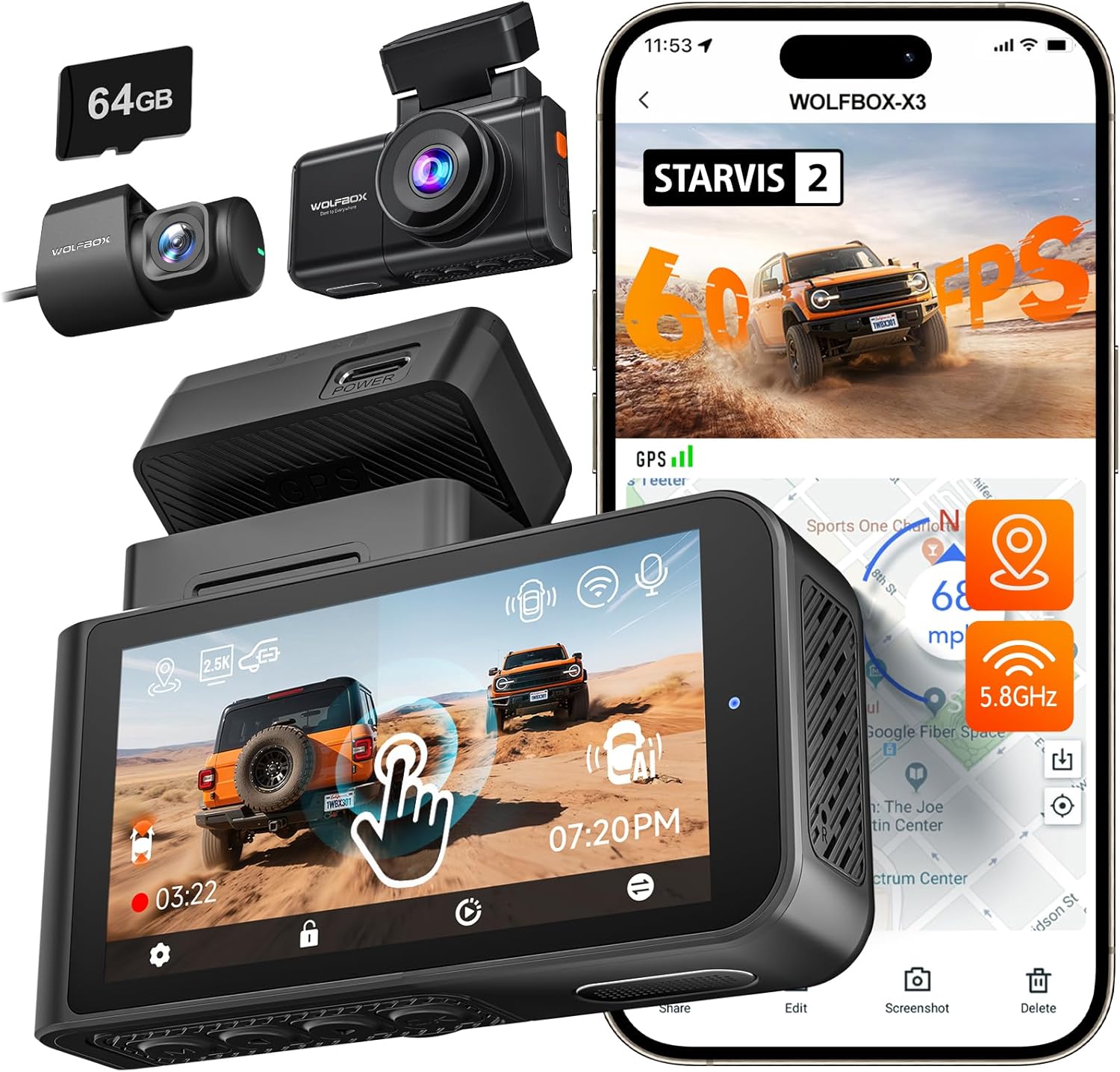
Figure 4.4: WOLFBOX X3 Dash Cam with included accessories and mobile app view.

Figure 4.5: Illustration of WOLFBOX X3's 60FPS Ultra Smooth Video recording.
5. Konfiguracja i instalacja
Follow these steps for proper installation of your WOLFBOX Dash Cam:
- Prepare the Memory Card: Insert the provided (or a compatible Class 10 U3 or higher) microSD card into the dash cam's card slot. Ensure it is inserted correctly until it clicks into place.
- Montaż przedniej kamery: Wybierz miejsce na przedniej szybie, które nie będzie Ci przeszkadzać. view, zwykle za tyłemview mirror. Clean the area thoroughly. Attach the adhesive mount to the windshield and then slide the dash cam onto the mount.
- Zainstaluj tylną kamerę: Zamontuj tylną kamerę na tylnej szybie, aby zapewnić wyraźny obraz. view. Route the rear camera cable neatly along the vehicle's headliner and A-pillar to the front dash cam unit.
- Install the Interior Camera (X5 only): Connect the interior camera to the main X5 unit. Position it to capture the vehicle's interior.
- Connect the GPS Module: Attach the GPS module to the designated port on the dash cam unit. Position it with a clear view nieba w celu optymalnego odbioru sygnału.
- Podłączenie zasilania: Connect the car charger to the dash cam's power input port and plug the other end into your vehicle's cigarette lighter socket. Route the power cable neatly to avoid interference with driving.
- Initial Power On and Formatting: Once connected, the dash cam will power on automatically when the vehicle starts. Follow the on-screen prompts to set the date/time and format the memory card. Formatting is crucial for stable recording.
6. Instrukcja obsługi
6.1 Podstawowa obsługa
- Włączanie/wyłączanie: The dash cam powers on automatically when connected to power and the vehicle starts. It powers off shortly after the vehicle is turned off.
- Nagranie: Recording begins automatically upon power-on. A flashing indicator (usually red) confirms recording is active.
- Wyświetlacz ekranowy: The touch screen displays live views from the connected cameras. Tap the screen to access menu options or switch views.
6.2 Smart Voice Control (WOLFBOX X5)
The WOLFBOX X5 supports hands-free voice commands. Speak clearly and directly to the device. Available commands include:
- „Zrób zdjęcie”
- „Włącz Wi-Fi”
- „Wyłącz Wi-Fi”
- "Lock the Video"
- „Pokaż przednią kamerę”
- „Pokaż tylną kamerę”
- "Show Interior Camera"
- "Turn on Audio"
- "Turn off Audio"
6.3 Wi-Fi Connectivity & WOLFBOX App
Both X5 and X3 models feature 5.8GHz Wi-Fi for fast and stable connection to the WOLFBOX mobile app. Download the WOLFBOX app from your device's app store.

Figure 6.1: Illustration of WOLFBOX X3's 5.8GHz Wi-Fi and GPS features.
- Włącz Wi-Fi: On the dash cam, enable Wi-Fi through the settings menu or by voice command (X5).
- Połącz przez aplikację: Open the WOLFBOX app on your smartphone. Connect to the dash cam's Wi-Fi network (SSID and password usually displayed on the dash cam screen).
- Funkcje aplikacji: Użyj aplikacji, aby:
- View żyćtage.
- Pobierz nagrane filmy i zdjęcia na swój telefon.
- Dostosuj ustawienia kamery samochodowej.
- Aktualizacja oprogramowania.
6.4 Funkcjonalność GPS
The integrated GPS module accurately records your vehicle's speed and location data. This information is embedded directly into the video files, providing crucial evidence for accident reconstruction or trip logging.
6.5 Tryby nagrywania i funkcje
- Nagrywanie w pętli: Filmy są nagrywane w ciągłych pętlach (np. 1, 3 lub 5 minut). Po zapełnieniu karty pamięci, najstarszy odblokowany film jest zapisywany. files są nadpisywane.
- Czujnik G (nagrywanie awaryjne): The built-in G-sensor detects sudden impacts or collisions. When triggered, it automatically locks the current video segment to prevent it from being overwritten.
- Monitor parkowania: With a hardwire kit (sold separately), the dash cam can monitor your vehicle while parked. It will automatically start recording if it detects a collision or motion (depending on settings).
- Widzenie nocne: Both X5 (STARVIS 2 IMX678) and X3 (STARVIS 2 IMX675) feature enhanced night vision technology for clear recordings in low-light conditions. The X5 also benefits from advanced digital signal transmission for improved clarity.
7. Konserwacja
- Czyszczenie: Use a soft, dry cloth to clean the dash cam's lenses and screen. Do not use abrasive cleaners or solvents.
- Pielęgnacja karty pamięci: Format the microSD card once a month to prevent data corruption and ensure smooth recording. Replace the memory card every 6-12 months, especially if used frequently, as memory cards have a limited lifespan.
- Aktualizacje oprogramowania układowego: Periodically check the WOLFBOX official website or the WOLFBOX app for firmware updates. Keeping your dash cam's firmware up-to-date ensures optimal performance and access to new features.
8. Rozwiązywanie Problemów
| Problem | Możliwa przyczyna | Rozwiązanie |
|---|---|---|
| Kamera samochodowa nie włącza się. | No power, faulty cable, loose connection. | Sprawdź podłączenie ładowarki samochodowej. Upewnij się, że gniazdo zapalniczki samochodowej działa. Spróbuj użyć innego źródła zasilania, jeśli jest dostępne. |
| Nagrywanie zostaje zatrzymane lub zawieszone. | Memory card error, incompatible card, full card. | Format the memory card. Use a high-speed (Class 10 U3 or higher) reputable brand microSD card. Replace the card if issues persist. |
| Słaba jakość wideo / rozmazany obraz. | Dirty lens, protective film, incorrect settings. | Clean the camera lens. Remove any protective film. Check video resolution settings. |
| GPS not working / inaccurate. | GPS module not connected, poor signal. | Ensure GPS module is securely connected and has a clear view of the sky (not blocked by tinted windows or metal). |
| Problemy z połączeniem Wi-Fi. | Incorrect password, app issues, interference. | Verify Wi-Fi password. Restart both dash cam and phone. Ensure the WOLFBOX app is updated. |
| Voice control (X5) not responding. | Microphone blocked, speaking too softly/unclearly. | Ensure nothing is blocking the microphone. Speak clearly and at a normal volume. |
9. Specyfikacje
9.1 WOLFBOX X5 Dash Cam
| Funkcja | Szczegół |
|---|---|
| Czujnik obrazu | STARVIS 2 IMX678 |
| Rozdzielczość przedniej kamery | 4K (3840x2160P) |
| Rozdzielczość tylnej kamery | 2.5K (2560x1440P) |
| Rozdzielczość kamery wewnętrznej | 1080P (1920x1080P) |
| Wyświetlacz | Ekran dotykowy |
| Sterowanie głosowe | Yes (12 commands) |
| Wi-Fi | 5.8 GHz |
| GPS | Wbudowany |
| Wizja nocna | Enhanced (3D DNR, HDR & WDR, Aperture f/1.7) |
9.2 WOLFBOX X3 Dash Cam
| Funkcja | Szczegół |
|---|---|
| Czujnik obrazu | STARVIS 2 IMX675 |
| Rozdzielczość przedniej kamery | 2.5K (2560x1440P) przy 60 kl./s |
| Rozdzielczość tylnej kamery | 1080P (1920x1080P) @ 30fps |
| Wyświetlacz | Ekran dotykowy |
| Sterowanie głosowe | NIE |
| Wi-Fi | 5.8 GHz |
| GPS | Wbudowany |
| Wizja nocna | Enhanced (IMX675, HDR, 3D DNR, Aperture f/1.5) |
10. Gwarancja i wsparcie
WOLFBOX products come with a standard manufacturer's warranty. For specific warranty terms and conditions, please refer to the warranty card included in your package or visit the official WOLFBOX website. If you encounter any issues or have questions regarding your dash cam, please contact WOLFBOX customer support:
- E-mail: [Sprawdź opakowanie produktu lub oficjalną instrukcję obsługi] webStrona]
- Webstrona: www.wolfbox.com
Please have your model number and purchase information ready when contacting support.
Ask a question about this manual
Ask about setup, troubleshooting, compatibility, parts, safety, or missing instructions. Manuals+ will review the question and use this page’s manual context to help answer it.