
YONHAN NB01W
YONHAN Rechargeable LED Drawing Board
Instruction Manual - Model NB01W
Wstęp
Thank you for choosing the YONHAN Rechargeable LED Drawing Board. This innovative and portable drawing board is designed to inspire creativity and provide hours of engaging fun for users of all ages. Featuring a magnetic design, 7 dynamic light colors, and adjustable brightness, it offers a versatile platform for drawing, tracing, and learning. Please read this manual carefully to ensure proper use and maintenance of your device.
Co jest w pudełku
- Rechargeable LED Note Board (1)
- Magnesy (4)
- Markers (7)
- Kabel USB-C (1)
- Ściereczka czyszcząca (1)

Image: All components included in the YONHAN LED Drawing Board package.
Organizować coś
- Rozpakować: Ostrożnie wyjmij wszystkie przedmioty z opakowania.
- Opłata: Before first use, fully charge the LED Drawing Board using the provided USB-C cable. Refer to the 'Charging' section for details.
- Aktywuj podstawkę: Locate the invisible stand on the back of the board. Gently pull out the two foldable supports to prop up the board for comfortable use.
- Secure Tracing Paper: If using tracing paper, place it on the acrylic surface. Use the four strong magnets provided to secure the paper firmly in place at each corner.
Video: Demonstrates the setup process, including attaching tracing paper with magnets and deploying the invisible stand.
Instrukcja obsługi
- Power On/Off & Change Colors:
Press the power button (located on the front base) once to turn on the LED lights. Each subsequent short press will cycle through the 7 available colors. To turn off the device, press and hold the power button for a few seconds.
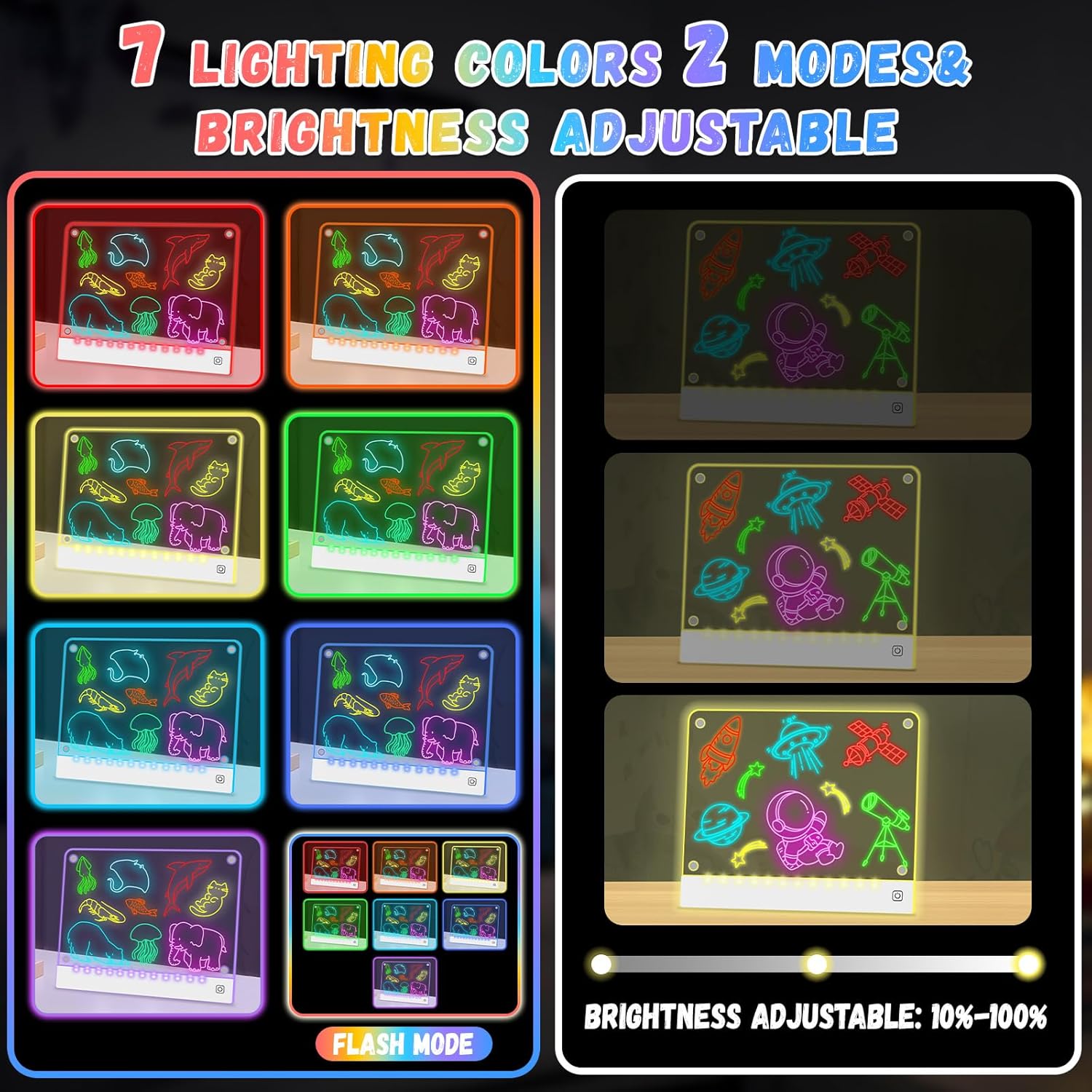
Image: The LED Drawing Board showcasing its 7 vibrant lighting colors.
- Dostosuj jasność:
While the board is powered on, press and hold the power button to smoothly adjust the brightness level from 10% to 100%. Release the button when the desired brightness is achieved.

Image: Illustration of the brightness adjustment feature on the LED Drawing Board.
- Drawing and Tracing:
Use the provided liquid chalk markers to draw directly on the acrylic surface. For tracing, place a tracing paper (or any image) under the acrylic board and secure it with the magnets. The LED lights will illuminate the image, making it easy to trace.

Image: The magnetic design in use, securing tracing paper for effortless drawing.
Ładowanie
The YONHAN LED Drawing Board features a built-in 1500mAh Lithium battery, offering cable-free creativity. A full charge takes approximately 4 hours and provides up to 20 hours of continuous use, depending on the brightness level selected.
- Connect the provided USB-C cable to the charging port on the side of the board.
- Podłącz drugi koniec kabla USB-C do kompatybilnego zasilacza USB (brak w zestawie) lub do portu USB komputera.
- Kontrolka ładowania (jeśli jest dostępna) pokaże stan ładowania.
- Po całkowitym naładowaniu odłącz kabel.

Image: The rechargeable feature of the LED Drawing Board, showing battery life.
Konserwacja i czyszczenie
- Cleaning the Board: Use the attached cleaning cloth or a soft, damp cloth to wipe the acrylic surface clean. For stubborn marks, a slightly damp paper towel can be used, followed by a dry cloth. Avoid abrasive cleaners or harsh chemicals.
- Pielęgnacja markera: Always recap the markers tightly after use to prevent them from drying out.
- Składowanie: Store the drawing board in a dry place away from direct sunlight and extreme temperatures.
- Obsługiwanie: Handle the board gently. Do not drop, hit, or scratch the board to maintain its integrity and functionality.
Rozwiązywanie problemów
- Board Not Turning On: Ensure the board is fully charged. If the battery is low, connect it to a power source using the USB-C cable.
- Lights Not Changing Colors/Brightness: Check if the power button is being pressed correctly. A short press changes colors, a long press adjusts brightness. If unresponsive, try charging the device.
- Markers Not Writing Clearly: Ensure marker caps are removed. If markers appear dry, try pressing the tip gently on a scrap piece of paper to reactivate the ink flow.
- Difficulty Erasing Marks: Use the provided cleaning cloth. For older or stubborn marks, a slightly damp cloth may be more effective. Ensure the surface is completely dry after cleaning.
Specyfikacje
| Funkcja | Szczegół |
|---|---|
| Marka | YONHAN |
| Numer modelu | NB01W |
| Waga przedmiotu | 1.5 funta |
| Wymiary produktu | 10 x 10 x 12.6 cala |
| Bateria | Wymagana 1 bateria litowo-jonowa (w zestawie) |
| Typ materiału | Akryl |
| Liczba elementów | 1 |
| Kolor | Biały2 |
Gwarancja i wsparcie
For warranty information or technical support, please refer to the product packaging or contact YONHAN customer service directly. Keep your purchase receipt as proof of purchase.
Ask a question about this manual
Ask about setup, troubleshooting, compatibility, parts, safety, or missing instructions. Manuals+ will review the question and use this page’s manual context to help answer it.