
Wstęp
This manual provides detailed instructions for the operation and maintenance of your NUISK SPSJ-4k Dual Screen Sports Camera. Designed for capturing dynamic moments, this compact camera features 4K video recording, electronic image stabilization, and versatile mounting options. Please read this manual thoroughly to ensure proper use and to maximize your camera's performance.
Co jest w pudełku
The NUISK SPSJ-4k package includes the following items:
- NUISK SPSJ-4k Dual Screen Sports Camera
- Wodoodporna obudowa
- Wisiorek magnetyczny
- Various Mounting Accessories (e.g., clip, quick release base, neck bracket, small hole adapter, bandage)
- Kabel ładujący USB-C
- 128GB Micro SDXC Memory Card
- Instrukcja obsługi
- Ściereczka do czyszczenia

This image displays the complete set of items included with your NUISK SPSJ-4k camera, such as the camera unit, waterproof housing, magnetic necklace mount, various clips and adapters for different surfaces, a USB charging cable, and the user manual.
Produkt ponadview
The NUISK SPSJ-4k is a compact and versatile action camera designed for various activities. It features dual screens for easy framing and control, along with robust video capabilities.
Główne cechy:
- Magnetic Hands-Free Mounting: Securely attaches to clothing or accessories for POV recording.
- Pocket-Size Design: Lekki i przenośny dla łatwego transportu.
- Smooth 4K Footage with EIS Stabilization: Reduces shake for clear and professional-looking videos.
- Wodoodporność: Submersible up to 98ft (30m) with the included waterproof case.
- Wszechstronne akcesoria: Includes mounts for hats, chest, bikes, and more.
- Podwójne ekrany: Front and rear screens for flexible viewi kontroli.
- Łączność Wi-Fi: Connects to a smartphone app for remote control and file przenosić.
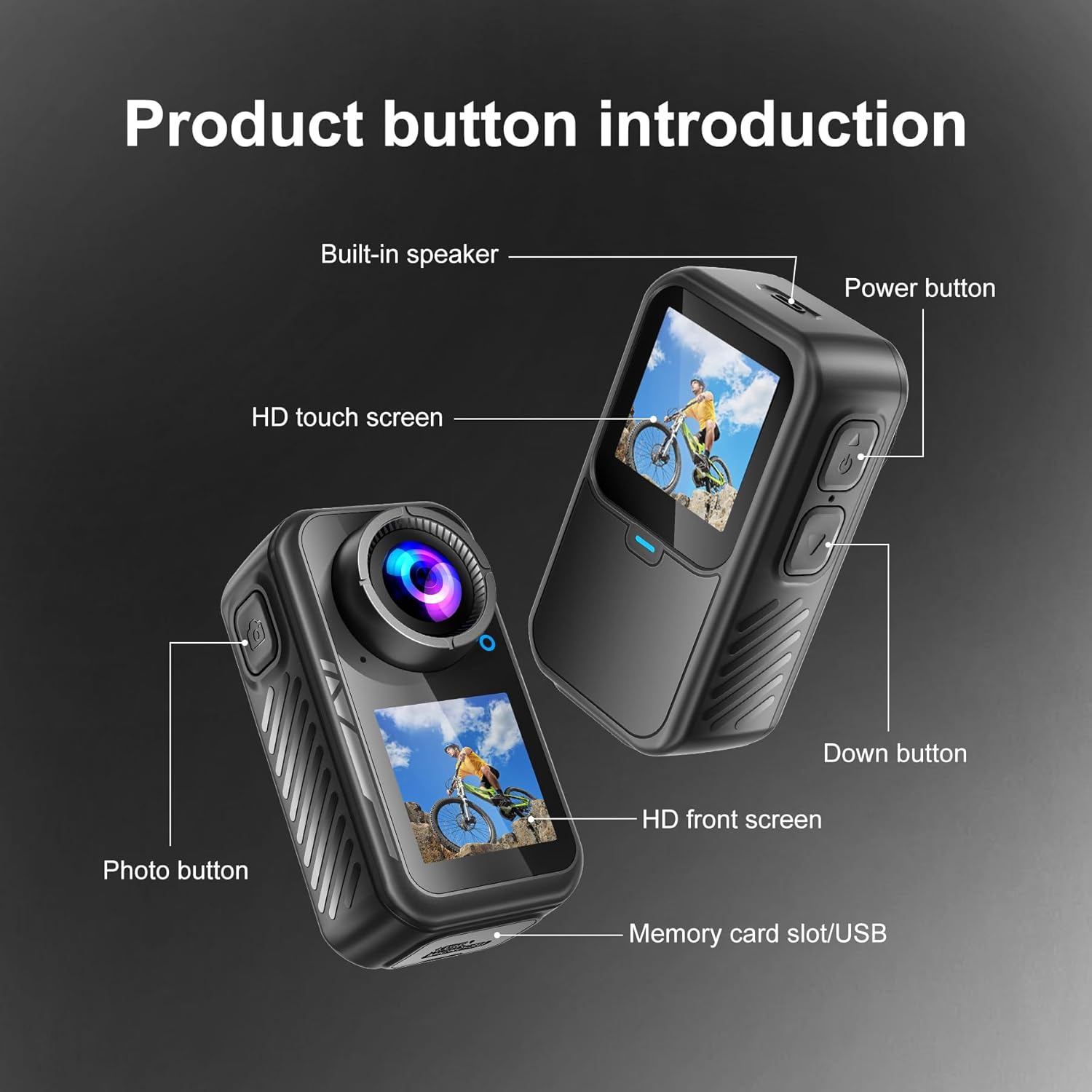
This diagram highlights the key physical features of the camera, including the power button, photo button, HD touch screen, HD front screen, built-in speaker, and the memory card slot/USB port.
Organizować coś
- Początkowe ładowanie: Connect the camera to a power source using the provided USB-C charging cable. The camera will indicate charging status on its screen.
- Włóż kartę Micro SD: Locate the memory card slot (often near the USB port, as shown in Figure 2). Insert the 128GB Micro SDXC card (included) into the slot until it clicks. Ensure the card is inserted correctly to avoid damage.
- Włączanie: Press and hold the Power button (refer to Figure 2) to turn on the camera.
- Ustawienia języka, daty i godziny: Upon first use, the camera may prompt you to set the language, date, and time. Use the touchscreen or navigation buttons to select your preferences. It is recommended to set the correct date and time for accurate video timestamps.
- Sformatuj kartę SD: For optimal performance and to ensure compatibility, it is recommended to format the SD card directly on the camera. Navigate to the settings menu and select the "Format SD Card" option. Confirm your selection. Uwaga: Formatowanie spowoduje usunięcie wszystkich danych z karty.
- Connect to Mobile App (Optional):
- Download the official NUISK app from your smartphone's app store.
- On the camera, navigate to the Wi-Fi settings and enable Wi-Fi. The camera screen may display a QR code or network name (SSID) and password.
- Na swoim smartfonie połącz się z siecią Wi-Fi aparatu.
- Open the NUISK app. You should now be able to control the camera remotely and view/pobierz multimedia.
- Zamontuj akcesoria montażowe: Depending on your activity, select the appropriate mounting accessory.
- For underwater use, place the camera inside the waterproof case and secure it.
- For hands-free POV recording, attach the magnetic pendant or chest strap.
- Utilize other clips and adapters for helmets, bicycles, or other surfaces as needed.
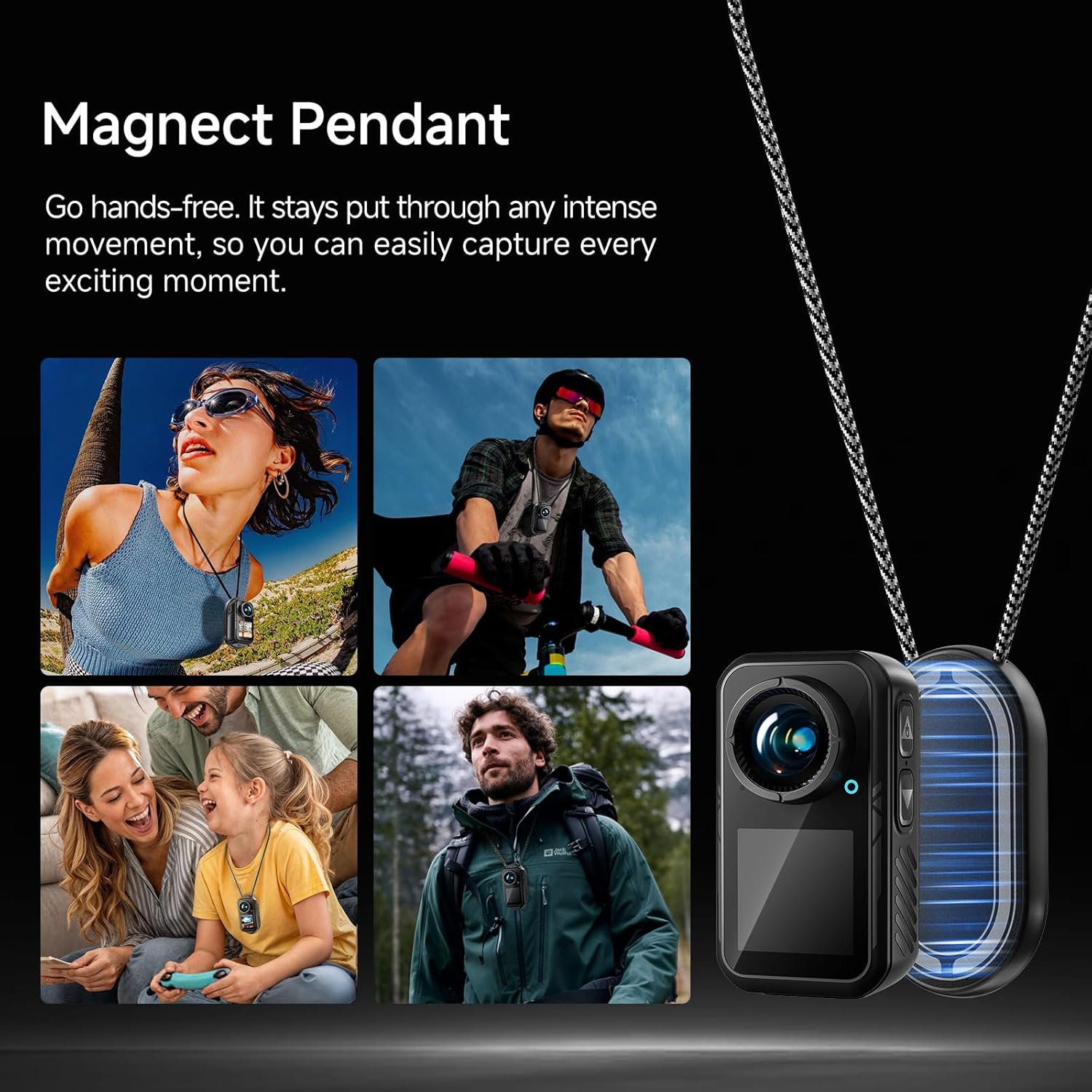
The magnetic pendant allows for secure, hands-free attachment of the camera to your clothing, ensuring stable capture during various activities.

The included waterproof case protects the camera, allowing it to be submerged up to 98 feet (30 meters) for capturing aquatic adventures.
Instrukcja obsługi
1. Podstawowa obsługa
- Włączanie/wyłączanie: Press and hold the Power button (top right button) to turn the camera on or off.
- Nawigacja na ekranie: The camera features an HD touchscreen for intuitive navigation. Swipe up, down, left, or right to access different menus and settings.
- Przełączanie ekranów: Long-press the 'Down' button (bottom right button) to switch between the rear HD touchscreen and the front HD screen.
- Rozpocznij/zatrzymaj nagrywanie: Press the Photo button (top left button) to start or stop video recording, or to capture a photo.
2. Tryby nagrywania
The camera offers various recording modes to suit different needs:
- Normalne wideo: Standardowe nagrywanie wideo.
- Zwolnione tempo: Nagrywa wideo z większą liczbą klatek na sekundę, co umożliwia odtwarzanie w zwolnionym tempie.
- Rekord pętli: Ciągłe nagrywanie wideo, nadpisując najstarszetage gdy karta pamięci jest pełna.
- Video Time-lapse (V-Timelapse): Records a sequence of video frames at set intervals to create a time-lapse video.
- Pojedyncze zdjęcie: Captures a single still image.
- Zdjęcie z serii Burst: Wykonuje wiele zdjęć jedno po drugim.
- Self-Timer Photo: Delays photo capture by a set amount of time.
- Photo Time-lapse (P-Timelapse): Captures a series of still images at set intervals.
3. Video and Image Settings
Access the settings menu via the touchscreen to adjust:
- Rozdzielczość wideo: Select from options like 4K/60fps, 4K/30fps, 2.7K/60fps, 2.7K/30fps, 1080P/60fps, 1080P/30fps, 720P/120fps, 720P/60fps, etc.
- Jakość wideo: Adjust the compression level for video files.
- Image Stabilization (EIS): Enable or disable Electronic Image Stabilization for smoother footage.
- Balans bieli: Adjust color temperature for accurate color reproduction in different lighting conditions.
- Filtr: Apply various visual filters to your footage.
- Obrót obrazu: Dostosuj orientację obrazu.
- Poziom podświetlenia: Kontroluj jasność ekranu.
- Częstotliwość: Set the power line frequency (50Hz/60Hz) to avoid flickering in recorded video.

The dedicated smartphone app allows for remote control of the camera, live preview z footage, and convenient downloading of videos and photos directly to your phone.
Konserwacja
- Czyszczenie: Use the provided cleaning cloth or a soft, lint-free cloth to gently wipe the camera lens and screens. Avoid abrasive materials or harsh chemicals.
- Pielęgnacja wodoodpornego etui: After using the waterproof case in water, rinse it with fresh water and allow it to air dry. Inspect the seals for any debris or damage before each use to ensure water tightness.
- Pielęgnacja baterii: Charge the camera regularly, even when not in use, to maintain battery health. Avoid extreme temperatures.
- Składowanie: Store the camera and accessories in a cool, dry place away from direct sunlight and dust.
Rozwiązywanie problemów
- Aparat się nie włącza: Upewnij się, że bateria jest naładowana. Podłącz kamerę do źródła zasilania i spróbuj ponownie.
- Błąd karty SD: Reformat the SD card via the camera's settings menu. If the issue persists, try a different compatible Micro SDXC card.
- Niespokojny Footage: Ensure Electronic Image Stabilization (EIS) is enabled in the settings. For best results, hold the camera as steady as possible or use appropriate mounts.
- Poor Low-Light Performance: Action cameras generally perform best in well-lit conditions. Ensure adequate lighting for optimal video quality.
- Brak reakcji ekranu dotykowego: Gently clean the screen. If unresponsive, try restarting the camera.
- Problemy z połączeniem Wi-Fi: Ensure the camera's Wi-Fi is enabled and your smartphone is connected to the correct network. Restart both the camera and the app if necessary.
Specyfikacje
| Funkcja | Szczegół |
|---|---|
| Marka | NUISK |
| Numer modelu | SPSJ-4k |
| Waga przedmiotu | 13.7 uncji |
| Wymiary produktu | 1.26 x 1.46 x 2.7 cala |
| Baterie | 1 niestandardowa bateria (w zestawie) |
| Kolor | Czarny |
| Cechy specjalne | Anti-Shake (EIS), Internal Memory |
| Technologia czujnika fotograficznego | Inny |
| Rozdzielczość przechwytywania wideo | 4K |
| Maksymalna ogniskowa | 30 milimetrów |
| Maksymalna apertura | 2.8 stopnia |
| Typ pamięci flash | Mikro SDXC |
| Format przechwytywania wideo | MP4 |
| Obsługiwany format audio | MP4 |
| Rozmiar ekranu | 1.3 cali |

This image illustrates the compact size of the camera, with a length of 2.7 inches (68.5mm), width of 1.46 inches (37.1mm), and depth of 1.26 inches (32mm), weighing only 2.33 ounces.
Gwarancja i wsparcie
Specific warranty details are not provided in the product information. For warranty claims, technical support, or further assistance, please refer to the contact information provided with your purchase or visit the official NUISK webstrona.