
SUGON 8650Pro
Instrukcja obsługi stacji lutowniczej na gorące powietrze SUGON 8650Pro
Model: 8650Pro
1. Wprowadzenie
This manual provides essential instructions for the safe and efficient operation of your SUGON 8650Pro Hot Air Rework Station. Please read this manual thoroughly before use and retain it for future reference.
Cechy produktu:
- 1300W high power for rapid heating.
- Digital display for precise temperature and air volume control.
- Three temperature rise models: Gentle, General, and Rapid.
- Four groups of preset memory for temperature and air volume.
- Automatic sleep function for energy saving and safety.
- Detachable handle and pluggable heating element for easy maintenance.
- Adjustable handle bracket with dual air gun station mode and multi-air gun nozzle bracket mode.
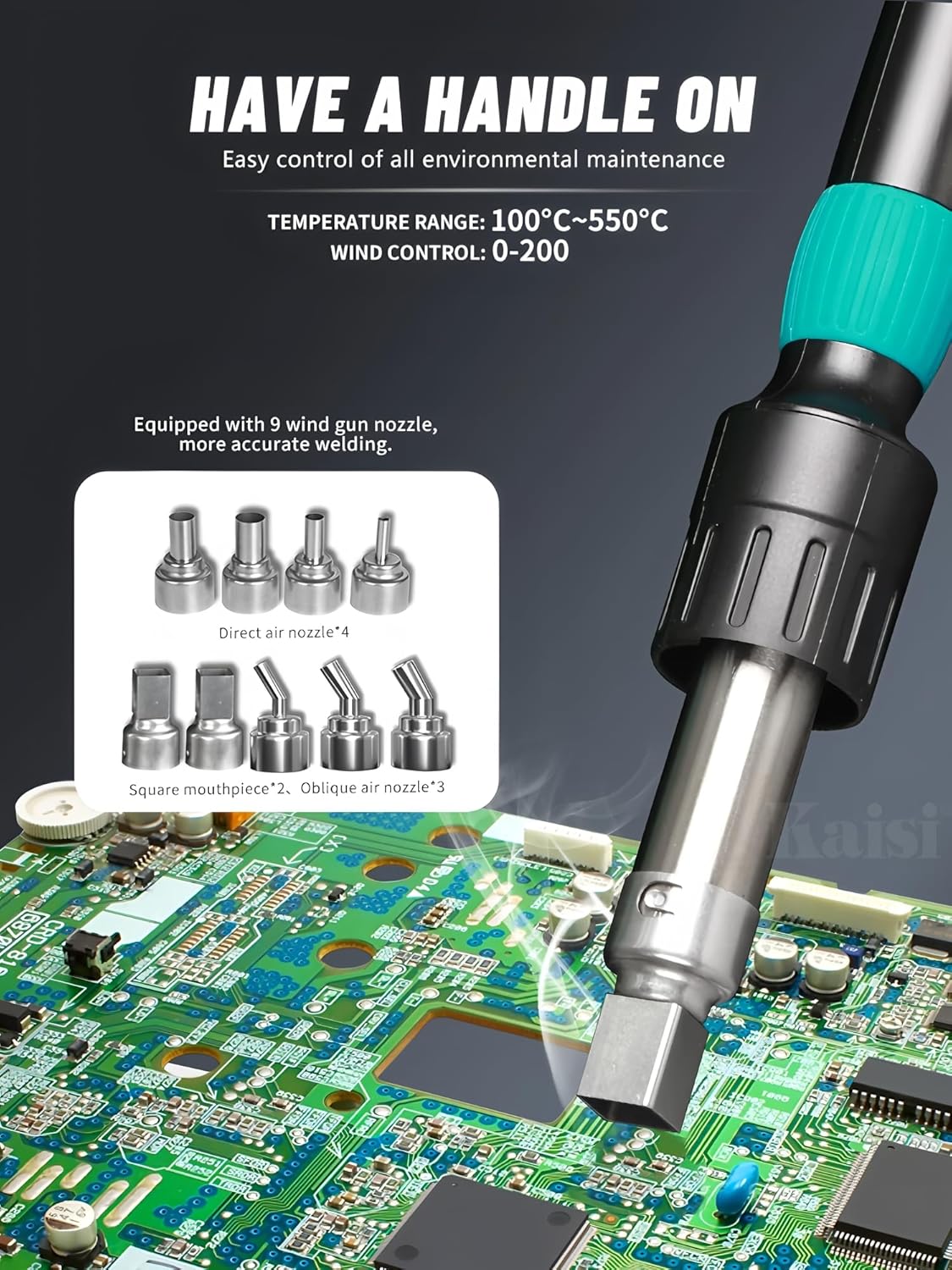
- Includes 9 different air gun nozzles for various applications.
2. Instrukcje bezpieczeństwa
Aby zapobiec obrażeniom ciała lub uszkodzeniu sprzętu, należy zawsze przestrzegać następujących środków ostrożności:
- Upewnij się, że zasilanie jest zgodne z głośnością urządzenia.tage (110 V dla tego modelu).
- Nie używaj urządzenia w damp lub w wilgotnych warunkach.
- Keep the work area well-ventilated to avoid inhaling fumes.
- Należy nosić odpowiedni sprzęt ochrony osobistej (PPE), w tym okulary ochronne i rękawice odporne na ciepło.
- Do not touch the hot air nozzle or heated components during or immediately after operation.
- Place the hot air gun in its holder when not in use to prevent accidental burns or damage.
- Odłącz zasilanie przed czyszczeniem lub serwisowaniem urządzenia.
- Przechowywać w miejscu niedostępnym dla dzieci.
3. Składniki produktu
The SUGON 8650Pro Hot Air Rework Station includes the following main components:
- Główna jednostka sterująca
- Uchwyt pistoletu na gorące powietrze
- Hot Air Gun Holder/Bracket
- Various Nozzles (9 pcs)
- Przewód zasilający
- Przewód uziemiający
- Śrubokręt
- Heating Core (Spare)

Rysunek 3.1: Nadview of the SUGON 8650Pro Hot Air Rework Station, showing the main unit, hot air gun, holder, and various nozzles.

Rysunek 3.2: Z bliska view illustrating the detachable handle and the pluggable heating element for easy replacement.

Rysunek 3.3: The adjustable handle bracket, configurable for supporting one or two air gun handles and storing multiple nozzles.
4. Instrukcje konfiguracji
- Rozpakowywanie: Ostrożnie wyjmij wszystkie elementy z opakowania. Sprawdź, czy nie mają uszkodzeń.
- Umieszczenie: Place the main control unit on a stable, heat-resistant, and level surface. Ensure adequate ventilation around the unit.
- Podłącz pistolet na gorące powietrze: Connect the hot air gun handle to the designated port on the main control unit. Ensure a secure connection.
- Install Handle Bracket: Assemble the hot air gun holder/bracket according to your preference (single or dual gun mode). Place it near the main unit.
- Zamocuj dyszę: Select the appropriate nozzle for your application and securely attach it to the hot air gun.
- Podłączenie zasilania: Connect the power cord to the main control unit and then plug it into a grounded 110V AC power outlet.
- Grunt: Connect the ground cable to the designated grounding terminal on the unit and to a reliable ground source.
5. Instrukcja obsługi
5.1 Włączanie/wyłączanie zasilania
- Press the power switch on the front panel to turn the unit ON. The digital display will illuminate.
- To turn OFF, press the power switch again. The unit will enter a cooling cycle before fully shutting down.
5.2 Regulacja temperatury i objętości powietrza
- Użyj GÓRA/DÓŁ buttons next to the temperature display to adjust the desired temperature.
- Użyj GÓRA/DÓŁ buttons next to the air volume display to adjust the desired air flow.
- The current temperature and air volume will be shown on the digital display.
Rysunek 5.1: The hot air gun handle features buttons for memory recall and switching between cold/hot air. Short press to switch, long press to lock.
5.3 Temperature Rise Modes
The unit offers three distinct temperature rise modes:
- Tryb delikatny: Slow and precise heating, suitable for beginners or delicate components.
- Tryb ogólny: Faster heating with maintained accuracy, suitable for general maintenance tasks.
- Tryb szybki: Quick temperature rise to reach the set temperature rapidly, ideal for experienced technicians.

Rysunek 5.2: Digital display showing the selection of Gentle, General, or Rapid temperature rise modes, with descriptions of each mode's characteristics.
5.4 Ustawienia pamięci
The SUGON 8650Pro allows you to store and recall up to four groups of preset temperature and air volume settings.
- Zapisać: Set your desired temperature and air volume. Press and hold one of the memory buttons (CH1, CH2, CH3, CH4) until a confirmation sound is heard.
- Przypomnieć sobie: Briefly press the corresponding memory button (CH1, CH2, CH3, CH4) to load the saved settings.
5.5 Funkcja automatycznego uśpienia
When the hot air gun is placed in its holder, the unit will automatically enter sleep mode after a set period. The temperature will decrease to a safe level, and the air flow will stop. Lifting the gun from the holder will resume operation with the last used settings.
5.6 Cool Air Function
The hot air gun handle features a button to switch between hot and cool air. A short press will toggle between the two. A long press will lock the selected mode.
6. Konserwacja
6.1 Czyszczenie
- Przed czyszczeniem należy upewnić się, że urządzenie jest wyłączone i odłączone od zasilania.
- Wipe the exterior of the main unit and hot air gun with a soft, damp ściereczka. Nie należy używać środków czyszczących o właściwościach ściernych ani rozpuszczalników.
- Periodically inspect nozzles for blockages and clean as necessary.
6.2 Heating Element Replacement
The heating element is a consumable part and may need replacement over time. Refer to Figure 3.2 for visual guidance.
- Ensure the unit is completely cool, powered off, and unplugged.
- Carefully detach the hot air gun handle from the main unit.
- Unscrew the retaining ring on the hot air gun handle to expose the heating element.
- Gently pull out the old heating element.
- Insert the new heating element, ensuring it is properly seated.
- Reattach the retaining ring and reconnect the handle to the main unit.
7. Rozwiązywanie Problemów
| Problem | Możliwa przyczyna | Rozwiązanie |
|---|---|---|
| Urządzenie nie włącza się. | Brak zasilania; luźny przewód zasilający. | Sprawdź podłączenie przewodu zasilającego i upewnij się, że gniazdko jest sprawne. |
| Brak ciepłego powietrza lub niewystarczające ciepło. | Uszkodzony element grzejny; nieprawidłowo ustawiona temperatura. | Check temperature setting; replace heating element if necessary. |
| No air flow or weak air flow. | Air volume set too low; blocked nozzle; fan malfunction. | Increase air volume; clean or replace nozzle; contact support if fan issue persists. |
| Temperature fluctuates erratically. | Problem z czujnikiem; niestabilne zasilanie. | Ensure stable power; contact support for sensor diagnosis. |
8. Specyfikacje

Rysunek 8.1: Detailed product parameters for the SUGON 8650Pro Hot Air Rework Station.
| Parametr | Wartość |
|---|---|
| Numer modelu | 8650Pro |
| Moc | 1300 W |
| Wejście Voltage | AC 110V (for this model) |
| Zakres objętości powietrza | Klasa 1-200 |
| Zakres temperatur | 100°C - 550°C (212°F - 1022°F) |
| Wymiary (jednostka główna) | 250 mm x 250 mm x 160 mm (w przybliżeniu) |
| Operating Time of ROC Mode | Three segments, each 330 seconds maximum |
| Cechy | Digital Display, Temperature Calibration/Conversion, 3 Temperature Rise Models, Adjustable Handle Bracket, 4 Memory Presets, Cool Air Function, Buzzer, Automatic Sleep Function. |
9. Gwarancja i wsparcie
For warranty information and technical support, please refer to the warranty card included with your product or contact your point of purchase. Keep your purchase receipt as proof of purchase.
Manufacturer: AIFEN/SUGON
For further assistance, please visit the official SUGON webstronie lub skontaktuj się z działem obsługi klienta.