
1. Wprowadzenie
Thank you for choosing the THOMSON WS902DUO Cosy Bookshelf Speakers. These active stereo speakers deliver a powerful 150W audio experience with deep bass from two 10 cm woofers. They offer versatile connectivity options including Bluetooth 5.3, Optical, HDMI (ARC), RCA, and USB playback. The included remote control and side panel adjustments provide precise control over your audio. Please read this manual carefully before use to ensure proper operation and to maximize your listening experience.

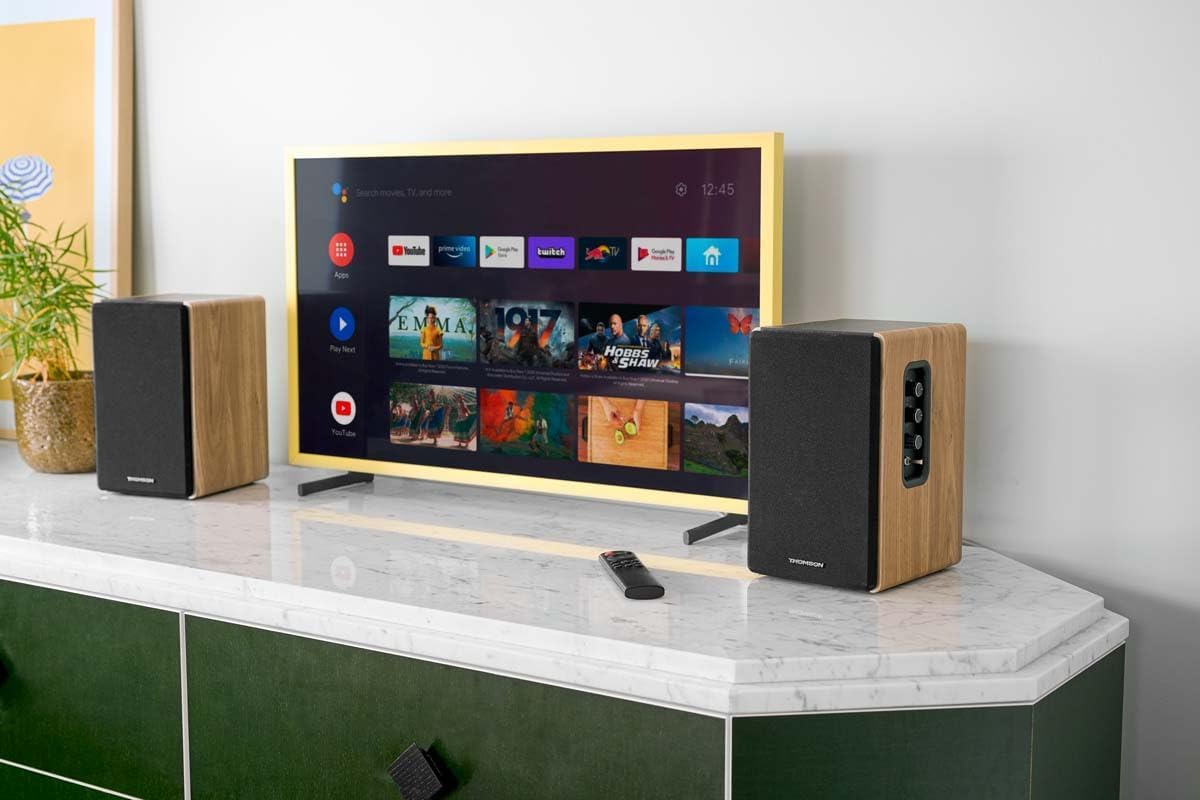
Image 1.1: THOMSON WS902DUO Bookshelf Speakers in a living space, showcasing their elegant wood finish.
2. Ważne instrukcje bezpieczeństwa
- Przed użyciem produktu należy uważnie przeczytać niniejszą instrukcję.
- Zachowaj tę instrukcję do wykorzystania w przyszłości.
- Przestrzegaj wszystkich ostrzeżeń umieszczonych na produkcie iw instrukcji obsługi.
- Postępuj zgodnie ze wszystkimi instrukcjami.
- Nie należy używać tego urządzenia w pobliżu wody.
- Czyścić wyłącznie suchą szmatką.
- Nie zasłaniaj żadnych otworów wentylacyjnych. Montaż należy wykonać zgodnie z instrukcją producenta.
- Nie należy instalować w pobliżu źródeł ciepła, takich jak grzejniki, kratki wentylacyjne, piece lub inne urządzenia (w tym amp(lifiers) wytwarzające ciepło.
- Nie lekceważ celu bezpieczeństwa wtyczki spolaryzowanej lub uziemiającej. Wtyczka spolaryzowana ma dwa bolce, z których jeden jest szerszy od drugiego. Wtyczka uziemiająca ma dwa bolce i trzeci bolec uziemiający. Szeroki bolec lub trzeci bolec są dostarczane dla Twojego bezpieczeństwa. Jeśli dostarczona wtyczka nie pasuje do Twojego gniazdka, skonsultuj się z elektrykiem w celu wymiany przestarzałego gniazdka.
- Chroń przewód zasilający przed deptaniem i przytrzaśnięciem, zwłaszcza przy wtyczkach, gniazdkach i miejscach, w których wychodzi z urządzenia.
- Stosować wyłącznie dodatki/akcesoria wskazane przez producenta.
- Używaj wyłącznie z wózkiem, stojakiem, statywem, uchwytem lub stołem określonym przez producenta lub sprzedawanym z urządzeniem. Gdy używany jest wózek, zachowaj ostrożność podczas przenoszenia kombinacji wózek/urządzenie, aby uniknąć obrażeń spowodowanych przewróceniem.
- Odłączaj urządzenie od zasilania podczas burzy z piorunami lub jeśli nie używasz go przez dłuższy czas.
- Wszelkie prace serwisowe należy zlecać wykwalifikowanemu personelowi serwisowemu. Serwisowanie jest wymagane, gdy urządzenie zostało w jakikolwiek sposób uszkodzone, np. przewód zasilający lub wtyczka są uszkodzone, płyn został wylany lub przedmioty wpadły do urządzenia, urządzenie zostało wystawione na działanie deszczu lub wilgoci, nie działa normalnie lub zostało upuszczone.
3. Zawartość opakowania
Sprawdź, czy w przesyłce znajdują się wszystkie wymienione poniżej elementy:
- THOMSON WS902DUO Bookshelf Speakers (2 units)
- Zdalne sterowanie
- Kabel zasilający
- Kabel połączeniowy głośnika
- 3.5mm Jack to RCA Adapter Cable
- Instrukcja obsługi (ten dokument)

Image 3.1: Packaging of the THOMSON WS902DUO Bookshelf Speakers.
4. Koniec produktuview
4.1. Side Control Panel (Active Speaker)
The active speaker features a side control panel for easy access to essential functions.

Image 4.1: Side control panel.
- Kontrola basu: Reguluje wyjście niskiej częstotliwości.
- Kontrola tonów wysokich: Reguluje wyjście wysokiej częstotliwości.
- Regulacja głośności: Reguluje ogólną głośność dźwięku.
- Przycisk zasilania: Włącza lub wyłącza głośniki.
- Wskaźnik LED: Shows the current status or selected input.
4.2. Rear Panel (Active Speaker)
The rear panel of the active speaker provides all necessary input and output connections.
Rysunek 4.2: Złącza na panelu tylnym.
- Wejście optyczne: For connecting digital audio sources like TVs, game consoles, or Blu-ray players.
- Wejście AUX (RCA): For connecting analog audio sources such as turntables, CD players, or PCs. A 3.5mm jack adapter is provided.
- TV Audio (HDMI ARC): For connecting to a TV's HDMI ARC port, allowing TV remote control of the speaker volume.
- Odtwarzanie USB: Do odtwarzania plików MP3 filebezpośrednio z dysku flash USB.
- Wyjście pomocnicze: For connecting an external active subwoofer for enhanced bass.
- Wyjście głośnika: Łączy się z głośnikiem pasywnym.
- Pobór mocy: Podłącza się do głównego źródła zasilania.
4.3. Pilot zdalnego sterowania
The remote control provides convenient access to all speaker functions from a distance.

Image 4.3: Remote control.
- Przycisk zasilania: Włącza/wyłącza głośniki.
- Przycisk wyciszenia: Wycisza/włącza dźwięk.
- Głośność +/-: Dostosowuje poziom głośności.
- Playback Controls (Play/Pause, Skip): Do odtwarzania przez USB.
- Source Selection Buttons (OPT, BT, ARC, USB, LINE): Wybiera źródło sygnału wejściowego audio.
- EQ Mode Buttons (MOVIE, MUSIC, DIALOG): Selects preset equalization modes.
5. Konfiguracja
5.1. Rozmieszczenie głośników
Place the speakers on a stable, flat surface such as a bookshelf, desk, or speaker stands. For optimal stereo imaging, position the speakers equidistant from your listening position and at ear level. Ensure there is adequate space around the speakers for ventilation.
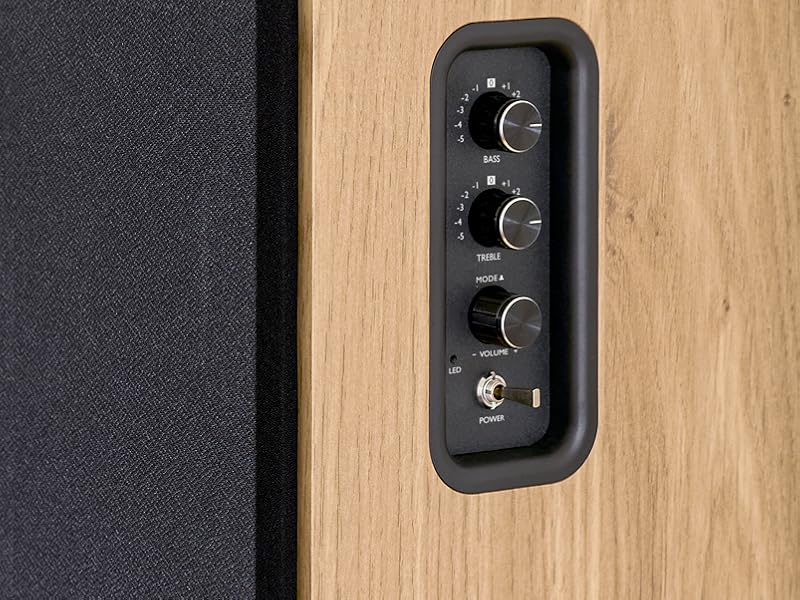
Image 5.1: Recommended speaker placement on a desk.
5.2. Podłączanie głośników
- Zidentyfikuj głośnik aktywny (z elementami sterującymi i wejściami) i głośnik pasywny.
- Connect the included speaker cable from the speaker output terminals on the active speaker to the input terminals on the passive speaker. Ensure correct polarity (+ to + and - to -).
5.3. Podłączanie źródeł audio
Connect your desired audio sources to the active speaker using the appropriate cables.
- Wejście optyczne: Use an optical cable to connect your TV, game console, or Blu-ray player to the OPTICAL IN port.
- Wejście HDMI (ARC): Use an HDMI cable to connect your TV's HDMI ARC port to the TV AUDIO (HDMI) port on the speaker. This allows your TV remote to control the speaker volume.
- Wejście RCA (AUX): Use an RCA cable (or the provided 3.5mm jack to RCA adapter) to connect devices like a turntable, CD player, or PC to the AUX IN (RCA) ports.
- Wejście USB: Włóż dysk flash USB zawierający plik MP3 files into the USB PLAY port.

Image 5.2: Speakers connected to a television via HDMI ARC.
5.4. Parowanie Bluetooth
- Sprawdź, czy głośniki są włączone.
- Press the 'BT' button on the remote control or the side panel to select Bluetooth input. The LED indicator will flash, indicating pairing mode.
- Włącz Bluetooth na swoim smartfonie, tablecie lub komputerze i wyszukaj dostępne urządzenia.
- Select "THOMSON WS902DUO" from the list of devices.
- Po sparowaniu wskaźnik LED przestanie migać i będzie świecić światłem ciągłym. Teraz możesz bezprzewodowo przesyłać dźwięk.
5.5. Podłączenie subwoofera (opcjonalnie)
If you wish to enhance bass further, connect an active subwoofer to the 'Sub Out' port on the rear panel of the active speaker using an RCA cable.
6. Instrukcja obsługi
6.1. Włączanie/wyłączanie zasilania
Use the power switch on the side control panel or the power button on the remote control to turn the speakers on or off.
6.2. Wybór źródła
Press the corresponding source button on the remote control (OPT, BT, ARC, USB, LINE) to switch between connected audio inputs. The LED indicator will change to reflect the selected source.
6.3. Regulacja głośności
Adjust the volume using the 'Volume' knob on the side control panel or the 'VOL+/-' buttons on the remote control.
6.4. Regulacja dźwięku
Fine-tune the sound to your preference:
- Bas/Góra: Use the 'Bass' and 'Treble' knobs on the side control panel to adjust the low and high frequencies.
- Tryby korektora: Press the 'MOVIE', 'MUSIC', or 'DIALOG' buttons on the remote control to select preset equalization settings optimized for different content types.
6.5. Odtwarzanie USB
When a USB flash drive with MP3 files is inserted and USB source is selected, the speakers will automatically begin playing. Use the playback control buttons on the remote control (Play/Pause, Skip) to manage your music.
6.6. Obsługa Bluetooth
After successful pairing (see Section 5.4), you can stream audio from your Bluetooth device. Use your device's controls or the speaker's remote control for playback and volume adjustments.
7. Konserwacja
Właściwa konserwacja gwarantuje długowieczność i wydajność głośników.
- Czyszczenie: Wipe the speaker surfaces with a soft, dry cloth. Do not use liquid cleaners or abrasive materials.
- Wentylacja: Aby zapobiec przegrzaniu, upewnij się, że otwory wentylacyjne nie są zablokowane.
- Składowanie: If storing the speakers for an extended period, unplug them from the power outlet and store them in a cool, dry place.
- Unikaj wilgoci: Keep the speakers away from water and high humidity.
8. Rozwiązywanie Problemów
Jeśli napotkasz jakiekolwiek problemy, zapoznaj się z następującym przewodnikiem rozwiązywania problemów:
| Problem | Możliwa przyczyna | Rozwiązanie |
|---|---|---|
| Brak zasilania | Power cable not connected; Power switch off; Wall outlet not working. | Ensure power cable is securely connected. Turn on the power switch. Test the wall outlet with another device. |
| Brak dźwięku | Incorrect input source selected; Volume too low; Mute function active; Audio cable not connected properly. | Select the correct input source. Increase volume. Press Mute button on remote. Check all audio cable connections. |
| Parowanie Bluetooth nie powiodło się | Speakers not in pairing mode; Device too far; Bluetooth disabled on source device. | Ensure speakers are in Bluetooth pairing mode (flashing LED). Move device closer to speakers. Enable Bluetooth on your source device. |
| Odtwarzanie USB nie działa | Dysk USB nie został poprawnie sformatowany; Files not MP3; USB drive not inserted properly. | Ensure USB drive is FAT32 formatted. Verify files are in MP3 format. Re-insert USB drive firmly. |
| Zniekształcenie dźwięku | Volume too high; Source audio quality poor; Bass/Treble settings too extreme. | Lower the volume. Test with a different audio source. Adjust Bass and Treble controls. |
9. Specyfikacje
| Funkcja | Specyfikacja |
|---|---|
| Marka | TOMSON |
| Numer modelu | WS902DUO |
| Maksymalna moc wyjściowa głośnika | 150 watów |
| Odpowiedź częstotliwościowa | 60 Hz |
| Technologia łączności | Bluetooth, HDMI (ARC), Optical, RCA, USB |
| Wersja Bluetooth | 5.3 |
| Tryb wyjścia audio | Stereo (2.0 kanały) |
| Wejście Voltage | 230 V (AC) |
| Typ montażu | Mocowanie do półki |
| Typ głośnika | Multimedia Bookshelf |
| Cechy specjalne | Stereo Pairing, USB Port, Sub-Out, Remote Control, EQ Modes |
| Zalecane zastosowania | Smartphone, Tablet, PC, TV, Game Console, DVD Player, Turntable |
| Kolor | Wykończenie z naturalnego drewna |
| Metoda kontroli | Remote Control, Side Panel Knobs |
| Rozmiar głośnika niskotonowego | 10 centymetrów |
| Wymiary (wys. x szer. x gł.) | 28 cm x 24 cm x 47 cm (w przybliżeniu, na głośnik) |
| Waga | 5048 Grams (total for pair) |
| Liczba elementów | 2 |
| Kraj pochodzenia | Chiny |
10. Informacje o gwarancji
This THOMSON WS902DUO product comes with a 1-roczna ograniczona gwarancja od daty zakupu. Niniejsza gwarancja obejmuje wady produkcyjne i wykonawcze przy normalnym użytkowaniu. Nie obejmuje uszkodzeń spowodowanych niewłaściwym użytkowaniem, wypadkami, nieautoryzowanymi modyfikacjami ani normalnym zużyciem. Prosimy zachować dowód zakupu na potrzeby roszczeń gwarancyjnych.
11. Obsługa klienta
For technical assistance, warranty claims, or any questions regarding your THOMSON WS902DUO speakers, please contact your retailer or visit the official THOMSON support website. Please have your model number (WS902DUO) and proof of purchase ready when contacting support.
Wsparcie online: www.thomsonconsumer.com (Sprawdź regionalne kontakty wsparcia)