
1. Wprowadzenie
Thank you for choosing the MONODEAL CD401 Portable HiFi Stereo CD Player. This versatile device combines classic CD playback with modern connectivity options, including Bluetooth, FM radio, USB, and AUX input. Enjoy high-fidelity audio with built-in speakers, dynamic RGB lighting, and convenient remote control. This manual provides essential information for setup, operation, and maintenance to ensure optimal performance.
2. Co znajduje się w pudełku
- 1x MONODEAL CD401 CD Player
- 1x Instrukcja obsługi
- 1x Pilot zdalnego sterowania
- Kabel audio 1x 3.5mm
- 1x Charging Cable and Plug
3. Koniec produktuview
The MONODEAL CD401 is designed for both portability and desktop use, offering a blend of classic and contemporary audio features. Its compact design includes integrated speakers and a clear display for easy navigation.
Rycina 1: Przód view of the MONODEAL CD401 Portable CD Player, showcasing its compact design and central display.
Główne cechy:
- Multi-Color RGB Lighting: Dynamic lighting effects that change color to the beat of the music, enhancing visual and auditory experience.
- Bluetooth 5.3: Functions as both a Bluetooth transmitter (to headphones/speakers) and receiver (from phones/tablets).
- Integrated 4*HIFI Speakers: Provides surround sound for an immersive listening experience.
- Wiele trybów odtwarzania: Easily switch between CD, Bluetooth, FM Radio, AUX, and USB modes via a large LCD screen.
- Szeroka kompatybilność z płytami CD: Supports CD, CD-R, CD-RW, MP3, and WMA formats.
- Efekty dźwiękowe: Choose from five equalizer presets: Flat, Rock, Pop, Jazz, and Classic.
- Radio FM: Access FM frequencies from 76MHz to 108MHz.
- USB & AUX Connectivity: Play music from a USB flash drive or connect external devices via the 3.5mm AUX cable.
- Akumulator: Built-in 3000mAh battery offers up to 8 hours of continuous playback.
- Wyłącznik czasowy: Customizable sleep timer from 10 to 90 minutes.

Figure 2: The MONODEAL CD401 displaying its multi-color RGB lighting effects, which synchronize with the music.
Sterowanie i porty:
The device features intuitive controls on its top panel and essential ports on the side for easy access.

Figure 3: Top panel of the CD player showing playback controls, mode selection, and display.

Figure 4: The side panel of the CD player, illustrating the AUX input, USB port, and charging port.
Oficjalny film o produkcie:
Video 1: Official product video from MonoDeals showcasing the Desktop CD Player with Bluetooth and RGB Light features.
Video 2: Official product video from MonoDeals demonstrating the Desktop Player's Bluetooth functionality and colorful lighting effects.
4. Konfiguracja
4.1 Ładowanie urządzenia
- Connect the provided USB charging cable to the charging port on the side of the CD player.
- Plug the other end of the USB cable into a compatible USB power adapter (included) or a computer's USB port.
- The battery indicator on the LCD screen will show charging status. A full charge provides up to 8 hours of playback.
4.2 Wkładanie płyty CD
- Delikatnie otwórz pokrywę komory płyty CD.
- Place the CD with the label side facing up onto the spindle. Ensure it clicks into place.
- Zamknij dokładnie pokrywę komory na płytę CD, aż do zatrzaśnięcia.
4.3 Włączanie/wyłączanie
- To power on, slide the ON/OFF switch to the 'ON' position. The LCD screen will light up.
- Aby wyłączyć urządzenie, przesuń przełącznik ON/OFF do pozycji „OFF”.
5. Instrukcja obsługi
5.1 Wybór trybu
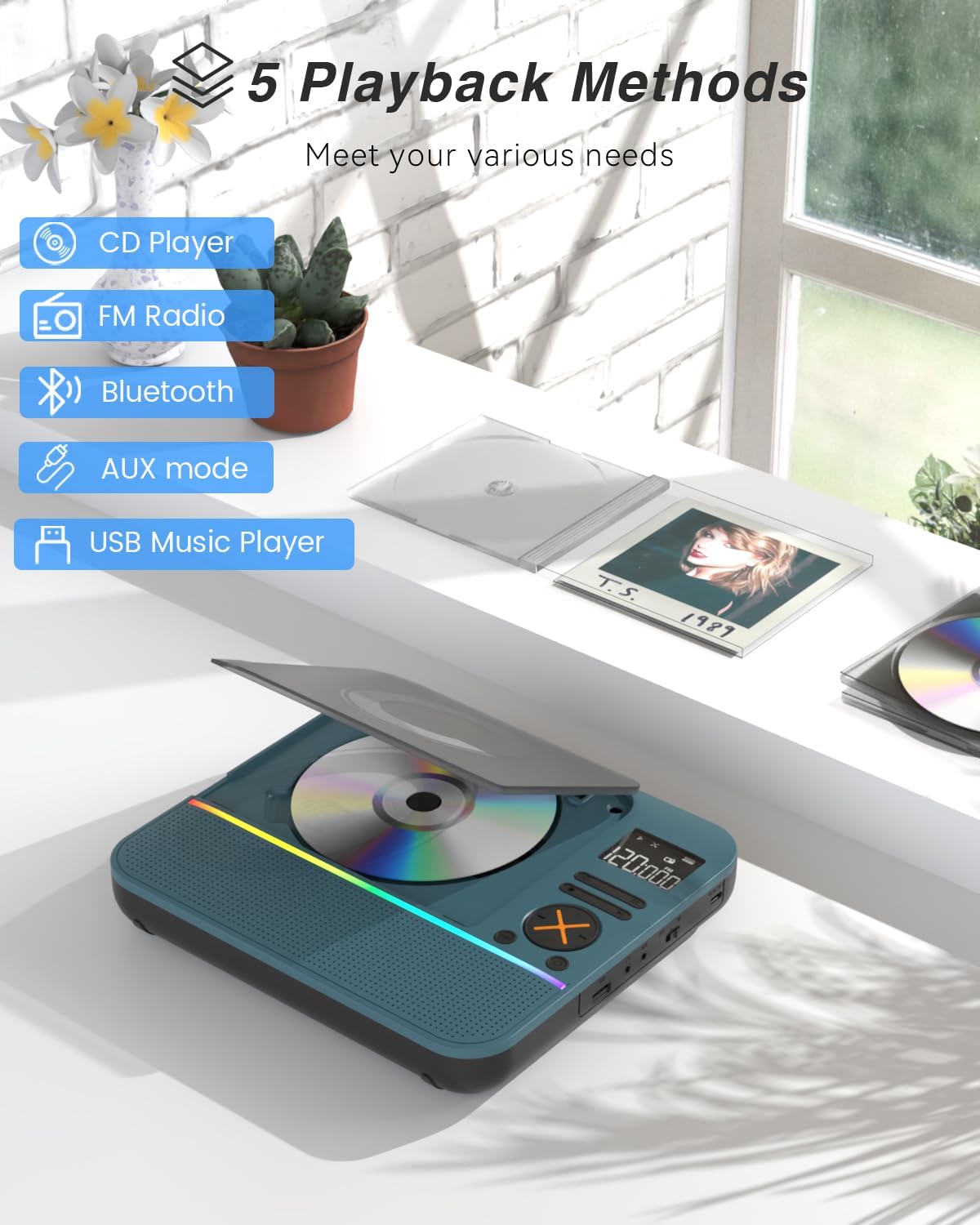
Naciśnij TRYB button on the device or remote control to cycle through the available modes: CD, Bluetooth, FM, AUX, and USB.

Figure 5: The CD player's display indicating the five available playback methods: CD, FM Radio, Bluetooth, AUX mode, and USB Music Player.
5.2 Odtwarzanie płyt CD
- Insert a compatible CD (CD, CD-R, CD-RW, MP3, WMA).
- Select 'CD' mode. The player will automatically start reading the disc.
- Użyj Odtwórz/Pauza, Następny utwór, I Poprzedni utwór przyciski do sterowania odtwarzaniem.
- Naciśnij POWTARZAĆ button to cycle through repeat options (e.g., repeat one, repeat all).
- Naciśnij EQ button to select desired sound effects (Flat, Rock, Pop, Jazz, Classic).
5.3 Tryb Bluetooth
The CD401 supports both Bluetooth transmission (BT TX) and reception (BT RX).
- Bluetooth Receiver (BT RX): Select 'Bluetooth' mode. The device will enter pairing mode. On your phone/tablet, search for 'CD401' and connect. Audio from your device will play through the CD player's speakers.
- Bluetooth Transmitter (BT TX): Select 'Bluetooth' mode. Press and hold the BTTX button. The CD player will search for nearby Bluetooth headphones or speakers. Once connected, CD audio will transmit to the external Bluetooth device.

Figure 6: Illustration of the CD player's dual Bluetooth functionality, allowing it to receive audio from a phone (RX) or transmit to headphones (TX).
5.4 Radio FM
- Wybierz tryb „FM”.
- Użyj Następny utwór I Poprzedni utwór przyciski umożliwiające skanowanie stacji radiowych.
- The FM frequency range is 76MHz to 108MHz.
5.5 Wejście AUX
- Wybierz tryb „AUX”.
- Connect an external audio device (e.g., smartphone, computer) to the AUX IN port using the provided 3.5mm audio cable.
- The CD player will now act as a wired speaker for the connected device.
- Note: Bluetooth connectivity is not supported in cars; use the 3.5mm AUX cable for car audio.
5.6 Odtwarzanie USB
- Select 'USB' mode.
- Włóż dysk flash USB zawierający dźwięk w formacie MP3 lub WMA files do portu USB.
- The player will automatically detect and begin playing the audio files.
5.7 Regulacja głośności
Adjust the volume using the dedicated volume buttons on the device or the remote control.
5.8 Wyłącznik czasowy
- Naciśnij SPAĆ przycisk na pilocie.
- Cycle through the available sleep timer durations (10, 20, 30, 40, 50, 60, 70, 80, 90 minutes).
- The device will automatically power off after the selected time.

Figure 7: The CD player featuring its sleep timer function, allowing users to set automatic shutdown after a specified duration.
6. Konserwacja
6.1 Czyszczenie
- Przetrzyj urządzenie miękką, suchą ściereczką. Nie używaj płynnych środków czyszczących ani materiałów ściernych.
- Utrzymuj komorę CD w czystości i bez kurzu.
6.2 Przechowywanie
- Store the CD player in a cool, dry place away from direct sunlight and extreme temperatures.
- Remove any CDs or USB drives before storing for extended periods.
7. Rozwiązywanie Problemów
| Problem | Możliwa przyczyna | Rozwiązanie |
|---|---|---|
| Urządzenie nie włącza się | Niski poziom naładowania baterii lub wyłączone zasilanie. | Charge the device fully. Ensure the ON/OFF switch is in the 'ON' position. |
| Brak dźwięku z głośników | Volume is too low or incorrect mode selected. | Increase volume. Verify correct playback mode (CD, Bluetooth, FM, AUX, USB). |
| Płyta CD nie odtwarza się | Płyta CD jest brudna, porysowana lub nieprawidłowo włożona. | Clean the CD. Check for scratches. Reinsert the CD correctly with the label side up. |
| Parowanie Bluetooth nie powiodło się | Urządzenie nie jest w trybie parowania lub znajduje się zbyt daleko od źródła. | Ensure the CD player is in Bluetooth pairing mode. Move devices closer. Disconnect from other Bluetooth devices. |
8. Specyfikacje
| Funkcja | Szczegół |
|---|---|
| Numer modelu | CD401 |
| Marka | MONODEAL |
| Technologia łączności | Bluetooth 5.3 |
| Typ głośnika | 4*HIFI Stereo |
| Pojemność baterii | 3000mAh (wbudowany) |
| Czas odtwarzania | Do 8 godzin (przy pełnym naładowaniu) |
| Obsługiwane formaty płyt | Płyta CD, płyta CD-R, płyta CD-RW |
| Obsługiwane formaty audio | MP3, WMA |
| Zakres częstotliwości FM | 76MHz do 108MHz |
| Wymiary opakowania | 10.83 x 9.13 x 1.93 cala |
| Waga przedmiotu | 2.48 funta |
9. Gwarancja i wsparcie
For warranty information, technical support, or customer service inquiries, please refer to the contact details provided in your product packaging or visit the official MONODEAL webstrona. Zachowaj dowód zakupu na potrzeby roszczeń gwarancyjnych.