
Wstęp
This manual provides detailed instructions for the operation and maintenance of your CYBORIS YGS-S18 2-in-1 Magnetic Split Bluetooth Speaker. Designed for versatility, this speaker system offers both combined and separated stereo sound experiences, magnetic attachment capabilities, and robust waterproofing for various environments.
Co jest w pudełku
- CYBORIS YGS-S18 2-in-1 Magnetic Split Bluetooth Speaker (2 units)
- Instrukcja obsługi (ten dokument)
- Kabel do ładowania TYPU C
- Kabel audio 3.5 mm

Image: The CYBORIS YGS-S18 speaker in its combined form, along with its charging and audio cables.
Produkt ponadview
The CYBORIS YGS-S18 consists of two individual speaker units that can be magnetically joined or separated for a wider stereo sound field. Each unit features intuitive controls and a vibrant LED light display.
Elementy sterujące i porty

Image: Close-up of the speaker showing the control buttons: Power On/Off/Play/Pause, Switch Playback Mode/Turn Light On/Off, Volume -/Previous track, and Volume +/Next track.
- Power On/Off / Play/Pause Button: Controls power and music playback.
- Przycisk trybu (M): Switches between Bluetooth, TF card, AUX, and USB playback modes. Also controls the LED lights.
- Głośność - / Przycisk poprzedniego utworu: Krótkie naciśnięcie zmniejsza głośność, długie naciśnięcie powoduje przejście do poprzedniego utworu.
- Przycisk zwiększania głośności / Następny utwór: Krótkie naciśnięcie zwiększa głośność, długie naciśnięcie powoduje przejście do następnego utworu.
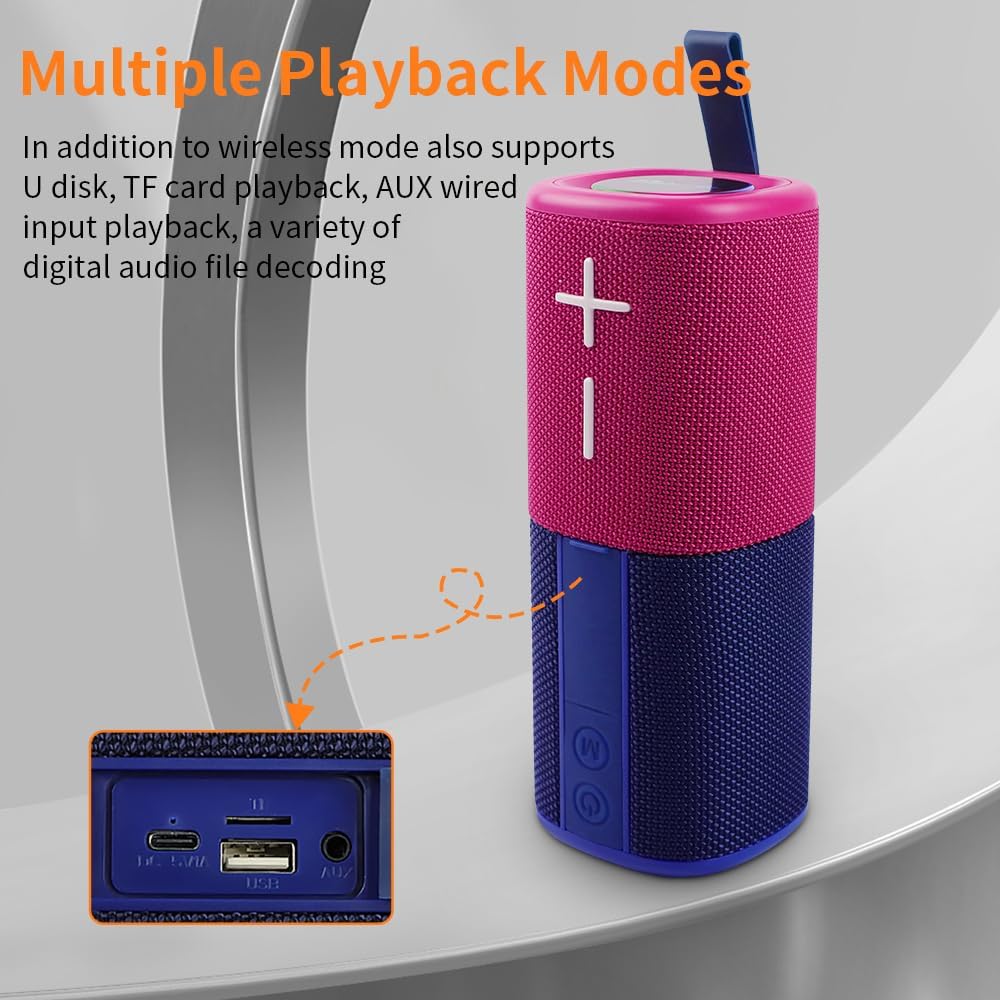
Image: The side panel of the speaker revealing the input ports: DC 5V/A (Type-C charging), TF card slot, USB port, and AUX port.
- DC 5V/A Port (Type-C): Do ładowania głośnika.
- Gniazdo karty TF: Do odtwarzania muzyki bezpośrednio z karty TF (MicroSD).
- Port USB: Do odtwarzania muzyki bezpośrednio z dysku flash USB.
- Port AUX: For wired audio input using the 3.5mm audio cable.
Organizować coś
1. Ładowanie głośników
Before first use, fully charge both speaker units. Connect the provided Type-C charging cable to the DC 5V/A port on each speaker and to a compatible USB power adapter (not included). The LED indicator will show charging status.
2. Włączanie/wyłączanie zasilania
Press and hold the Power On/Off button on each speaker unit to power them on or off. A sound prompt will indicate the power status.
3. Parowanie Bluetooth (tryb pojedynczego głośnika)
- Sprawdź, czy głośnik jest włączony i czy pracuje w trybie Bluetooth (co sygnalizuje migająca niebieska dioda LED).
- Na swoim urządzeniu (smartfonie, tablecie, laptopie) włącz Bluetooth i wyszukaj dostępne urządzenia.
- Select "YGS-S18" from the list. A sound prompt will confirm successful pairing.
4. True Wireless Stereo (TWS) Pairing (Splittable Mode)
To achieve a wider stereo sound, you can pair both speaker units together:
- Ensure both speaker units are powered on and not connected to any other Bluetooth device.
- Press the Power On/Off button on one speaker unit twice quickly. It will enter TWS pairing mode.
- The two speakers will automatically connect to each other. A sound prompt will confirm successful TWS pairing.
- Once TWS paired, connect your device to one of the speakers via Bluetooth (as described in step 3). Both speakers will now play audio in stereo.

Image: Two CYBORIS YGS-S18 speakers, separated and placed on either side of a laptop, demonstrating True Wireless Stereo (TWS) connectivity for an immersive sound experience.
Instrukcja obsługi
Odtwarzanie muzyki
- Odtwórz/Pauza: Krótko naciśnij przycisk włączania/wyłączania zasilania.
- Regulacja głośności: Naciśnij krótko przycisk Głośność + lub Głośność -.
- Następny / poprzedni utwór: Long press the Volume + for next track, or Volume - for previous track.
Switching Playback Modes
Press the 'M' (Mode) button to cycle through available playback modes: Bluetooth, TF Card, AUX, and USB. Insert the respective media (TF card, USB drive) or connect the 3.5mm audio cable for these modes to become active.
Rozmowy bez użycia rąk
Po podłączeniu przez Bluetooth wbudowany mikrofon głośnika umożliwia prowadzenie rozmów w trybie głośnomówiącym:
- Odbierz połączenie: Krótko naciśnij przycisk włączania/wyłączania zasilania.
- Zakończ połączenie: Short press the Power On/Off button during a call.
- Odrzuć połączenie: Naciśnij i przytrzymaj przycisk włączania/wyłączania.
Efekty świetlne LED
The speaker features colorful breathing lights that can be controlled:
- Włącz/wyłącz światła: Long press the 'M' (Mode) button.

Image: The base of the CYBORIS YGS-S18 speaker unit illuminated with colorful LED lights, indicating active light effects.
Mocowanie magnetyczne
Each speaker unit is equipped with strong magnets, allowing it to attach to metallic surfaces such as refrigerators, metal shelves, or vehicle panels. This feature provides flexible placement options for your audio experience.

Image: Two CYBORIS YGS-S18 speakers, one red and one blue, magnetically attached to the side of a refrigerator, demonstrating their versatile placement.
Konserwacja
- Czyszczenie: Use a soft, dry cloth to clean the speaker's exterior. Do not use harsh chemicals or abrasive materials.
- Wodoodporność: The speaker has an IPX6 waterproof rating, meaning it can withstand strong jets of water. However, it is not designed for submersion. Ensure all port covers are securely closed before exposure to water.
- Składowanie: Przechowuj głośnik w chłodnym, suchym miejscu, z dala od bezpośredniego światła słonecznego i ekstremalnych temperatur, jeśli nie będziesz go używać przez dłuższy czas.

Image: The CYBORIS YGS-S18 speaker, in its combined form, being splashed with water, highlighting its IPX6 waterproof capability.
Rozwiązywanie problemów
| Problem | Możliwa przyczyna | Rozwiązanie |
|---|---|---|
| Głośnik nie włącza się. | Niski poziom naładowania baterii lub brak ładowania. | Naładuj głośnik przy użyciu dołączonego kabla typu C. |
| Nie można sparować przez Bluetooth. | Speaker is already connected to another device, or not in pairing mode. | Ensure the speaker is in Bluetooth pairing mode (flashing blue LED). Disconnect from other devices if necessary. Restart both the speaker and your device. |
| Parowanie TWS nie powiodło się. | Speakers are too far apart, or one is already paired to a device. | Ensure both speakers are close to each other and not connected to any other Bluetooth device. Follow TWS pairing steps carefully. |
| No sound from TF card/USB/AUX. | Incorrect mode selected, or media not properly inserted/connected. | Press the 'M' button to select the correct input mode. Ensure the TF card/USB drive is inserted correctly or the AUX cable is fully plugged in. |
| Jakość dźwięku jest niska. | Low battery, interference, or source audio quality. | Charge the speaker. Move closer to the connected device. Try different audio sources. |
Specyfikacje
| Funkcja | Szczegół |
|---|---|
| Marka | CYBORIS |
| Nazwa modelu | S18 (YGS-S18) |
| Typ głośnika | Outdoor, Portable, Splittable |
| Technologia łączności | Bluetooth V5.3 |
| Zasięg komunikacji bezprzewodowej | Do 18 metrów (59 stóp) |
| Tryb wyjścia audio | Stereo (when TWS paired) |
| Maksymalna moc wyjściowa głośnika | 20 watów (łącznie) |
| Odpowiedź częstotliwościowa | 20 kHz |
| Pojemność baterii | 2 x 2000mAh (Total 4000mAh) Polymer Lithium Battery |
| Pauza w szkole | Do 24 godzin |
| Poziom wodoodporności | IPX6 (wodoodporny) |
| Metoda kontroli | Przyciski dotykowe |
| Wymiary produktu | 3"D x 3"W x 8"H (combined) |
| Waga przedmiotu | 0.8 kilogramów (1.76 funty) |
| Obsługiwane tryby odtwarzania | Bluetooth, TF Card, AUX, USB |
Oficjalne filmy produktowe
CYBORIS YGS-S18 Speaker Overview
Wideo: Ten film przedstawia ogólny przeglądview of the CYBORIS YGS-S18 speaker, demonstrating its split functionality and portability. It highlights how the two units can be separated for a wider sound experience.
Gwarancja i wsparcie
The CYBORIS YGS-S18 speaker comes with a limited warranty. For specific warranty details, please refer to the warranty card included with your product or contact CYBORIS customer support. For further assistance, visit the official CYBORIS store or contact their support channels.