
1. Wprowadzenie
This manual provides essential information for the safe and efficient operation of your PETLIBRO Automatic Pet Feeder with Camera. This device is designed to automate pet feeding schedules, monitor your pet, and facilitate two-way communication, ensuring your pet receives meals on time and you stay connected.
The feeder features a 1080P HD camera with night vision, 5G WiFi connectivity, two-way audio, and a stainless steel slow-feed bowl to promote healthier eating habits.

Figure 1: PETLIBRO Automatic Pet Feeder with Camera
2. Składniki produktu
Sprawdź, czy w opakowaniu znajdują się wszystkie komponenty:
- 1 x PETLIBRO Automatic Camera Feeder
- 1 x Stainless Steel Slow Food Bowl
- 1 x zasilacz
- 1 x Desiccant Bag (pre-installed or separate)
- 1 x Instrukcja obsługi
3. Przewodnik konfiguracji
3.1 Rozpakowywanie i umieszczanie
- Ostrożnie wyjąć wszystkie elementy z opakowania.
- Place the feeder on a flat, stable surface in a dry area, away from direct sunlight or heat sources.
- Upewnij się, że gniazdko elektryczne jest łatwo dostępne.
3.2 Połączenie zasilania
- Podłącz zasilacz do zasilacza i do gniazdka ściennego.
- Dla mocytage protection, install 3 D-cell batteries (not included) in the battery compartment at the bottom of the feeder.
3.3 Pobieranie aplikacji i połączenie Wi-Fi
- Pobierz PETLIBRO App ze sklepu z aplikacjami na Twoim smartfonie (iOS lub Android).
- Create an account and follow the in-app instructions to add your feeder. The feeder supports both 2.4GHz and 5GHz WiFi networks.
- Ensure your phone is connected to the same WiFi network you intend to connect the feeder to during setup.
3.4 Napełnianie zbiornika na żywność
- Otwórz pokrywę zbiornika na żywność.
- Pour dry pet food into the tank. The feeder has a 5L capacity.
- Ensure the desiccant bag is placed in its compartment to keep food fresh. Replace the desiccant bag every 15-30 days.
- Dokładnie zamknij pokrywę, aby zachować świeżość żywności.
3.5 Attaching the Slow Food Bowl
- Place the stainless steel slow food bowl into the designated slot at the base of the feeder. Ensure it is seated correctly.

Figure 2: Stainless Steel Slow Food Bowl
4. Instrukcja obsługi
4.1 Planowanie posiłków
- Use the PETLIBRO App to set up to 10 meals per day.
- Adjust portion sizes from 1 to 50 portions per meal, according to your pet's dietary needs.
- The app allows for flexible scheduling and monitoring of feeding history.
4.2 Karmienie ręczne
- Press the manual feed button on the feeder or use the app's "Feed Now" function to dispense a single portion instantly.
4.3 Camera Features and Monitoring
The built-in 1080P HD camera allows you to monitor your pet's mealtime in real-time.
- W czasie rzeczywistym Viewing: Access the live camera feed through the PETLIBRO App.
- Widzenie nocne: The camera automatically switches to night vision in low-light conditions, providing clear monitoring even at night.
- Automatyczne przechwytywanie: Feeding moments are automatically recorded and stored for playback within the app.
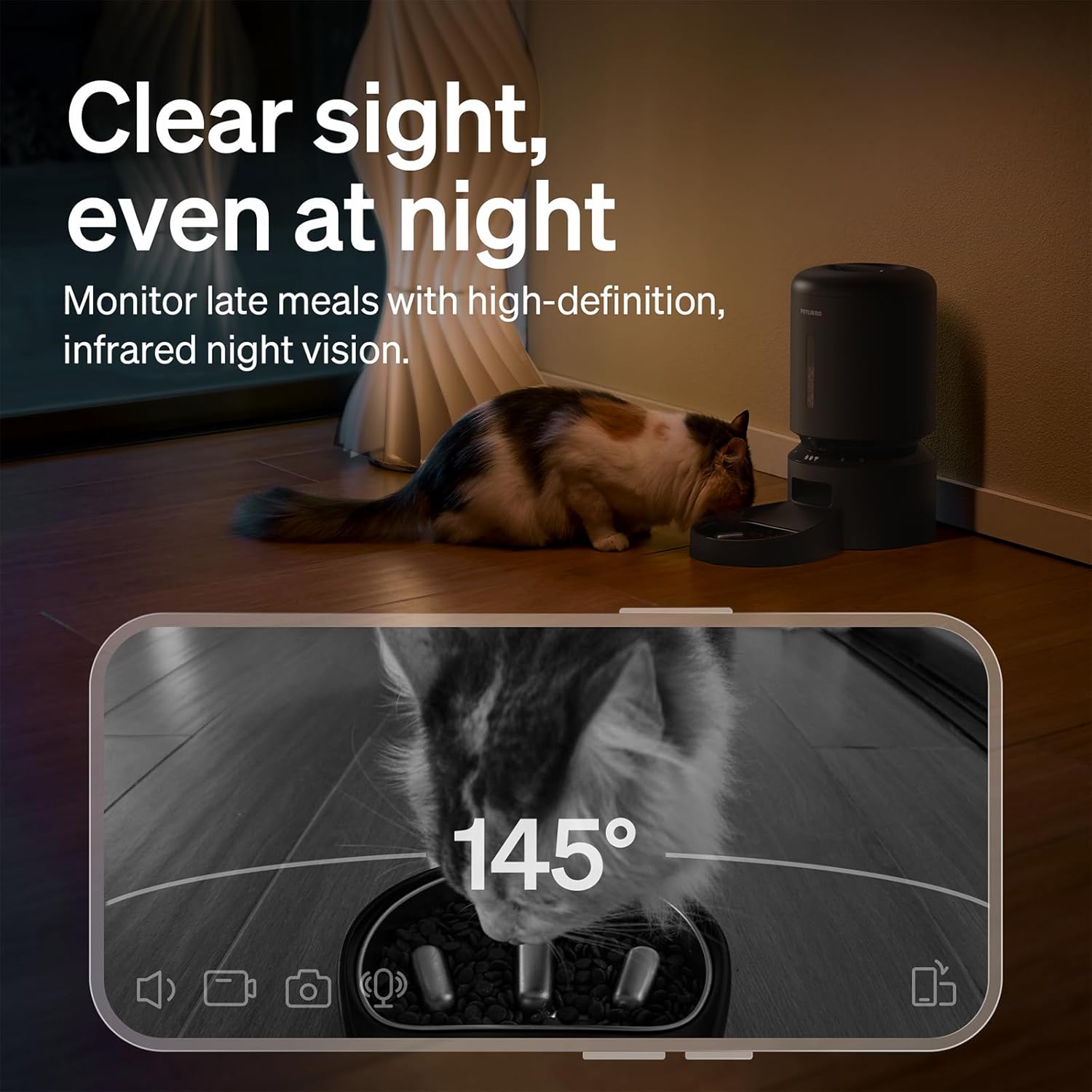
Figure 3: Night Vision Monitoring
4.4 Two-Way Audio Interaction
- Use the two-way audio feature in the app to speak to your pet remotely.
- You can also record a personalized 10-second meal call that plays during scheduled feeding times.
4.5 Powiadomienia i alerty
The PETLIBRO App provides instant alerts to keep you informed:
- Low Food Level: Receive alerts when the food tank is running low, prompting you to refill.
- Dżemy spożywcze: The anti-blockage system detects and alerts you to any food dispensing issues.
- Detekcja ruchu i dźwięku: Get notifications for detected motion or sound around the feeder.

Rysunek 4: Powiadomienia w czasie rzeczywistym
4.6 Slow Feeding Benefits
The integrated stainless steel slow-feed bowl is designed with ridges to reduce eating speed by up to 2 times. This helps prevent choking, bloating, and indigestion, supporting better digestion for pets that eat too fast.

Figure 5: Slow Feeding in Action
4.7 Demonstracja wideo
Watch this short video to see the PETLIBRO Automatic Pet Feeder in operation, demonstrating its food dispensing capabilities.
Video 1: PETLIBRO Automatic Dog Feeder with Slow Bowl, 1080P HD (6 seconds)
5. Konserwacja
5.1 Cleaning the Slow Food Bowl
- The stainless steel bowl is removable and dishwasher safe for easy cleaning.
- Wash regularly to maintain hygiene and prevent bacterial growth.
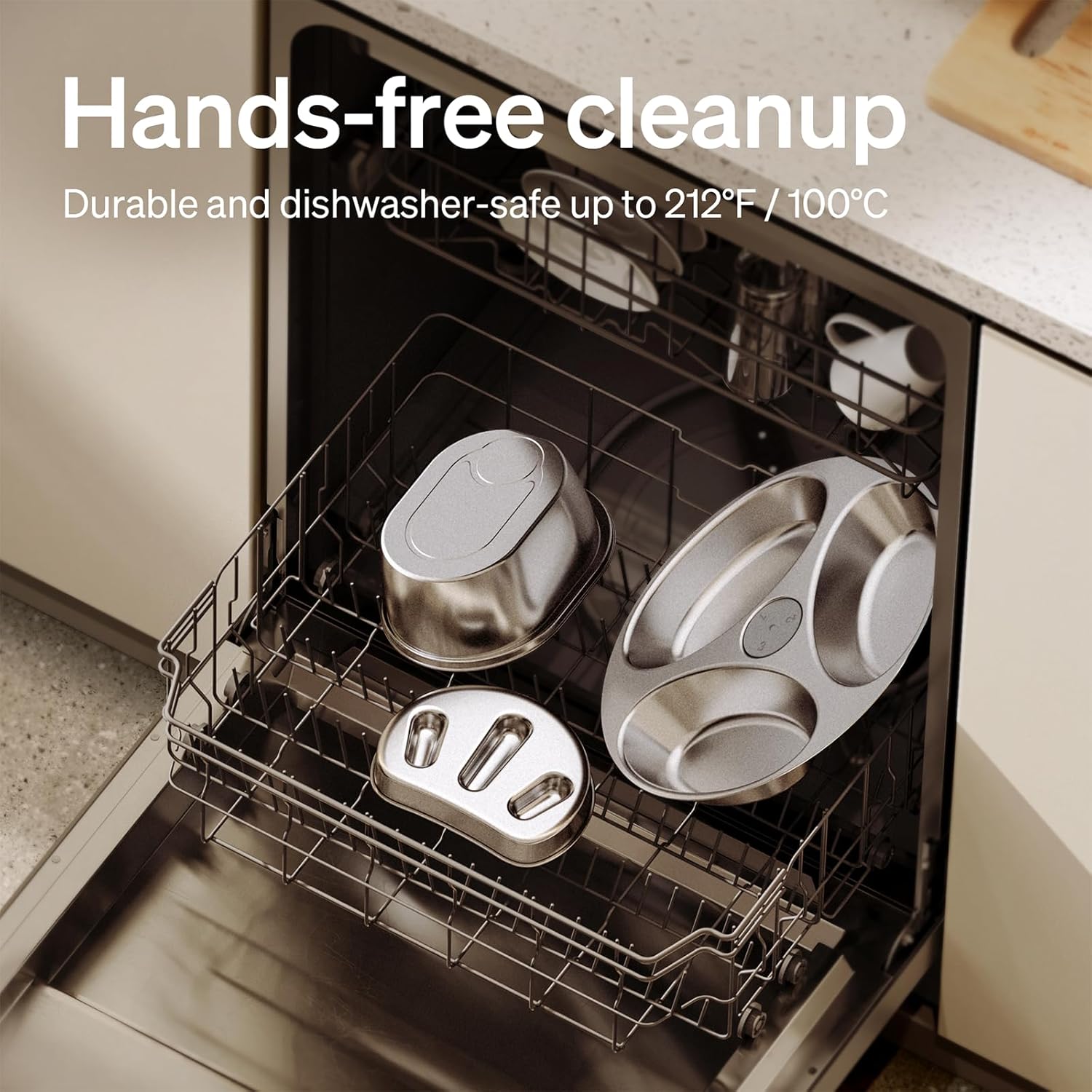
Rysunek 6: Elementy nadające się do mycia w zmywarce
5.2 Cleaning the Food Tank and Dispenser
- Wipe the interior of the food tank with a damp cloth. Ensure it is completely dry before refilling.
- Clean the food dispensing outlet regularly to prevent blockages.
5.3 Wymiana worka pochłaniającego wilgoć
- Replace the desiccant bag in the lid compartment every 15-30 days to ensure food freshness.
6. Rozwiązywanie Problemów
| Wydanie | Możliwa przyczyna | Rozwiązanie |
|---|---|---|
| Podajnik nie włącza się | Power adapter disconnected; no battery backup; batteries depleted. | Check power connection; install fresh D-cell batteries. |
| Żywność nie jest wydawana | Food tank empty; food jam; dispenser blocked. | Refill food tank; clear any food blockages in the dispenser; clean the outlet. |
| Błąd połączenia Wi-Fi | Incorrect WiFi password; feeder too far from router; incompatible WiFi band. | Verify password; move feeder closer to router; ensure 2.4GHz or 5GHz network is used. |
| Kamera nie działa | App permissions; network issue. | Check app camera permissions; ensure stable WiFi connection. |
| Powiadomienia nie odebrane | Ustawienia powiadomień aplikacji; ustawienia telefonu. | Enable notifications in the PETLIBRO App and your phone's settings. |
If issues persist, please contact PETLIBRO customer support.
7. Specyfikacje
- Numer modelu: PLAF203-SB
- Wymiary produktu: 12.99" dł. x 7.48" szer. x 13.78" wys.
- Waga przedmiotu: 3.8 funtów
- Pojemność: 5 litrów
- Tworzywo: Stainless Steel (bowl), Plastic (feeder body)
- Technologia łączności: WiFi (2.4GHz & 5GHz)
- Źródło zasilania: Corded Electric, Battery Backup (3 x D-cell batteries, not included)
- Kamera: 1080P HD with Night Vision
- Cechy szczególne: Two-Way Audio, Slow Food Bowl, App Control, Motion/Sound Detection, Low Food Alerts
- Docelowe gatunki: Koty, Psy, Małe Zwierzęta
8. Gwarancja i wsparcie
Your PETLIBRO Automatic Pet Feeder with Camera comes with a 24-miesięczna gwarancja od daty zakupu. Niniejsza gwarancja obejmuje wady produkcyjne i usterki powstałe podczas normalnego użytkowania.
For warranty claims, technical support, or any questions regarding your product, please visit the official PETLIBRO webOdwiedź stronę internetową lub skontaktuj się bezpośrednio z działem obsługi klienta. Zachowaj paragon jako dowód zakupu.
Wsparcie online: www.petlibro.com/support