
Wstęp
This user manual provides detailed instructions for setting up, operating, and maintaining your FIFINE AmpliGame H13BP Wired USB Gaming Headset. Please read this manual thoroughly before using the product to ensure optimal performance and longevity.
Co jest w pudełku
- FIFINA AmpliGame H13BP Gaming Headset
- Odłączany mikrofon
- Instrukcja obsługi

Obraz: FIFINE AmpliGame H13BP headset, its detachable microphone, and the user manual as packaged.
Produkt ponadview
FIFINE AmpliGame H13BP headset features a robust design with comfortable earcups and an adjustable headband for extended gaming sessions. It includes a versatile USB control box for easy audio management.
Kluczowe komponenty:
- Stery: Equipped with 50mm dynamic drivers for clear audio across all frequencies.
- Odłączany mikrofon: Features noise-canceling technology for clear communication.
- USB Control Box: In-line controls for volume, mic mute, 7.1 surround sound, EQ modes, and game/chat balance.
- Oświetlenie RGB: Customizable RGB effects on the earcups.
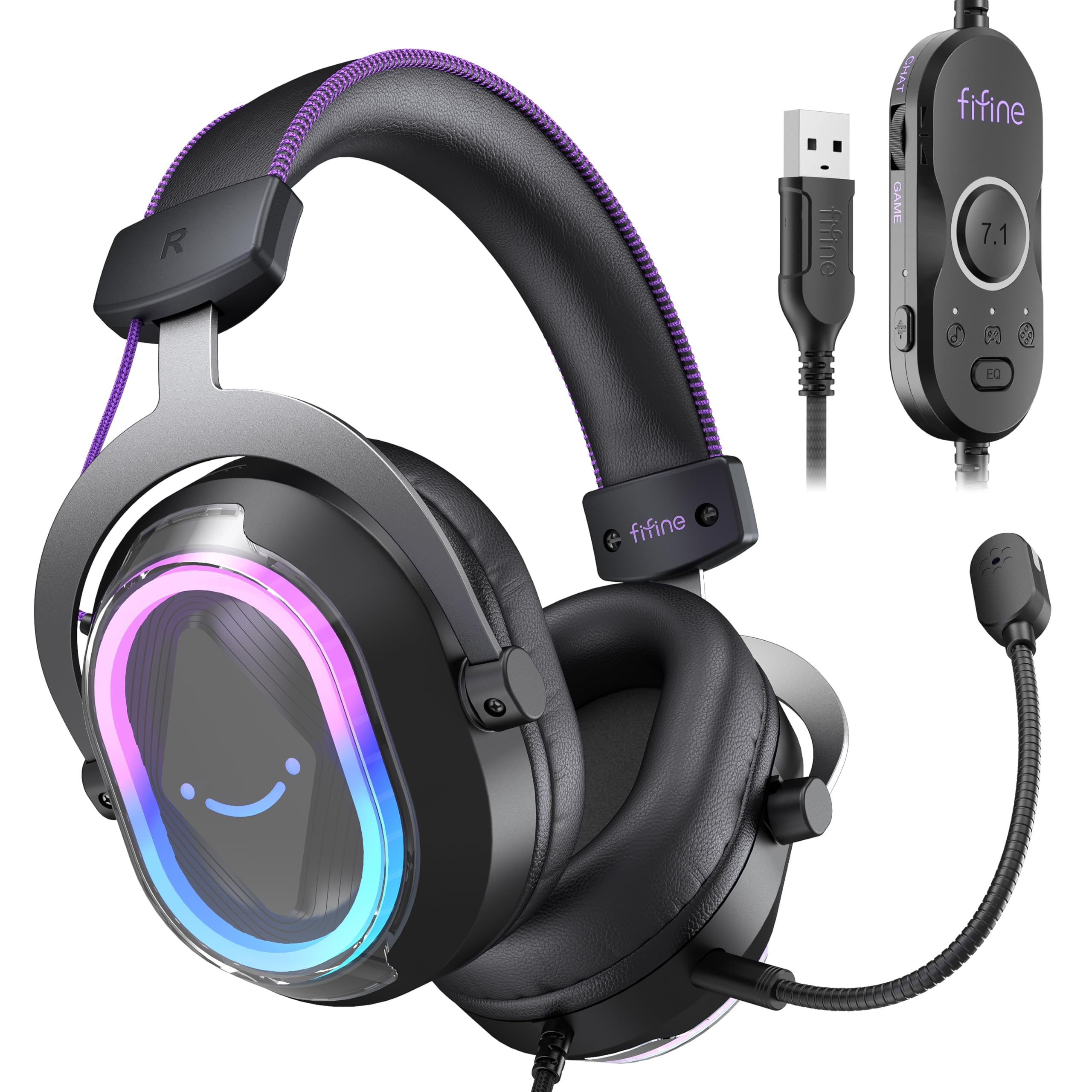
Obraz: szczegółowy view z FIFINE AmpliGame H13BP Gaming Headset.

Image: Close-up diagram of the USB Control Box with labeled functions.
Organizować coś
- Podłącz zestaw słuchawkowy: Plug the USB-A connector of the headset into an available USB port on your PC, Mac, PS5, or PS4. No additional software is required for basic functionality.
- Podłącz mikrofon: Insert the detachable microphone into the designated port on the left earcup until it clicks into place.
- Dopasuj dopasowanie: Adjust the headband and earcup positions for a comfortable and secure fit. The protein skin ear pads and memory foam cushions are designed for long-term comfort.

Image: Headset connected to various compatible devices.
Instrukcja obsługi
USB Control Box Functions:
- Headset Volume Control: Use the volume wheel on the side of the control box to adjust the overall headset volume.
- Wyciszenie mikrofonu: Press the mic mute button on the control box to toggle the microphone on/off. The mic indicator light on the microphone will glow red when muted.
- Balans gry/czatu: Use the dedicated slider on the control box to prioritize game audio or chat audio. Slide towards 'CHAT' to increase chat volume relative to game volume, or towards 'GAME' to increase game volume.
- Dźwięk przestrzenny 7.1: Press the 7.1 button on the control box to activate or deactivate 7.1 virtual surround sound.
- Tryby korektora: Press the EQ button to cycle through four pre-set equalizer modes: Default (Balanced Audio), Music (Clear Vocal), Game (Powerful Bass), and Movie (Dynamic Enhancement). Long press the EQ button to return to default mode.

Image: Demonstrating the game/chat balancing feature.

Obraz: Ponadview of the different EQ modes available.
Sterowanie oświetleniem RGB:
- Change RGB Modes: Press the dedicated button on the earcup to cycle through 11 different RGB lighting modes.
- Włączanie/wyłączanie RGB: Long press the RGB button to turn the lighting on or off.

Image: Headset displaying various RGB lighting effects.
Funkcje mikrofonu
The detachable microphone is designed for clear voice pickup and features noise-canceling capabilities to reduce background distractions, ensuring your teammates hear you clearly.

Image: The microphone with its noise-canceling indicator.
Komfort i trwałość
The H13BP headset is built for comfort during long gaming sessions. It features protein skin ear pads and soft memory foam cushions that conform to your ears. The adjustable headband ensures a snug fit for various head sizes. The durable construction includes metal and plastic components, and the braided cable enhances longevity.

Image: Close-up of the headset's comfortable earcups and adjustable headband.
Specyfikacje
| Funkcja | Szczegół |
|---|---|
| Marka | FIFINA |
| Numer modelu | H13BP |
| Technologia łączności | Przewodowy (USB-A) |
| Umieszczenie ucha | Na ucho |
| Rozmiar sterownika audio | 50 milimetrów |
| Typ sterownika audio | Dynamiczny sterownik |
| Zakres częstotliwości | 20Hz - 20,000Hz |
| Impedancja | 32 omy |
| Kontrola hałasu | Pasywna redukcja szumów |
| Dodatkowe funkcje | 7.1 Surround Sound, Noise Canceling Mic, RGB Lighting |
| Kompatybilne urządzenia | PC, Mac, PS5/PS4 (Not compatible with Xbox) |
| Cechy kabla | Braided material cable (7.55ft) |
| Typ sterowania | Volume Control, Mic Mute, EQ Modes, 7.1 On/Off, Game/Chat Balance |
| Tworzywo | Skóra, metal, plastik |
Rozwiązywanie problemów
Brak dźwięku/niedziałający mikrofon:
- Sprawdź połączenia: Ensure the USB-A connector is fully inserted into the port.
- Sprawdź status wyciszenia: Check the mic mute button on the control box and the mic indicator light. Ensure the headset volume is not at minimum.
- Ustawienia systemowe: Confirm that the FIFINE H13BP headset is selected as the default audio input and output device in your computer's or console's sound settings.
- Zgodność: Remember that the headset is not compatible with Xbox consoles.
Światła RGB nie działają:
- Sprawdź połączenie: Sprawdź, czy zestaw słuchawkowy jest prawidłowo podłączony przez USB.
- Przełącz RGB: Long press the RGB button on the earcup to ensure the lighting is not simply turned off.
Gwarancja i wsparcie
For warranty information and detailed support, please refer to the official FIFINE website or contact their customer service. FIFINE offers product specialists assistance and free technical support for their products.
You can visit the FIFINE Store for more information: Sklep FIFINE na Amazon
Oficjalne filmy produktowe
FIFINE H13 USB Gaming Headset Review
Wideo: Kompleksowe badanieview of the FIFINE H13 USB Gaming Headset, demonstrating its features and performance.
Testing This Colorful Headset Immersive High-Quality Sound!
Video: A demonstration of the headset's immersive sound quality and vibrant RGB lighting.