
MOZOTER SP9i
Instrukcja obsługi bezprzewodowych słuchawek dousznych MOZOTER SP9i
Model: SP9i
Wstęp
Thank you for choosing the MOZOTER SP9i Wireless Earbuds. These earbuds are designed to provide a comfortable and stable audio experience with advanced Bluetooth 5.3 technology, deep bass sound, and extended playtime. This manual will guide you through the setup, operation, and maintenance of your new earbuds to ensure optimal performance.
Co jest w pudełku
- MOZOTER SP9i Wireless Earbuds (Left and Right)
- Etui ładujące
- Kabel ładujący USB-C
- Końcówki douszne (rozmiary S, M, L)
- Instrukcja obsługi
Produkt ponadview
The MOZOTER SP9i earbuds feature an over-ear hook design for secure fit and comfort. Each earbud is equipped with intuitive touch controls for easy management of audio and calls. The compact charging case provides additional battery life and convenient storage.

Image: The MOZOTER SP9i Wireless Earbuds resting in their open charging case, showcasing the over-ear hook design and the charging contacts.
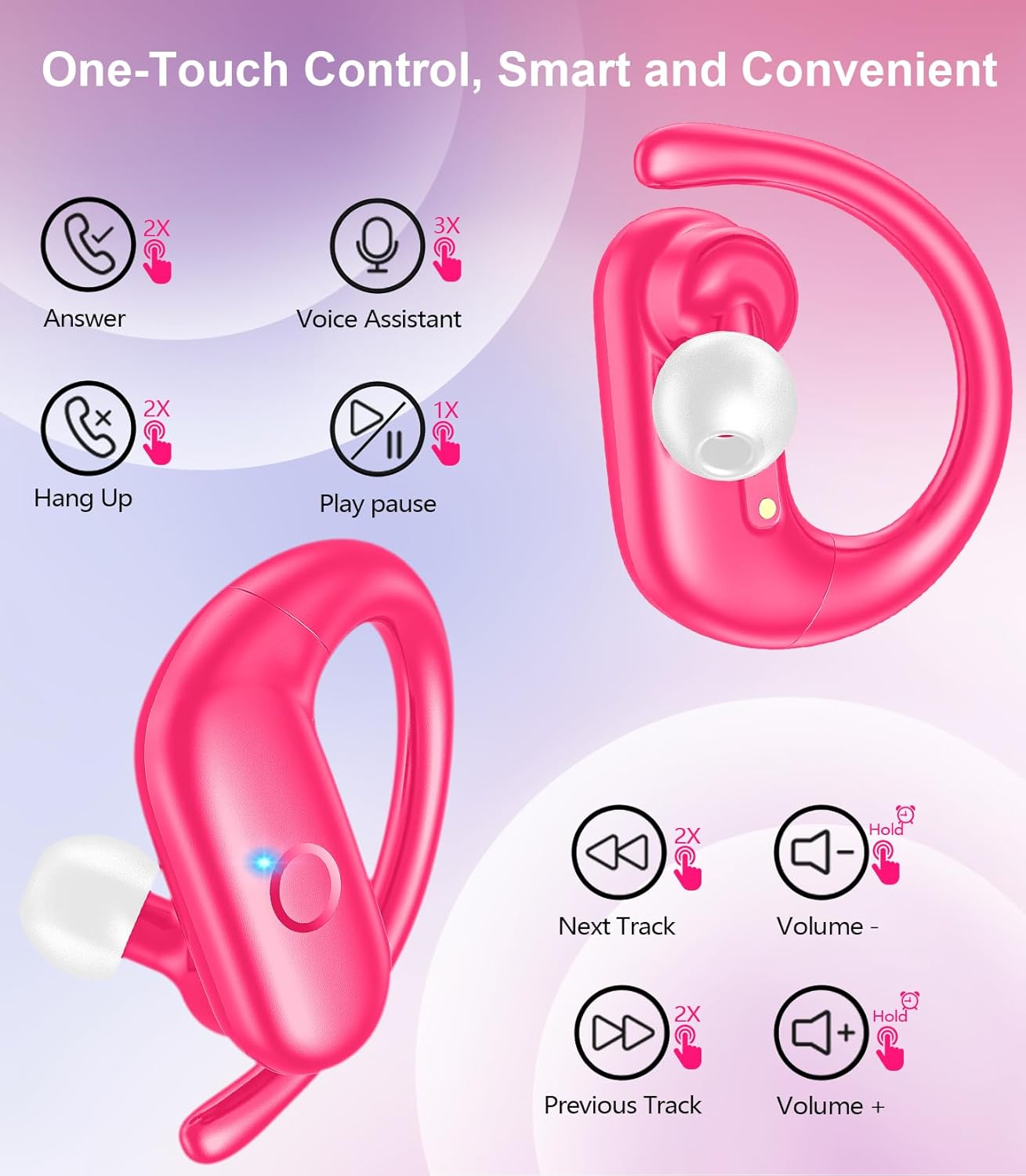
Obraz: szczegółowy view of an earbud highlighting the integrated Bluetooth 5.3 technology for stable and efficient wireless connectivity.
Organizować coś
1. Ładowanie słuchawek i etui
Przed pierwszym użyciem należy w pełni naładować słuchawki i etui ładujące. Podłącz dołączony kabel USB-C do portu ładowania w etui i do źródła zasilania. Kontrolki na etui pokażą stan ładowania.
- Czas ładowania: Pełne ładowanie trwa około 1.5 godzin.
- Czas odtwarzania słuchawek: Do 12 godzin na jednym ładowaniu.
- Całkowity czas odtwarzania z etui: Do 60 godzin.

Image: The charging case with earbuds inside, illustrating the 60-hour total playtime, 12-hour single charge, and 48-hour case capacity, along with the USB-C charging port.
2. Parowanie z urządzeniem
- Ensure the charging case has power and the earbuds are inside.
- Otwórz etui ładujące. Słuchawki automatycznie włączą się i przejdą w tryb parowania.
- Włącz Bluetooth na swoim urządzeniu (smartfonie, tablecie, laptopie).
- Szukaj dostępne urządzenia Bluetooth i wybierz „SP9i" z listy.
- Po nawiązaniu połączenia usłyszysz dźwięk potwierdzający, a kontrolki słuchawek wyłączą się lub zaczną powoli migać.
Słuchawki douszne automatycznie połączą się ponownie z ostatnio sparowanym urządzeniem po wyjęciu z etui, jeśli w urządzeniu włączony jest Bluetooth.

Image: An illustration showing the MOZOTER SP9i earbuds in their open case, with a smartphone screen displaying a successful Bluetooth connection to "SP9i".
Instrukcje noszenia
For optimal sound quality and comfort, it is important to wear the earbuds correctly and choose the appropriate eartip size.
1. Wybór wkładek dousznych
The earbuds come with small (S), medium (M), and large (L) eartips. Experiment with different sizes to find the pair that provides the best seal and comfort for your ears. A good seal enhances bass response and passive noise cancellation.
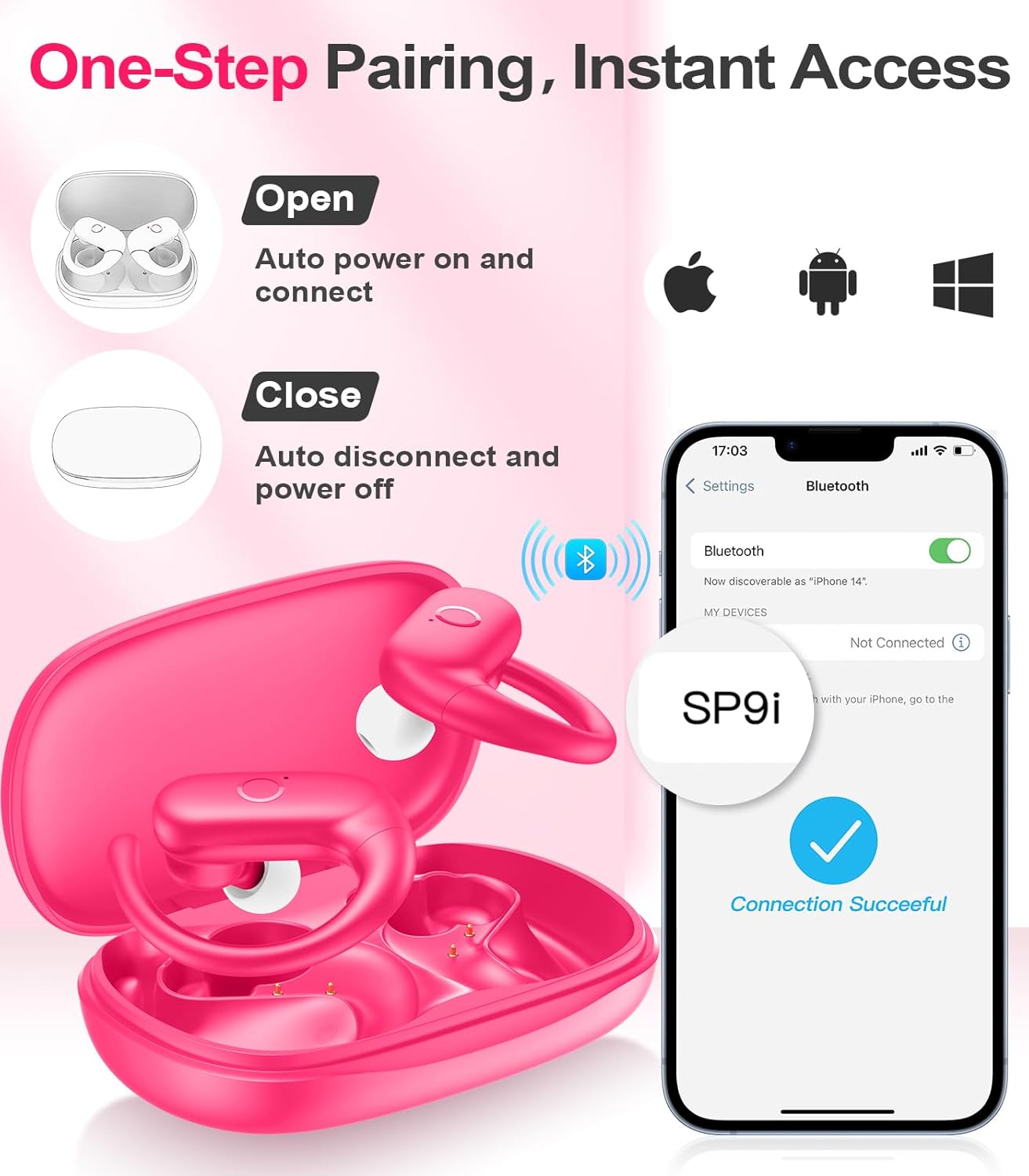
Image: A woman wearing an earbud, with an inset showing the three available eartip sizes (S, M, L) for a customized and comfortable fit.
2. Uzyskanie bezpiecznego dopasowania
- Krok 1: Umieść zaczep na uchu.
- Krok 2: Delikatnie włóż wkładkę douszną do kanału słuchowego.
- Krok 3: Rotate the earbud slightly to find a comfortable and secure angle. The flexible ear hooks ensure a stable fit, ideal for sports and active use.

Image: A three-step diagram illustrating the correct method to wear the MOZOTER SP9i earbuds, ensuring a secure and comfortable fit with the ear hook.

Image: A woman wearing the MOZOTER SP9i earbuds, demonstrating the ergonomic design that rests comfortably and securely on the ear.
Instrukcja obsługi
The MOZOTER SP9i earbuds feature intuitive touch controls on each earbud. The following table outlines the functions:
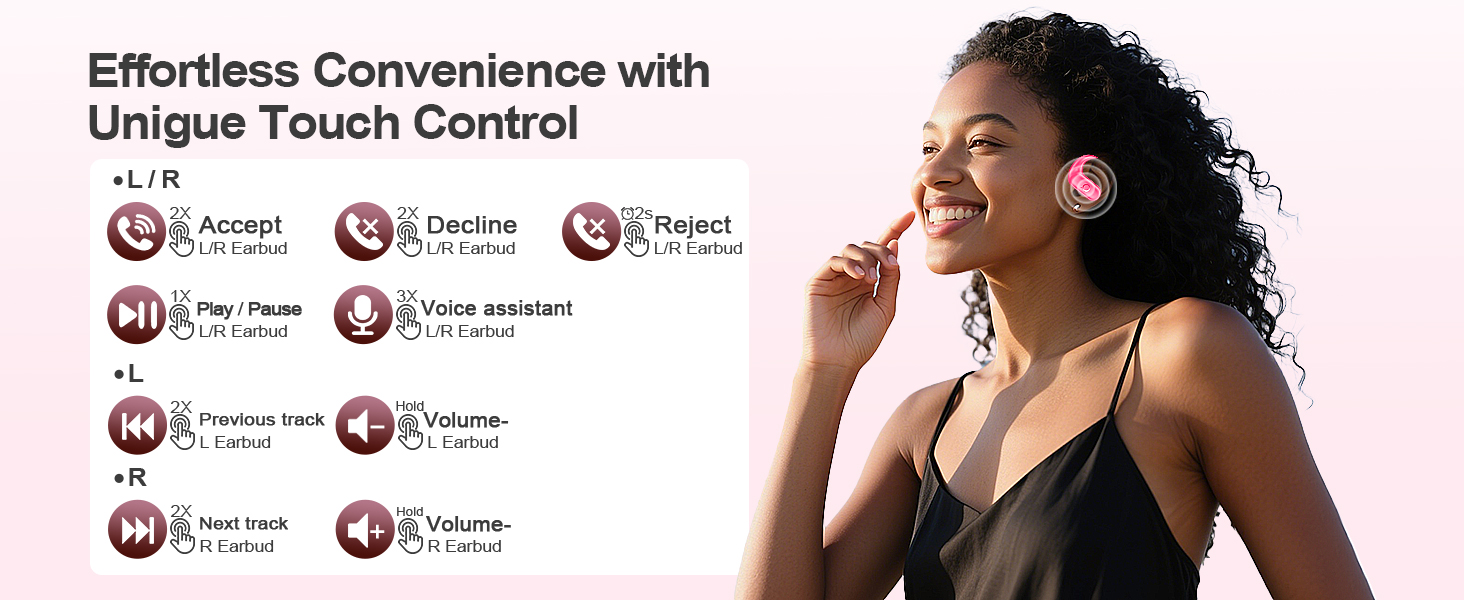
Image: A visual guide detailing the various touch control gestures for the MOZOTER SP9i earbuds, including call management, music playback, and volume adjustments.
| Działanie | Gesture (L/R Earbud) |
|---|---|
| Odbierz połączenie | Double-tap (2X) |
| Rozłącz połączenie | Double-tap (2X) |
| Odrzuć połączenie | Triple-tap (3X) |
| Odtwórz/wstrzymaj muzykę | Single-tap (1X) |
| Aktywuj Asystenta Głosowego | Triple-tap (3X) |
| Następny utwór | Double-tap (2X) on Prawidłowy słuchawki douszne |
| Poprzedni utwór | Double-tap (2X) on Lewy słuchawki douszne |
| Zwiększ głośność | Trzymać się Prawidłowy słuchawki douszne |
| Zmniejsz głośność | Trzymać się Lewy słuchawki douszne |
Konserwacja
Właściwa konserwacja gwarantuje trwałość i wydajność słuchawek dousznych.
- Czyszczenie: Regularly clean the eartips and the charging contacts on both the earbuds and the case with a soft, dry, lint-free cloth. Avoid using harsh chemicals or abrasive materials.
- Składowanie: Gdy nie używasz słuchawek, przechowuj je w etui ładującym, aby chronić je przed kurzem i uszkodzeniami.
- Narażenie na działanie wody: Choć słuchawki są przeznaczone do uprawiania sportu, należy unikać zanurzania ich w wodzie. Po użyciu należy natychmiast wytrzeć pot lub wilgoć.
Rozwiązywanie problemów
If you encounter any issues with your MOZOTER SP9i earbuds, please refer to the following common solutions:
- Słuchawki nie łączą się: Ensure both earbuds are charged and removed from the case. Turn off and on your device's Bluetooth. If issues persist, try resetting the earbuds (refer to manufacturer's web(jeśli nie ma ich w instrukcji, odwiedź tę witrynę, aby uzyskać szczegółowe instrukcje dotyczące resetowania).
- Działa tylko jedna słuchawka: Place both earbuds back into the charging case, close the lid, wait a few seconds, then open the lid and remove them. This often resynchronizes them.
- Słaba jakość dźwięku: Ensure the eartips provide a good seal in your ear. Clean any debris from the earbud speakers. Check your device's volume and audio settings.
- Problemy z ładowaniem: Upewnij się, że kabel ładujący jest prawidłowo podłączony do etui i źródła zasilania. Wyczyść styki ładowania na słuchawkach i wewnątrz etui.
- Wypadanie słuchawek: Experiment with different eartip sizes and adjust the ear hooks for a more secure fit as described in the Wearing Instructions section.
Specyfikacje
| Funkcja | Szczegół |
|---|---|
| Nazwa modelu | SP9i |
| Technologia łączności | Bezprzewodowa (Bluetooth 5.3) |
| Kontrola hałasu | Pasywna redukcja szumów |
| Impedancja | 4 omy |
| Waga słuchawek | Około 8 g na słuchawkę |
| Czas odtwarzania w słuchawkach | Do 12 godzin |
| Całkowity czas odtwarzania (z etui) | Do 60 godzin |
| Port ładowania | USB-C |
| Zawarte komponenty | Earbuds, Charging Case, Eartips, User Manual |
Gwarancja i wsparcie
MOZOTER products are designed and manufactured to the highest quality standards. For warranty information and customer support, please refer to the documentation included with your purchase or visit the official MOZOTER website. If you require further assistance, please contact our customer service team.
Ask a question about this manual
Ask about setup, troubleshooting, compatibility, parts, safety, or missing instructions. Manuals+ will review the question and use this page’s manual context to help answer it.