
1. Wprowadzenie
Thank you for choosing the Schneider 43A1 4K UHD LED TV. This television combines advanced display technology with smart features to provide an immersive viewing experience. Featuring a 4K Ultra High Definition display, QLED-LCD technology with Direct LED backlighting, and the VIDAA Smart TV platform, your new TV offers vibrant colors, deep blacks, and access to a wide range of entertainment.
This manual provides essential information for the safe and efficient use of your television. Please read it thoroughly before operating the device and retain it for future reference.
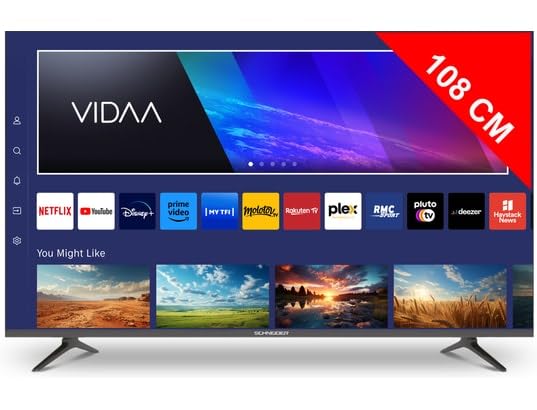
Obraz 1.1: Przód view of the Schneider 43A1 TV with VIDAA interface.
2. Informacje dotyczące bezpieczeństwa
Aby zapewnić bezpieczną obsługę i zapobiec uszkodzeniom, należy przestrzegać następujących środków ostrożności:
- Umieszczenie: Position the TV on a stable, level surface. Avoid placing it in direct sunlight, near heat sources, or in environments with high humidity or dust.
- Wentylacja: Ensure adequate ventilation around the TV. Do not block ventilation openings. Maintain a minimum distance of 10 cm from walls or other objects.
- Zasilanie: Używaj tylko podanego zasilacza voltage. Ensure the power cord is not pinched or walked on. Disconnect the power plug during lightning storms or when unused for extended periods.
- Czyszczenie: Odłącz telewizor od zasilania przed czyszczeniem. Użyj miękkiej, suchej ściereczki. Nie używaj środków czyszczących w płynie ani aerozolu.
- Płyny: Do not expose the TV to dripping or splashing liquids. Do not place objects filled with liquids, such as vases, on the TV.
- Dzieci: Pilnuj, aby dzieci nie wspinały się na telewizor ani meble.
- Montaż na ścianie: If wall-mounting, use a VESA compatible bracket (200 x 200 mm) and ensure proper installation by qualified personnel to prevent injury.
3. Zawartość opakowania
Sprawdź, czy wszystkie przedmioty są obecne i w dobrym stanie:
- Schneider 43A1 4K UHD LED TV
- Zdalne sterowanie
- Kabel zasilający
- Stojak pod telewizor (2 sztuki)
- Śruby do stojaka pod telewizor
- Instrukcja obsługi (ten dokument)
4. Konfiguracja
4.1 Rozpakowanie
Carefully remove the TV from its packaging. It is recommended to keep the original packaging for potential future transport or service needs.
4.2 Instalacja stojaka
If you are not wall-mounting the TV, attach the included stand pieces to the bottom of the TV using the provided screws. Ensure the stand is securely fastened before placing the TV upright.
4.3 Montaż na ścianie (opcjonalnie)
The Schneider 43A1 is compatible with VESA 200 x 200 mm wall mounts. For safe installation, it is highly recommended to use a professional installer. Refer to your wall mount's instructions for specific details.
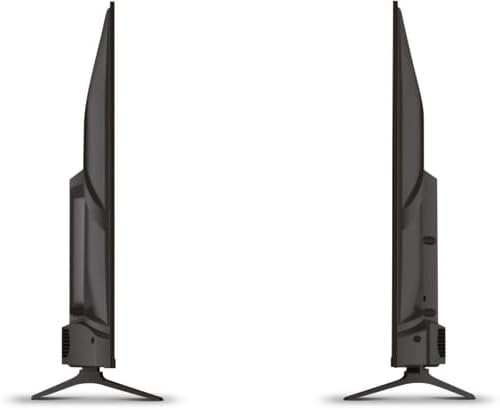
Obraz 4.1: Bok view of the Schneider 43A1 TV, illustrating its profile for placement or wall mounting.
4.4 Podłączanie urządzeń zewnętrznych
Telewizor oferuje różne opcje łączności:
- HDMI: Podłącz maksymalnie trzy urządzenia HDMI 2.0 (np. odtwarzacz Blu-ray, konsolę do gier, dekoder) do portów HDMI.
- USB: Two USB ports are available for connecting USB storage devices to play media.
- AV/Audio Input: For older devices requiring composite video and stereo audio.
- Wyjście koncentryczne: Do podłączenia do zewnętrznego systemu audio.
- Wejście antenowe/kablowe: Connect your antenna or cable TV signal for DVB-T/T2/C/S2 reception.
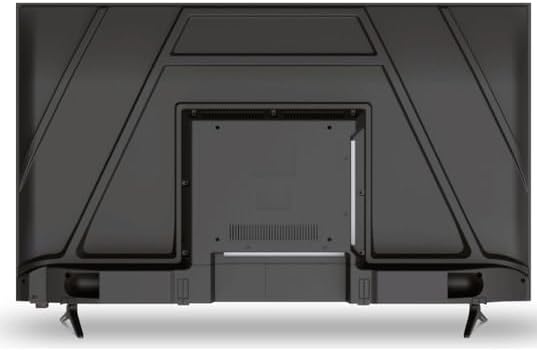
Obraz 4.2: Tył view of the Schneider 43A1 TV, highlighting connection ports.
4.5 Podłączanie zasilania
Plug the power cable into the TV's power input, then into a suitable wall outlet.
4.6 Kreator konfiguracji początkowej
Upon first power-on, the TV will guide you through an initial setup process. This includes selecting your language, connecting to a Wi-Fi network, and scanning for available channels (DVB-T/T2/C/S2).
5. Obsługa
5.1 Funkcje zdalnego sterowania
The remote control allows you to navigate the TV's features:
- Przycisk zasilania: Włącza lub wyłącza telewizor.
- Zwiększanie/zmniejszanie głośności: Reguluje poziom dźwięku.
- Kanał w górę/w dół: Zmienia kanały telewizyjne.
- Źródło sygnału wejściowego: Selects the input source (HDMI, USB, TV Tuner).
- Przyciski nawigacyjne: Do nawigacji po menu.
- Przyciski Smart TV: Direct access to popular apps like Netflix, Prime Video, YouTube.
5.2 Smart TV (VIDAA)
The integrated VIDAA Smart TV platform provides access to a variety of applications and streaming services. Connect your TV to the internet via Wi-Fi to enjoy features like Netflix, Prime Video, and YouTube. Bluetooth connectivity allows for wireless connection to compatible audio devices.

Obraz 5.1: Widok z przodu pod kątem view of the Schneider 43A1 TV, displaying the VIDAA Smart TV interface.
5.3 Wybór wejścia
Press the 'Input' or 'Source' button on your remote control to switch between connected devices (HDMI 1, HDMI 2, HDMI 3, USB, AV, TV Tuner).
5.4 Ustawienia obrazu i dźwięku
Access the TV's menu to adjust picture and sound settings. The 4K UHD resolution, QLED-LCD technology, and Direct LED backlighting ensure a high-quality visual experience. The TV also features upscaling to enhance lower-resolution content. Audio is delivered via 2 x 8 W RMS stereo speakers with Dolby Audio support.
5.5 PC Monitor Mode
The TV can be used as a PC monitor by connecting your computer via an HDMI cable. This mode optimizes the display for computer use.
6. Konserwacja
6.1 Czyszczenie telewizora
Before cleaning, ensure the TV is unplugged from the power outlet.
- Ekran: Delikatnie przetrzyj ekran miękką, niepozostawiającą włókien ściereczką. W przypadku uporczywych zabrudzeń delikatnie przetrzyj.ampPrzetrzyj ściereczkę wodą lub specjalnym środkiem do czyszczenia ekranów (nie spryskuj bezpośrednio ekranu).
- Zewnętrzny: Do czyszczenia telewizora należy używać miękkiej, suchej ściereczki.asing. Unikaj środków czyszczących o właściwościach ściernych i rozpuszczalników.
6.2 Aktualizacje oprogramowania
Twój telewizor może otrzymywać aktualizacje oprogramowania, które poprawią wydajność i dodadzą nowe funkcje. Upewnij się, że telewizor jest podłączony do internetu, aby automatycznie otrzymywać aktualizacje, lub sprawdź je ręcznie w menu ustawień.
7. Rozwiązywanie Problemów
Jeśli masz problemy z telewizorem, zapoznaj się z poniższymi typowymi problemami i ich rozwiązaniami:
- Brak zasilania:
- Check if the power cable is securely plugged into the TV and the wall outlet.
- Upewnij się, że gniazdko ścienne działa (sprawdź, używając innego urządzenia).
- Naciśnij przycisk zasilania na pilocie lub na samym telewizorze.
- Brak obrazu/dźwięku:
- Sprawdź, czy wybrano prawidłowe źródło sygnału wejściowego (np. HDMI 1, TV).
- Sprawdź wszystkie połączenia kablowe między telewizorem i urządzeniami zewnętrznymi.
- Sprawdź, czy głośność nie jest wyciszona lub ustawiona na minimum.
- Jeśli używasz anteny, sprawdź połączenie antenowe i przeskanuj kanały.
- Pilot nie działa:
- Wymień baterie w pilocie.
- Upewnij się, że między pilotem a czujnikiem podczerwieni telewizora nie ma żadnych przeszkód.
- Problemy z telewizorem Smart TV/siecią:
- Sprawdź router Wi-Fi i połączenie internetowe.
- Go to the TV's network settings to re-connect to your Wi-Fi network.
- Uruchom ponownie telewizor i router.
Jeśli po wypróbowaniu tych rozwiązań problem nadal występuje, skontaktuj się z obsługą klienta.
8. Specyfikacje
| Funkcja | Specyfikacja |
|---|---|
| Model | Schneider 43A1 |
| Rozmiar wyświetlacza | 109 cm (43 cala) |
| Rezolucja | 4K Ultra HD (3840 x 2160 pikseli) |
| Technologia wyświetlania | QLED-LCD with Direct LED Backlight |
| Współczynnik kontrastu | 1100:1 |
| Jasność | 200 cd/m² |
| Wyjście audio | 2 x 8 W RMS Stereo |
| Technologia audio | Dźwięk Dolby |
| Porty HDMI | 3 2.0 (HDMI XNUMX) |
| Porty USB | 2 |
| Inne wejścia | AV/Audio Input |
| Wyjścia | Wyjście koncentryczne |
| Tuner | DVB-T/T2/C/S2 |
| Platforma Smart TV | VIDAA (Netflix, Prime Video, YouTube) |
| Łączność bezprzewodowa | Wi-Fi, Bluetooth |
| Zgodność ze standardem VESA | 200x200mm |
| Waga | 7.5 kilograma |