
FLEXISPOT V9-Max-AR
FLEXISPOT V9-Max-AR Exercise Bike with 2D Desktop User Manual
Model: V9-Max-AR (Exercise Bike with Desk)
1. Wprowadzenie
This manual provides essential information for the safe and effective use of your FLEXISPOT V9-Max-AR Exercise Bike with 2D Desktop. Please read all instructions carefully before assembly and operation. Retain this manual for future reference.
Ważne informacje dotyczące bezpieczeństwa
- Przed każdym użyciem należy upewnić się, że wszystkie części są solidnie zamocowane.
- Nie należy przekraczać maksymalnej zalecanej wagi wynoszącej 300 funtów.
- Trzymaj dzieci i zwierzęta domowe z dala od roweru treningowego podczas jego użytkowania.
- Przed rozpoczęciem nowego programu ćwiczeń skonsultuj się z lekarzem.
- Use the product on a stable, level surface.
2. Koniec produktuview i komponenty
The FLEXISPOT V9-Max-AR is a versatile exercise bike designed for indoor use, featuring an integrated 2D adjustable desktop. It combines a stationary bike with a functional workspace, allowing for simultaneous exercise and productivity.

Figure 2.1: User operating the FLEXISPOT V9-Max-AR Exercise Bike with the desktop in use.
Key features include an 8-level quiet magnetic resistance system, an LCD display for tracking workout metrics, and a robust design supporting up to 300 lbs. The adjustable seat and desktop accommodate various user heights and preferences.
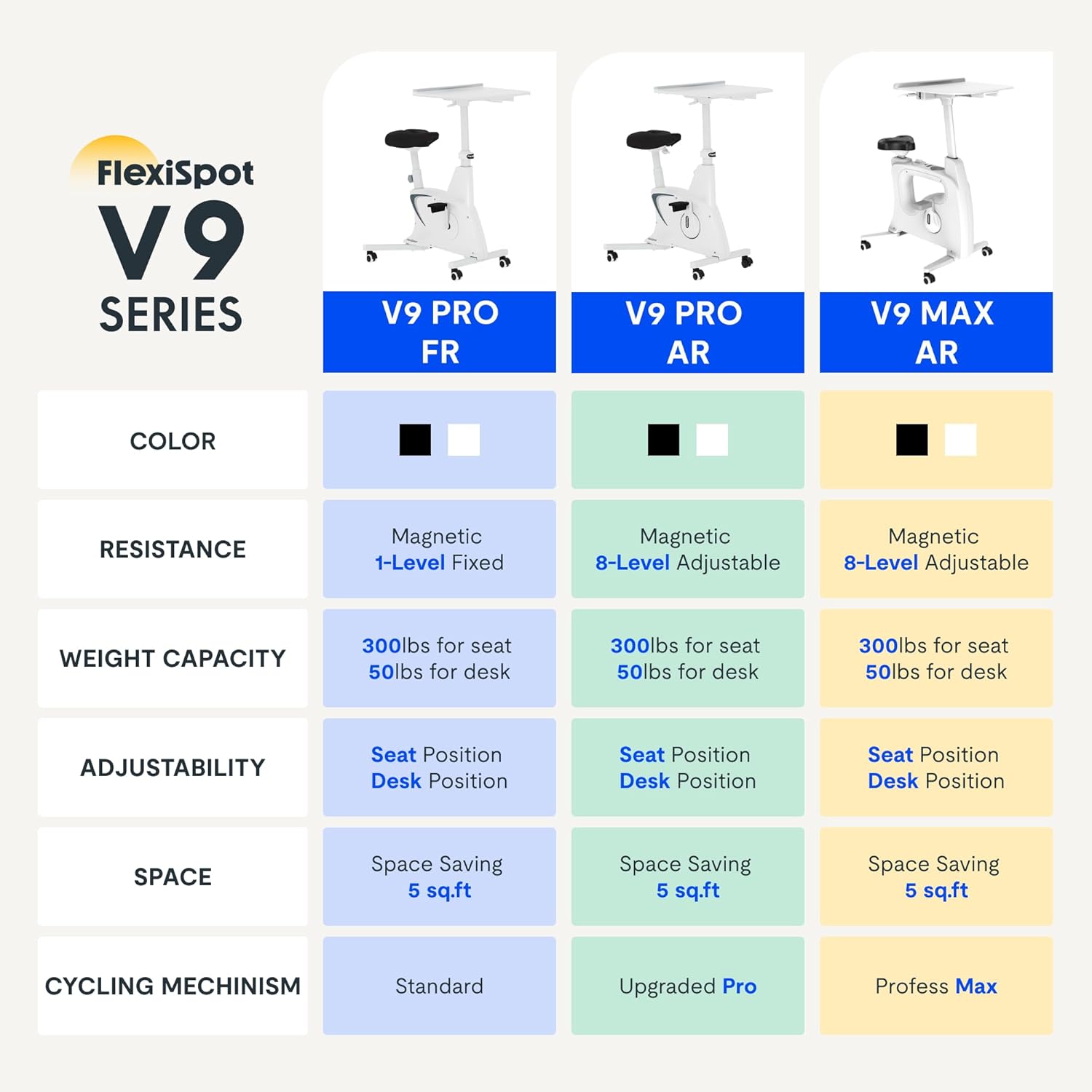
Figure 2.2: Comparison of FlexiSpot V9 series models, highlighting features like resistance and adjustability.
Główne składniki:
- Main Frame with Flywheel and Resistance Mechanism
- Regulowane siedzenie
- Adjustable Desktop
- Pedały
- Konsola wyświetlacza LCD
- Koła transportowe
3. Instalacja i montaż
The FLEXISPOT V9-Max-AR is designed for quick and straightforward assembly, typically requiring about 10 minutes.
Kroki montażu:
- Rozpakuj wszystkie elementy i sprawdź je na liście przewozowej.
- Attach the front and rear stabilizers to the main frame using the provided screws.
- Zamontuj pedały, upewniając się, że lewy pedał jest dokręcony przeciwnie do ruchu wskazówek zegara, a prawy pedał zgodnie z ruchem wskazówek zegara.
- Mount the seat post and seat onto the main frame, securing them firmly.
- Attach the desktop support column to the main frame.
- Secure the desktop to its support column.
- Insert batteries into the LCD display (batteries not included) and connect the sensor wire.
- Ensure all screws and connections are tightened before first use.

Figure 3.1: Illustration of adjustable components for personalized setup.
4. Instrukcja obsługi
Adjusting Seat and Desktop:
- Wysokość siedziska: Use the quick-release lever located on the seat post to adjust the seat to a comfortable height. Ensure your leg has a slight bend at the knee when the pedal is at its lowest point.
- Desktop Height: The desktop can be adjusted vertically. Locate the adjustment lever beneath the desktop and raise or lower the desktop to your desired working height.
- Głębokość pulpitu: The desktop can also be adjusted horizontally (forward/backward) to optimize your working posture.
Poziomy oporu:
The V9-Max-AR features 8 levels of quiet magnetic resistance. Rotate the resistance knob, located below the desktop, clockwise to increase resistance and counter-clockwise to decrease it.

Figure 4.1: LCD display and resistance control knob.
Korzystanie z wyświetlacza LCD:
The built-in LCD display monitors your workout statistics. It tracks:
- Czas
- Prędkość
- Dystans
- Spalone kalorie
- Total Distance Covered (Odometer)
- Prędkość obrotowa
Press the button on the display to cycle through different metrics or hold it to reset values (refer to display specific instructions for exact operation).
Using the 2D Desktop:
The spacious desktop (20" x 22.8") is designed to hold a laptop, notebook, mobile phone, or water cup. It provides a stable surface for working or entertainment while exercising.

Figure 4.2: Desktop in use for studying or working.
Ruchliwość:
Equipped with movable silent wheels, the exercise bike can be easily relocated within your home or office. Simply tilt the bike and roll it to your desired position.
5. Konserwacja
Regular maintenance ensures the longevity and optimal performance of your FLEXISPOT V9-Max-AR Exercise Bike.
- Czyszczenie: Regularnie przecieraj rower wodąamp Ściereczką i łagodnym detergentem. Unikaj środków czyszczących o działaniu ściernym i rozpuszczalników.
- Kontrola: Okresowo sprawdzaj dokręcenie wszystkich śrub, nakrętek i części ruchomych. Natychmiast dokręć wszystkie luźne elementy.
- Smarowanie: Układ oporu magnetycznego nie wymaga żadnego specjalnego smarowania.
- Składowanie: Przechowuj rower w suchym i chłodnym miejscu, z dala od bezpośredniego światła słonecznego i ekstremalnych temperatur.
6. Rozwiązywanie Problemów
W tej sekcji omówiono typowe problemy, jakie mogą wystąpić podczas korzystania z roweru treningowego.
| Problem | Możliwa przyczyna | Rozwiązanie |
|---|---|---|
| Wyświetlacz LCD nie działa | Baterie są rozładowane lub nieprawidłowo zainstalowane. | Replace batteries (AAA, not included) or ensure correct polarity. |
| Niestabilny lub chwiejny rower | Luźne śruby lub nierówna powierzchnia. | Check and tighten all assembly bolts. Ensure the bike is on a flat, stable surface. |
| Opór się nie zmienia | Problem z mechanizmem oporowym. | Upewnij się, że pokrętło oporu jest prawidłowo założone. Jeśli problem nadal występuje, skontaktuj się z obsługą klienta. |
| Piski lub nietypowe dźwięki | Loose components or friction. | Inspect all connections and tighten any loose parts. Ensure no foreign objects are interfering with moving parts. |
7. Specyfikacje
Detailed specifications for the FLEXISPOT V9-Max-AR Exercise Bike:
- Model: V9-Max-AR (Exercise Bike with Desk)
- Marka: ELASTYCZNI
- Kolor: Czarny
- Mechanizm oporu: Magnetyczny
- Liczba poziomów oporu: 8
- Maksymalna zalecana waga: 300 funtów
- Wymiary produktu (gł. x szer. x wys.): 37.6" x 23.2" x 47.2"
- Wymiary pulpitu: Około 20" x 22.8"
- Minimum Height (Seat): 29.6 cali
- Maximum Height (Overall): 47.2 Inches (desktop height can go up to 47.2")
- Źródło zasilania: Napędzany pedałami (nieelektryczny)
- Układ napędowy: Pasek
- Dodatek specjalny: Adjustable Seat, Adjustable Desktop
- Zalecane zastosowanie: Wnętrz
- Space Occupied: Około 5 XNUMX stóp kwadratowych

Rysunek 7.1: Wymiary produktu.
8. Gwarancja i wsparcie
FLEXISPOT is committed to providing quality products and customer satisfaction.
- Zwroty: Ten produkt można łatwo zwrócić w ciągu 30 dni. Szczegółowe informacje można znaleźć w polityce zwrotów platformy zakupowej.
- Gwarancja: For specific warranty terms and conditions, please refer to the official FLEXISPOT webodwiedź witrynę lub skontaktuj się bezpośrednio z działem obsługi klienta.
- Obsługa klienta: For any questions, assistance, or troubleshooting not covered in this manual, please contact FLEXISPOT customer support. Contact information can typically be found on the manufacturer's webwitryny lub dokumentacji zakupu.
9. Informacje dodatkowe
While no specific official product videos were provided in the product data, users may find helpful assembly or usage guides on the manufacturer's official website or their authorized channels. Always ensure the source is official for accurate information.