
YESYAMO C8TW-2PCS
Instrukcja obsługi bezprzewodowej kamery bezpieczeństwa YESYAMO C8TW-2PCS 2K zasilanej energią słoneczną
Model: C8TW-2PCS | Brand: YESYAMO
1. Wprowadzenie
Thank you for choosing the YESYAMO 2K Solar Wireless Outdoor Security Camera. This manual provides detailed instructions for the installation, operation, and maintenance of your security camera system. Please read this manual thoroughly before use to ensure proper functionality and to maximize the benefits of your device.

Image: Two YESYAMO C8TW-2PCS solar-powered outdoor security cameras, white in color, with integrated solar panels and dual antennas.
2. Koniec produktuview
2.1 Zawartość opakowania
- YESYAMO GX8S Surveillance Camera (Quantity: 2 for this package)
- Solar Panel (Quantity: 2 for this package)
- Kabel USB
- Flexible Mount Bracket
- Instrukcja obsługi
- Śruby montażowe i kołki ścienne

Image: The complete package contents, including the camera, solar panel, USB cable, mounting bracket, user manual, and screws.
2.2 Główne cechy
- Łączność Wi-Fi 2.4 GHz: Supports 2.4G WiFi networks only (5G not supported) for stable wireless connection.
- Akumulator zasilany energią słoneczną i ładowalny: Equipped with a solar panel (3M cable included) and a large-capacity rechargeable battery for continuous power.
- 360° PTZ Coverage: Offers 355° horizontal pan and 90° vertical tilt rotation, controllable via the mobile application, ensuring comprehensive area monitoring.
- Rozdzielczość 2K QHD: Delivers clear 2K Quad HD image quality with 5x digital zoom, providing detailed surveillance footage.
- PIR Motion Detection & Triple Alert: Features an upgraded smart PIR infrared sensor for accurate human motion detection, reducing false alarms. Triggers lights, an audible alarm, and sends instant notifications to your phone (within 1 second).
- AI Intelligent Humanoid Analysis: Advanced AI capabilities for intelligent humanoid detection.
- Kolorowe widzenie nocne: Utilizes 4 infrared night vision lights to provide ultra-clear color night vision, even in low-light conditions.
- Odporność na warunki atmosferyczne IP66: Certified IP66 waterproof, suitable for outdoor use in various weather conditions (-20°C to 60°C).
- Przechowywanie lokalne i w chmurze: Supports Micro SD cards up to 128GB and offers a 7-day free trial for encrypted cloud storage.
- Dwukierunkowy dźwięk: Umożliwia komunikację w czasie rzeczywistym poprzez kamerę.

Image: The camera highlighting its IP66 waterproof rating and icons representing 2K QHD, PIR detection, 360° rotation, color night vision, and SD/cloud storage.
3. Instrukcje konfiguracji
3.1 Fizyczna instalacja
The camera and solar panel can be installed together or separately. Ensure the solar panel receives adequate sunlight for optimal charging.
- Wybierz lokalizację: Wybierz miejsce montażu zapewniające żądane viewing angle and ensures the solar panel is exposed to direct sunlight for several hours daily.
- Zamontuj wspornik: Use the provided screws and wall plugs to securely attach the mounting bracket to the wall or desired surface.
- Attach the Camera/Solar Panel: Secure the camera and/or solar panel to the mounted bracket. Adjust the angle of the solar panel to maximize sun exposure.
- Podłącz panel słoneczny: Connect the 3-meter solar cable from the solar panel to the camera's charging port.

Image: A visual guide showing three steps for installing the camera bracket, attaching the solar panel, and connecting it to the camera.

Image: The camera mounted outdoors with its solar panel, illustrating the 2-meter solar cable and indicating 2.4G WiFi connectivity.
3.2 Połączenie aplikacji
To operate your camera, you will need to download and install the companion mobile application (e.g., CloudEdge, as mentioned in customer reviews) on your smartphone.
- Pobierz aplikację: Szukaj the recommended app (e.g., "CloudEdge" or "Yes iH") in your device's app store (Google Play Store for Android or Apple App Store for iOS).
- Utwórz konto: Otwórz aplikację i postępuj zgodnie z instrukcjami wyświetlanymi na ekranie, aby utworzyć nowe konto użytkownika.
- Dodaj urządzenie: Select the option to add a new device. Follow the in-app prompts to connect your camera to your 2.4GHz WiFi network. This typically involves scanning a QR code displayed on your phone with the camera.
- Pełna konfiguracja: Po nawiązaniu połączenia możesz nadać nazwę kamerze i skonfigurować ustawienia początkowe.

Image: A smartphone screen showing the 'Yes iH' application interface, indicating app availability for Android and iOS.
4. Instrukcja obsługi
4.1 Sterowanie PTZ
Kamera wyposażona jest w funkcję Pan-Tilt-Zoom (PTZ), która umożliwia zdalną regulację jej położenia. viewkąt.
- Otwórz na żywo view of your camera in the app.
- Use the directional controls (usually a joystick or arrows) within the app to pan the camera horizontally (355°) and tilt it vertically (90°).
- You can also use the pinch-to-zoom gesture for 5x digital zoom.
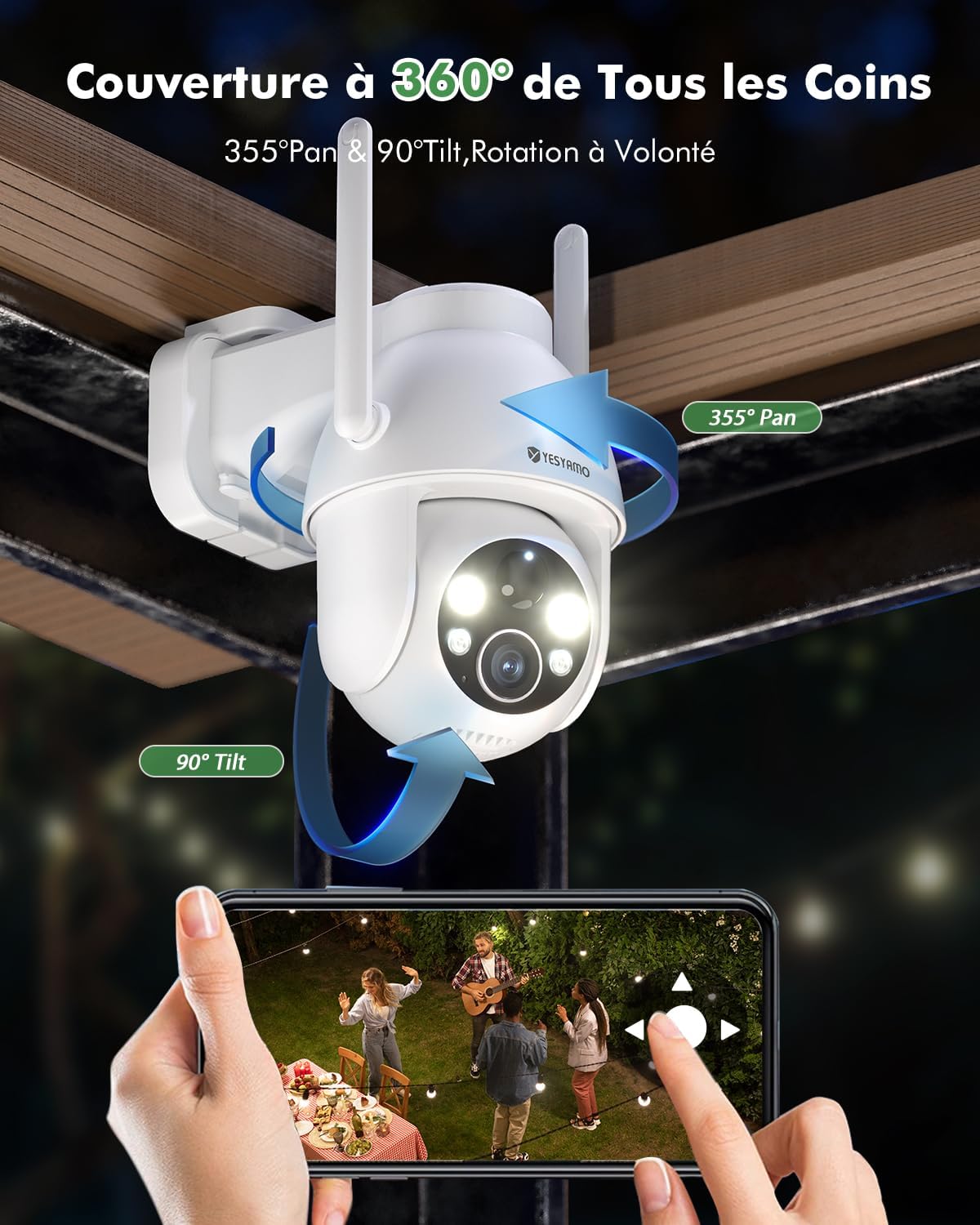
Image: A user's hands holding a smartphone, demonstrating the control of the camera's 355° pan and 90° tilt functions to achieve 360° coverage.
4.2 Detekcja ruchu i alerty
The camera is equipped with advanced motion detection capabilities to keep your property secure.
- Czujnik PIR: The Passive Infrared (PIR) sensor detects heat signatures from moving objects, primarily humans, to minimize false alarms.
- AI Humanoid Analysis: The camera uses AI to specifically identify human shapes, further enhancing detection accuracy. Free human detection is included. Detection of vehicles, packages, and animals may require a paid subscription.
- Triple Alert System: Upon detecting a suspicious person, the camera can activate its built-in siren, turn on its spotlight, and send an immediate notification to your smartphone.
- Dostosuj czułość: You can adjust the motion detection sensitivity within the app to suit your environment and reduce unwanted alerts.

Image: An outdoor scene at night showing the camera's spotlight illuminating a person and icons for siren, light, and audio alerts, indicating a rapid response to suspicious activity.

Image: An illustration showing AI detection capabilities for humans, cars, and animals, with a note that human detection is free, while vehicle, package, and animal detection are paid features.
4.3 Widzenie nocne
The camera offers enhanced night vision capabilities for clear monitoring in low-light conditions.
- Kolorowe widzenie nocne: The 4 infrared lights can automatically activate to provide full-color video footage even in very dark environments.
- Nocna Nocna Wizja: Standard black and white infrared vision is also available, offering clear images in complete darkness.

Image: A split image demonstrating the difference between 2K color night vision (left, showing a car in a lit driveway) and 2K infrared night vision (right, showing a monochrome view of a house at night).
4.4 Dźwięk dwukierunkowy
Komunikuj się z gośćmi lub odstraszaj intruzów, korzystając z wbudowanego mikrofonu i głośnika kamery.
- Z koncertu view w aplikacji dotknij ikony mikrofonu, aby mówić przez kamerę.
- Mikrofon kamery będzie wychwytywał dźwięki z otoczenia, umożliwiając podsłuchiwanie.

Image: A scene depicting a delivery person at a door, with speech bubbles indicating two-way audio communication between the user via the app and the person at the door.
4.5 Rejestrowanie i przechowywanie
Your camera supports both local and cloud storage options for recording events.
- Karta micro sd: Insert a Micro SD card (up to 128GB, not included) into the designated slot on the camera for local storage of recordings.
- Przechowywanie w chmurze: The camera offers a 7-day free trial of encrypted cloud storage. After the trial, subscription plans are available for continued cloud service.
- Odtwarzanie zdarzeń: Uzyskaj dostęp do nagranego pliku footage through the app's playback feature, whether stored locally or in the cloud.

Image: A close-up of the camera showing the Micro SD card slot, indicating support for cards up to 128GB (card not included).

Image: A smartphone showing the cloud service interface, highlighting a 7-day free trial for cloud storage.
5. Konserwacja
5.1 Pielęgnacja paneli słonecznych
To ensure optimal charging efficiency, periodically clean the surface of the solar panel to remove dust, dirt, or debris that may accumulate. A soft, damp Zwykle wystarczy sama tkanina.
5.2 Odporność na warunki atmosferyczne
The camera is designed with an IP66 weatherproof rating, making it resistant to dust and water jets. It can operate reliably in temperatures ranging from -20°C to 60°C. While designed for outdoor use, avoid submerging the camera in water or exposing it to extreme conditions beyond its specified operating range.

Image: The camera mounted outdoors, shown functioning under sunny, cloudy, rainy, and snowy conditions, indicating its suitability for diverse weather.
6. Rozwiązywanie Problemów
- Kamera nie łączy się z siecią Wi-Fi: Upewnij się, że Twoja sieć Wi-Fi działa w paśmie 2.4 GHz. Sprawdź, czy kamera znajduje się w zasięgu routera. Uruchom ponownie kamerę i router.
- Słaba jakość obrazu: Upewnij się, że obiektyw aparatu jest czysty. Sprawdź prędkość swojego połączenia internetowego.
- Panel słoneczny nie ładuje się: Verify the solar panel is receiving direct sunlight and is free from obstructions. Clean the panel surface. Ensure the solar cable is securely connected.
- Częste fałszywe alarmy: Adjust the motion detection sensitivity settings in the app. Ensure the detection zone is configured correctly to avoid triggering by irrelevant movements (e.g., passing cars on a public road if not desired).
- Brak powiadomień: Check your phone's app notification settings and ensure they are enabled for the camera app. Verify the camera's motion detection is active.
- Problemy z dwukierunkowym dźwiękiem: Ensure your phone's microphone and speaker are working. Check the app's audio settings.
7. Specyfikacje
| Funkcja | Specyfikacja |
|---|---|
| Nazwa modelu | C8TW-2PCS |
| Technologia łączności | Bezprzewodowa (Wi-Fi 2.4 GHz) |
| Rozdzielczość nagrywania wideo | 2K QHD (2304x1296) |
| Pan / Tilt Angle | Obrót o 355°, pochylenie o 90° |
| Zoom cyfrowy | 5x |
| Źródło zasilania | Solar Power, Battery Power (Lithium-ion) |
| Poziom wodoodporności | IP66 (wodoodporne) |
| Temperatura pracy | -20°C do 60°C |
| Opcje przechowywania | Karta Micro SD (do 128 GB), przechowywanie w chmurze |
| Cechy specjalne | Uninterrupted solar power, 2K QHD quality, Color night vision, 2.4G WiFi, PTZ control, Motion detection, Two-way audio |
| Kompatybilne urządzenia | Smartfon (Android i iOS) |
| Tworzywo | ABS + PC + Metal |
| Tomtage | 5 wolty |
| Moc | 2.4 watów |
8. Gwarancja i wsparcie
YESYAMO is committed to providing reliable products and excellent customer service.
- Gwarancja: Ten produkt jest objęty 2-letnią gwarancją.
- Wsparcie techniczne: Oferujemy dożywotnią pomoc techniczną.
- Usługa online: Customer support is available 24/7 online.
For any questions, technical assistance, or warranty claims, please contact YESYAMO customer support through the contact information provided in the product packaging or on the official YESYAMO webstrona.

Image: Icons representing 2 years warranty, lifetime technical assistance, and 24/7 online service.

Image: An Amazon Echo Show device displaying a live feed from the camera, with text indicating compatibility with Alexa: "Alexa, Show Me the Yard."
Ask a question about this manual
Ask about setup, troubleshooting, compatibility, parts, safety, or missing instructions. Manuals+ will review the question and use this page’s manual context to help answer it.