
1. Ważna informacja o zgodności
This Naifay Android Car Radio (Model A) is specifically designed for Toyota Camry models from 2012, 2013, and 2014. It is crucial to verify your vehicle's specifications before installation.
- Model A Compatibility: This unit is suitable for vehicles that NIE have a premium J.B.L sound system and NIE have a large factory navigation screen.
- If your car has a J.B.L sound system or a large factory screen, you require Model B.
To ensure correct model selection, please send your car's model, year, and a picture of your car's dashboard to customer support via Amazon chat. Online assistance, user manuals, and installation videos are provided to aid in this process.
2. Koniec produktuview
The Naifay Android Car Radio is a 10.1-inch touchscreen head unit featuring Android 12, 2GB RAM, and 32GB ROM. It offers a responsive touch interface and a clear color display. Key functionalities include wireless CarPlay, Android Auto, MirrorLink, GPS navigation, Wi-Fi connectivity, Bluetooth, FM radio, AHD backup camera support, and steering wheel control (SWC).

Image: Comparison of the car dashboard before and after installing the Naifay Android Car Radio. The top image shows the new 10.1-inch touchscreen unit seamlessly integrated into the dashboard, while the bottom image displays the original factory radio.
3. Instrukcja instalacji
3.1. Kontrola przed instalacją
- Confirm your vehicle's compatibility (Model A) as per Section 1.
- Sprawdź, czy wszystkie elementy wymienione w liście przewozowym są obecne.
- Aby zapobiec uszkodzeniom elektrycznym, przed rozpoczęciem instalacji należy odłączyć akumulator pojazdu.
3.2. Removing the Old Unit
- Use the provided dash removal tool to carefully pry off the trim pieces surrounding the factory radio.
- Unscrew the mounting bolts/screws holding the factory radio in place.
- Gently pull out the old unit and disconnect all wiring harnesses.
3.3. Połączenia okablowania
Connect the new Naifay head unit using the provided wiring harnesses. Refer to the wiring diagram included in the package. Key connections include:
- Przewód zasilający: Podłącz do źródła zasilania pojazdu.
- Kable RCA: Do wejścia/wyjścia audio/wideo.
- Kable USB: Connect the two USB ports for external devices.
- Antena GPS: Zamontuj w miejscu z wolnym dostępem view nieba w celu optymalnego odbioru sygnału.
- Radio Cable: Connect to the vehicle's antenna.
- Odwrotne wejście: For the backup camera.
- Mikrofon: Connect the external microphone for clear hands-free calls.

Image: Detailed wiring diagram for the reversing camera. It illustrates connecting the camera power cable to the reversing lamp and the video signal cable to the head unit's reverse input.
3.4. Installing the Backup Camera
The unit supports an AHD backup camera and includes one in the package. Follow the wiring diagram for proper connection:
- Mount the camera at the rear of your vehicle.
- Connect the camera's power wire to the vehicle's reversing lamp źródło zasilania.
- Run the video cable from the camera to the 'Reverse Input' on the head unit.
3.5. Montaż końcowy
- Ostrożnie wsuń nowy moduł główny do otworu w desce rozdzielczej.
- Secure it with the mounting bolts/screws.
- Reattach the trim pieces.
- Podłącz ponownie akumulator pojazdu.
4. Instrukcja obsługi
4.1. Pierwsze włączenie i konfiguracja
- Po instalacji włącz zapłon pojazdu. Urządzenie powinno włączyć się automatycznie.
- Follow any on-screen prompts for initial language and time zone settings.
4.2. Bezprzewodowy CarPlay i Android Auto
This unit supports wireless Apple CarPlay and Android Auto. Connect your smartphone via Bluetooth for seamless integration.
- Włącz Bluetooth w swoim smartfonie i radiu samochodowym.
- Pair your phone with the car radio.
- Once connected, CarPlay or Android Auto will launch automatically, allowing access to navigation, calls, messages, and music through the car radio's interface or voice commands.

Image: Diagram illustrating the connectivity options for Apple CarPlay (Bluetooth/WiFi), Android Auto (Bluetooth/WiFi), and MirrorLink (WiFi/Bluetooth/USB) with the Naifay Android Car Radio.
4.3. MirrorLink Function
The MirrorLink feature allows you to project your iOS or Android phone's screen onto the car radio display. Connect via Bluetooth or USB cable.
- Connect your phone via Bluetooth or a USB cable to the unit.
- Select the MirrorLink application on the car radio.
- Follow on-screen instructions to establish the connection and mirror your phone's content.
4.4. GPS Navigation & Wi-Fi Connection
The unit includes a GPS module for navigation. It supports both online and offline maps.
- Mapy offline: Connect the unit to Wi-Fi or a mobile hotspot to download maps in advance.
- Mapy online: Use a Wi-Fi connection for real-time traffic and map updates.
- You can download navigation applications from the software store. It is recommended to download only 1-2 applications to prevent system slowdowns.

Image: Displays the GPS navigation interface with online and offline map options, alongside the Wi-Fi connection feature for downloading apps and maps.
4.5. Bluetooth & FM Radio
- Bluetooth: Built-in Bluetooth allows for hands-free calling and audio streaming. An external microphone is included for improved call quality.
- Radio FM: The unit features an FM radio tuner (no AM radio). You can perform automatic, semi-automatic, or precision channel searches to listen to radio stations.
4.6. Sterowanie z kierownicy (SWC)
The unit supports your vehicle's existing steering wheel controls, allowing you to manage calls, adjust volume, or switch songs without taking your hands off the wheel.
- Access the SWC settings in the unit's menu.
- Postępuj zgodnie z instrukcjami wyświetlanymi na ekranie, aby przypisać przyciski na kierownicy do wybranych funkcji.
4.7. Kamera cofania AHD
Po włączeniu biegu wstecznego wyświetlacz automatycznie przełącza się na kamerę cofania view, zapewniając pomoc przy parkowaniu i manewrowaniu.
4.8. Funkcja podzielonego ekranu
Funkcja dzielenia ekranu umożliwia jednoczesne korzystanie z dwóch aplikacji na 10.1-calowym wyświetlaczu, np. nawigacji i odtwarzania muzyki.
- To activate, open an application, then long-press the recent apps button or drag another compatible app to the side of the screen.

Obraz: Pokaz kolażuasing various features: Bluetooth hands-free calling, FM radio interface, a car parking with backup camera view, steering wheel control buttons, and the split-screen functionality displaying two apps simultaneously.
5. Konserwacja
To ensure the longevity and optimal performance of your Naifay Android Car Radio, follow these simple maintenance guidelines:
- Czyszczenie ekranu: Użyj miękkiej, niestrzępiącej się ściereczki, lekko wyczyśćampPrzemyj wodą lub specjalnym środkiem do czyszczenia ekranów przeznaczonym do urządzeń elektronicznych. Unikaj agresywnych środków chemicznych i materiałów ściernych.
- Aktualizacje oprogramowania: Periodically check for available software updates through the unit's settings to ensure you have the latest features and bug fixes.
- Unikaj ekstremalnych temperatur: Nie wystawiaj urządzenia na długotrwałe, bezpośrednie działanie promieni słonecznych lub ekstremalnie niskie temperatury, ponieważ może to wpłynąć na wydajność i żywotność urządzenia.
- Połączenia kablowe: Upewnij się, że wszystkie kable są solidnie podłączone. Luźne połączenia mogą powodować sporadyczne problemy.
6. Rozwiązywanie Problemów
If you encounter issues with your Naifay Android Car Radio, refer to the following common troubleshooting steps:
- Urządzenie nie włącza się: Sprawdź wszystkie połączenia zasilania i upewnij się, że akumulator pojazdu jest prawidłowo podłączony. Sprawdź bezpieczniki.
- Screen Freezes or Slows Down: This can occur if too many applications are running or installed. Try closing unnecessary apps or uninstalling rarely used ones. A system restart may also resolve temporary freezes.
- Brak dźwięku: Check volume settings on the unit and your phone (if connected via Bluetooth/CarPlay/Android Auto). Ensure all speaker wires are correctly connected.
- Problemy z sygnałem GPS: Upewnij się, że antena GPS jest zamontowana w miejscu z wolnym dostępem view nieba. Sprawdź, czy nie ma przeszkód.
- Problemy z łącznością Bluetooth/Wi-Fi: Ensure Bluetooth/Wi-Fi is enabled on both the unit and your device. Try unpairing and re-pairing devices. Restarting both devices can also help.
- Kamera cofania nie jest wyświetlana: Verify the camera's power and video connections. Ensure the 'Reverse Input' wire is correctly connected to the vehicle's reversing lamp moc.
- Sterowanie na kierownicy nie działa: Recheck the SWC wiring connections and ensure the controls are properly configured in the unit's settings menu.
For persistent issues or problems not covered here, please contact Naifay customer support for assistance.
7. Specyfikacje
Detailed technical specifications for the Naifay Android Car Radio (Model A).
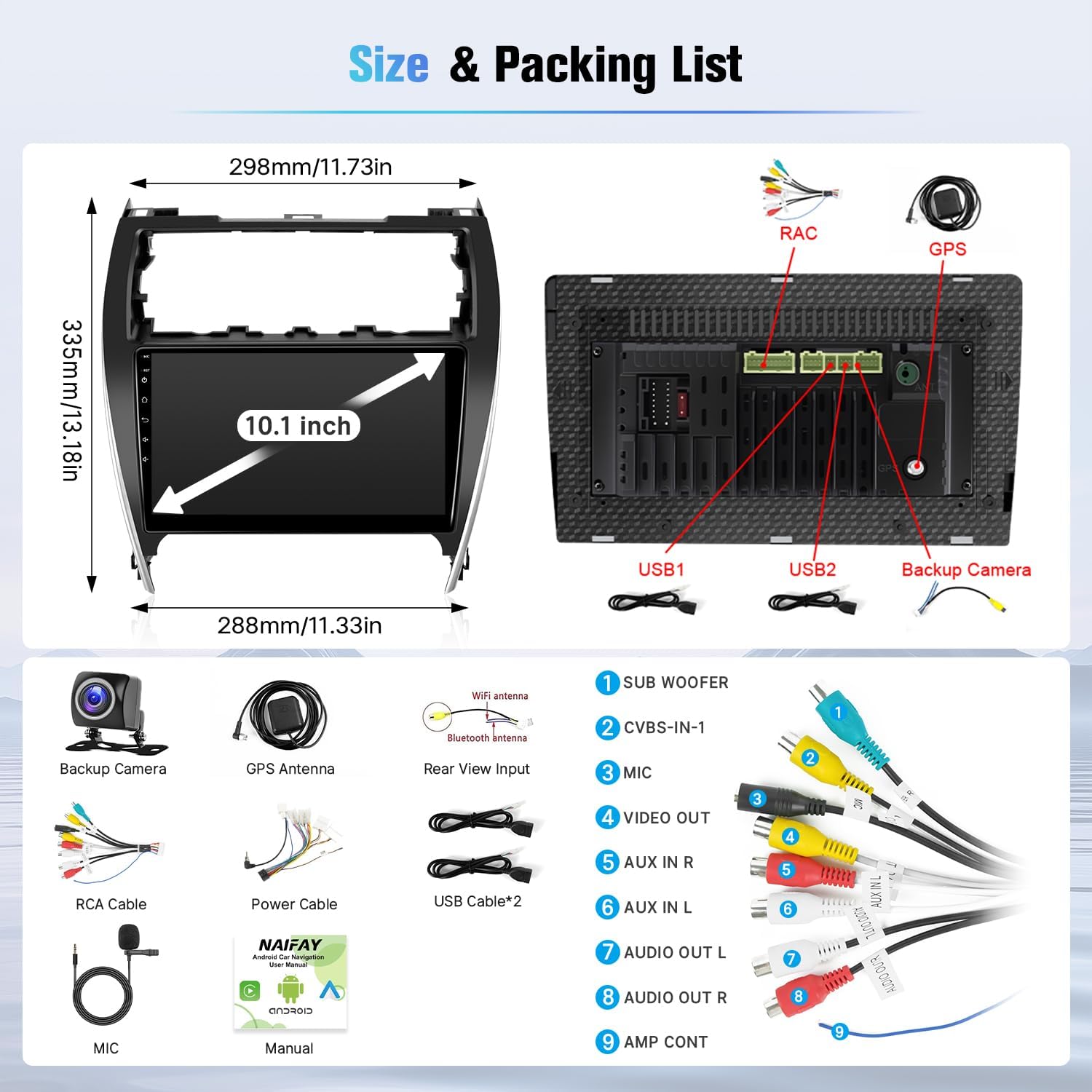
Image: Diagram showing the dimensions of the 10.1-inch head unit and a visual representation of the included accessories and cables in the packing list.
| Funkcja | Specyfikacja |
|---|---|
| Marka | Naifay |
| Typ serwisu pojazdu | Car (Toyota Camry 2012-2014, Model A) |
| Rozmiar ekranu | 10.1 cali |
| System operacyjny | Android 12 |
| Pojemność pamięci masowej | 32 GB |
| BARAN | 2 GB |
| Cechy specjalne | Bluetooth, Touchscreen, Wireless CarPlay, Android Auto, MirrorLink, GPS, WiFi, SWC, AHD Backup Camera |
| Technologia łączności | Bezprzewodowy, Bluetooth, USB, Wi-Fi |
| Typ mapy | Na całym świecie (online/offline) |
| Tryb wyjścia audio | Stereofoniczny |
| Typ montażu | Montaż na desce rozdzielczej |
| Typ ekranu dotykowego | Pojemnościowy |
| Typ wyświetlacza | PROWADZONY |
| Wprowadzanie danych przez interfejs użytkownika | Ekran dotykowy |
| Kompatybilne urządzenia | iPhone, telefon z Androidem |
| Metoda kontroli | Aplikacja, dotyk, głos |
| Obsługiwany system nawigacji satelitarnej | GPS |
| Waga przedmiotu | 1.5 kilograma |
8. Gwarancja i wsparcie
Naifay is committed to providing excellent products and customer service. For any inquiries, technical assistance, or warranty claims, please utilize the following resources:
- Pomoc online: Refer to the user manuals and installation videos provided with your purchase.
- Skontaktuj się ze sprzedawcą: For direct support, you can contact Naifay through the Amazon platform. Navigate to your order details and select 'Contact Seller' or 'Ask a question' on the Naifay store page.

Image: A visual guide demonstrating how to locate and use the 'Ask a question' feature to contact Naifay customer support via Amazon.