
1. Wprowadzenie
Thank you for choosing the roborock Q10 S5 Robot Vacuum and Mop Cleaner. This manual provides essential information for setting up, operating, and maintaining your device to ensure optimal performance and longevity. Please read this manual thoroughly before using the product and keep it for future reference.
2. Informacje dotyczące bezpieczeństwa
To reduce the risk of injury, electric shock, fire, or damage, please observe the following safety precautions:
- Z urządzenia mogą korzystać dzieci w wieku od 8 lat oraz osoby o ograniczonej sprawności fizycznej, sensorycznej lub umysłowej, a także osoby nieposiadające odpowiedniego doświadczenia lub wiedzy, jeśli znajdują się pod nadzorem lub zostały poinstruowane na temat bezpiecznego korzystania z urządzenia i rozumieją związane z tym zagrożenia.
- Dzieci powinny znajdować się pod nadzorem, aby mieć pewność, że nie bawią się urządzeniem.
- Dzieciom nie wolno czyścić ani konserwować urządzenia bez nadzoru.
- Do not use the robot in areas with open flames or fragile objects.
- Upewnij się, że stacja ładująca jest umieszczona na równej powierzchni, przy ścianie.
- Należy używać wyłącznie oryginalnego zasilacza dołączonego do urządzenia.
- Do not expose the robot to direct sunlight or moisture.
- Before cleaning, remove power cords, small objects, and fragile items from the floor.
3. Koniec produktuview
Familiarize yourself with the components of your roborock Q10 S5 robot vacuum.
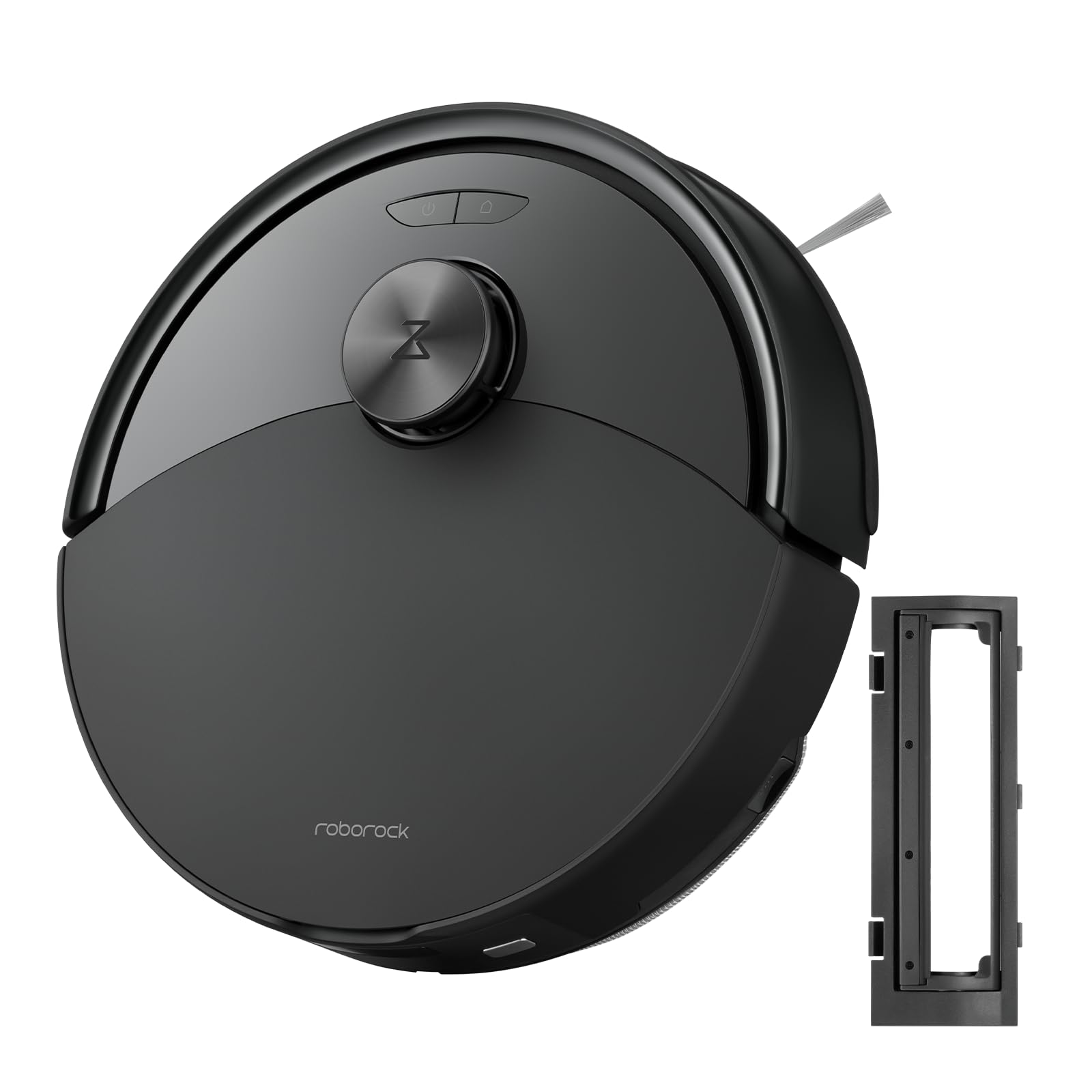
Rysunek 1: The roborock Q10 S5 Robot Vacuum and Mop Cleaner. This image shows the top view of the robot, highlighting its sleek black design and main control buttons.
Komponenty robota:
- Górna obudowa: Lifts to reveal the dustbin and Wi-Fi indicator.
- Przycisk zasilania/czyszczenia: Press to start/pause cleaning, hold to turn on/off.
- Dock/Spot Clean Button: Press to send the robot back to the dock, hold for spot cleaning.
- Czujnik LDS: For navigation and mapping.
- Zderzak: Wykrywa przeszkody.
- Szczotka boczna: Zmiata zanieczyszczenia z krawędzi i narożników.
- Pędzel główny: Collects dirt and debris from floors. Features a floating design for better contact.
- Koło wielokierunkowe: Dla ruchu.
- Ładowanie styków: Łączy się ze stacją ładującą.
- Czujniki klifów: Zapobiega upadkowi robota ze schodów.
- Zbiornik na wodę i nakładka na mopa: Do funkcji mopowania.
Stacja ładująca:
- Dock Location Beacon: Helps the robot locate the dock.
- Ładowanie styków: Transfers power to the robot.
- Port kabla zasilającego: Łączy zasilacz.
4. Konfiguracja
- Rozpakuj robota: Ostrożnie wyjmij robota i wszystkie akcesoria z opakowania. Usuń wszelkie folie ochronne i materiały transportowe.
- Install the Side Brush: Press the side brush onto its post until it clicks into place.
- Umieść stację ładującą:
- Place the charging dock on a hard, level surface against a wall.
- Ensure there is at least 0.5 meters (1.6 feet) of clear space on both sides and 1.5 meters (4.9 feet) in front of the dock.
- Connect the power cable to the charging dock and plug it into a wall outlet.
- Opłata początkowa: Place the robot on the charging dock. The robot will automatically turn on and begin charging. For first-time use, fully charge the robot before operation (approximately 4-6 hours). The power indicator light will breathe white during charging and turn solid white when fully charged.
- Pobierz aplikację: Szukaj "Roborock" in the App Store or Google Play Store, or scan the QR code on the packaging to download and install the app.
- Połącz się z Wi-Fi:
- Open the Roborock app and follow the on-screen instructions to add your device.
- Upewnij się, że Twój telefon jest podłączony do sieci Wi-Fi 2.4 GHz.
- Naciśnij i przytrzymaj Dok I Moc buttons simultaneously for 3 seconds until you hear the "Resetting Wi-Fi" voice alert.
- Follow the app's instructions to complete the connection.
5. Instrukcja obsługi
Rozpoczęcie czyszczenia:
- Od robota: Naciśnij Moc button once. The robot will start cleaning.
- Z aplikacji: Open the Roborock app and tap the "Clean" button.
Pausing/Resuming/Stopping:
- Pauza: Press any button on the robot or tap "Pause" in the app.
- Wznawiać: Naciśnij Moc button or tap "Resume" in the app.
- Zatrzymać: To stop a cleaning cycle, press the Dok button to send the robot back to the charging dock, or tap "Stop" in the app.
Funkcja mopowania:
- Napełnij zbiornik na wodę: Open the water tank cover, fill with clean water, and close securely.
- Zamontuj nakładkę mopa: Wet the mop pad and wring it out. Slide it into the mop pad slot until it is securely attached.
- Start Mopping: The robot will automatically detect the mop module and switch to mopping mode. You can adjust water flow levels in the app.
Funkcje aplikacji:
- Zarządzanie mapą: Create and save maps, set no-go zones, virtual walls, and invisible barriers.
- Selektywne sprzątanie pokoi: Wybierz konkretne pokoje do posprzątania.
- Zaplanowane sprzątanie: Ustaw harmonogramy sprzątania na różne godziny i dni.
- Custom Cleaning Modes: Dostosuj siłę ssania i poziom przepływu wody.
- Zdalne sterowanie: Ręczne sterowanie ruchami robota.
6. Konserwacja
Regular maintenance ensures your roborock Q10 S5 operates efficiently. Always turn off the robot and unplug the charging dock before performing any maintenance.
Dustbin and Filter (Weekly):
- Lift the top cover of the robot.
- Wyjmij kosz na śmieci.
- Otwórz pokrywę kosza na śmieci i opróżnij jego zawartość do kosza na śmieci.
- Remove the filter. Tap it gently to remove dust. The filter can be rinsed with water; ensure it is completely dry before reinstallation (allow 24 hours).
- Rinse the dustbin with water if necessary and allow it to dry completely.
- Reinstall the dry filter and dustbin.
Main Brush (Weekly):
- Odwróć robota.
- Press the tabs to remove the main brush cover.
- Podnieś szczotkę główną.
- Za pomocą narzędzia czyszczącego (jeśli jest dołączone) lub nożyczek usuń wszelkie włosy i zanieczyszczenia nagromadzone wokół szczotki.
- Reinstall the main brush and cover, ensuring it clicks into place.
Side Brush (Monthly):
- Unscrew the side brush.
- Usuń wszelkie włosy i zanieczyszczenia.
- Reattach and tighten the screw.
Sensors and Charging Contacts (Monthly):
- Wipe all sensors (cliff sensors, wall sensor, LDS sensor window) and the charging contacts on both the robot and the dock with a soft, dry cloth.
Mop Pad (After Each Use):
- Wyjmij nakładkę mopa ze zbiornika wody.
- Rinse thoroughly with water and allow it to air dry completely before next use.
7. Rozwiązywanie Problemów
If you encounter issues with your robot, please refer to the following table before contacting support.
| Problem | Możliwa przyczyna | Rozwiązanie |
|---|---|---|
| Robot nie włącza się. | Niski poziom naładowania baterii lub bateria nie naładowana. | Umieść robota w stacji ładującej i upewnij się, że się ładuje. |
| Robot nie może połączyć się z Wi-Fi. | Nieprawidłowe hasło Wi-Fi, sieć 5 GHz lub słaby sygnał. | Ensure correct 2.4GHz Wi-Fi, reset Wi-Fi on robot, move closer to router. |
| Robot często się zacina. | Przeszkody, splątane kable lub brudne czujniki. | Clear floor, clean sensors, use no-go zones in app. |
| Słaba skuteczność czyszczenia. | Full dustbin, dirty filter, tangled brushes. | Empty dustbin, clean/replace filter, clean main/side brushes. |
| Robot wydaje nietypowe dźwięki. | Debris in main brush, side brush, or wheels. | Inspect and clean all brushes and wheels for obstructions. |
If the problem persists, please refer to the Roborock app for more detailed error messages or contact customer support.
8. Specyfikacje
| Funkcja | Szczegół |
|---|---|
| Model | Q10 S5 |
| Wymiary | Około 353 x 350 x 96.5 mm (13.9 x 13.8 x 3.8 cala) |
| Waga | Około 3.7 kg (8.16 funty) |
| Bateria | Lithium-Ion (Capacity not specified, typical for robot vacuums) |
| Moc znamionowa | Approx. 60W (Typical for robot vacuums) |
| Pojemność pojemnika na śmieci | Approx. 470 ml (Typical for robot vacuums) |
| Pojemność zbiornika na wodę | Approx. 300 ml (Typical for robot vacuums) |
| Moc ssania | Up to 10,000 Pa (HyperForce Suction Power from feature bullets) |
| Łączność Wi-Fi | 2.4 GHz |
Uwaga: Specyfikacje mogą ulec zmianie bez powiadomienia.
9. Gwarancja i wsparcie
roborock products are manufactured to the highest quality standards. For detailed warranty information, please refer to the warranty card included in your product packaging or visit the official roborock website. For technical support, troubleshooting assistance, or to purchase replacement parts, please contact roborock customer service through the app or their official webstrona.
Urzędnik Webstrona: www.roborock.com