
Wstęp
The LKTOP 100WH Portable Power Station is designed to provide reliable and efficient power for your DJI drones, charging hubs, controllers, and other electronic devices. With a robust 27000mAh capacity and advanced 21700 steel-shell battery cells, this power station ensures your devices remain charged during outdoor activities, photography sessions, and live streaming events. Its compact design and multiple output ports make it a versatile companion for any adventure.
Co jest w pudełku
- LKTOP Drone Power Station for DJI × 1
- Kabel USB-C do USB-C × 1
- Wrist Lanyard × 1
- Instrukcje × 1
Produkt ponadview

Obraz: The LKTOP Drone Power Station displayed alongside various compatible DJI drone models, charging hubs, controllers, and camera accessories, illustrating its wide range of applications.
Ports and Output Power
- USB-C1: 140W Max (specifically for drones)
- USB-C2: 36W Max
- USB-A1/A2: 18W Max
- Gniazdo prądu zmiennego: 100W Max (specifically for drones, combined total 160W Max)
Ekran wyświetlacza LCD
The integrated LCD screen provides real-time information on battery status, current charging power, and output power, allowing for easy monitoring of the device's performance.

Obraz: Szczegółowy view of the power station's LCD screen, displaying input/output wattage i aktualny procent bateriitage, along with port indicators.
Światła LED
The power station includes a high-brightness LED light with multiple modes for emergency lighting, enhancing safety during nighttime outdoor activities.
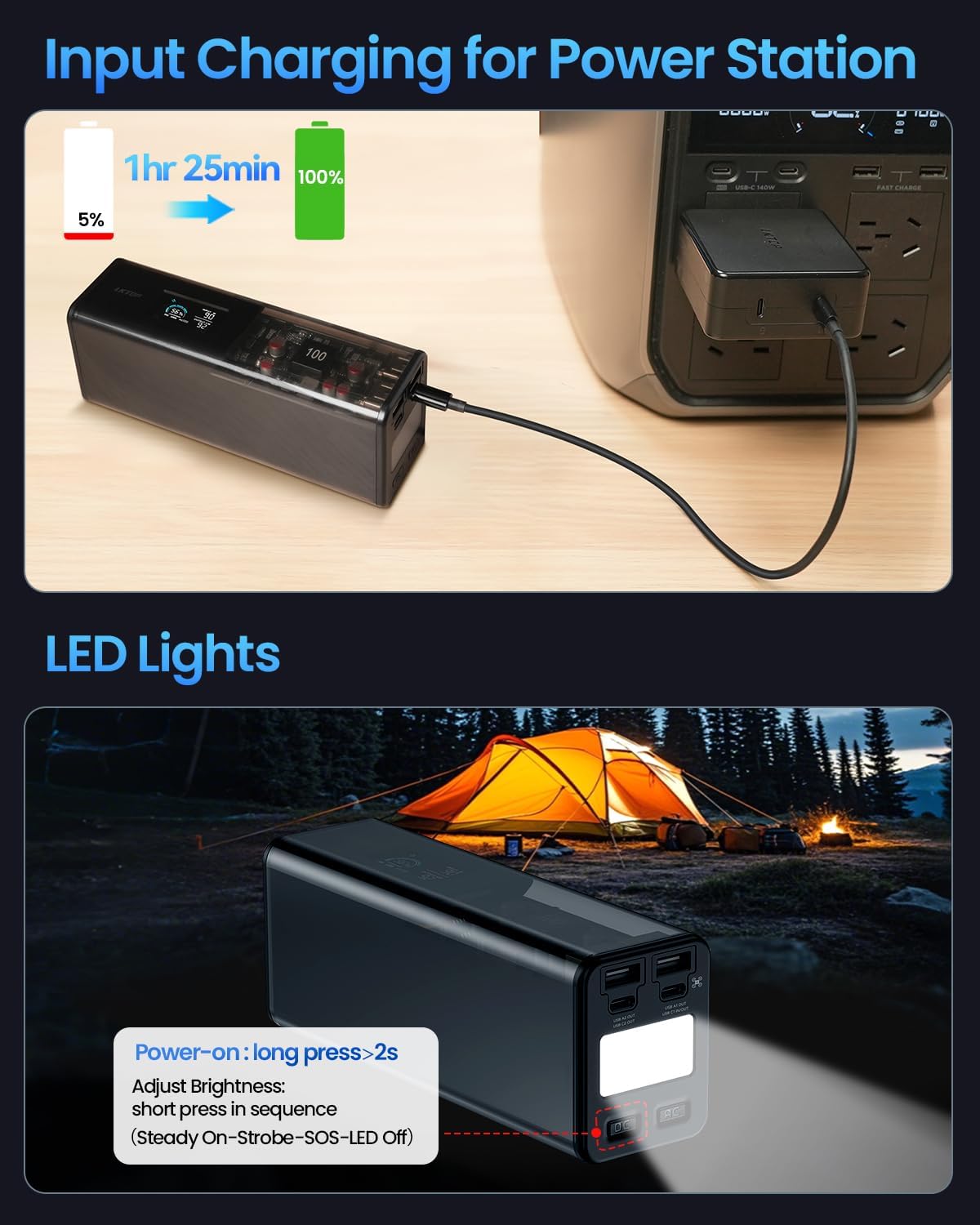
Obraz: The power station is shown being charged from a wall outlet, with an inset demonstrating the activation and brightness adjustment of its integrated LED lights, useful for camping.
Zgodność
The LKTOP Power Station is compatible with a wide range of DJI drones and accessories, as well as other electronic devices. It supports various Power Delivery (PD) protocols.
Zgodne urządzenia:
- DJI Mavic 4 Series Drone (approx. 1hr 55min charge)
- DJI Mavic 3 Series Drone (approx. 1hr 10min charge)
- DJI Air Series Drone (approx. 1hr charge)
- DJI Mini Series Drone (approx. 57min charge)
- DJI Flip Drone (approx. 70min charge)
- DJI Neo Drone (approx. 50min charge)
- LKTOP/DJI Charging Hubs (various models)
- DJI Remote Controllers (approx. 2hr - 2hr 40min charge)
- Other devices: Camping Lights, Cameras, Projectors, Audio devices, Live Sound Cards, Fans, Electric Caldrons, Car Refrigerators.

Obraz: An infographic detailing the compatibility of the LKTOP Power Station with various devices, including drones, remote controllers, action cameras, and other outdoor electronics, along with estimated charging capacities.
Unsupported Appliances:
Appliances over 100W (watts) or with continuously amplifying power are not supported. This includes, but is not limited to: Electric Kettles, Induction Cookers, Microwave Ovens, Air Blowers, Electric Scooters, Electric Vehicles, Bread Makers, and 220V Audio Systems.
Organizować coś
- Rozpakować: Ostrożnie wyjmij wszystkie elementy z opakowania. Sprawdź, czy wszystkie elementy wymienione w sekcji „Zawartość opakowania” są obecne.
- Opłata początkowa: Before first use, fully charge the LKTOP Power Station. Connect the provided USB-C to USB-C cable to the power station's input port and a suitable power adapter (not included) to a wall outlet. The LCD screen will indicate charging progress.
- Zapoznaj się: Review the layout of the ports, buttons, and the LCD display as described in the Product Overview sekcja.
Instrukcja obsługi
Ładowanie elektrowni
- Connect the provided USB-C to USB-C cable to the power station's input port.
- Connect the other end of the USB-C cable to a compatible power adapter (e.g., wall charger, car charger, or solar panel, sold separately).
- The LCD screen will display the input power and charging progress. A full charge takes approximately 85 minutes.
Ładowanie urządzeń zewnętrznych
- Włączanie: Short press and then long press (for >2 seconds) the power button to turn on the power station.
- Podłącz urządzenie: Plug your device's charging cable into the appropriate output port (USB-C1, USB-C2, USB-A1/A2, or AC outlet) on the power station.
- Monitor: The LCD screen will show the output power being delivered to your device.
- Odłączyć: Once your device is charged, disconnect it from the power station.
- Wyłączone: Short press and then long press the power button to turn off the power station when not in use to conserve battery.
Wideo: This video demonstrates the LKTOP Drone Power Station's super fast charging capabilities for DJI drones and accessories, highlighting its efficiency and ease of use.
Wideo: A time-lapse video showcasing the LKTOP Drone Power Station's charging speed for multiple DJI drone batteries, illustrating its rapid charging performance.
Korzystanie ze świateł LED
- Włączanie: Long press the LED light button (usually located near the LED) for more than 2 seconds to turn on the light.
- Adjust Brightness/Mode: Short press the LED light button in sequence to cycle through different modes: Steady On, Strobe, SOS, and Off.
Konserwacja
- Czyszczenie: Use a soft, dry cloth to clean the exterior of the power station. Avoid using harsh chemicals or abrasive materials.
- Składowanie: Store the power station in a cool, dry place away from direct sunlight and extreme temperatures. For long-term storage, it is recommended to charge the battery to approximately 60% to prolong its lifespan.
- Pielęgnacja baterii: Avoid fully discharging the battery frequently. Recharge the power station regularly, even if not in active use, to maintain battery health.
Rozwiązywanie problemów
| Problem | Możliwa przyczyna | Rozwiązanie |
|---|---|---|
| Power Station not turning on. | Akumulator jest całkowicie rozładowany. | Podłącz urządzenie do źródła zasilania i ładuj przez co najmniej 15 minut przed próbą włączenia. |
| Urządzenie się nie ładuje. | Incorrect port used, cable is faulty, or device is incompatible. | Ensure the correct port is used for the device's power requirements. Try a different cable. Verify device compatibility. |
| Power Station gets hot during use. | Normalna praca przy dużym obciążeniu. | This is normal. Ensure adequate ventilation around the unit. If overheating persists or is excessive, discontinue use and contact support. |
| LCD screen not displaying information. | Power station is off or screen is in standby mode. | Press the power button briefly to wake the screen or turn on the power station. |
Specyfikacje
- Wymiary produktu: 6.89 x 2.68 x 2.05 cala
- Waga przedmiotu: 3.04 funta
- Pojemność baterii: 27000mAh / 97.2 Wh
- Typ baterii: 21700 steel-shell battery cells
- Wejście Voltage: 110 V (AC)
- Objętość wyjściatage: 100 V (AC)
- Czas ładowania: Około 85 minut (pełne naładowanie)
- Kolor: Czarny
- Producent: Dongguan Junyuda Technology co.,ltd.
Gwarancja i wsparcie
For warranty information, technical support, or service inquiries, please refer to the contact details provided in your product packaging or visit the official LKTOP webZachowaj paragon jako dowód zakupu na wypadek reklamacji.