
Nelko PM220
Instrukcja obsługi drukarki etykiet termicznych Bluetooth Nelko PM220
Model: PM220
1. Wprowadzenie
Thank you for choosing the Nelko PM220 Bluetooth Thermal Label Printer. This portable device is designed for efficient label printing without the need for ink cartridges, making it ideal for small businesses, address labeling, logo printing, and various organizational tasks. This manual provides detailed instructions for setup, operation, maintenance, and troubleshooting to ensure optimal performance.
2. Koniec produktuview
The Nelko PM220 is a compact thermal label printer that connects wirelessly via Bluetooth to your smartphone or PC. It supports various label sizes and offers clear, high-resolution printing for text, barcodes, and QR codes.
2.1 Zawartość opakowania
- Drukarka etykiet Nelko PM220
- Label Paper Roll (starter roll)
- Kabel ładujący USB
- Instrukcja obsługi

Rysunek 1: The Nelko PM220 Bluetooth Thermal Label Printer shown with a roll of blank labels. The printer features a sleek navy blue design with a power button and a paper feed button on the front panel.
3. Przewodnik konfiguracji
3.1 Ładowanie taśmy etykietowej
- Open the printer cover by gently pushing the release button or lifting the designated area.
- Insert the label roll into the paper bin, ensuring the labels face upwards and the leading edge extends slightly out of the printer slot.
- Adjust the paper slot guide to the right to ensure the label paper is tightly attached to the far right side of the paper bin, preventing misalignment during printing.
- Zamknij dokładnie pokrywę drukarki.

Rysunek 2: A label roll being correctly inserted into the paper compartment of the Nelko PM220 printer. The roll is placed with the labels facing upwards.
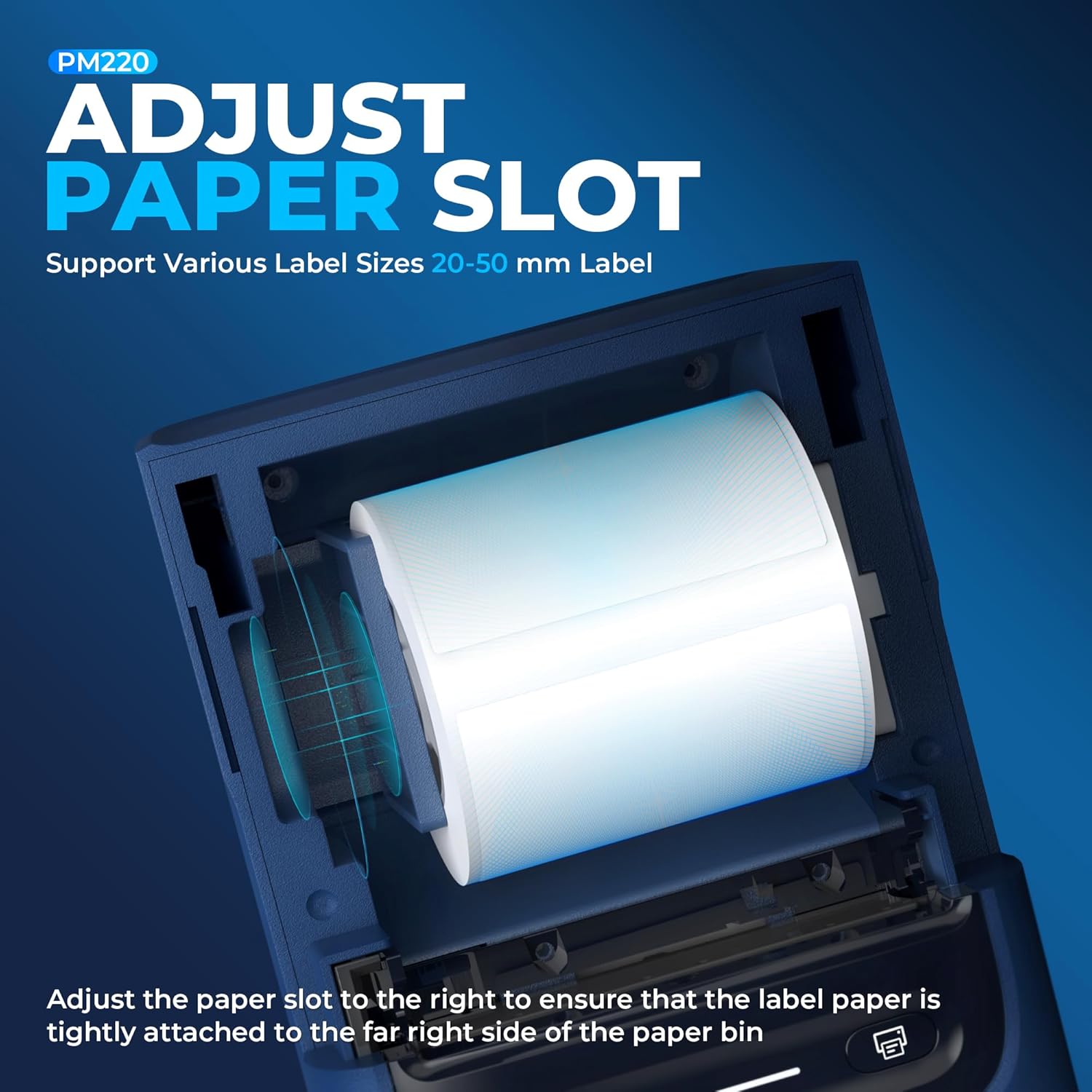
Rysunek 3: Zbliżenie view demonstrating how to adjust the paper slot guide within the Nelko PM220 printer. The guide is moved to the right to secure the label roll.
3.2 Podłączanie do zasilania
- Podłącz dołączony kabel ładujący USB do portu ładowania drukarki.
- Podłącz drugi koniec kabla USB do kompatybilnego zasilacza USB (nie ma go w zestawie) lub do portu USB komputera.
- Allow the printer to charge fully before first use. The indicator light will typically change color to indicate a full charge.
3.3 Instalacja aplikacji i parowanie Bluetooth
- Download the official Nelko label printing application from your device's app store (e.g., Apple App Store for iOS, Google Play Store for Android). For PC connectivity, download the appropriate driver and software from the official Nelko webstrona.
- Ensure Bluetooth is enabled on your smartphone or PC.
- Power on the Nelko PM220 printer by pressing and holding the power button until the indicator light illuminates.
- Open the Nelko app (or PC software) and navigate to the device connection section.
- Szukaj available Bluetooth devices and select 'Nelko PM220' from the list.
- Follow any on-screen prompts to complete the pairing process. A successful connection will be indicated by a change in the printer's indicator light or a message within the app.
4. Instrukcja obsługi
4.1 Włączanie/wyłączanie zasilania
- Włączanie: Naciśnij i przytrzymaj przycisk zasilania przez około 2–3 sekundy, aż zaświeci się kontrolka.
- Aby wyłączyć: Press and hold the power button for approximately 2-3 seconds until the indicator light turns off.
4.2 Drukowanie etykiety
- Sprawdź, czy drukarka jest włączona i prawidłowo połączona z urządzeniem przez Bluetooth.
- Open the Nelko app or PC software.
- Select your desired label template or create a new label design.
- Enter the text, add images, barcodes, or QR codes as needed.
- Adjust label size and print settings within the app to match the loaded label tape.
- Przedview etykietę, aby zapewnić dokładność.
- Tap the 'Print' button in the app. The printer will feed and print the label.
- Carefully tear off the printed label along the serrated edge.

Rysunek 4: The Nelko PM220 printer actively printing various labels, including shipping labels, product labels, and decorative stickers, demonstrating its versatility.
5. Konserwacja
5.1 Czyszczenie głowicy drukującej
Regular cleaning of the print head ensures optimal print quality and extends the life of your printer. Use a soft, lint-free cloth lightly dampnasączone alkoholem izopropylowym.
- Ensure the printer is powered off and disconnected from power.
- Otwórz pokrywę drukarki.
- Gently wipe the print head surface with the dampened cloth. Avoid touching the print head with bare hands.
- Przed zamknięciem pokrywy i włączeniem drukarki należy odczekać, aż głowica drukująca całkowicie wyschnie.
5.2 Przechowywanie
Store the printer in a cool, dry place away from direct sunlight and extreme temperatures. Remove any label rolls if storing for an extended period.
6. Rozwiązywanie Problemów
If you encounter issues with your Nelko PM220 printer, refer to the table below for common problems and solutions.
| Problem | Możliwa przyczyna | Rozwiązanie |
|---|---|---|
| Drukarka się nie włącza | Low battery or no power connection | Charge the printer using the provided USB cable. Ensure the power adapter is working. |
| Nie można połączyć się przez Bluetooth | Bluetooth is off, printer is not in pairing mode, or incorrect device selected | Ensure Bluetooth is enabled on your device. Restart the printer and try pairing again. Verify you are selecting 'Nelko PM220'. |
| Słaba jakość wydruku (blady, rozmazany) | Zabrudzona głowica drukująca, nieprawidłowy typ etykiety lub niski poziom naładowania baterii | Clean the print head as described in Section 5.1. Ensure you are using thermal labels. Charge the printer. |
| Etykiety nie są podawane prawidłowo | Label roll improperly loaded or paper slot not adjusted | Re-load the label roll, ensuring it is seated correctly and the paper slot guide is adjusted tightly against the roll (refer to Section 3.1). |
| Printer stops printing mid-label | Out of labels or low battery | Replace the label roll. Charge the printer. |
7. Specyfikacje techniczne
| Funkcja | Specyfikacja |
|---|---|
| Marka | Nelko |
| Nazwa modelu | PM220 |
| Technologia druku | Termiczny |
| Technologia łączności | Bluetooth |
| Wyjście drukarki | Monochromia |
| Maksymalna rozdzielczość wydruku czarno-białego | 203 dpi |
| Maksymalna prędkość druku monochromatycznego | 45 mm/s |
| Obsługiwane rozmiary nośników | 23-54 mm (szerokość) |
| Wymiary produktu | 13.3 x 8 x 10.2 cala |
| Waga przedmiotu | 13.4 uncji |
| Typ atramentu do drukarki | Bez tuszu (termiczny) |
| Zawarte komponenty | Drukarka, papier |
8. Gwarancja i wsparcie
Nelko products are designed for reliability and performance. For specific warranty information, please refer to the warranty card included with your purchase or visit the official Nelko website. If you require technical assistance or have questions not covered in this manual, please contact Nelko customer support through their official channels.
Wsparcie online: Visit the official Nelko webStrona z odpowiedziami na często zadawane pytania, sterownikami i oprogramowaniem do pobrania.
Wsparcie e-mailowe: Zapoznaj się z opakowaniem produktu lub oficjalnym webwitryna zawierająca adresy e-mail obsługi klienta.
Ask a question about this manual
Ask about setup, troubleshooting, compatibility, parts, safety, or missing instructions. Manuals+ will review the question and use this page’s manual context to help answer it.