
1. Koniec produktuview
The KESHIDE Digital Alarm Clock Model 210 is a battery-operated alarm clock featuring a large LCD display, indoor temperature reading, night light, and snooze function. It is designed for ease of use in various settings such as bedrooms, offices, and during travel.

Rycina 1: Przód view of the KESHIDE Digital Alarm Clock Model 210.
Główne cechy:
- Large LCD display with time, date, and indoor temperature.
- 12/24 hour format selection.
- Daily alarm with 5-minute snooze function.
- Night light with a 5-second illumination or glow-in-the-dark function.
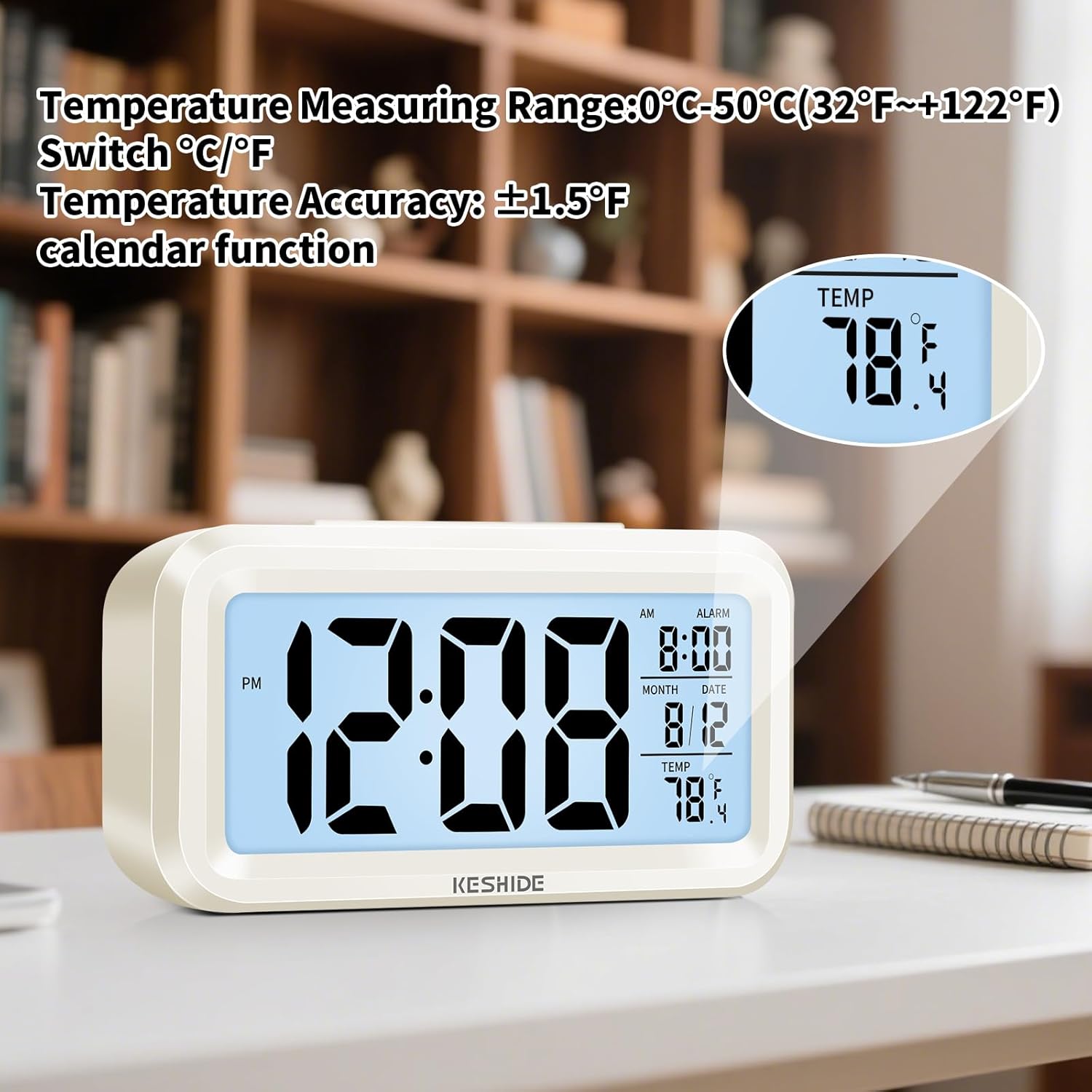
- Temperature display in Celsius (℃) or Fahrenheit (℉).
- Battery operated (3 AAA batteries, not included).
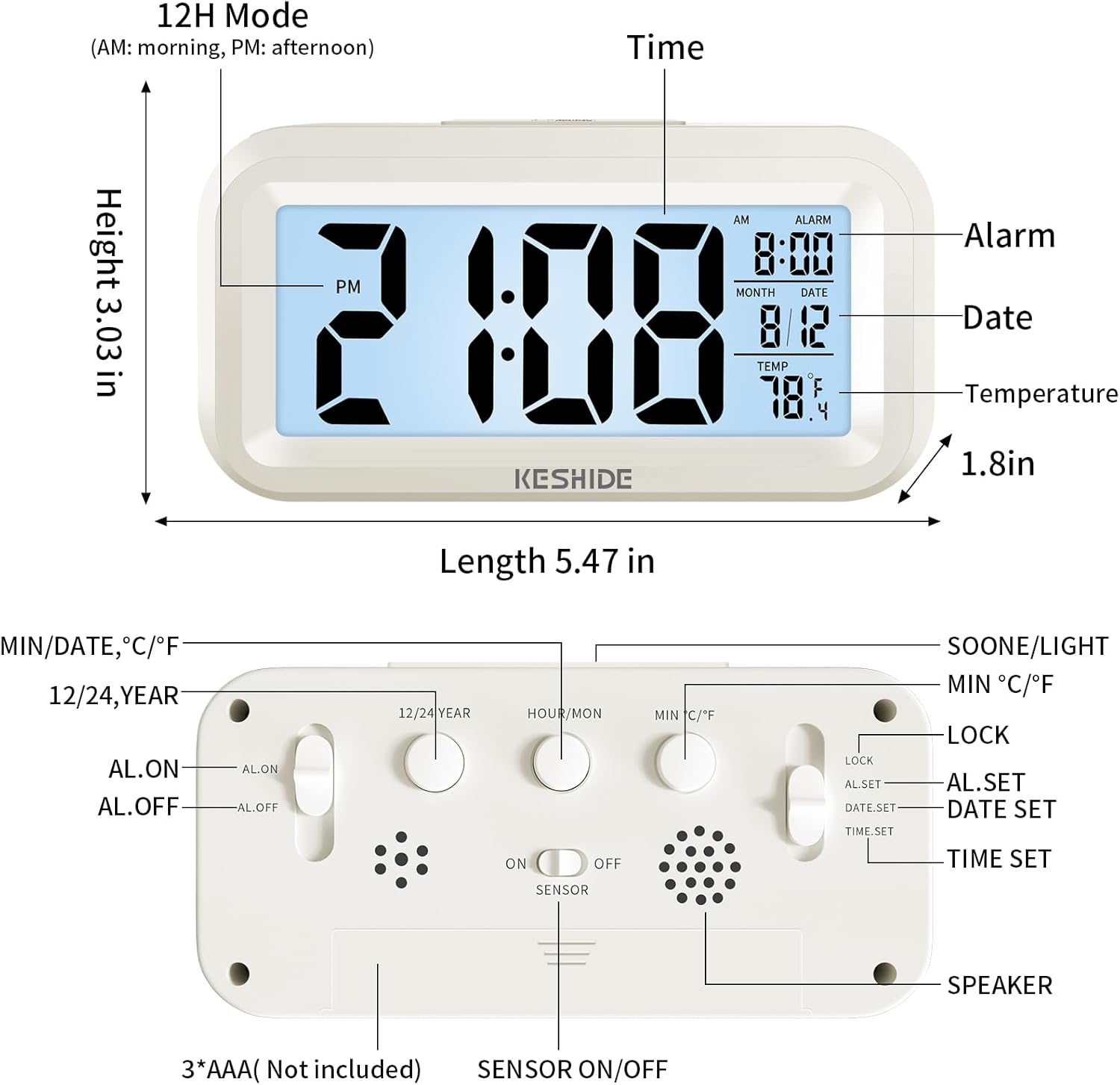
Figure 2: Labeled diagram of the alarm clock, showing display elements and dimensions.
2. Konfiguracja
2.1 Instalacja baterii
- Znajdź komorę baterii z tyłu zegara.
- Otwórz pokrywę komory baterii.
- Insert 3 new AAA batteries (not provided), ensuring correct polarity (+/-).
- Dokładnie zamknij pokrywę komory baterii.

Figure 3: Back panel controls and battery compartment.
3. Instrukcja obsługi
3.1 Ustawianie czasu i daty
- Przesuń LOCK/AL.SET/DATE.SET/TIME.SET switch on the back to ZESTAW CZASU.
- Naciśnij HOUR/MON przycisk, aby ustawić godzinę.
- Naciśnij MIN/DATA przycisk, aby ustawić minuty.
- To set the year, press the 12/24 LATA przycisk.
- To set the month, slide the switch to DATE.SET i naciśnij HOUR/MON.
- To set the day, slide the switch to DATE.SET i naciśnij MIN/DATA.
- Once time and date are set, slide the switch back to ZAMEK aby zapisać ustawienia.
3.2 Wybór formatu 12/24-godzinnego
While in normal time display mode (switch set to ZAMEK), wciśnij 12/24 LATA przycisk umożliwiający przełączanie między formatem 12-godzinnym (AM/PM) i 24-godzinnym.

Figure 4: Switching between 12-hour and 24-hour time display.
3.3 Ustawianie alarmu
- Przesuń LOCK/AL.SET/DATE.SET/TIME.SET switch on the back to AL.ZESTAW.
- Naciśnij HOUR/MON przycisk, aby ustawić godzinę alarmu.
- Naciśnij MIN/DATA przycisk, aby ustawić minuty alarmu.
- Once the alarm time is set, slide the switch back to ZAMEK.
- Aby włączyć lub wyłączyć alarm, użyj przycisku AL.ON/AL.OFF switch on the back. When set to AL.WŁ, an alarm icon will appear on the display.
3.4 Funkcja drzemki
Gdy zabrzmi alarm, naciśnij duży przycisk SNOOZE / LIGHT button on the top of the clock. The alarm will temporarily stop and sound again after approximately five minutes. To turn off the alarm completely, press any button on the back of the clock, or the alarm will automatically stop after 60 seconds if no action is taken.
Rysunek 5: Aktywacja funkcji drzemki.
3.5 Night Light and Backlight
- Podświetlenie tymczasowe: Naciśnij SNOOZE / LIGHT button on the top to illuminate the screen for five seconds.
- Automatic Glow-in-the-Dark: The clock features a photosensitive sensor. Slide the CZUJNIK WŁ./WYŁ switch on the back to ON. In dark environments, the screen will emit a soft glow, allowing you to see the time without pressing any buttons. Slide the switch to WYŁĄCZONY aby wyłączyć tę funkcję.

Figure 6: Automatic screen standby during the day and soft glow at night.
3.6 Wyświetlacz temperatury
The clock displays the indoor temperature. To switch between Celsius (℃) and Fahrenheit (℉), press the MIN ℃/℉ button on the back of the clock. The temperature range is 0℃~50℃ (32℉~122℉).

Figure 7: Indoor temperature display.
4. Konserwacja
4.1 Wymiana baterii
When the display dims or functions become erratic, it is time to replace the batteries. Follow the steps in Section 2.1 for battery installation.
4.2 Czyszczenie
Wipe the clock with a soft, dry cloth. Do not use abrasive cleaners or immerse the clock in water.
5. Rozwiązywanie Problemów
- Wyświetlacz jest pusty lub przyciemniony:
Ensure batteries are correctly installed and not depleted. Replace with fresh AAA batteries. - Alarm nie włącza się:
Sprawdź czy AL.ON/AL.OFF przełącznik jest ustawiony na AL.WŁ. Verify that the alarm time is correctly set. - Night light/backlight not working:
For temporary backlight, ensure the SNOOZE / LIGHT button is pressed firmly. For automatic glow, ensure the CZUJNIK WŁ./WYŁ przełącznik jest ustawiony na ON and the environment is sufficiently dark. - Nieprawidłowy odczyt temperatury:
The clock measures ambient indoor temperature. Ensure it is not placed near heat sources or air conditioning vents that could affect readings.
6. Specyfikacje
| Funkcja | Szczegół |
|---|---|
| Marka | KESHIDE |
| Numer modelu | 210 |
| Typ wyświetlacza | LCD |
| Źródło zasilania | Baterie 3 x AAA (brak w zestawie) |
| Wymiary produktu | 6.7" szer. x 3" wys. |
| Waga przedmiotu | 5.6 uncji |
| Zakres temperatur | 0℃~50℃ (32℉~122℉) |
| Tworzywo | Plastikowy |
| Typ montażu | Blat stołu |
7. Gwarancja i wsparcie
KESHIDE is committed to providing quality products and customer satisfaction. If you encounter any issues or have concerns regarding your product, please contact KESHIDE customer service via the Amazon Platform. We are dedicated to addressing your problems even if the standard return window has closed, ensuring you receive appropriate support.