
1. Instrukcje bezpieczeństwa
Przed użyciem tego urządzenia należy przeczytać i zrozumieć wszystkie instrukcje bezpieczeństwa. Nieprzestrzeganie tych instrukcji może spowodować porażenie prądem, pożar lub poważne obrażenia.
- Tylko do użytku wewnątrz pomieszczeń: This unit is designed for indoor use only. Do not expose it to rain, moisture, or extreme temperatures.
- Wysoka głośnośćtage: Ta jednostka pracuje przy dużej objętościtage. Only qualified personnel should open or attempt to service the device.
- Prawidłowe połączenie: Ensure the regulator is switched ON before connecting any appliance to its output.
- Wentylacja: Zapewnij odpowiednią wentylację wokół urządzenia. Nie blokuj otworów wentylacyjnych.
- Grunt: Zawsze podłączaj urządzenie do prawidłowo uziemionego gniazdka elektrycznego.
- Zabezpieczenie przed przeciążeniem: Do not exceed the maximum rated power of 10000 VA. Overloading can damage the unit and connected appliances.
- Dzieci i zwierzęta: Przechowywać urządzenie w miejscu niedostępnym dla dzieci i zwierząt domowych.
2. Koniec produktuview
The Kemot MSER-10000 is an automatic voltage stabilizer designed to provide a stable 230 VAC output voltage for various electrical appliances. It utilizes a servomotor for precise voltage regulation and features comprehensive protection mechanisms.

Obraz 2.1: Front panel of the Kemot MSER-10000 Automatic Voltage Stabilizer. This view shows the digital LED display, indicating input and output voltage, częstotliwość i obciążenie procentowetage. Below the display are the 'POWER ON' and 'BY PASS' switches, each with an 'ON' and 'OFF' position, protected by circuit breakers.
Główne cechy:
- Duża pojemność: 10000 VA for stable power supply to multiple devices.
- Precision Regulation: Maintains output voltage within +/- 3% accuracy.
- Servomotor Technology: Ensures smooth and accurate voltage korekty.
- Kompleksowa ochrona: Includes safeguards against short-circuits, overvoltage i przegrzanie.
- Wyświetlacz cyfrowy: Zapewnia informacje w czasie rzeczywistym o objętości wejściowej/wyjściowejtage, częstotliwość i obciążenie.
- Multiple Output Sockets: Equipped with two output sockets (German and French/Polish type).
3. Konfiguracja
Follow these steps to properly set up your voltage stabilizer:
3.1. Umieszczenie
- Umieść urządzenie na stabilnej, płaskiej powierzchni.
- Ensure there is sufficient space (at least 10-15 cm) around the unit for proper air circulation and heat dissipation. Do not place it near heat sources or in direct sunlight.
- Avoid areas with high humidity or dust.
3.2. Połączenia
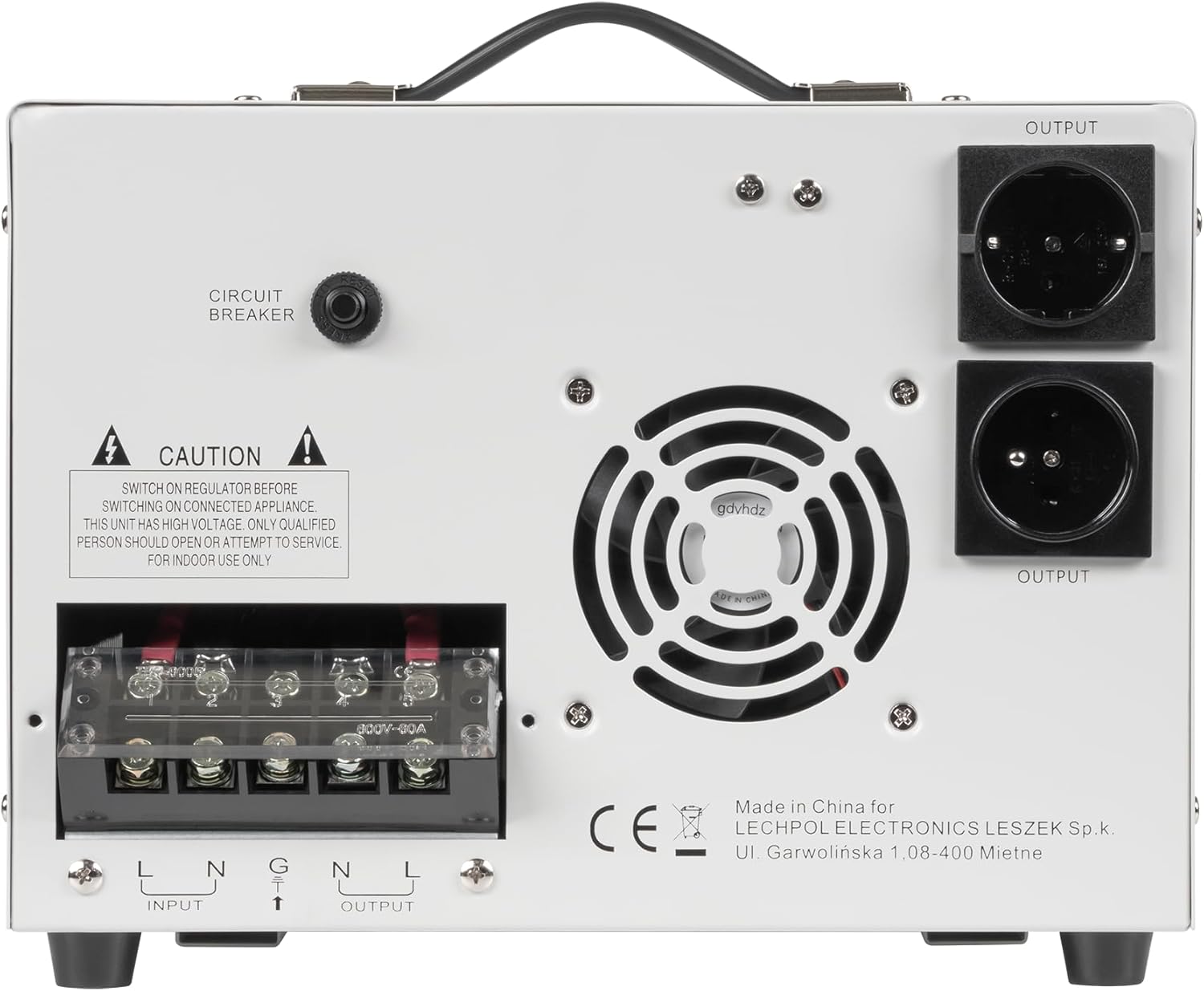
Obraz 3.1: Rear panel of the Kemot MSER-10000 Automatic Voltage Stabilizer. This image highlights the two output sockets, the 'CIRCUIT BREAKER' button, and a 'CAUTION' label regarding high voltage and qualified personnel for service. A cooling fan is also visible.

Obraz 3.2: Rear panel of the Kemot MSER-10000 Automatic Voltage Stabilizer, focusing on the terminal block. This shows the 'INPUT' and 'OUTPUT' screw terminals for hardwired connections (L, N, G for Input; L, N for Output), along with the 'CAUTION' label and 'CIRCUIT BREAKER' button.
- Podłączenie zasilania wejściowego: Connect the main power supply (130-260 VAC, 50 Hz) to the 'INPUT' terminals on the rear panel. Ensure correct polarity (Live, Neutral, Ground). For models with a power cord, plug it into a grounded wall outlet.
- Output Appliance Connection: Connect your appliances to the 'OUTPUT' sockets on the rear panel. Alternatively, for hardwired installations, connect to the 'OUTPUT' terminals (L, N).
- Wyłącznik obwodu: Ensure the 'CIRCUIT BREAKER' button on the rear panel is reset (pushed in) before operation.
4. Instrukcja obsługi
Operating the Kemot MSER-10000 is straightforward:
- Włączanie: After ensuring all connections are secure and the circuit breaker is reset, switch the 'POWER ON' toggle switch on the front panel to the 'ON' position. The LED display will illuminate.
- Bypass Mode (Optional): If you wish to bypass the voltage stabilization function and provide direct input power to the output, switch the 'BY PASS' toggle switch to the 'ON' position. In normal operation, this switch should be in the 'OFF' position.
- Monitorowanie: The digital LED display provides real-time information:
- Wejście Voltage (v): Pokazuje aktualną głośnośćtage from the main power supply.
- Objętość wyjściatage (v): Shows the stabilized voltage supplied to your appliances (nominally 230 VAC).
- Częstotliwość (Hz): Displays the operating frequency (50 Hz).
- Load (%): Wskazuje procenttage of the stabilizer's maximum capacity currently being used.
- Wskaźniki: May show warnings for 'UNUSUAL' conditions (e.g., overvoltage, podobjtagnp. przeciążenie).
- Wyłączone: To turn off the unit, first switch off all connected appliances, then switch the 'POWER ON' toggle switch to the 'OFF' position.
5. Konserwacja
Regular maintenance ensures optimal performance and longevity of your stabilizer:
- Czyszczenie: Okresowo czyść zewnętrzną część urządzenia miękką, suchą ściereczką. Nie używaj płynnych środków czyszczących ani rozpuszczalników.
- Wentylacja: Ensure the ventilation openings are free from dust and obstructions. Use a soft brush or compressed air to clean them if necessary.
- Inspekcje: Regularly check power cords and connections for any signs of damage or wear.
- Usługa wewnętrzna: Do not attempt to open the unit or perform internal servicing. Refer all repairs to qualified service personnel.
6. Rozwiązywanie Problemów
If you encounter issues with your Kemot MSER-10000, refer to the following common problems and solutions:
| Problem | Możliwa przyczyna | Rozwiązanie |
|---|---|---|
| Brak zasilania/Urządzenie nie włącza się |
|
|
| Niestabilna objętość wyjściowatage |
|
|
| Ostrzeżenie o przeciążeniu na wyświetlaczu | Total power consumption exceeds 10000 VA. | Odłącz niektóre urządzenia, aby zmniejszyć obciążenie. |
| Jednostka się przegrzewa |
|
|
Jeśli po wypróbowaniu tych rozwiązań problem nadal występuje, skontaktuj się z działem obsługi klienta lub wykwalifikowanym technikiem.
7. Specyfikacje
Technical specifications for the Kemot MSER-10000 Automatic Voltage Stabilizator:
| Parametr | Wartość |
|---|---|
| Pojemność mocy | 10000 VA |
| Wejście Voltage | 130-260 VAC |
| Częstotliwość wejściowa | 50 Hz |
| Objętość wyjściatage | 230 V AC |
| Częstotliwość wyjściowa | 50 Hz |
| Precyzja wyjściowa | +/- 3% |
| Efektywność | 98% |
| Typ wyjścia | Jednofazowy |
| Typ transformatora | Transformator toroidalny CRGO |
| Gniazda wyjściowe | 2 (typ niemiecki, francuski/polski) |
| Ochrona | Zwarcie, przepięcietage, przegrzanie |
| Temperatura pracy | 0-40°C |
| Wilgotność | 10-90% |
| Temperatura przechowywania | -15-45°C |
| Waga | 22 kilogramów |
| Wymiary (dł. x szer. x wys.) | Wymiary: 388 x 302 x 210 mm |
| Producent | LECHPOL ELECTRONICS LESZEK Spółka komandytowa |
| Kraj pochodzenia | Chiny |
8. Gwarancja i wsparcie
This Kemot MSER-10000 Automatic VoltagStabilizator e jest dostarczany z 2-letnia gwarancja od daty zakupu, obejmując wady produkcyjne.

Obraz 8.1: Product packaging for the Kemot MSER-10000, clearly displaying the '2 YEARS WARRANTY' badge, confirming the warranty period for the device.
W przypadku roszczeń gwarancyjnych, pomocy technicznej lub pytań serwisowych prosimy o kontakt bezpośrednio ze sprzedawcą lub producentem. Zachowaj dowód zakupu w celu potwierdzenia gwarancji.
Producent: LECHPOL ELECTRONICS LESZEK Spółka komandytowa
Adres: Ul. Garwolińska 1, 08-400 Miętne, Poland
Information regarding spare parts availability and software updates is currently unavailable.