
Wstęp
This manual provides comprehensive instructions for the setup, operation, and maintenance of your YIQU Smart Color Changing Christmas Lights. These 66-foot string lights feature 200 RGB LEDs, offering a wide range of colors and dynamic modes controllable via remote or a smartphone application. Designed for both indoor and outdoor use, they include features like music synchronization, timer options, and memory function.
Informacje dotyczące bezpieczeństwa
Przed użyciem produktu należy przeczytać i zrozumieć wszystkie instrukcje bezpieczeństwa. Nieprzestrzeganie tych instrukcji może spowodować porażenie prądem, pożar lub poważne obrażenia.
- The Christmas lights have passed UL safety certification, ensuring high quality and safety in use.
- Operate with low voltage power to prevent overheating. The LED string lights are safe to touch.
- For outdoor use, ensure the power plug is protected from water or rain. The long leading wire assists in achieving this function.
- Do not attempt to modify or repair the product yourself. Contact customer support for assistance.
- Przechowywać w miejscu niedostępnym dla dzieci i zwierząt domowych.
Zawartość opakowania
Sprawdź, czy w pakiecie znajdują się wszystkie elementy:
- 1 x Wtyczka zasilająca
- 1 x String Lights (66 FT, 200 LED)
- 1 x Pilot zdalnego sterowania
Organizować coś
- Rozpakuj światła: Carefully uncoil the string lights from their packaging. Ensure the wires are not tangled.
- Umieszczenie: Determine the desired location for your lights. These lights are suitable for both indoor and outdoor environments. For outdoor use, ensure the power adapter is in a dry, protected area.
- Podłączenie zasilania: Connect the string lights to the provided power plug. Insert the power plug into a standard 110V-120V AC outlet.
- Pierwsze włączenie: Once plugged in, the lights should illuminate. You can use the remote control or the smartphone app for further customization.
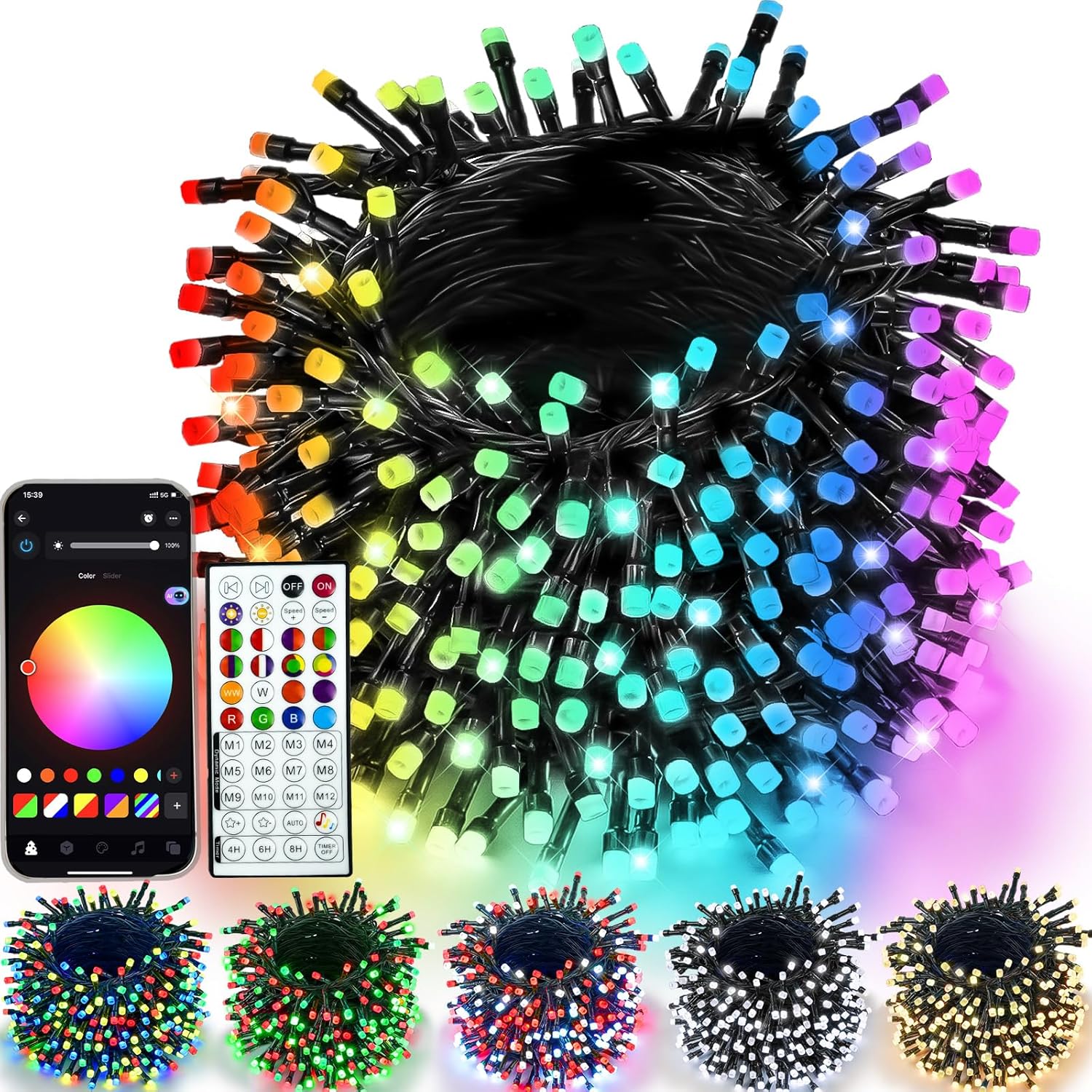
Figure 1: YIQU Smart Color Changing Christmas Lights with remote and app interface.
Instrukcja obsługi
1. Korzystanie z pilota zdalnego sterowania
The included 44-key wireless remote allows control of the lights from up to 40 meters away. Ensure the remote has a working battery and is pointed towards the light controller.
- WŁ./WYŁ.: Press the 'ON' or 'OFF' buttons to power the lights.
- Wybór kolorów: Choose from 16 million colors using the color palette buttons.
- Tryby dynamiczne: Select from various pre-set dynamic modes (M1-M12) to create different lighting effects.
- Regulacja jasności: Use the brightness control buttons to increase or decrease light intensity.
- Regulacja prędkości: Adjust the speed of dynamic modes using the speed control buttons.
- Regulator czasowy: Set the timer for 4H, 6H, or 8H using the dedicated buttons.

Figure 2: Remote control functions for the YIQU Smart Christmas Lights.
2. Sterowanie aplikacją na smartfonie
Download the dedicated smartphone application to unlock advanced control features and customization options.
- Pobierz aplikację: Scan the QR code provided in the product packaging or search for the "YIQU Lights" app in your device's app store.
- Łączyć: Follow the in-app instructions to connect your smartphone to the string lights via Bluetooth.
- Funkcje aplikacji:
- Color & Effect Adjustment: Easily adjust brightness, color, and lighting effects.
- Inteligentny asystent: Use voice commands to control light changes.
- Kontrola grupy: Control multiple YIQU devices simultaneously.
- Niestandardowy timer: Set specific on/off times.

Figure 3: Smartphone app interface for controlling YIQU Smart Christmas Lights.
3. Music Synchronization
The lights can synchronize with music, creating a dynamic visual experience. This feature is primarily controlled via the smartphone app.
- Aktywuj tryb muzyczny: In the app, select the "Music Mode" option.
- Import Music: Click "Add Music" to import music files from your device or select from the built-in music library.
- Funkcja mikrofonu: The lights can react to music rhythms picked up by your phone's microphone (voice-activated version only). Adjust brightness and sensitivity as needed.

Figure 4: Music synchronization feature in action with the YIQU Smart Christmas Lights.
4. Timer Options & Memory Function
The lights include built-in timer options and a memory function to retain your last settings.
- Pre-set Timers: Use the remote to select 4H (4 hours ON, 20 hours OFF), 6H (6 hours ON, 18 hours OFF), or 8H (8 hours ON, 24 hours OFF).
- Custom Timers: Set custom on/off schedules via the smartphone app.
- Funkcja pamięci: The lights will automatically recall your last lighting setting when powered on again.

Figure 5: Timer options and memory function for convenient operation.
Cechy
- Multiple Colors and Modes: 16 million color options with various lighting effects and adjustable speed/brightness.
- Podwójna kontrola: Operate via a 44-key wireless remote or a dedicated smartphone application.
- Synchronizacja muzyki: Lights change with the rhythm of music, enhancing ambiance.
- Inteligentny asystent: Voice control functionality through the app.
- Timer & Memory: Pre-set and custom timer options, plus memory of last settings.
- Trwałe i bezpieczne: UL certified, low voltage, and IP44 waterproof for indoor/outdoor use.
- Szerokie zastosowanie: Suitable for various occasions and holidays, including Christmas, Halloween, and parties.
Specyfikacje
| Funkcja | Szczegół |
|---|---|
| Marka | YIQU |
| Numer modelu | GP-SW290DC0310-IP44(US) |
| Typ światła | Oświetlenie LED String |
| Liczba diod LED | 200 |
| Długość | 66 stóp |
| Opcje kolorów | RGB (16 milionów kolorów) |
| Metody kontroli | Zdalne sterowanie, aplikacja na smartfon |
| Źródło zasilania | Elektryczny przewodowy |
| Tomtage | 29 wolty |
| Cotage | 6 watów |
| Stopień wodoodporności | IP44 (Suitable for Indoor/Outdoor) |
| Cechy specjalne | Music Sync, Timer, Memory Function, Intelligent Assistant |
Konserwacja
- Czyszczenie: Disconnect the power before cleaning. Wipe the lights gently with a soft, dry cloth. Do not use harsh chemicals or abrasive cleaners.
- Składowanie: When not in use, carefully coil the string lights to prevent tangling. Store them in a cool, dry place away from direct sunlight and extreme temperatures.
- Kontrola: Periodically inspect the lights and wiring for any damage. If any damage is found, discontinue use and contact customer support.
Rozwiązywanie problemów
- Światła się nie włączają:
- Ensure the power plug is securely connected to a working outlet.
- Sprawdź, czy bateria w pilocie zdalnego sterowania wymaga wymiany.
- Verify the lights are not set to an "OFF" timer mode.
- Pilot nie działa:
- Ensure there are no obstructions between the remote and the light controller.
- Wymień baterię pilota.
- Problemy z połączeniem aplikacji:
- Upewnij się, że Bluetooth jest włączony w Twoim smartfonie.
- Uruchom ponownie aplikację i spróbuj połączyć się ponownie.
- Ensure the lights are within Bluetooth range.
Oficjalne filmy produktowe
Watch these official videos for visual guidance and demonstrations of the YIQU Smart Color Changing Christmas Lights.
Video 1: YIQU APP Christmas String Lights - A demonstration of the lights' features and app control.
Gwarancja i wsparcie
For warranty information, technical support, or any inquiries regarding your YIQU Smart Color Changing Christmas Lights, please refer to the contact information provided in your product packaging or visit the official YIQU webstrona. Zachowaj dowód zakupu na potrzeby roszczeń gwarancyjnych.