
1. Wprowadzenie
Thank you for choosing the ELECCTV W1-B-2PC 2K Dual-Band WiFi Security Camera. This manual provides essential information for the proper installation, operation, and maintenance of your security camera system. The W1-B-2PC camera features advanced 2.4GHz and 5GHz dual-band wireless connectivity, 2K QHD video resolution, color night vision, AI motion detection with spotlight and siren, two-way audio communication, and an IP65 weather-resistant design for reliable outdoor use. Please read this manual thoroughly before use to ensure optimal performance and safety.
2. Informacje dotyczące bezpieczeństwa
- Ensure the camera is installed in a location where it is protected from direct impact or vandalism.
- Use only the provided charging cable and adapter to charge the camera's battery.
- Do not expose the camera to extreme temperatures outside its operating range (-4°F to 113°F / -20°C to 45°C).
- Przechowuj aparat i jego akcesoria poza zasięgiem dzieci.
- Avoid pointing the camera directly at strong light sources, as this may affect image quality.
- Regularly check the mounting to ensure the camera remains securely attached.
3. Zawartość opakowania
Sprawdź, czy w przesyłce znajdują się wszystkie elementy:
- ELECCTV W1-B-2PC Security Camera (2 units)
- Uchwyt montażowy (2 sztuki)
- Kabel ładujący USB (2 sztuki)
- Mounting Screw Kit (2 sets)
- Instrukcja obsługi
4. Koniec produktuview
Familiarize yourself with the components of your ELECCTV W1-B-2PC camera:
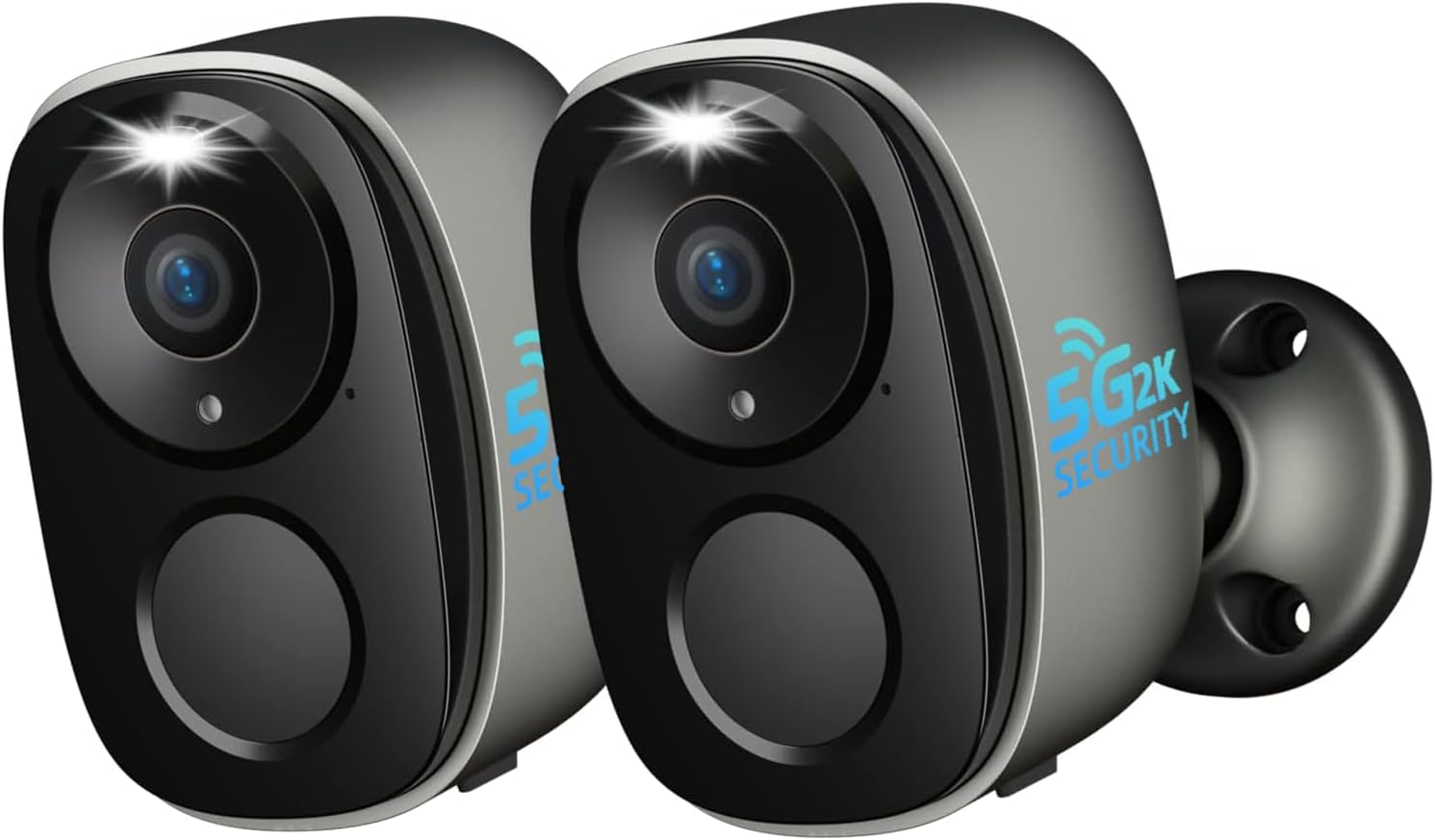
Obraz: Przód view of two ELECCTV W1-B-2PC cameras.
- Obiektyw: Captures 2K QHD video footage.
- Reflektor: Zapewnia oświetlenie umożliwiające widzenie kolorowe w nocy i działa odstraszająco.
- Czujnik ruchu PIR: Wykrywa sygnały cieplne, umożliwiając dokładne wykrywanie ruchu.
- Mikrofon: Przechwytuje dźwięk w celu umożliwienia dwukierunkowej rozmowy i nagrywania.
- Głośnik: Enables two-way audio communication and siren activation.
- Podstawa montażowa: Allows for secure wall or ceiling installation.
- Port ładowania USB: Do ładowania wewnętrznego akumulatora.
- Przycisk resetowania: Służy do przywracania ustawień fabrycznych aparatu.
- Gniazdo kart Micro SD: Obsługuje pamięć lokalną do 256 GB (karta nie jest dołączona).
5. Przewodnik konfiguracji
5.1. Ładowanie aparatu
Before initial use, fully charge the camera's built-in rechargeable battery. Connect the provided USB charging cable to the camera's charging port and a standard 5V/2A USB power adapter (not included). The charging indicator light will show the charging status. A full charge can last 1-3 months depending on usage and power-saving settings.
5.2. Instalacja aplikacji
Pobierz i zainstaluj O-KAM Pro app on your smartphone. The app is available for both iOS and Android devices. Szukaj "O-KAM Pro" in your device's app store or scan the QR code provided in the quick start guide (if applicable).

Image: O-KAM Pro app interface for easy setup and WiFi connection.
5.3. Parowanie urządzeń
Aby podłączyć kamerę do sieci Wi-Fi, wykonaj następujące czynności:
- Open the O-KAM Pro app and create an account or log in.
- Kliknij ikonę „+”, aby dodać nowe urządzenie.
- Wybierz model aparatu z listy.
- Power on the camera. If the indicator light is not flashing, press and hold the reset button for 5 seconds until it flashes.
- Follow the in-app instructions to connect the camera to your 2.4GHz or 5GHz Wi-Fi network. The camera supports dual-band connectivity for a stable connection.
- Zeskanuj kod QR wyświetlony na Twoim telefonie za pomocą obiektywu aparatu.
- Po nawiązaniu połączenia nadaj nazwę swojej kamerze i zakończ konfigurację.

Image: Dual-band WiFi 6 connectivity and key features.
5.4. Montaż kamery
The ELECCTV W1-B-2PC camera is 100% wire-free and IP65 waterproof, allowing for flexible installation both indoors and outdoors. Choose a location with a strong Wi-Fi signal and a clear view obszaru, który chcesz monitorować.
- Mark the desired drilling spots using the mounting bracket as a template.
- Drill holes and insert wall anchors if mounting on a masonry surface.
- Przymocuj uchwyt montażowy do ściany lub sufitu za pomocą dołączonych śrub.
- Zamontuj kamerę w uchwycie montażowym i dostosuj kąt, aby uzyskać optymalny zasięg.

Image: Camera demonstrating IP65 waterproof rating in rain.

Image: Flexible mounting options for the camera.
6. Instrukcja obsługi
6.1. Na żywo View i odtwarzanie
Access the O-KAM Pro app to view live 2K QHD video from your camera. You can also review recorded events by date and time. The app supports simultaneous live streaming from up to four cameras for comprehensive coverage.

Image: Reviewing recorded events in the app.

Image: Quad-view live streaming in the app.
6.2. Dźwięk dwukierunkowy
The camera features a built-in microphone and speaker. In the live view interface of the O-KAM Pro app, tap the microphone icon to speak through the camera and the speaker icon to listen to audio from the camera's location.
6.3. Detekcja ruchu i alerty
The camera utilizes AI motion detection to identify human movement. When motion is detected, the camera can activate its spotlight, trigger a 120dB siren, and send instant notifications to your smartphone. You can customize detection zones and sensitivity settings within the app to reduce false alerts.

Image: Night guard security with spotlight and siren activation.

Image: AI precision detection for persons and birds.
6.4. Tryby widzenia nocnego
The camera offers both infrared and full-color night vision. With its 2K QHD resolution and integrated spotlights, you can achieve clear, detailed color images even in low-light conditions. The 130° wide-angle lens provides extensive coverage.

Image: 2K QHD Color Night Vision in action.

Image: Day and night security with color night vision and digital zoom capabilities.
6.5. Opcje przechowywania
Twój aparat obsługuje dwie metody przechowywania danych:
- Karta micro sd: Insert a Micro SD card (up to 256GB, not included) into the designated slot for local storage of recordings.
- Przechowywanie w chmurze: The camera offers free 1-day rolling cloud storage for life, with no subscription required for this basic service. Extended cloud storage plans may be available through the app.

Image: SD Card and Cloud storage options.
6.6. Integracja inteligentnego domu (Alexa)
The ELECCTV W1-B-2PC camera is compatible with Amazon Alexa. Follow the instructions in the O-KAM Pro app or your Alexa app to link your camera and enable voice commands for live viewing on compatible Alexa-enabled devices.
6.7. Udostępnianie dostępu
You can share access to your camera's live feed and recordings with family members through the O-KAM Pro app. This allows multiple users to monitor the property simultaneously.

Image: Sharing camera access with family for enhanced security.
6.8. Bird Identification Feature
The camera includes an advanced bird identification feature that can distinguish different bird species. Note that this feature requires a separate subscription within the O-KAM Pro app.
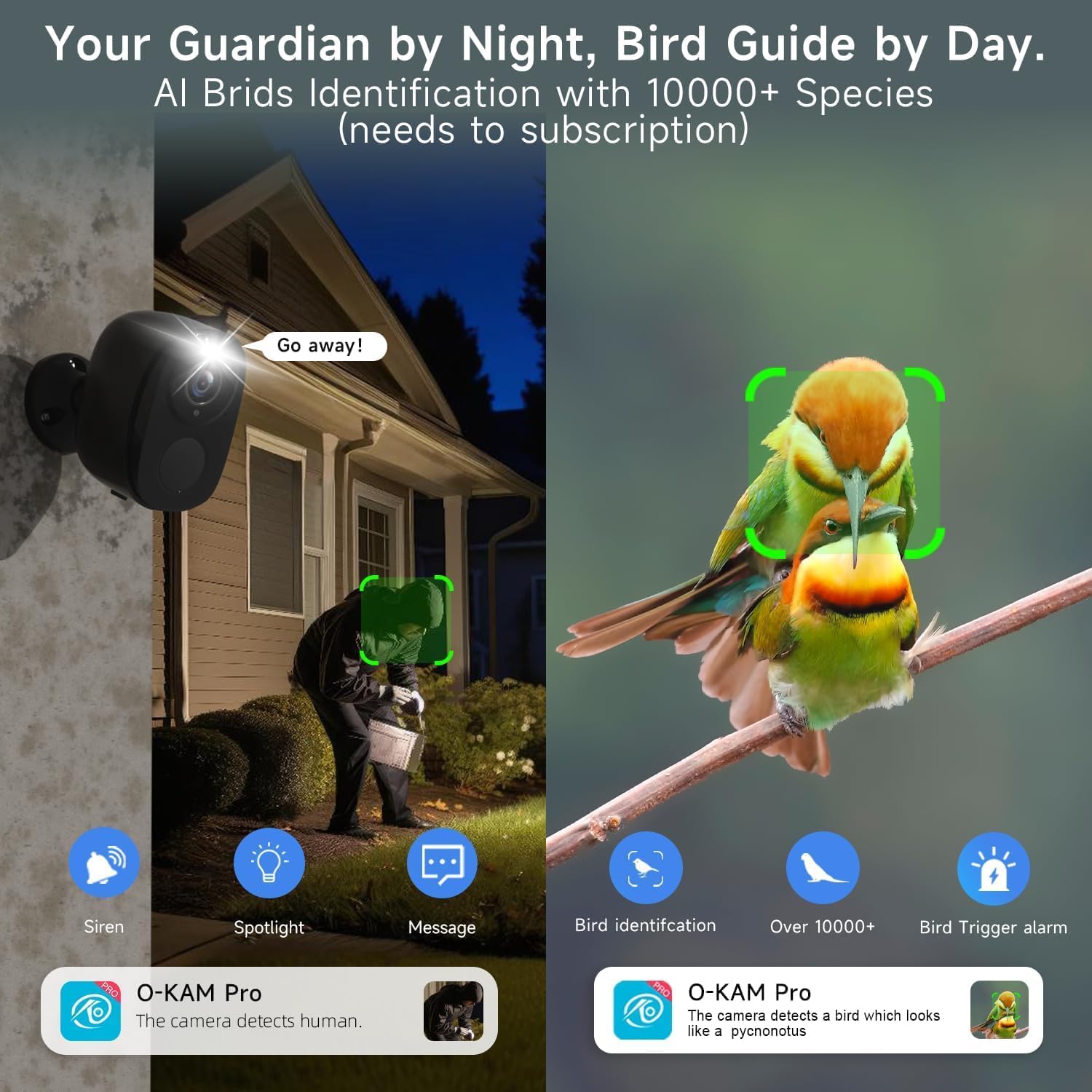
Image: Bird identification and night security features.

Image: New bird identification feature in the app.
7. Konserwacja
- Ładowanie akumulatora: Recharge the camera battery as needed. The app will notify you when the battery level is low.
- Czyszczenie: Periodically clean the camera lens and body with a soft, dry cloth to ensure clear image quality and proper sensor function. Do not use harsh chemicals.
- Aktualizacje oprogramowania układowego: Keep the camera's firmware updated through the O-KAM Pro app to ensure optimal performance, security, and access to new features.
8. Rozwiązywanie Problemów
| Wydanie | Możliwe rozwiązanie |
|---|---|
| Kamera nie łączy się z siecią Wi-Fi | Ensure your Wi-Fi network is 2.4GHz or 5GHz. Check Wi-Fi signal strength at the camera's location. Reset the camera and try pairing again. Verify correct Wi-Fi password entry. |
| Niska jakość obrazu | Wyczyść obiektyw aparatu. Upewnij się, że w polu widzenia aparatu nie ma żadnych przeszkód. view. Check Wi-Fi signal strength for stable streaming. |
| Detekcja ruchu nie działa lub jest zbyt czuła | Adjust motion detection sensitivity and customize detection zones in the O-KAM Pro app. Ensure the PIR sensor is not blocked. |
| Bateria szybko się rozładowuje | Reduce motion detection frequency or sensitivity. Adjust power-saving modes in the app. Ensure the camera is not in an area with constant motion. |
| Dwukierunkowe audio nie działa | Check microphone and speaker permissions for the O-KAM Pro app on your smartphone. Ensure camera's microphone and speaker are not obstructed. |
9. Specyfikacje
| Funkcja | Specyfikacja |
|---|---|
| Nazwa modelu | W1 |
| Rozdzielczość przechwytywania wideo | 2K QHD (1920p) |
| Technologia łączności | Wi-Fi (dwuzakresowe 2.4 GHz i 5 GHz) |
| Źródło zasilania | Zasilanie bateryjne (ładowalne) |
| Zastosowanie wewnątrz/na zewnątrz | Plenerowy |
| Poziom wodoodporności | IP65 |
| Cechy specjalne | Wireless, AI Motion Detection, Spotlight, Siren, Color Night Vision, 2-Way Talk |
| Kompatybilne urządzenia | Smartphone (via O-KAM Pro App), Amazon Alexa |
| Opcje przechowywania | Karta Micro SD (do 256 GB), przechowywanie w chmurze |
| Przysłona obiektywu | f/2.0 |
| Zoom cyfrowy | 5X |
| Pole View | 130 ° Szerokokątny |
| Wymiary produktu | 8 x 2 x 2.7 cala |
| Waga przedmiotu | 1.39 funta (0.63 kilograma) |
| UPC | 765150757364 |
10. Gwarancja i wsparcie
ELECCTV products are designed for reliability and performance. For specific warranty details, please refer to the warranty card included with your product or visit the official ELECCTV website. If you encounter any issues or require technical assistance, please contact ELECCTV customer support through the O-KAM Pro app or the contact information provided on the ELECCTV webstrona.