
Wstęp
This manual provides detailed instructions for the installation, operation, and maintenance of your UNITOPSCI Single Din Car Stereo, Model 6886C. This unit features a 6.86-inch HD touchscreen, Apple CarPlay, Android Auto, Bluetooth 5.0, FM radio, USB connectivity, and support for a backup camera. Please read this manual thoroughly before use to ensure proper functionality and safety.
Zawartość opakowania
Sprawdź, czy w przesyłce znajdują się wszystkie elementy wymienione poniżej:
- 1 x samochodowe radio
- 1 x kamera cofania
- 1 x kabel zasilający
- 1 x kabel głośnikowy
- 1 x Remote Control (Battery Not included)
- 1 x Instrukcja obsługi
- 1 x Mikrofon

Image: All components included in the UNITOPSCI car stereo package.
Produkt ponadview
The UNITOPSCI 6886C is a single DIN car stereo featuring a 6.86-inch HD touchscreen. Its compact design allows for installation in standard single DIN openings.
Wymiary i połączenia
The unit measures approximately 187mm (7.3 inches) in length and 52mm (2.0 inches) in height. The screen itself is 6.86 inches. The rear panel includes various ports for power, speakers, microphone, video output, camera input, and GPS antenna.

Obraz: przód i tył view with dimensions and connection ports labeled.
Konfiguracja i instalacja
Zaleca się zlecenie instalacji profesjonalnemu fachowcowi. Przed rozpoczęciem instalacji należy upewnić się, że zasilanie pojazdu jest odłączone.
Kroki instalacji:
- Prepare Dash Opening: Confirm your vehicle's dash opening is suitable for a single DIN unit (187mm x 52mm). A suitable dash kit may be required if the opening is not standard.
- Połączenia elektryczne: Connect the power cable and speaker cable to the corresponding ports on the car stereo and your vehicle's wiring harness. Refer to the wiring diagram in the included user manual for specific connections.
- Kamera cofania: Connect the backup camera cable to the 'CAMIN' port on the rear of the stereo. Ensure the camera's power is correctly wired to the vehicle's reverse light circuit for automatic activation.
- Mikrofon: Connect the external microphone to the 'MIC' port for improved hands-free calling audio quality.
- Antena GPS: If applicable, connect the GPS antenna to the 'GPS' port.
- Bezpieczna jednostka: Mount the car stereo securely into the dash opening.
- Ponowne podłączenie zasilania: Podłącz ponownie akumulator pojazdu i sprawdź wszystkie funkcje.
Instrukcja obsługi
This section details the primary functions and features of your car stereo.
1. Apple CarPlay & Android Auto (Wired Connection)
Connect your iPhone or Android smartphone via a USB cable to access Apple CarPlay or Android Auto. This allows you to use navigation, make calls, send messages, and listen to music directly from your phone's interface displayed on the stereo screen. Voice control (Siri for CarPlay, Google Assistant for Android Auto) is supported for hands-free operation.

Image: Apple CarPlay, Android Auto, and Mirror Link functionality via wired USB connection.
2.Bluetooth 5.0
Pair your mobile device with the stereo via Bluetooth 5.0 for hands-free calling and wireless audio streaming. Access your phonebook and dial directly from the stereo's touchscreen. The Bluetooth name for pairing is 'CAR BT'.
3.Radio FM
Tune into FM radio stations (frequency range 87.5-108MHz). The unit supports 18 preset stations, allowing quick access to your favorite channels for news, music, and traffic updates.
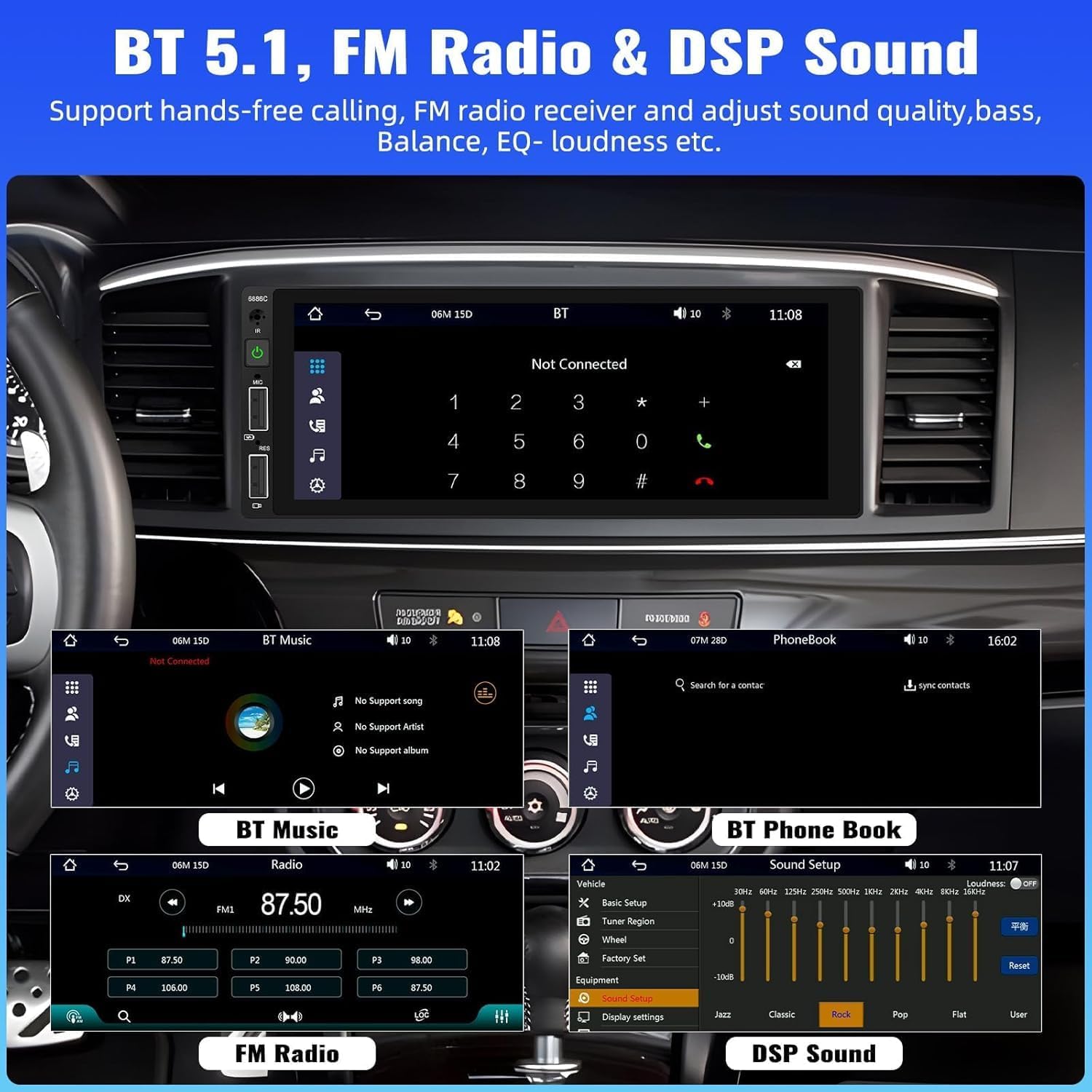
Image: Bluetooth, FM Radio, and Digital Sound Processing (DSP) settings interface.
4. Łącze lustrzane
Utilize the Mirror Link function to display your smartphone's screen directly on the car stereo. Connect your device using its original USB cable. This feature is useful for viewing maps or playing videos from your phone.
5. Odtwarzanie i ładowanie przez USB
The stereo features dual USB slots. Use these ports for media playback from USB drives or for fast charging your mobile devices. The unit also supports DVR connection via USB (DVR not included).

Image: Multiple playback options including USB charging and DVR support.
6. EQ Sound Feature
Adjust the audio output to your preference using the built-in EQ sound feature. Customize settings for bass, balance, and loudness to optimize your listening experience.
7. Sterowanie z kierownicy (SWC)
If your vehicle supports it, connect the steering wheel control wires to easily manage radio functions, adjust volume, and handle calls without taking your hands off the wheel. This enhances driving safety.
8. Wejście kamery cofania
When the vehicle is shifted into reverse gear, the stereo automatically displays the video feed from the connected backup camera. The included camera features 4 LED lights for clear night vision and parking lines to assist with safer parking maneuvers.

Image: Backup camera input and steering wheel control interface.
9. Seven Color Backlight
Customize the button backlight color to match your vehicle's interior or your personal preference. Choose from seven available colors.
10. Wyłącz pamięć
The unit retains the last playing state (e.g., radio station, music track) when powered off and resumes from that point upon restart.
Konserwacja
Aby zapewnić długą żywotność i optymalną pracę radia samochodowego, należy przestrzegać poniższych wskazówek dotyczących konserwacji:
- Czyszczenie: Do czyszczenia ekranu i obudowy używaj miękkiej, suchej ściereczki. Unikaj środków czyszczących o działaniu ściernym i rozpuszczalników.
- Temperatura: Unikaj wystawiania urządzenia na działanie ekstremalnych temperatur.
- Wilgoć: Przechowywać urządzenie w miejscu suchym i chronionym przed wilgocią.
- Aktualizacje oprogramowania układowego: Sprawdź producenta webokresowo odwiedzaj tę witrynę w celu sprawdzenia dostępności aktualizacji oprogramowania sprzętowego, które poprawią wydajność i dodadzą nowe funkcje.
Rozwiązywanie problemów
Jeśli masz problemy z radiem samochodowym, zapoznaj się z poniższymi typowymi problemami i ich rozwiązaniami:
| Problem | Możliwa przyczyna | Rozwiązanie |
|---|---|---|
| Brak zasilania | Nieprawidłowe okablowanie; Przepalony bezpiecznik; Niski poziom naładowania akumulatora pojazdu. | Sprawdź połączenia zasilania; Wymień bezpiecznik; Sprawdź akumulator pojazdu. |
| Brak dźwięku | Przewody głośnikowe odłączone; Głośność zbyt niska; Funkcja wyciszenia aktywna. | Sprawdź połączenia głośników; Zwiększ głośność; Wyłącz wyciszenie. |
| Brak połączenia Bluetooth | Bluetooth not enabled on device; Incorrect pairing process. | Ensure Bluetooth is on; Re-attempt pairing (Bluetooth name: CAR BT). |
| CarPlay/Android Auto nie działa | Faulty USB cable; Phone not compatible; Software issue. | Use original USB cable; Check phone compatibility; Restart phone and stereo. |
| Backup Camera No Display | Camera not powered; Video cable disconnected; Incorrect trigger wire. | Sprawdź zasilanie kamery; Zweryfikuj połączenie kabla wideo; Upewnij się, że przewód wyzwalacza biegu wstecznego jest podłączony. |
Specyfikacje
Detailed technical specifications for the UNITOPSCI 6886C car stereo:
- Model: 6886C
- Tomtage: Prąd stały 12 V
- System: DRGNIENIE
- Układ CPU: F133
- Rozmiar ekranu: 6.86 cali
- Rozdzielczość ekranu: 1280*480
- Link lustrzany: Utrzymany
- Pasmo radiowe: FM
- Układ radiowy: QN8035
- Moc wyjściowa: 45W*4 (180 Watts total)
- Temperatura pracy: -10~60℃
- Wersja Bluetooth: 5.0
- Nazwa Bluetooth: SAMOCHÓD BT
- Kolorowe podświetlenie: Utrzymany
- Wejście odwrotne: CVBS
- Moc Ampukład scalony: TDA7388
- Częstotliwość radiowa: 87.5-108MHz
- Obsługa formatu audio: MP3 / WMA / WAV / APE / FLAC
- Obsługa formatu wideo: RM/RMVB/AVI/MP4/MKV/3GP
- Obsługa formatu obrazu: JPG BMP PNG
- Obsługiwane języki: Angielski, chiński, hiszpański, portugalski, rosyjski, włoski, niemiecki, francuski, turecki, czeski, arabski, polski, hebrajski
Gwarancja i wsparcie
Your UNITOPSCI car stereo comes with a 2-letnia gwarancja from the date of purchase, covering manufacturing defects. For technical assistance, troubleshooting, or warranty claims, please contact our support team.
Wsparcie online: UNITOPSCI@126.com

