
1. Koniec produktuview
This manual provides essential instructions for the proper installation, operation, and maintenance of your SEEIRIR TP.HV352T.PB753(N) TV Motherboard. This motherboard is designed as a replacement component for televisions, offering precise adaptation and stable performance.
Główne cechy:
- Precise Adaptation: Engineered for perfect replacement of original TV motherboards.
- Naprawa usterek: Capable of resolving common display issues such as black screen, blurred screen, or no signal.
- Stabilne i trwałe: Constructed with industrial-grade PCB materials to withstand high temperatures and moisture, ensuring long-term reliability.
- Łatwa instalacja: Features clear interface identification and includes a comprehensive installation guide.
- Podstawowe funkcje: Provides all necessary functions for daily television use.
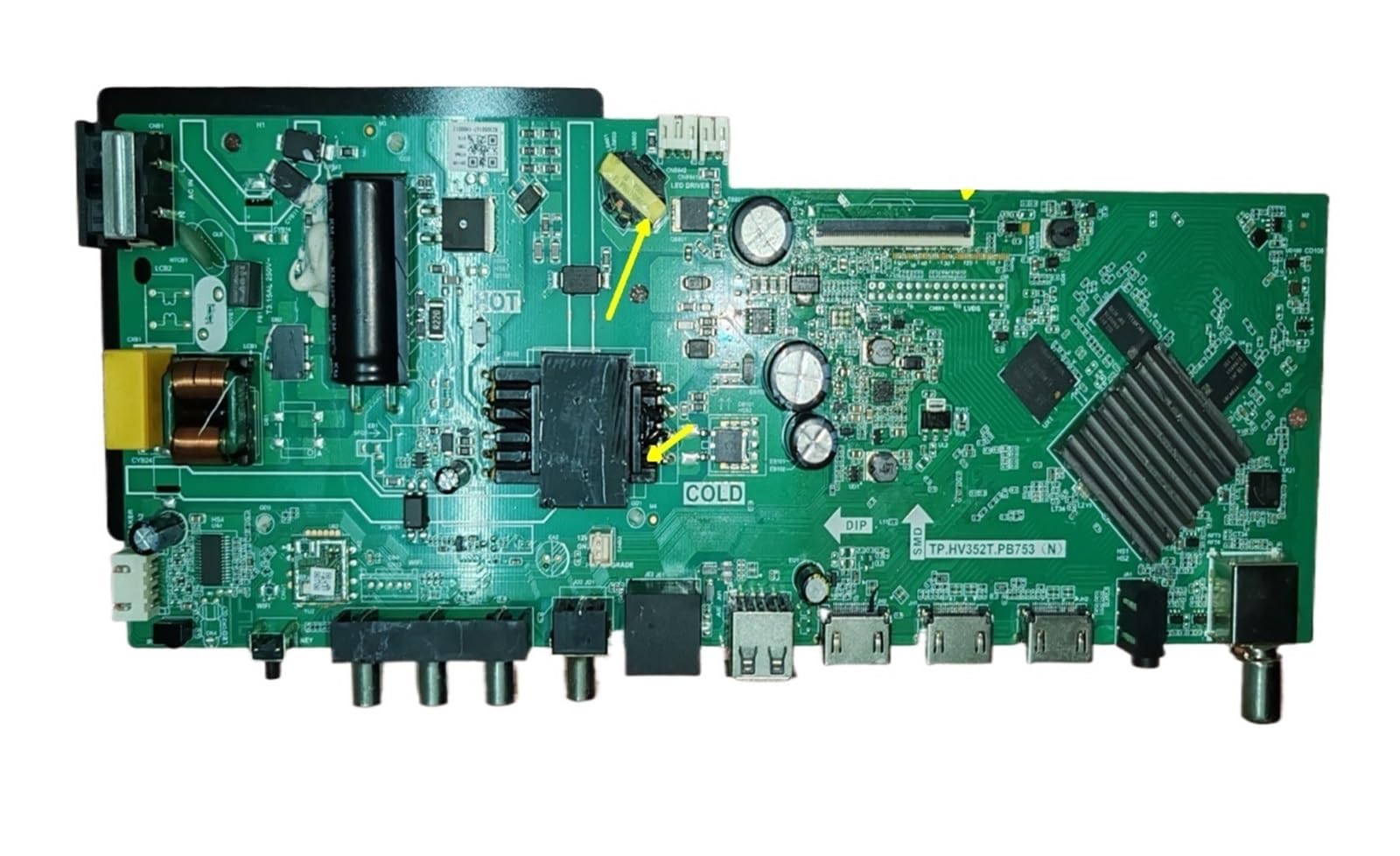
Rycina 1: Przód view of the SEEIRIR TP.HV352T.PB753(N) TV Motherboard, showing various ports and components.
2. Informacje dotyczące bezpieczeństwa
Please read and understand all safety instructions before attempting to install or operate this product. Failure to follow these instructions may result in electric shock, fire, or damage to the product or other equipment.
- Odłączenie zasilania: Always disconnect the television from the main power supply before beginning any installation or maintenance work.
- Elektryczność statyczna: Elementy elektroniczne są wrażliwe na elektryczność statyczną. Podczas dotykania płyty głównej należy stosować odpowiednie środki antystatyczne (np. antystatyczną opaskę na nadgarstek).
- Profesjonalna instalacja: If you are not confident in your ability to perform the installation, seek assistance from a qualified technician.
- Wentylacja: Ensure adequate ventilation around the television after installation to prevent overheating of components.
- Ekspozycja na płyny: Keep the motherboard and television away from liquids and excessive moisture.
- Obsługa komponentów: Trzymaj płytę główną za krawędzie, aby uniknąć dotykania delikatnych podzespołów.
3. Konfiguracja i instalacja
This section provides general guidelines for installing the TP.HV352T.PB753(N) TV Motherboard. Refer to the detailed installation guide included with your product for specific steps and diagrams.
- Przygotuj telewizor:
- Odłącz telewizor od gniazdka elektrycznego.
- Aby chronić ekran, połóż telewizor ekranem do dołu na miękkiej i czystej powierzchni.
- Aby uzyskać dostęp do wewnętrznych podzespołów, zdejmij tylną obudowę telewizora.
- Remove the Old Motherboard:
- Carefully disconnect all cables connected to the existing motherboard (e.g., power, LVDS, backlight, speaker, input ports). Note their positions or take photos for reference.
- Unscrew the mounting screws holding the old motherboard in place.
- Gently lift and remove the old motherboard.
- Install the New Motherboard:
- Align the new SEEIRIR TP.HV352T.PB753(N) motherboard with the mounting holes in the TV chassis.
- Zabezpiecz płytę główną odpowiednimi śrubami. Nie dokręcaj ich zbyt mocno.
- Reconnect all cables to their corresponding ports on the new motherboard. Ensure all connections are firm and correctly oriented. Pay special attention to the LVDS cable and power connections (35-110V, 600mA, FCP 75W).
- Początkowe uruchomienie:
- Before replacing the back cover, plug the TV into a power outlet.
- Power on the TV and check for basic functionality (e.g., power indicator, screen display, sound).
- If issues arise, refer to the Troubleshooting section.
- Montaż końcowy:
- Once basic functionality is confirmed, unplug the TV again.
- Replace the TV's back cover and secure it with screws.
- Reconnect all external peripherals and power up the TV for full testing.
Notatka: The motherboard features clear interface identification to assist with correct cable connections. Always double-check connections before powering on.
4. Działanie
Once the SEEIRIR TP.HV352T.PB753(N) TV Motherboard is correctly installed, the television should function as expected. The motherboard manages all core TV operations.
- Włączanie/wyłączanie: Use the TV's remote control or physical power button to turn the television on or off.
- Wybór wejścia: Select desired input sources (HDMI, AV, USB, etc.) using the TV remote.
- Strojenie kanałów: If applicable, perform channel scanning for over-the-air or cable channels.
- Nawigacja po menu: Access and navigate the TV's on-screen display (OSD) menu for settings adjustments (picture, sound, network, etc.).
Refer to your television's original user manual for detailed instructions on specific TV functions and menu navigation.
5. Konserwacja
The SEEIRIR TP.HV352T.PB753(N) TV Motherboard is designed for durability with industrial-grade PCB. Minimal maintenance is required, but following these guidelines can extend its lifespan and ensure optimal performance:
- Usuwanie kurzu: Periodically clean the interior of the TV (with power disconnected) using compressed air to remove dust buildup, which can impede cooling and cause component failure.
- Wentylacja: Ensure the TV's ventilation openings are not blocked. Proper airflow is crucial to prevent overheating of the motherboard and other internal components.
- Warunki środowiskowe: Operate the TV in a stable environment, avoiding extreme temperatures, high humidity, and direct sunlight.
- Skoki napięcia: Consider using a surge protector to safeguard the TV and its internal components, including the motherboard, from electrical spikes.
6. Rozwiązywanie Problemów
This section addresses common issues you might encounter after installing the SEEIRIR TP.HV352T.PB753(N) TV Motherboard. If problems persist, consult a qualified technician.
| Problem | Możliwa przyczyna | Rozwiązanie |
|---|---|---|
| No Power / TV Does Not Turn On |
|
|
| Black Screen / No Display |
|
|
| Blurred Screen / Distorted Image |
|
|
| Brak sygnału |
|
|
7. Specyfikacje
| Funkcja | Szczegół |
|---|---|
| Numer modelu | TP.HV352T.PB753(N) |
| Marka | SEEIRIR |
| Compatible & Video Equipment Style | Sprzęt wystawowy |
| Wejście Voltage Zakres | 35-110 V |
| Wyjście prądowe | 600mA |
| Power Output (Variant) | FCP 75W |
| Waga przedmiotu | 500 gram |
| ASIN | B0FF41WYG7 |
8. Gwarancja i obsługa klienta
Informacje o gwarancji:
Specific warranty terms for the SEEIRIR TP.HV352T.PB753(N) TV Motherboard are typically provided by the seller at the time of purchase. Please refer to your purchase documentation or contact the seller directly for details regarding warranty coverage, duration, and claims procedures. Standard return policies may apply as per the retailer's terms.
Obsługa klienta:
For technical assistance, installation queries, or troubleshooting beyond the scope of this manual, please contact the seller or manufacturer directly. You can typically find their contact information on your purchase invoice or the product packaging.
Sprzedający: taizhoushidimaimaoyistore