
Ameta S20 Pro
Instrukcja obsługi drona GPS Ameta S20 Pro
Model: S20 Pro
1. Wprowadzenie
This manual provides essential instructions for the safe operation, setup, and maintenance of your Ameta S20 Pro GPS Drone. Please read this manual thoroughly before operating the drone to ensure proper function and to prevent damage or injury.

Image 1.1: The Ameta S20 Pro drone in flight, showcasing its design and operational context.
2. Wytyczne bezpieczeństwa
Adherence to these safety guidelines is crucial for safe operation and to avoid potential hazards.
- Kontrola przed lotem: Always inspect the drone, remote control, and batteries for any damage before each flight.
- Warunki środowiskowe: Avoid flying in strong winds, rain, snow, or fog. Maintain a clear line of sight to the drone.
- Obszar lotu: Operate the drone in open areas, away from people, animals, buildings, and power lines. Do not fly over crowds.
- Bezpieczeństwo baterii: Use only approved batteries and chargers. Do not overcharge or puncture batteries. Discontinue use if batteries show signs of swelling or damage.
- Szanuj lokalne przepisy: Be aware of and comply with all local aviation laws and regulations regarding drone operation. The Ameta S20 Pro weighs under 249g, which may exempt it from registration requirements in some regions. Always verify local laws.

Image 2.1: The Ameta S20 Pro drone, highlighting its lightweight design (under 249g) and potential exemption from registration in certain jurisdictions. Users should always check local regulations.
3. Zawartość opakowania
Sprawdź, czy w przesyłce znajdują się wszystkie elementy wymienione poniżej:
- Dron GPS z kamerą 4K
- Zdalne sterowanie
- 2 x Batteries (3000mAh)
- Instrukcja obsługi
- Etui transportowe
- Zapasowe śmigła (8 sztuki)
- Kabel ładujący USB
- Śrubokręt

Image 3.1: All components included in the Ameta S20 Pro drone package.
4. Koniec produktuview
4.1 Komponenty drona
Familiarize yourself with the various parts of the Ameta S20 Pro drone.

Image 4.1: The Ameta S20 Pro drone with its arms extended.
- Śmigła: Four propellers for lift and propulsion.
- Silniki bezszczotkowe: Provide efficient and stable flight.
- Kamera 4K: Integrated camera with 13MP Sony IMX258 sensor for high-resolution photo and video capture.
- Komora baterii: Houses the flight battery.
- Wskaźniki LED: Provide status information during flight and operation.
4.2 Pilot zdalnego sterowania
The remote control allows for precise manipulation of the drone's flight and camera functions.
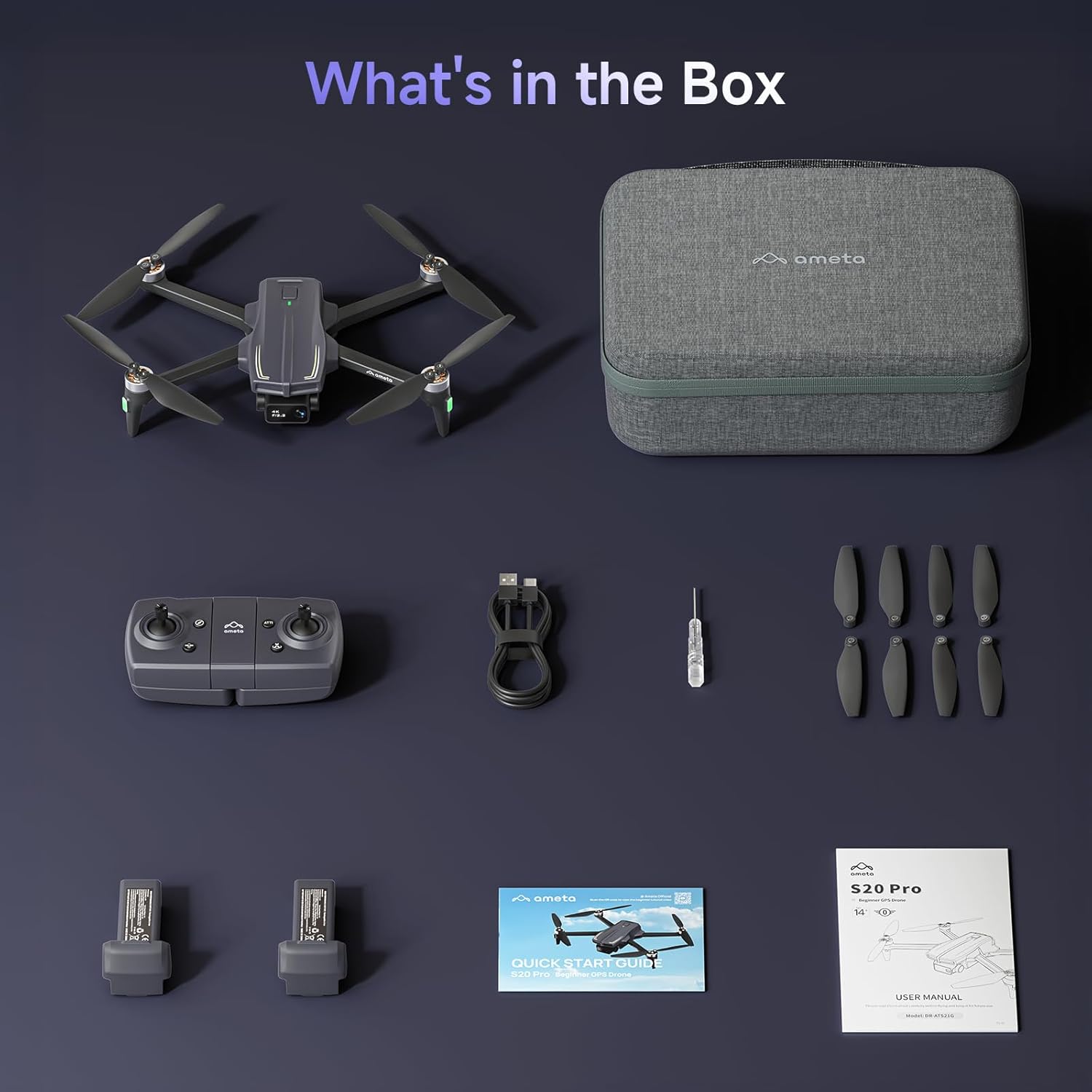
Image 4.2: The remote control with a smartphone holder.
- Drążki sterujące: Do sterowania lotem kierunkowym i wysokością.
- Uchwyt do smartfona: Bezpieczne trzymanie smartfona podczas FPV viewi sterowanie aplikacją.
- Przyciski funkcyjne: Dedicated buttons for takeoff/landing, Return-to-Home, photo/video capture, and speed adjustment.
5. Konfiguracja
5.1 Ładowanie akumulatora
- Insert the flight battery into the drone's battery compartment.
- Connect the USB charging cable to the drone's charging port and a USB power adapter (not included).
- The LED indicator on the drone will show charging status. A full charge typically takes approximately 2 hours for each 3000mAh battery.
- The drone cannot be flown while the battery is charging.

Image 5.1: Illustration of the drone battery and its extended flight duration.
5.2 Instalacja śmigła
Ensure propellers are correctly installed before flight. Match propellers with corresponding motor arms (A and B markings).
- Zidentyfikuj śmigła oznaczone literami „A” i „B”.
- Attach 'A' propellers to motor arms marked 'A', and 'B' propellers to motor arms marked 'B'.
- Przymocuj każde śmigło dołączonymi śrubami, używając śrubokręta.
5.3 Zdalne sterowanie i konfiguracja aplikacji
- Włóż do pilota 3 baterie AAA (nie ma ich w zestawie).
- Download the Ameta flight app from your device's app store.
- Włącz drona, a następnie włącz pilota.
- Connect your smartphone to the drone's Wi-Fi network (usually named 'Ameta-S20Pro-XXXX').
- Open the Ameta flight app to establish a connection.
5.4 Kalibracja
Perform compass and gyroscope calibration before the first flight and whenever flying in a new location.
- Follow the on-screen instructions in the Ameta app for compass calibration. This typically involves rotating the drone horizontally and vertically.
- Place the drone on a flat, level surface for gyroscope calibration.
6. Instrukcja obsługi
6.1 Kontrole przed lotem
- Ensure batteries are fully charged in both drone and remote control.
- Propellers are securely attached and undamaged.
- Drone is placed on a flat, open surface.
- GPS signal is acquired (indicated by solid green lights on the drone).
6.2 Start i lądowanie
- Start za pomocą jednego przycisku: Press the one-button takeoff icon on the remote control or in the app. The drone will automatically ascend to a safe altitude and hover.
- Start ręczny: Przesuń oba drążki sterownicze w dół i na zewnątrz, aby uruchomić silniki. Powoli przesuń lewy drążek w górę, aby wznieść się.
- Lądowanie za pomocą jednego przycisku: Press the one-button landing icon. The drone will descend and land automatically.
- Lądowanie ręczne: Powoli pociągnij lewy drążek w dół, aby opaść. Po wylądowaniu, pchnij oba drążki w dół i do środka, aby zatrzymać silniki.

Image 6.1: Key beginner-friendly features of the Ameta S20 Pro drone.
6.3 Sterowanie lotem
Use the control sticks on the remote for basic flight maneuvers:
- Lewy drążek (przepustnica/odchylenie): Up/Down for altitude, Left/Right for rotation.
- Prawy drążek (pochylenie/przechylenie): Góra/Dół - ruch do przodu/do tyłu, Lewo/Prawo - ruch w lewo/prawo.
6.4 Inteligentne tryby lotu
The Ameta S20 Pro features several intelligent flight modes for enhanced control and creative shots. Note: GPS features are only available when GPS mode is enabled and a strong GPS signal is acquired.
- Powrót do domu (RTH): Automatically brings the drone back to its takeoff point. Activated by a button press, low battery, or signal loss.

Image 6.2: Visual representation of the Return-to-Home function.
- Lot punktowy: Set custom points on a map, and the drone will follow the designated path.

Image 6.3: The drone executing a Waypoint Flight path.
- Okrągła mucha: The drone orbits around a selected point, capturing circular footage.

Image 6.4: The drone performing a Circle Fly maneuver.
- GPS Śledź mnie: The drone automatically follows the remote control (and thus the user), keeping them in the frame.

Image 6.5: The drone utilizing GPS Follow Me mode.
- Other Creative Modes: Rocket, Orbit, Dolly Zoom, Panorama, Time-lapse, and Gesture Selfie are available via the app for diverse shooting options.

Obraz 6.6: Koniecview of creative shooting modes.
6.5 Obsługa kamery
The Ameta S20 Pro is equipped with a 4K camera for high-quality imaging.

Image 6.7: Details of the 4K camera with 13MP sensor.
- Przechwytywanie zdjęć/wideo: Użyj dedykowanych przycisków na pilocie lub w interfejsie aplikacji, aby robić zdjęcia lub rozpoczynać/zatrzymywać nagrywanie wideo.
- FPV (widok z pierwszej osoby) View): The 5G WiFi transmission provides real-time video feed to your connected smartphone.
- Regulowany obiektyw: The camera lens can be adjusted 90 degrees for varied shooting angles.
- Składowanie: Photos and videos are saved to a microSD card (not included) inserted into the drone.
7. Konserwacja
7.1 Czyszczenie
- Po każdym użyciu przetrzyj drona i pilota miękką, suchą ściereczką.
- Nie używaj żrących chemikaliów ani rozpuszczalników.
- Ensure no dust or debris obstructs the camera lens or motor vents.
7.2 Wymiana śmigła
Replace damaged or bent propellers immediately to ensure stable flight.
- Wyłącz drona.
- Use the provided screwdriver to remove the screws securing the damaged propeller.
- Ostrożnie zdejmij uszkodzone śmigło.
- Install a new propeller, ensuring it matches the 'A' or 'B' marking of the motor arm.
- Secure the new propeller with screws.
7.3 Pielęgnacja i przechowywanie baterii
- Przechowuj baterie w chłodnym i suchym miejscu, z dala od bezpośredniego światła słonecznego i ekstremalnych temperatur.
- W przypadku długotrwałego przechowywania naładuj akumulatory do poziomu około 50–60%.
- Nie należy przechowywać całkowicie naładowanych lub całkowicie rozładowanych baterii przez dłuższy czas.
8. Rozwiązywanie Problemów
| Problem | Możliwa przyczyna | Rozwiązanie |
|---|---|---|
| Dron się nie włącza | Niski poziom naładowania baterii; Bateria nie została prawidłowo włożona | Charge battery; Reinsert battery securely |
| No connection to remote control | Remote control battery low; Pairing failed | Replace remote control batteries; Re-pair drone and remote control |
| Niestabilny lot/dryfowanie | Improper calibration; Damaged propellers; Strong winds | Perform gyroscope and compass calibration; Replace damaged propellers; Fly in calm conditions |
| Brak transmisji wideo FPV | Phone not connected to drone Wi-Fi; App not open; Weak Wi-Fi signal | Connect to drone Wi-Fi; Open app; Fly closer to drone |
| Funkcje GPS nie działają | Weak GPS signal; GPS mode not enabled | Fly in an open area with clear sky; Ensure GPS mode is enabled in app |
| Drone lost during flight | Out of range; RTH not activated | Use the 'Find Your Drone' feature in the app (if available and GPS was active). Always fly within visual line of sight. |

Image 8.1: The 'Find Your Drone' feature on the app, useful for locating a lost drone if GPS was active.
9. Specyfikacje
| Funkcja | Szczegół |
|---|---|
| Marka | Ameta |
| Nazwa modelu | S20 Pro |
| Rozdzielczość przechwytywania wideo | 4K |
| Efektywna rozdzielczość obrazu nieruchomego | 13 MP |
| Technologia łączności | Wi-Fi (5 G) |
| Cechy specjalne | 13MP Sensor, 50-Min Flight Time, GPS Drone, One Button Return, Speed Adjustment |
| Poziom umiejętności | Początkujący |
| Waga przedmiotu | 20.14 uncji (ok. 571 g) |
| Pojemność baterii | 3000 mlnamp Godziny (na baterię) |
| Wymiary produktu (złożony) | 8.27" dł. x 10.43" szer. x 3.15" wys. |
| Tworzywo | ABS |

Image 9.1: Product dimensions of the Ameta S20 Pro drone.
10. Gwarancja i wsparcie
The Ameta S20 Pro GPS Drone comes with a standard manufacturer's warranty. For specific warranty terms, duration, and conditions, please refer to the warranty card included in your package or contact Ameta customer support.
For technical assistance, troubleshooting not covered in this manual, or to inquire about replacement parts, please contact Ameta customer support through the contact information provided on the official Ameta webwitrynę lub platformę zakupową.
Ask a question about this manual
Ask about setup, troubleshooting, compatibility, parts, safety, or missing instructions. Manuals+ will review the question and use this page’s manual context to help answer it.