Wstęp
This user manual provides comprehensive instructions for the Baseus Enercore Product Bundle, which includes a 67W Retractable USB C Charger and a 10000mAh Fast Charging Portable Power Bank. Please read this manual carefully before using the products to ensure safe and optimal performance.
Informacje dotyczące bezpieczeństwa
- Nie wystawiaj urządzeń na działanie ekstremalnych temperatur, bezpośredniego światła słonecznego i wysokiej wilgotności.
- Unikaj upuszczania urządzeń i narażania ich na silne uderzenia.
- Do not disassemble, repair, or modify the devices.
- Przechowywać w miejscu niedostępnym dla dzieci.
- Należy używać wyłącznie oryginalnych lub certyfikowanych kabli i adapterów.
- Odłącz ładowarkę od gniazdka sieciowego, gdy nie jest używana.
- Jeśli powerbank puchnie, przecieka lub wydziela nietypowy zapach, należy natychmiast zaprzestać jego używania.
Zawartość opakowania
- 1 x Baseus Enercore 67W Retractable USB C Charger
- 1 x Baseus Enercore 10000mAh Fast Charging Portable Power Bank
- 1 x Instrukcja obsługi (ten dokument)

Image: The Baseus Enercore 67W Retractable USB C Charger (left) and the 10000mAh Portable Power Bank (right).
Produkt ponadview
Baseus Enercore 67W Retractable USB C Charger
This compact wall charger features a 67W power output, two USB-C ports, and a built-in retractable USB-C cable for convenient charging of multiple devices simultaneously.

Image: The 67W charger connected to a smartphone, illustrating its high-speed charging capability.

Image: The 67W charger with its retractable USB-C cable extended, charging a MacBook Pro.
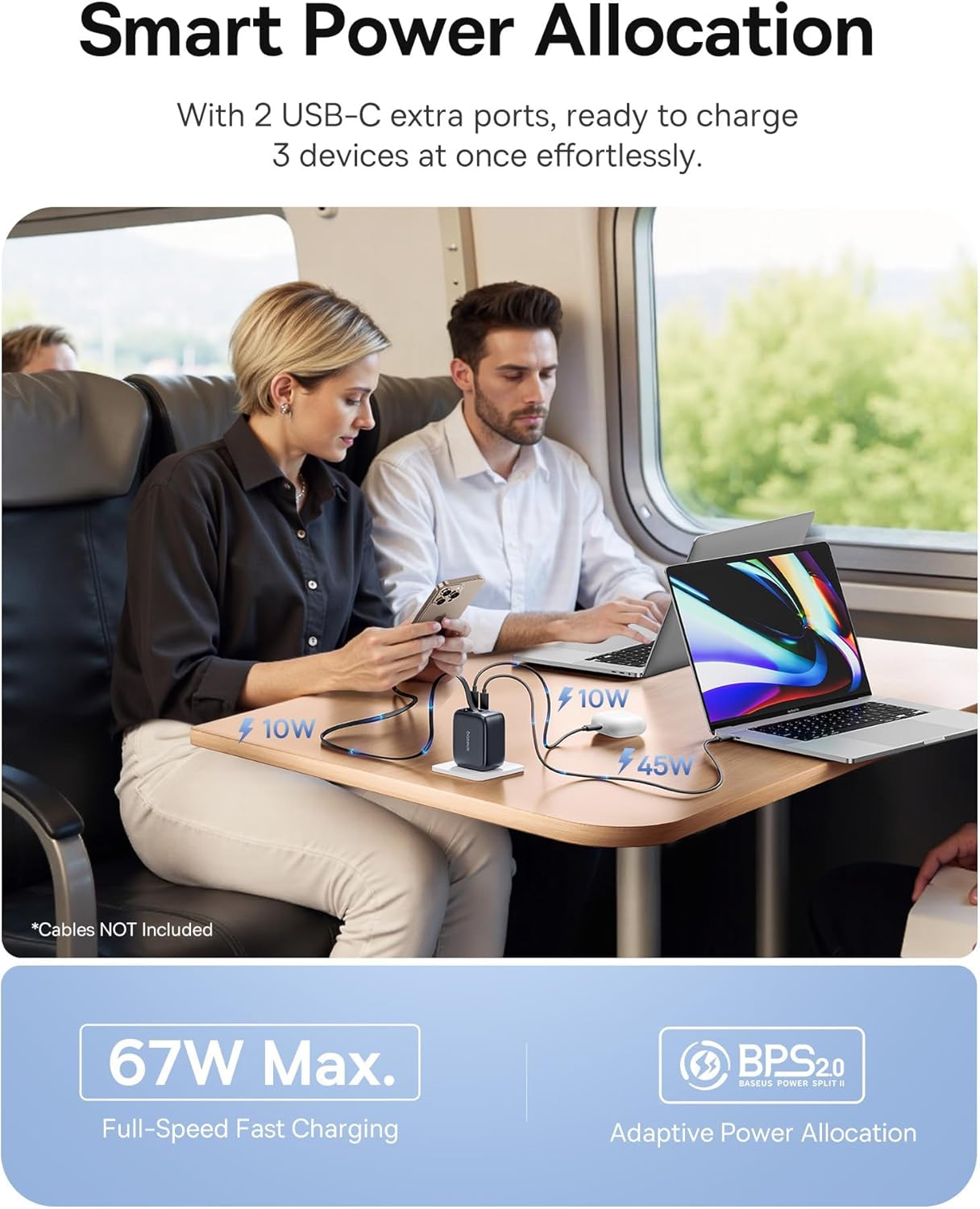
Image: The 67W charger in use, demonstrating its ability to charge three devices simultaneously with smart power allocation.

Image: Close-up of the 67W charger highlighting its foldable prongs and compact, travel-ready design.
Baseus Enercore 10000mAh Portable Power Bank
This portable power bank features a 10000mAh capacity, 45W fast charging, and an integrated retractable USB-C cable, making it ideal for on-the-go power needs.

Image: The 10000mAh power bank showcasing its integrated retractable USB-C cable for convenience.

Obraz: Wybuch view of the 10000mAh power bank's internal components and a size comparison to a soda can.

Image: The 10000mAh power bank connected to an iPhone, demonstrating its 45W fast charging capability.

Image: A close-up of the power bank's integrated smart digital display, showing the battery percentage.
Organizować coś
Initial Power Bank Charging
- Before first use, fully charge the Baseus Enercore Power Bank.
- Connect the power bank to the 67W charger or another compatible USB-C power source using the integrated retractable cable or a separate USB-C cable.
- The digital display will show the charging progress. Charging is complete when the display shows 100%.
Instrukcja obsługi
Using the 67W Retractable USB C Charger
- Podłącz do zasilania: Fold out the prongs and plug the charger into a standard wall outlet.
- Urządzenia ładujące:
- For devices with a USB-C port, gently pull the integrated retractable USB-C cable from the charger and connect it to your device.
- For additional devices, use your own USB-C to USB-C or USB-C to Lightning cables and connect them to the available USB-C ports on the charger.
- Zwiń kabel: After use, gently pull the retractable cable slightly further out, then release it to allow it to retract back into the charger.
- Fold Prongs: Fold the prongs back into the charger for compact storage.
Using the 10000mAh Portable Power Bank
- Sprawdź poziom naładowania baterii: Press the power button once to activate the digital display and check the remaining battery percentage.
- Urządzenia ładujące:
- Gently pull the integrated retractable USB-C cable from the power bank and connect it to your device's USB-C port.
- Power bank automatycznie rozpocznie ładowanie Twojego urządzenia.
- Power Bank do ładowania: When the power bank's battery is low, recharge it using a compatible USB-C charger (like the included 67W charger) and the integrated cable.
- Zwiń kabel: After use, gently pull the retractable cable slightly further out, then release it to allow it to retract back into the power bank.
Konserwacja
- Czyszczenie: Use a soft, dry cloth to wipe the surface of the devices. Do not use liquid cleaners or aerosols.
- Składowanie: Przechowuj urządzenia w chłodnym, suchym miejscu, z dala od bezpośredniego światła słonecznego i ekstremalnych temperatur.
- Pielęgnacja kabli: When retracting the cables, ensure they are not twisted or forced.
Rozwiązywanie problemów
| Problem | Możliwa przyczyna | Rozwiązanie |
|---|---|---|
| Device not charging from charger. | Charger not plugged in correctly; cable faulty; device incompatible. | Ensure charger is firmly plugged into outlet. Try a different cable. Verify device compatibility. |
| Power bank nie ładuje. | Charging cable faulty; power source insufficient; power bank depleted. | Try a different USB-C cable and charger. Ensure the power source is active. Allow sufficient time for charging. |
| Kabel zwijany nie zwija się płynnie. | Kabel jest skręcony lub zablokowany. | Gently pull the cable out slightly further, then release it. Ensure no obstructions. Do not force. |
| Powolne ładowanie. | Kabel nie obsługuje szybkiego ładowania; urządzenie nie obsługuje szybkiego ładowania; podłączonych jest wiele urządzeń. | Use a high-quality, fast-charging compatible cable. Ensure your device supports fast charging. Charging speed may decrease when multiple devices are connected. |
Specyfikacje
Baseus Enercore 67W Retractable USB C Charger
- Model: CJ11 (part of bundle)
- Moc wyjściowa: Maks. do 67 W
- Porty: 2 x USB-C, 1 x Integrated Retractable USB-C Cable
- Cechy: Foldable Prongs, Smart Power Allocation (BPS2.0)
Baseus Enercore 10000mAh Portable Power Bank
- Model: (part of bundle)
- Pojemność: 10000mAh
- Moc wyjściowa: Up to 45W PD Fast Charging
- Kabel: Built-in 45W Retractable USB-C Cable
- Wyświetlacz: Integrated Smart Digital Display
- Zgodność: iPhone 16/15 Series, Samsung Galaxy series, Google Pixel, iPad, AirPods, Drone, GoPro, etc.
Gwarancja i wsparcie
Baseus products typically come with a limited warranty. For specific warranty terms and conditions, please refer to the warranty card included with your purchase or visit the official Baseus webAby uzyskać pomoc techniczną, pomoc w rozwiązywaniu problemów lub zapytać o części zamienne, skontaktuj się z obsługą klienta Baseus za pośrednictwem oficjalnych kanałów.
Więcej informacji i danych kontaktowych znajdziesz na stronie Sklep Baseus na Amazon.