
1. Koniec produktuview
The WESECUU Light Bulb Security Camera offers comprehensive home surveillance with easy installation. Designed for both indoor and outdoor use, this camera provides a 360° panoramic view, motion tracking, and AI detection for enhanced security.
- Bezproblemowa instalacja: Screws into a standard light bulb socket, requiring no drilling or complex wiring.
- Panoramiczny 360 ° View & Auto Motion Tracking: Provides full-area coverage and automatically follows detected movement.
- Inteligentne wykrywanie AI: Distinguishes between people and other movements to reduce false alerts.
- Dwukierunkowy dźwięk: Features a built-in speaker and microphone for real-time communication.
- 24/7 Day & Night Monitoring: Ensures continuous surveillance in various lighting conditions.

2. Zawartość opakowania
Sprawdź, czy w przesyłce znajdują się wszystkie elementy:
- WESECUU Light Bulb Security Camera
- Instrukcja obsługi (ten dokument)
3. Instrukcje konfiguracji
3.1 Fizyczna instalacja
The camera is designed for simple installation into a standard E27/E26 light bulb socket.
- Ensure the power to the light socket is turned off at the circuit breaker before installation.
- Carefully screw the WESECUU Light Bulb Security Camera into the light bulb socket until it is secure. Do not overtighten.
- Turn the power back on at the circuit breaker. The camera will power on and initiate its startup sequence.
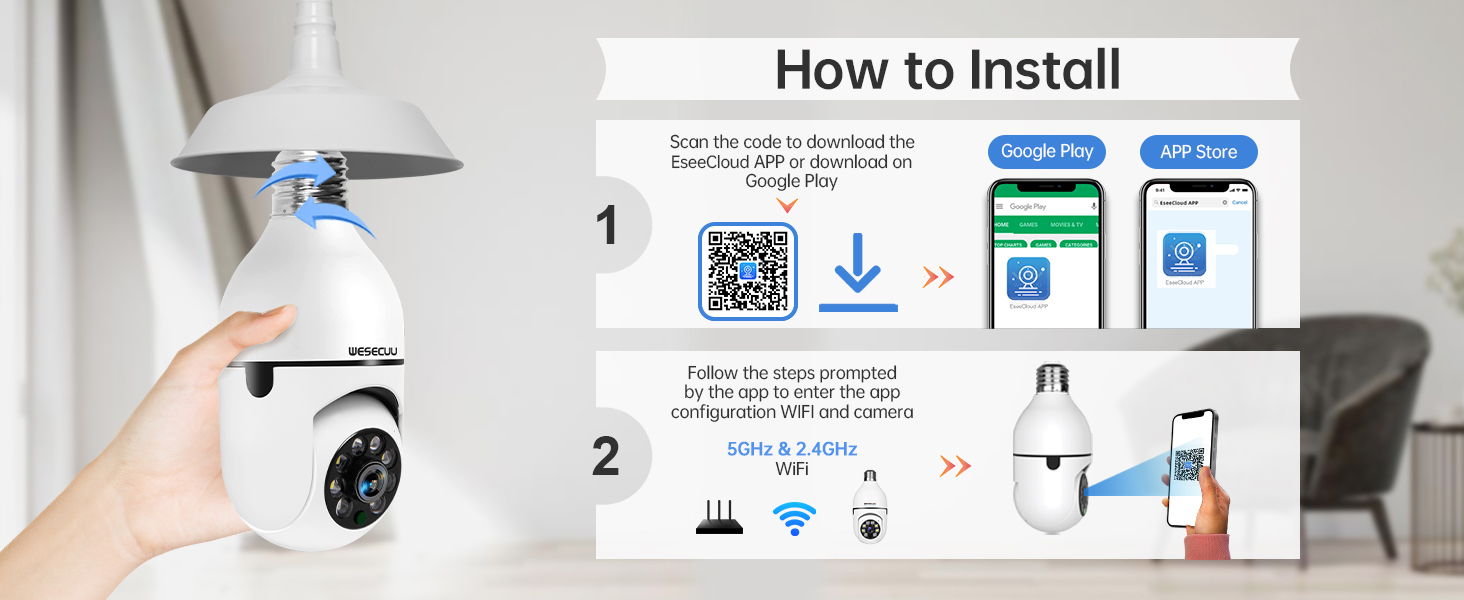
3.2 Pobieranie aplikacji i parowanie aparatu
To operate your camera, you need to download the EseeCloud APP and pair the device.
- Download the EseeCloud APP from the Google Play Store or Apple App Store. You can also scan the QR code provided in the installation image below or visit http://www.e-seenet.com/download/indexm.php?p=tjesee.
- Open the EseeCloud APP and create an account or log in.
- Follow the in-app instructions to add your new camera. Ensure your smartphone is connected to a 2.4GHz or 5GHz Wi-Fi network during the pairing process. The camera supports both 2.4GHz and 5GHz Wi-Fi.
- Once successfully paired, you can access the live feed and camera settings through the app.
4. Instrukcja obsługi
4.1 Na żywo View i odtwarzanie
Access the EseeCloud APP to view transmisję na żywo z kamery. Możesz również ponownieview nagrano footage from the SD card (if installed) or cloud storage (if subscribed).

4.2 Detekcja ruchu i śledzenie
The camera features advanced motion detection and automatic tracking. When motion is detected, the camera will pan and tilt to follow the subject, ensuring continuous coverage. Alerts will be sent to your smartphone.

4.3 AI Detection Alerts
The integrated AI technology helps differentiate between human movement and other sources of motion, such as pets or passing vehicles, reducing irrelevant notifications.

4.4 Dźwięk dwukierunkowy
Utilize the two-way audio feature to communicate through the camera. This allows you to speak to visitors, deter intruders, or comfort pets remotely.

4.5 Widzenie nocne
The camera provides both full-color night vision and infrared night vision modes for clear monitoring in low-light conditions.

4.6 Opcje przechowywania
The camera supports local storage via an SD card (16-128GB, not included) and offers optional cloud storage plans for continuous recording and advanced features.

5. Konserwacja
To ensure optimal performance and longevity of your WESECUU Light Bulb Security Camera, follow these maintenance guidelines:
- Czyszczenie soczewek: Gently wipe the camera lens with a soft, dry microfiber cloth to remove dust or smudges. Avoid abrasive cleaners.
- Zasilanie: Ensure the camera receives a stable power supply. Avoid frequent power interruptions.
- Aktualizacje oprogramowania układowego: Regularly check the EseeCloud APP for available firmware updates to ensure your camera has the latest features and security enhancements.
- Warunki środowiskowe: While designed for outdoor use, avoid direct exposure to extreme weather conditions if possible, and ensure the light socket is weather-protected.
6. Rozwiązywanie Problemów
If you encounter issues with your WESECUU Light Bulb Security Camera, refer to the following common solutions:
- Kamera nie łączy się z Wi-Fi:
- Ensure your Wi-Fi network is 2.4GHz or 5GHz and stable.
- Sprawdź, czy hasło Wi-Fi jest poprawnie wprowadzone w aplikacji.
- Podczas konfiguracji przesuń kamerę bliżej routera Wi-Fi.
- Uruchom ponownie router i kamerę.
- Brak obrazu lub czarny ekran:
- Check if the camera is properly powered on and the light socket has power.
- Ensure the camera lens is not obstructed.
- Restart the camera by turning off and on the power to the socket.
- Wykrywanie ruchu nie działa:
- Check motion detection settings in the EseeCloud APP.
- Ensure the detection sensitivity is set appropriately.
- Verify that notification permissions are enabled for the app on your smartphone.
- Słaba jakość obrazu:
- Wyczyść obiektyw aparatu.
- Aby uzyskać optymalną czytelność obrazu, zwłaszcza w przypadku widzenia kolorów w nocy, należy zadbać o odpowiednie oświetlenie.
- Check your internet connection speed, as a slow connection can affect streaming quality.

Figure 10: Visual comparison demonstrating the superior clarity of WESECUU's 3MP resolution compared to other standard resolutions.
7. Specyfikacje
| Funkcja | Specyfikacja |
|---|---|
| Numer modelu | TP-8052BW3 |
| Marka | WESECUU |
| Zastosowanie wewnątrz/na zewnątrz | Plenerowy |
| Technologia łączności | Bezprzewodowy (Wi-Fi) |
| Protokół łączności | Wi-Fi (2.4 GHz i 5 GHz) |
| Źródło zasilania | Elektryczny przewodowy |
| Rozdzielczość przechwytywania wideo | 4K |
| Typ montażu | Montaż sufitowy |
| Funkcja specjalna | Nastawny |
| Kompatybilne urządzenia | Amazon Alexa |
| Typ kontrolera | Amazon Alexa |
| Wymiary produktu (dł. x szer. x wys.) | 1 x 1 x 1 cala |
| Waga przedmiotu | 7.2 uncji (0.21 kilograma) |
8. Informacje o gwarancji
For detailed warranty information, please refer to the warranty card included with your product packaging or visit the official WESECUU webWarunki gwarancji mogą się różnić w zależności od regionu i daty zakupu.
9. Obsługa klienta
If you require further assistance or have questions not covered in this manual, please contact WESECUU customer support:
- Infolinia dla klientów: +1-888-9716718
- Godziny pracy: Pacific Standard Time 6:00 PM - 3:00 AM, Monday to Friday
- Wsparcie online: Visit the official WESECUU webwitryna z odpowiedziami na często zadawane pytania, zasobami pomocy i formularzami kontaktowymi.