
MOBAPAD Huben2 H6
MOBAPAD Huben2 Wireless Switch Controller Pro Instruction Manual
Model: Huben2 H6 | Brand: MOBAPAD
1. Wprowadzenie
This manual provides detailed instructions for the setup, operation, and maintenance of your MOBAPAD Huben2 Wireless Switch Controller Pro. Please read this manual thoroughly before using the product to ensure optimal performance and longevity.
2. Informacje dotyczące bezpieczeństwa
- Trzymaj kontroler z dala od wody i innych płynów.
- Nie wystawiaj kontrolera na działanie ekstremalnych temperatur.
- Unikaj upuszczania kontrolera i narażania go na silne uderzenia.
- Do not attempt to disassemble or repair the controller yourself. Contact customer support for assistance.
- Do ładowania należy używać wyłącznie dołączonego kabla ładującego lub certyfikowanego kabla USB-C.
3. Zawartość opakowania
Sprawdź, czy w przesyłce znajdują się wszystkie elementy:
- MOBAPAD Huben2 Wireless Controller Pro
- Kabel ładujący USB-C
- Wireless Dongle (2.4G)
- PU Travel Case
- Replaceable D-pad (Cross/Circle)
- Instrukcja obsługi (ten dokument)
4. Układ kontrolera
Familiarize yourself with the buttons and features of your Huben2 controller.

Rycina 4.1: Przód view of the MOBAPAD Huben2 Wireless Controller Pro. Shows the joysticks, face buttons (A, B, X, Y), D-pad, and central function buttons.
- Lewy/prawy drążek analogowy: Capacitive joysticks with 4,096-step precision.
- Przyciski A/B/X/Y: Omron mechanical face buttons.
- D-pad: Replaceable cross or circle D-pad.
- L1/R1 (Przyciski na ramionach): Standard shoulder buttons.
- L2/R2 (Wyzwalacze): Dual-mode triggers (Hall Effect and Microswitch).
- Przyciski M1/M2/M3/M4: Four programmable back buttons.
- Przycisk Home: Powers on/off and returns to system home screen.
- Przycisk zrzutu ekranu: Robi zrzuty ekranu.
- Przyciski plus/minus: Standard system menu buttons.
- Przycisk Turbo: Włącza/wyłącza funkcję turbo.
- Port USB-C: Do ładowania i przewodowego połączenia.

Rysunek 4.2: Tył view showing the four programmable M1, M2, M3, M4 back buttons.
5. Konfiguracja
5.1 Ładowanie Kontrolera
Before first use, fully charge the controller. Connect the provided USB-C cable to the controller's USB-C port and the other end to a USB power source (e.g., console, PC, or USB wall adapter). The charging indicator will show the charging status.
- A full charge provides approximately 15 hours of gameplay.

Figure 5.1: The controller features a 1000mAh battery for extended gameplay.
5.2 Tryby połączenia
The Huben2 controller supports three connection methods:

Figure 5.2: The controller supports 2.4G wireless, Bluetooth, and wired connections across various platforms.
- 2.4G Wireless (via Dongle):
- Compatible with Windows PC, Steam, and Android TV.
- Insert the 2.4G wireless dongle into a USB port on your device.
- Włącz kontroler. Powinien automatycznie połączyć się z kluczem sprzętowym.
- Bezprzewodowe Bluetooth:
- Compatible with Nintendo Switch, Nintendo Switch 2, Android, and iOS devices.
- Na swoim urządzeniu przejdź do ustawień Bluetooth i włącz Bluetooth.
- On the controller, press and hold the Bluetooth pairing button (refer to controller layout for exact location) until the indicator lights flash rapidly.
- Select "MOBAPAD Huben2" from the list of available devices on your system to pair.
- For Nintendo Switch, the controller can wake the console from sleep mode after initial pairing and firmware update via the Mobapad app.
- Połączenie przewodowe:
- Compatible with Windows PC and Android TV.
- Connect the controller to your device using the USB-C cable. The controller will be recognized automatically.
6. Instrukcja obsługi
6.1 Włączanie/wyłączanie zasilania
- Włączanie: Naciśnij przycisk Home.
- Wyłączone: Press and hold the Home button for 3-5 seconds. The controller will also power off automatically after a period of inactivity.
6.2 Dual Trigger Modes
The L2 and R2 triggers feature dual modes for different gaming experiences:

Figure 6.1: Visual representation of the 2mm Microswitch Trigger and 10mm Hall Linear Trigger modes.
- Microswitch Trigger (2mm): Provides a short, tactile click for rapid input, ideal for FPS games.
- Hall Effect Linear Trigger (10mm): Offers analog input with a longer travel distance, suitable for racing or simulation games.
- Przełączanie trybów: Use the physical switches located near the L2/R2 triggers to toggle between modes.
6.3 Customizable Features (Back Buttons, Macros, App Support)
The Huben2 controller offers extensive customization options:
- Programmable Back Buttons (M1-M4): Assign single button presses or complex macros to the four back buttons using the dedicated Mobapad PC/mobile application.
- Rapid-Fire Turbo Mode: Activate turbo functionality for any button. Refer to the Mobapad app or controller manual for specific button combinations to enable/disable.
- Mobapad App: Download the official Mobapad application for Windows or mobile devices to:
- Adjust joystick dead zones and response curves.
- Dostosuj intensywność wibracji.
- Twórz i zarządzaj makrami.
- Zaktualizuj oprogramowanie układowe kontrolera.
6.4 HD Rumble and ALPS Linear Motors
The controller features dual ALPS linear motors for precise HD Rumble feedback, reacting to in-game sound and motion with 0ms startup time.
6.5 Sterowanie ruchem 6-osiowym
The integrated 6-axis motion sensor provides precise motion control for compatible games.

Figure 6.2: The controller's internal 6-axis sensing motors enable precise motion control.
6.6 Replaceable D-pad and Faceplate
The controller allows for customization of the D-pad and faceplate.
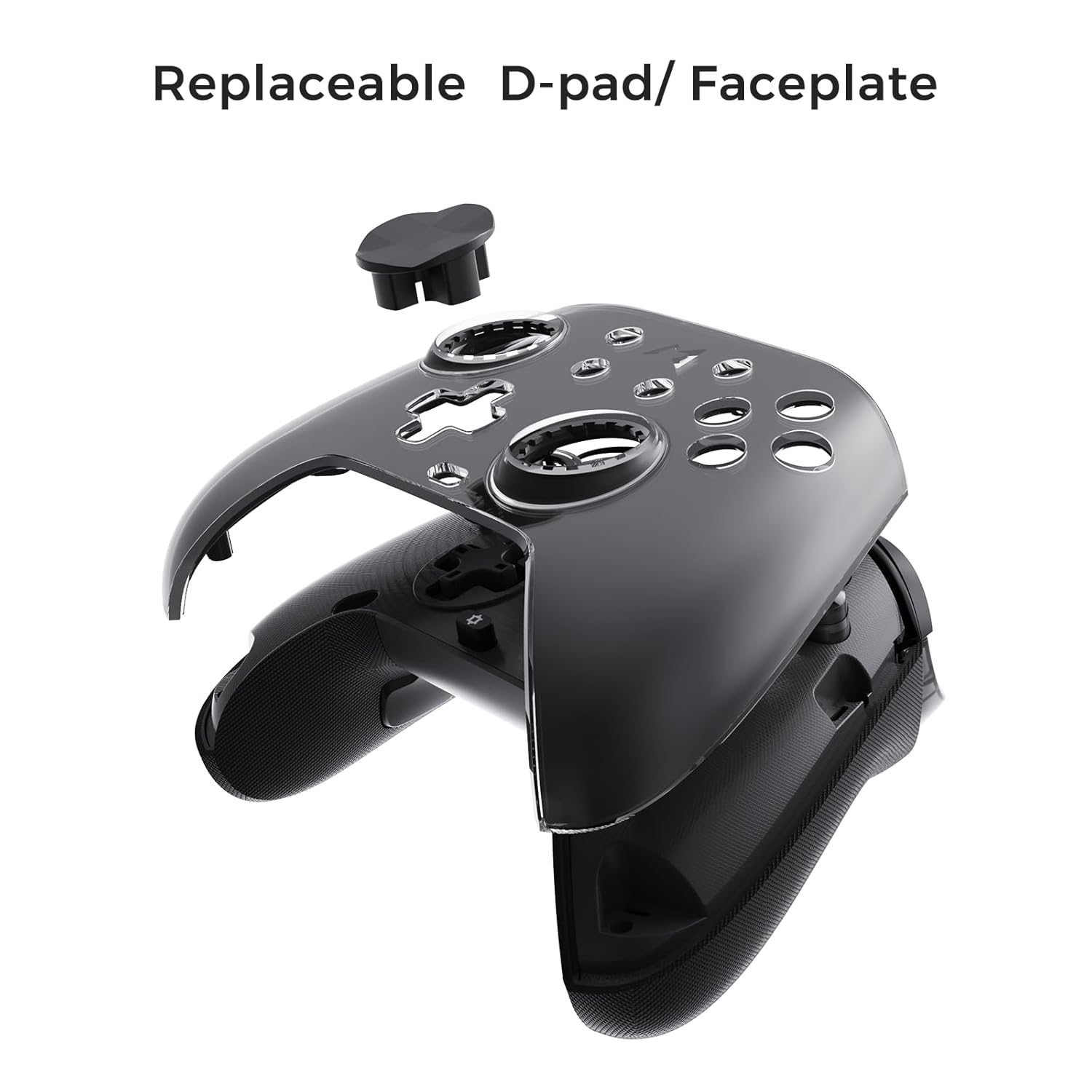
Figure 6.3: The D-pad and faceplate can be replaced for customization or preference.
- To replace the D-pad, gently remove the magnetic faceplate and then lift out the D-pad. Insert the desired D-pad (cross or circle) and reattach the faceplate.
7. Konserwacja
- Czyszczenie: Do czyszczenia kontrolera należy używać miękkiej, suchej ściereczki. W przypadku uporczywych zabrudzeń należy delikatnie przetrzeć kontroler.ampWytrzyj szmatkę wodą. Nie używaj silnych środków chemicznych ani ściernych środków czyszczących.
- Składowanie: Store the controller in a cool, dry place, away from direct sunlight and extreme temperatures. When not in use for extended periods, store it in the provided PU travel case.
- Pielęgnacja baterii: Aby przedłużyć żywotność baterii, unikaj częstego całkowitego rozładowywania kontrolera. Ładuj go regularnie, nawet jeśli nie jest używany regularnie.
8. Rozwiązywanie Problemów
| Problem | Możliwa przyczyna | Rozwiązanie |
|---|---|---|
| Kontroler nie włącza się. | Niski poziom naładowania baterii. | Ładuj kontroler przez co najmniej 30 minut. |
| Kontroler nie łączy się bezprzewodowo. | Not in pairing mode; out of range; interference; incorrect mode selected. | Ensure controller is in pairing mode. Move closer to the device. Check for other wireless devices causing interference. Verify correct connection mode (2.4G or Bluetooth). |
| Input lag or dropped connections. | Wireless interference; low battery; outdated firmware. | Reduce distance to device. Charge controller. Update firmware via Mobapad app. Try wired connection. |
| Przyciski i joysticki nie reagują. | Software glitch; physical obstruction; calibration issue. | Restart the controller and the connected device. Check for physical debris. Calibrate joysticks via Mobapad app. |
| HD Rumble not working. | Feature disabled in game/system settings; low battery. | Ensure rumble is enabled in game and system settings. Charge controller. |
If you encounter issues not listed here, please refer to the official MOBAPAD support webodwiedź witrynę lub skontaktuj się z obsługą klienta.
9. Specyfikacje
| Funkcja | Szczegół |
|---|---|
| Numer modelu | Mobapad Huben2 H6 |
| Łączność | 2.4G bezprzewodowa, Bluetooth, przewodowa (USB-C) |
| Zgodność | Nintendo Switch, Nintendo Switch 2, Windows, Steam, Android, iOS |
| Joysticki | Capacitive, 4,096-step precision, 1000Hz polling rate |
| Wyzwalacze | Dual Mode: 2mm Omron Microswitch, 10mm Hall Effect Linear |
| Pikolak | Omron Mechanical Face Buttons, Programmable Back Buttons (M1-M4) |
| Wibracja | Dual ALPS Linear Motors (HD Rumble) |
| Sterowanie ruchem | Żyroskop osi 6 |
| Pojemność baterii | 1000 mAh litowo-jonowy |
| Żywotność baterii | Do 15 godzin (w przybliżeniu) |
| Wymiary | 6.3 x 4.13 x 2.76 cala |
| Waga | 1.87 funta |
10. Gwarancja i wsparcie
MOBAPAD products are designed and manufactured to the highest quality standards. For warranty information, technical support, or customer service inquiries, please visit the official MOBAPAD website or contact their authorized support channels. Please retain your proof of purchase for warranty claims.
Webstrona: Visit the MOBAPAD Store on Amazon
Ask a question about this manual
Ask about setup, troubleshooting, compatibility, parts, safety, or missing instructions. Manuals+ will review the question and use this page’s manual context to help answer it.