
1. Koniec produktuview
This manual provides essential information for setting up, operating, maintaining, and troubleshooting your HP OMEN 16L Gaming Desktop. This high-performance desktop is equipped with an Intel Core i7-14700F processor, NVIDIA GeForce RTX 4060 graphics, 64GB DDR5 RAM, and a 2TB PCIe NVMe M.2 Solid State Drive, running on Windows 11 Pro.
The HP OMEN 16L is designed for demanding gaming and computing tasks, offering robust performance and efficient cooling. It comes bundled with a Thunderobot KG3089R Gaming Keyboard to enhance your experience.

Obraz 1.1: Przód view of the HP OMEN 16L Gaming Desktop.
2. Przewodnik konfiguracji
2.1 Rozpakowanie i początkowe rozmieszczenie
- Carefully remove the desktop and all accessories from the packaging. Retain packaging for future transport or service.
- Ustaw biurko na stabilnej, płaskiej powierzchni z odpowiednią wentylacją ze wszystkich stron. Upewnij się, że żadne otwory wentylacyjne nie są zasłonięte.
2.2 Podłączanie urządzeń peryferyjnych
Connect your monitor, keyboard, mouse, and other peripherals to the appropriate ports on the desktop. Refer to the 'Ports' section for a detailed diagram.
- Monitor: Connect your monitor using a DisplayPort or HDMI cable to the dedicated graphics card ports.
- Myszka klawiaturowa: Connect the Thunderobot KG3089R Gaming Keyboard and your mouse to any available USB Type-A ports.
- Moc: Connect the power cable to the desktop's power supply port and then to a grounded electrical outlet.
- Sieć: For wired internet, connect an Ethernet cable to the RJ-45 port. For wireless, ensure Wi-Fi 6 is enabled after initial setup.

Obraz 2.1: Example of a complete desktop setup with peripherals connected.
2.3 Pierwsze uruchomienie i konfiguracja systemu Windows 11 Pro
- Naciśnij przycisk zasilania znajdujący się z przodu komputera stacjonarnego.
- Follow the on-screen instructions to complete the Windows 11 Pro initial setup, including language, region, network connection, and user account creation.
- Ensure all drivers are up-to-date after Windows setup for optimal performance.
3. Instrukcja obsługi
3.1 Włączanie/wyłączanie zasilania
- Włączanie: Naciśnij przycisk zasilania znajdujący się z przodu komputera.
- Wyłączone: Click the Start button in Windows, then select Power > Shut down. Avoid direct power-offs unless necessary to prevent data loss.
3.2 Łączność sieciowa
- Przewodowe (Ethernet): Connect an Ethernet cable to the RJ-45 port on the rear of the desktop. The connection should be automatically detected.
- Bezprzewodowa (Wi-Fi 6): W systemie Windows kliknij ikonę sieci na pasku zadań, wybierz swoją sieć Wi-Fi, wprowadź hasło i połącz się.
3.3 Using Ports and Connections
The desktop offers a variety of ports for connecting external devices:
- Porty przednie: 3 x Superspeed USB Type-A (5Gbps signaling rate), 1 x Superspeed USB Type-C (10Gbps signaling rate), 1 x Headphone/Microphone combo.
- Porty tylne: 4 x USB Type-A 2.0, 1 x RJ-45 (Ethernet), 1 x HDMI, 3 x DisplayPort, 2 x Audio Port.

Image 3.1: Front panel ports for easy access.
3.4 Gry i wydajność
The HP OMEN 16L is optimized for gaming. Utilize the pre-installed OMEN Gaming Hub software to monitor system performance, customize RGB lighting, and optimize game settings. Ensure your graphics drivers are regularly updated for the best gaming experience.

Image 3.2: The HP OMEN 16L desktop in a gaming environment.
4. Konserwacja
4.1 Czyszczenie
- Zewnętrzny: Użyj miękkiego, damp Do czyszczenia powierzchni zewnętrznych używaj ściereczki. Unikaj stosowania silnych środków chemicznych.
- Wentylatory: Periodically use compressed air to clear dust from the intake and exhaust vents to maintain optimal airflow and cooling. Ensure the system is powered off before cleaning vents.
4.2 Aktualizacje oprogramowania
- Regularly check for and install Windows updates through the Windows Settings.
- Update graphics drivers (NVIDIA GeForce RTX 4060) directly from the NVIDIA website or through the GeForce Experience application.
- Update HP-specific drivers and firmware using the HP Support Assistant or OMEN Gaming Hub.
4.3 Kopia zapasowa danych
Regularnie twórz kopie zapasowe ważnych danych na dysku zewnętrznym lub w chmurze, aby zapobiec utracie danych w przypadku awarii systemu.
5. Rozwiązywanie Problemów
W tej sekcji omówiono typowe problemy, na które możesz natrafić.
5.1 Brak zasilania
- Upewnij się, że kabel zasilający jest solidnie podłączony zarówno do komputera stacjonarnego, jak i do gniazdka elektrycznego.
- Sprawdź, czy gniazdko elektryczne działa prawidłowo, podłączając do niego inne urządzenie.
5.2 Brak wyświetlacza
- Check that the monitor is powered on and the video cable (DisplayPort/HDMI) is securely connected to both the desktop's graphics card and the monitor.
- Sprawdź, czy na monitorze wybrano właściwe źródło sygnału wejściowego.
- If using multiple monitors, test with a single monitor.
5.3 Spowolnienie lub zawieszanie się systemu
- Zamknij niepotrzebne aplikacje działające w tle.
- Check Task Manager (Ctrl+Shift+Esc) for processes consuming high CPU, RAM, or disk resources.
- Ensure the system has adequate ventilation and is not overheating. Clean vents if necessary.
- Uruchom pełne skanowanie systemu w celu wykrycia złośliwego oprogramowania i wirusów.
5.4 Problemy z łącznością sieciową
- wired: Sprawdź połączenie kabla Ethernet i stan routera.
- Bezprzewodowy: Restart your router/modem. Ensure Wi-Fi is enabled in Windows and try reconnecting to the network.
6. Specyfikacje
Detailed technical specifications for the HP OMEN 16L Gaming Desktop (Model TG03).
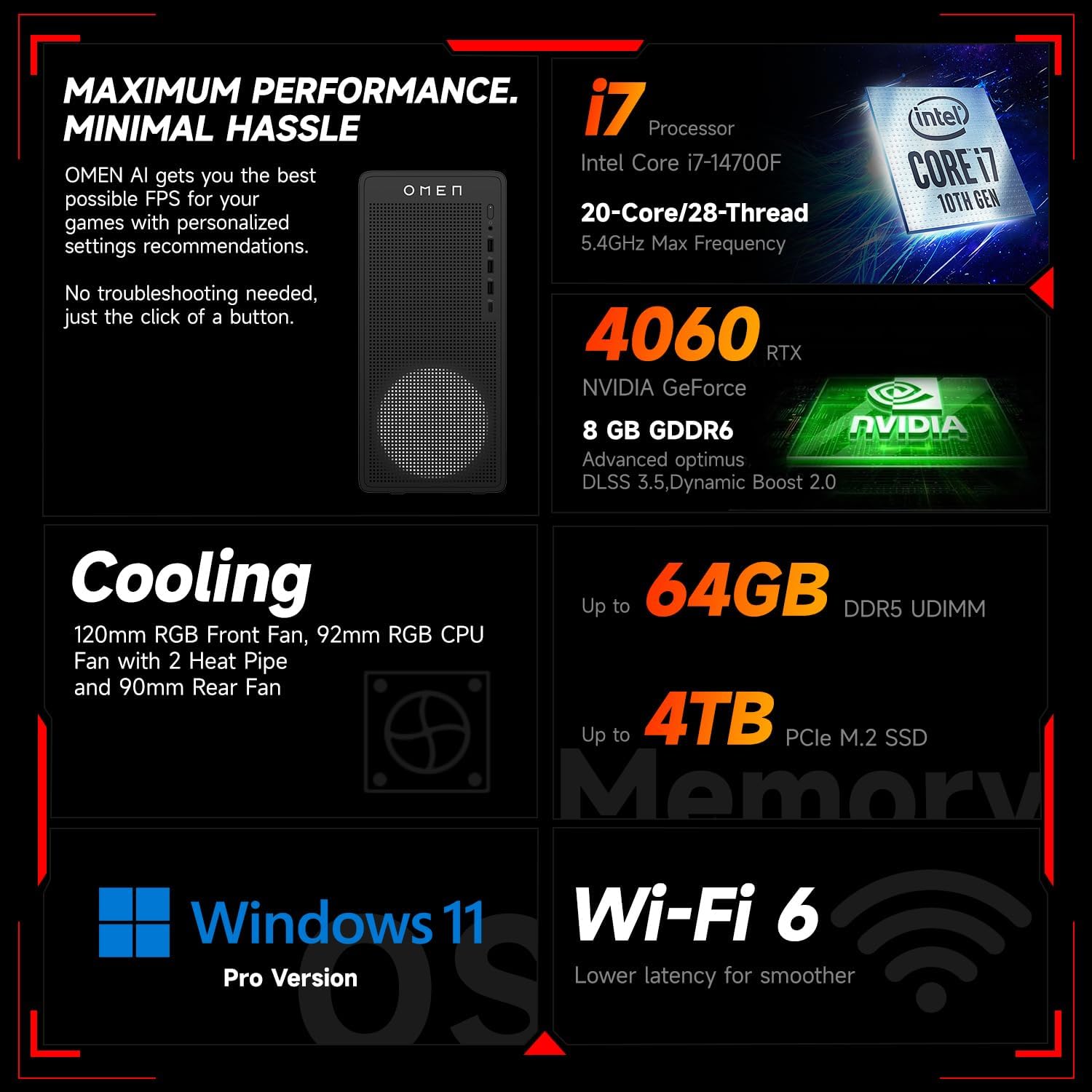
Obraz 6.1: Koniecview of key performance and cooling specifications.
| Część | Specyfikacja |
|---|---|
| Marka | HP |
| Numer modelu | TG03 |
| System operacyjny | Windows 11 Pro |
| Model procesora | Intel Core i7-14700F (20 Cores, 28 Threads, up to 5.4 GHz) |
| Koprocesor graficzny | NVIDIA GeForce RTX 4060 (8 GB GDDR6) |
| Rozmiar zainstalowanej pamięci RAM | 64 GB pamięci RAM DDR5 |
| Pojemność pamięci masowej | 2 TB PCIe NVMe M.2 Solid State Drive |
| Łączność bezprzewodowa | Wi-Fi 6, Bluetooth |
| Porty przednie | 3x USB Type-A (5Gbps), 1x USB Type-C (10Gbps), Headphone/Mic Combo |
| Tylne porty | 4x USB Type-A 2.0, 1x RJ-45, 1x HDMI, 3x DisplayPort, 2x Audio Port |
| Wymiary (dł. x szer. x wys.) | 13.26 x 6.1 x 12.12 cala |
| Waga przedmiotu | 13.14 funtów |
| Kolor | Czarny |
| Dołączony dodatek | Thunderobot KG3089R Gaming Keyboard |

Image 6.2: Details of the Intel Core i7-14700F processor.

Image 6.3: Information on the NVIDIA GeForce RTX 4060 graphics card.
7. Informacje o gwarancji
Your HP OMEN 16L Gaming Desktop comes with a standard manufacturer's warranty. The specific terms and duration of the warranty are provided with your purchase documentation and are subject to HP's official warranty policy.
Ważna uwaga: Modifications to the system, such as upgrading components (e.g., RAM) with non-HP certified parts or by unauthorized personnel, may void the manufacturer's warranty. Always consult HP's official support or authorized service providers before making any internal hardware changes.
The Thunderobot KG3089R Gaming Keyboard bundled with this desktop may have a separate warranty provided by its manufacturer. Please refer to the documentation included with the keyboard for its specific warranty terms.
8. Wsparcie
For further assistance, technical support, or warranty claims, please contact HP Customer Support through the following channels:
- Wsparcie HP Webstrona: Odwiedzać www.hp.com/support w celu uzyskania sterowników, instrukcji i poradników dotyczących rozwiązywania problemów.
- Asystent pomocy HP: Use the pre-installed HP Support Assistant software on your desktop for diagnostics, updates, and direct access to support.
- Wsparcie telefoniczne: Refer to your product documentation or the HP support webwitryna z regionalnymi numerami kontaktowymi.