
1. Wprowadzenie
This manual provides detailed instructions for the installation, operation, and maintenance of your Rimoody 10.4 inch Single Din Car Stereo. Please read this manual thoroughly before using the product to ensure proper function and safety. Keep this manual for future reference.

Image 1.1: The Rimoody 10.4 inch Single Din Car Stereo with included accessories like the backup camera and microphone.
2. Koniec produktuview i kluczowe cechy
The Rimoody 10.4 inch Single Din Car Stereo is designed to enhance your in-car entertainment and connectivity. Key features include:
- Bezprzewodowy CarPlay i Android Auto: Bezproblemowa integracja ze smartfonem umożliwiająca nawigację, słuchanie muzyki, wykonywanie połączeń i wiele więcej.
- Funkcjonalność Mirror Link: Display your smartphone screen directly on the car stereo.
- 10.4-inch 2.5D Touch Screen: High-resolution (1280x800) display with adjustable brightness and contrast.
- Manual Rotational Screen: Adjust the screen orientation between vertical and horizontal modes.
- Bluetooth 4.2: Hands-free calling, music streaming, and synchronous address book access.
- Radio FM/RDS: High-quality stereo radio with automatic and manual channel search.
- EQ Sound Processing: Multiple equalizer modes for customized audio output.
- Tył View Wejście kamery: Automatic display of the reverse image when shifting into reverse.
- Sterowanie z kierownicy (SWC): Kompatybilny z istniejącymi przyciskami na kierownicy, co zapewnia wygodę sterowania.
- Wiele opcji łączności: USB, AUX, TF card slot.

Image 2.1: Visual representation of the main features of the car stereo.
3. Konfiguracja i instalacja
3.1. Installation Size
The installation size of the main unit is 178mm x 50mm (7 inches x 2 inches), suitable for most single DIN car models. Ensure your vehicle's dashboard opening matches these dimensions for proper fitment.
3.2. Obrót ekranu
The 10.4-inch screen supports manual rotation. You can adjust the screen by hand to switch between vertical and horizontal display modes to suit your viewing preference and dashboard layout.

Image 3.1: Illustration of the screen's manual rotation feature, allowing for both vertical and horizontal orientations.
3.3. Połączenia okablowania
Refer to the wiring diagram provided in the package for specific connections. Key connections typically include:
- Przewód zasilający: Connect to your vehicle's power supply (constant 12V, accessory 12V, ground).
- Kabel klaksonowy: For specific vehicle models.
- Antena radiowa: Podłącz antenę radiową pojazdu.
- Wyjście audio: Connect to vehicle speakers.
- Wyjście wideo: For external displays (if applicable).
- Odwrócenie wejścia wideo: Podłącz dołączoną kamerę cofania.
- Przewody sterowania z kierownicy (SWC): Connect to your vehicle's SWC wires.
- USB/AUX/TF: For external media and connectivity.
It is recommended to have a professional perform the installation to ensure correct wiring and prevent damage to the unit or vehicle.
4. Instrukcja obsługi
4.1. Bezprzewodowy CarPlay i Android Auto
This unit supports both Wireless CarPlay and Android Auto. This allows you to access your phone's navigation, music, messages, and other apps directly on the stereo screen.
- Upewnij się, że Bluetooth jest włączony w Twoim smartfonie.
- Na samochodowym radiu przejdź do aplikacji CarPlay lub Android Auto.
- Pair your phone with the car stereo via Bluetooth. Follow the on-screen prompts to confirm the pairing code.
- Po sparowaniu system automatycznie połączy się z CarPlay lub Android Auto.
- Alternatively, you can connect via USB for a wired connection.
Voice control is available through CarPlay and Android Auto, allowing you to use voice commands for various functions.

Image 4.1: Demonstrates Wireless CarPlay and Android Auto functionality, including voice command examples.
4.2. Łącze lustrzane
The Mirror Link function allows you to display your smartphone's screen on the car stereo. This is compatible with both iOS and Android devices.
- Podłącz smartfon do radia samochodowego za pomocą kabla USB.
- On the car stereo, select the 'Mirror Link' option.
- Follow any on-screen instructions on both your phone and the stereo to establish the connection.

Image 4.2: Visual of the Mirror Link feature, displaying a smartphone's content on the larger car stereo screen.
4.3. Funkcjonalność Bluetooth
The unit features Bluetooth 4.2 for wireless communication.
- Łączenie w pary: Go to the Bluetooth menu on the stereo, enable Bluetooth on your phone, and search for the stereo's device name. Select it to pair.
- Rozmowy bez użycia rąk: Once paired, you can make and receive calls directly through the stereo. The built-in microphone (or external mic if connected) will be used.
- Odtwarzanie muzyki: Stream audio from your phone to the stereo wirelessly.
- Książka adresowa: Synchronize your phone's address book for easy access to contacts.
4.4.Radio FM
The built-in FM/RDS radio provides access to local radio stations.
- Automatyczne wyszukiwanie: Select the auto-search function to scan and save available stations.
- Strojenie ręczne: Ręcznie dostosuj częstotliwość, aby znaleźć konkretne stacje.
- RDS (system danych radiowych): Displays station information like song title or program name where available.
4.5. Ustawienia korektora
Customize your audio experience using the Equalizer (EQ) settings.
- Access the EQ menu from the main interface.
- Choose from preset EQ modes (e.g., Pop, Rock, Classic) or manually adjust bass, treble, and other frequency bands.
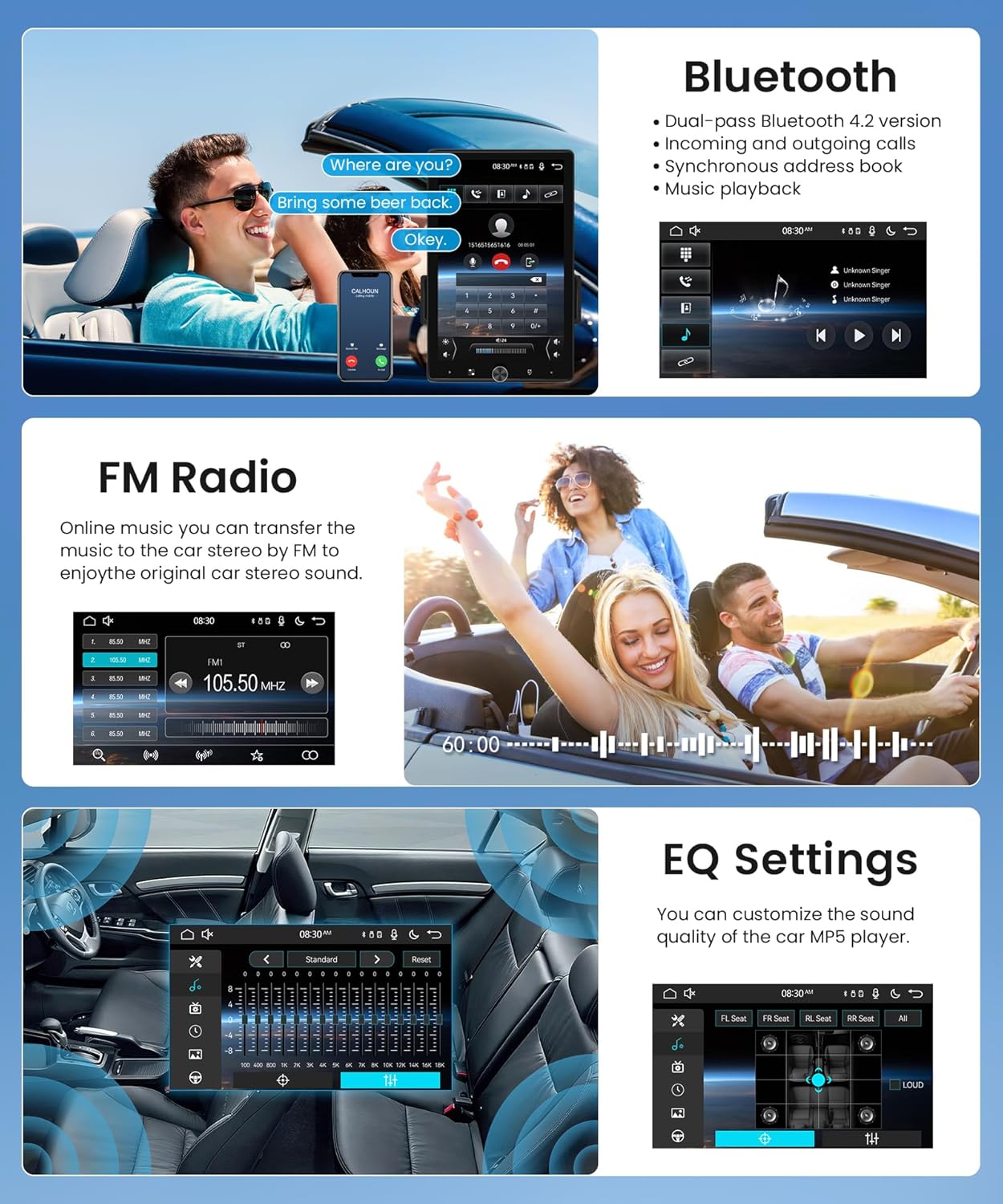
Image 4.3: Displays the user interfaces for Bluetooth calls, FM radio, and Equalizer settings.
4.6. Tył View Kamera
Jednostka obsługuje tylną view camera input for enhanced safety during parking.
- Connect the included backup camera to the 'Reversing Video Input' on the stereo.
- When your vehicle shifts into reverse gear, the car stereo screen will automatically display the rear view obraz.
- Kamera zapewnia wyraźny, szerokokątny obraz view, often with parking guidelines, to assist in avoiding obstacles.
4.7. Sterowanie z kierownicy (SWC)
You can program your vehicle's existing steering wheel buttons to control the car stereo.
- Access the 'Steering Wheel Control' learning function in the stereo's settings menu.
- Follow the on-screen instructions to assign functions (e.g., volume up/down, track skip, mode) to your steering wheel buttons.

Image 4.4: Illustrates the Steering Wheel Control setup and the automatic display from the Rear View Kamera.
5. Konserwacja
- Czyszczenie ekranu: Delikatnie przetrzyj ekran miękką, niepozostawiającą włókien ściereczką. W przypadku uporczywych plam delikatnie przetrzyj.ampPrzetrzyj ściereczkę wodą lub środkiem do czyszczenia ekranów. Unikaj silnych środków chemicznych i materiałów ściernych.
- Ogólne sprzątanie: Utrzymuj urządzenie w czystości, usuwając kurz i zanieczyszczenia. Do czyszczenia otworów wentylacyjnych i portów używaj miękkiej szczotki lub sprężonego powietrza.
- Aktualizacje oprogramowania: Okresowo sprawdzaj producenta webodwiedź naszą witrynę, aby sprawdzić dostępne aktualizacje oprogramowania i uzyskać dostęp do optymalnych funkcji.
- Unikaj ekstremalnych temperatur: Nie wystawiaj urządzenia na działanie ekstremalnie wysokich lub niskich temperatur, gdyż może to wpłynąć na jego wydajność i żywotność.
6. Rozwiązywanie Problemów
Jeśli masz problemy z radiem samochodowym, zapoznaj się z poniższymi typowymi problemami i ich rozwiązaniami:
- Brak zasilania:
- Check all power connections (constant 12V, accessory 12V, ground) to ensure they are secure.
- Sprawdź, czy bezpiecznik radia samochodowego nie jest przepalony.
- Brak dźwięku:
- Sprawdź, czy przewody głośnikowe są prawidłowo podłączone i nie są zwarte.
- Check volume levels and mute settings on the stereo.
- Sprawdź, czy źródło dźwięku zostało wybrane prawidłowo.
- Problemy z łącznością Bluetooth:
- Upewnij się, że Bluetooth jest włączony zarówno w zestawie stereo, jak i w telefonie.
- Usuń poprzednie sparowania na obu urządzeniach i spróbuj sparować je ponownie.
- Przysuń telefon bliżej sprzętu stereo.
- Brak połączenia CarPlay/Android Auto:
- For wireless connection, ensure Bluetooth is active and the phone is paired.
- For wired connection, try a different USB cable.
- Ensure CarPlay/Android Auto is enabled in your phone's settings.
- Tył View Kamera nie wyświetla:
- Sprawdź podłączenie zasilania i sygnału wideo kamery.
- Upewnij się, że przewód włączający bieg wsteczny jest prawidłowo podłączony do obwodu światła cofania pojazdu.
If these steps do not resolve the issue, please contact Rimoody customer support for further assistance.
7. Specyfikacje
| Funkcja | Specyfikacja |
|---|---|
| Rozmiar ekranu | 10.4 cali |
| Typ ekranu | 2.5D Touch Screen |
| Rezolucja | 1280x800 |
| Rozmiar instalacji | 178 x 50 mm (Single Din) |
| Technologia łączności | USB, Bluetooth |
| Wersja Bluetooth | 4.2 |
| Kompatybilne urządzenia | Smartfon (iOS/Android) |
| Tryb wyjścia audio | Stereofoniczny |
| Cechy specjalne | Touchscreen, Wireless CarPlay, Android Auto, Mirror Link, FM/RDS, EQ, Rear View Camera Input, Steering Wheel Control, Manual Rotational Screen |
| Waga przedmiotu | 3.69 funta |
| Wymiary opakowania | 11.46 x 8.15 x 7.24 cala |
8. Zawartość opakowania
W opakowaniu produktu znajdują się następujące elementy:
- Rimoody 10.4 inch Single Din Car Stereo Unit
- Kamera cofania
- Kabel zasilający
- Kabel klaksonu
- Mikrofon (MIC)
- Uchwyty montażowe (2 zestawy)
- Instrukcja obsługi (ten dokument)

Rysunek 8.1: Szczegółowy view of the car stereo's dimensions and a visual representation of all items included in the package.
9. Gwarancja i wsparcie
For warranty information and customer support, please refer to the warranty card included in your package or visit the official Rimoody website. If you encounter any issues or have questions regarding your product, please contact Rimoody customer service for assistance.