
Wstęp
Dziękujemy za zakupasing the Marvel Legends Series X-Men '97 Cyclops Premium Roleplay Visor. This 1:1 scale reproduction is inspired by Cyclops' iconic Ruby Quartz Visor from Marvel Studios' X-Men '97 animated series. Designed for collectors and enthusiasts aged 14 and up, this visor features a premium design, detailed sculpt, and light-up effects to enhance your roleplay or display experience.
Please read this instruction manual thoroughly before use to ensure proper setup, operation, and maintenance of your visor.
Informacje dotyczące bezpieczeństwa
OSTRZEŻENIE: Mogą powstawać drobne elementy. Nieodpowiednie dla dzieci poniżej 3 lat.
This product is intended for ages 14 and up. Adult supervision is recommended for younger users within the age range. Keep all components away from small children to prevent choking hazards. Do not look directly into the LED lights for extended periods.
Co jest w pudełku
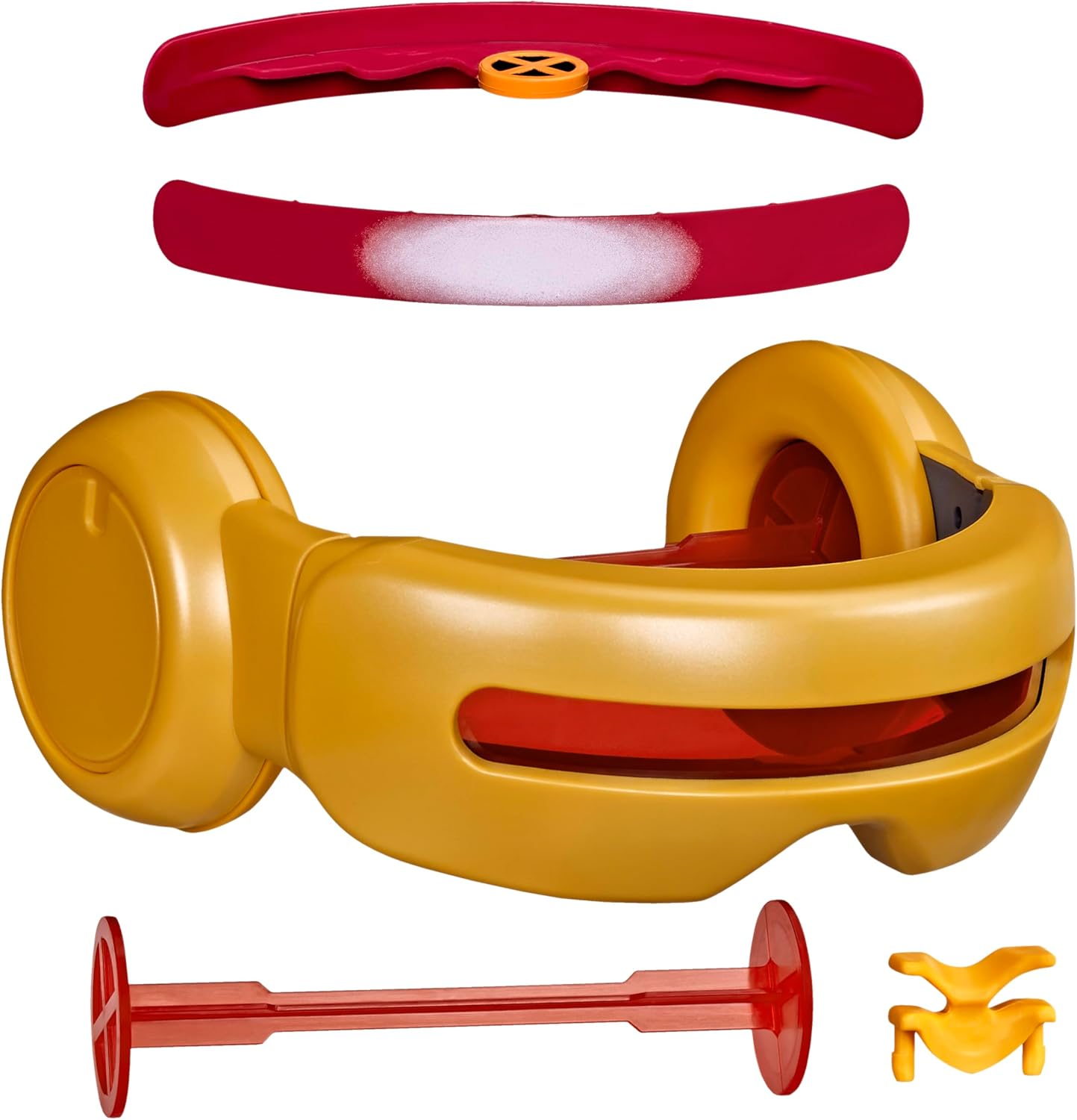
Your Marvel Legends Cyclops Premium Roleplay Visor package includes the following components:
- 1 x Cyclops Premium Roleplay Visor
- 1 x Removable Display Support Piece
- 1 x Colored Lens Insert
- 1 x Swapable Nose Piece

Image: All components of the Cyclops visor set laid out, including the visor, red lens inserts, a red display stand, and a yellow nose piece.
Organizować coś
1. Instalacja baterii
The visor requires 2 baterie AAA (not included) to power the light-up effect. Locate the battery compartment, typically on the inside of one of the ear pieces. Open the compartment, insert the batteries according to the polarity indicators (+/-), and close the compartment securely.
2. Adjusting for Wear
To ensure a comfortable and proper fit when wearing the visor:
- The visor features spring-loaded ear pieces that adjust to fit various head sizes. Gently pull the ear pieces apart to place the visor on your head.
- Wykorzystaj swapable nose piece to customize the fit around your nose. Select the nose piece that provides the most comfortable and secure fit.

Image: Hands adjusting a yellow nose piece on the inside of the Cyclops visor for a customized fit.

Image: Hands demonstrating the adjustment of the swapable nose piece on the Cyclops visor.

Image: A man holding the Cyclops visor, illustrating the spring-loaded ear pieces designed for a proper fit.
3. Setting up for Display
For displaying your visor on a desk or shelf, use the provided removable display support and colored lens insert:
- Włóż colored lens insert into the visor's lens slot.
- Dołącz removable display support piece to the designated slot on the visor's interior. This piece allows the visor to stand upright for exhibition.

Image: Hands inserting the red colored lens piece with an X-Men logo into the Cyclops visor for display.
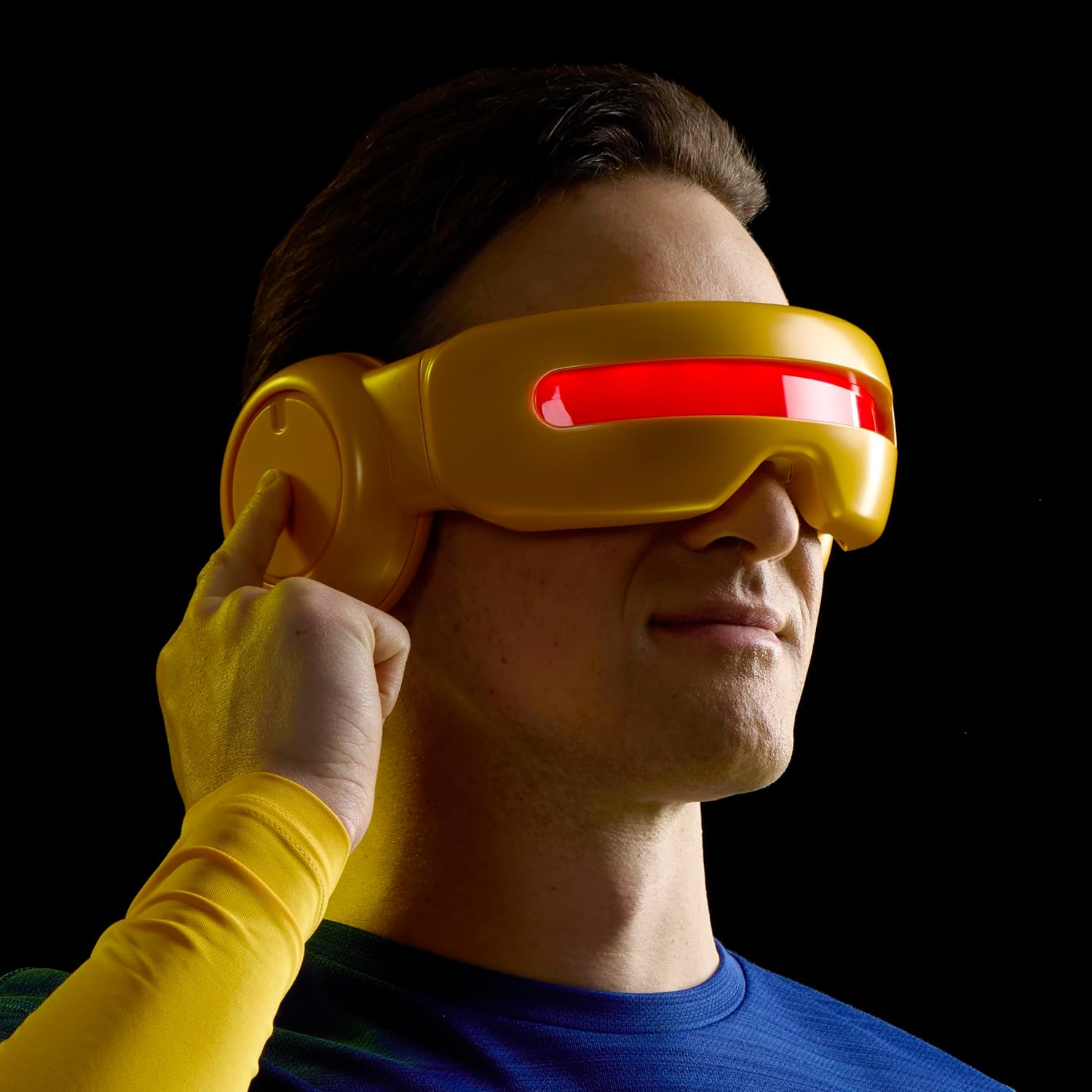
Image: Hands inserting the red display stand into the Cyclops visor, preparing it for exhibition.
Instrukcja obsługi
Once batteries are installed, you can activate the visor's light-up effect:
- Activating the Optic Blast Effect: Push the button located on the side dial of the visor. This will activate the LED light, illuminating the clear tinted lens to simulate Cyclops' optic blast.
- Adjusting Beam Width: Double-tap the button to decrease the simulated beam width.
- Automatyczne wyłączanie: The LED lights will automatically time out after 2 minutes of inactivity to conserve battery life.

Image: A man wearing the Cyclops visor, pressing the side button to activate the red light-up effect.
Obraz: Bok view of a man wearing the Cyclops visor, demonstrating the action of pressing the side button.

Obraz: Bok view of a man wearing the Cyclops visor with the red light-up effect actively illuminated.

Obraz: Przód view of a man wearing the Cyclops visor with the red light-up effect active, arms crossed.

Image: The Cyclops visor viewed from the side, clearly showing the activated red light-up effect.
Konserwacja
To keep your Cyclops Visor in optimal condition:
- Czyszczenie: Wipe the visor with a soft, dry cloth. For stubborn marks, a slightly damp Można użyć ściereczki, a następnie natychmiast wysuszyć. Unikać środków czyszczących o działaniu ściernym i rozpuszczalników.
- Składowanie: Store the visor in a cool, dry place away from direct sunlight and extreme temperatures. If storing for an extended period, remove the batteries to prevent leakage.
- Obsługiwanie: Handle the visor with care to prevent scratches or damage to the lens and electronic components.
Rozwiązywanie problemów
If you encounter issues with your Cyclops Visor, refer to the following common solutions:
- Światła się nie włączają:
- Upewnij się, że baterie zostały prawidłowo zainstalowane, z zachowaniem właściwej polaryzacji.
- Wymień stare baterie na nowe baterie AAA.
- Sprawdź, czy komora baterii jest szczelnie zamknięta.
- Inconsistent Light Effect:
- Może to oznaczać niski poziom naładowania baterii. Wymień baterie.
- Ensure the button is being pressed firmly and consistently.
- Visor Does Not Fit Comfortably:
- Adjust the spring-loaded ear pieces.
- Try using the alternative swapable nose piece for a better fit.
Jeśli problem nadal występuje, skontaktuj się z obsługą klienta.
Specyfikacje
| Funkcja | Szczegół |
|---|---|
| Nazwa marki | Podziwiać |
| Numer modelu | G20635S0 |
| Numer części producenta | G2063 |
| Nazwa typu przedmiotu | Roleplay Toy |
| Skala | 1:1 Scale (Full-size) |
| Typ materiału | Plastikowy |
| Kolor | Multicolor (Yellow and Red) |
| Źródło zasilania | Baterie 2 x AAA (brak w zestawie) |
| Opis przedziału wiekowego | 14+ lat |
| Zawarte komponenty | Visor, Display Support, Colored Lens Insert, Swapable Nose Piece |
| Wymiary produktu (DxSxW) | 4.02 x 10 x 10 cala |
Gwarancja i wsparcie
This product is manufactured by Hasbro. For warranty information or customer support, please refer to the contact details provided on the product packaging or visit the official Hasbro webStrona. Zachowaj dowód zakupu na wypadek roszczeń gwarancyjnych.