
KOFIRE UG-09
Bezprzewodowy zestaw słuchawkowy do gier KOFIRE UG-09
Instrukcja obsługi
Wstęp
This manual provides detailed instructions for the setup, operation, maintenance, and troubleshooting of your KOFIRE UG-09 Wireless Gaming Headset. Please read this manual thoroughly before using the product to ensure optimal performance and longevity.

Image: The KOFIRE UG-09 Wireless Gaming Headset displayed with its charging cable, detachable microphone, and USB/Type-C 2-in-1 transmitter.
Zawartość opakowania
Sprawdź, czy w przesyłce znajdują się wszystkie elementy:
- 1 x KOFIRE Wireless Gaming Headset (Model: UG-09)
- 1 x USB & Type-C 2-in-1 Transmitter
- 1 x kabel ładujący typu C
- 1 x Odpinany mikrofon
- 1 x 3.5 mm kabel audio
- 1 x Instrukcja obsługi (ten dokument)
Produkt ponadview
Familiarize yourself with the components and controls of your headset.
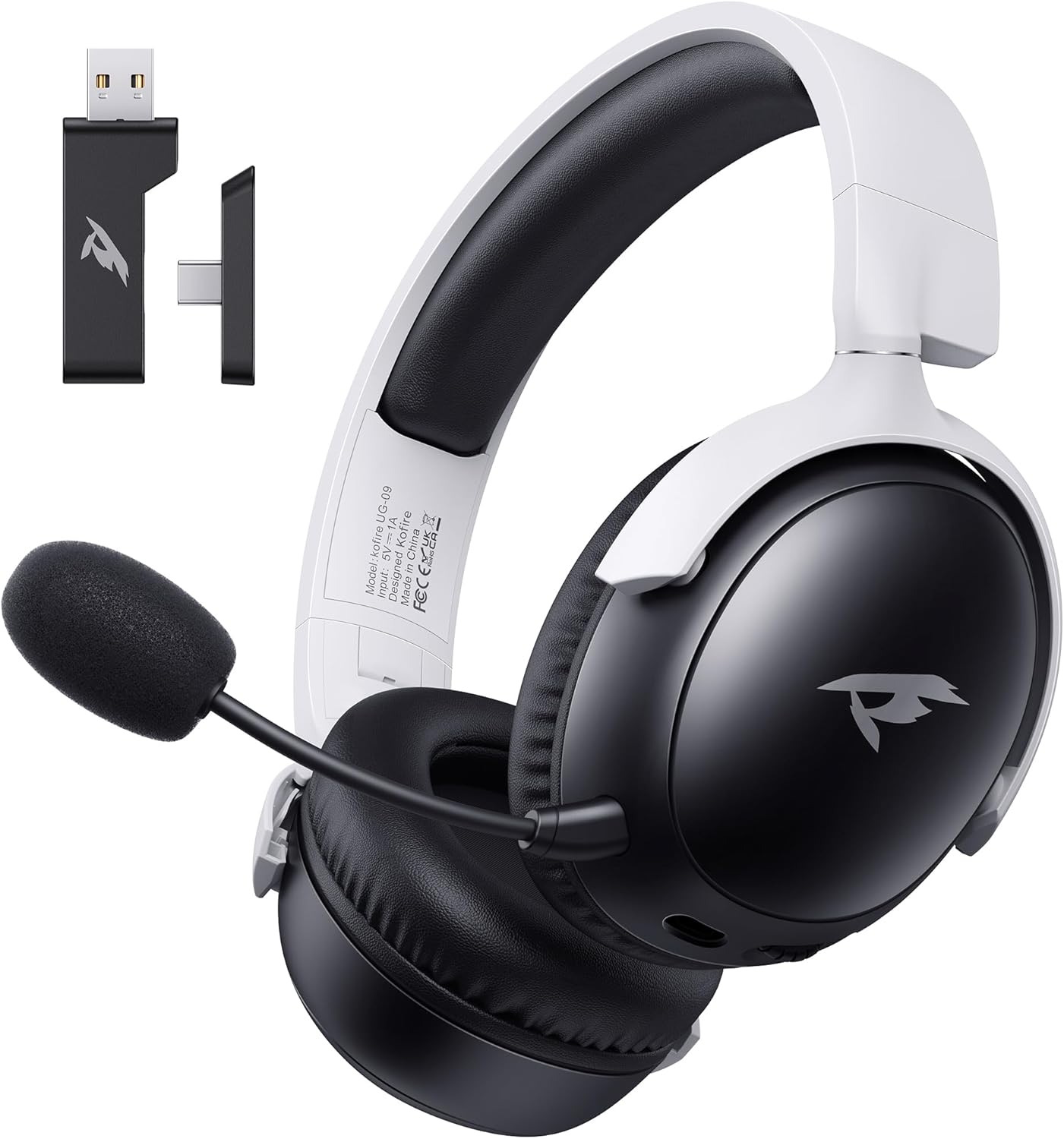
Obraz: Przód view of the KOFIRE UG-09 Wireless Gaming Headset in black and white, showing the detachable microphone and the USB/Type-C 2-in-1 transmitter.
Główne cechy:
- Łączność wielomodowa: 2.4GHz Wireless, Bluetooth 5.4, and 3.5mm Wired options.
- Długa żywotność baterii: Do 65 godzin odtwarzania.
- Przetworniki dynamiczne 53 mm: For immersive 3D stereo sound.
- ENC Noise-Canceling Microphone: Detachable and omnidirectional for clear communication.
- Ergonomiczna konstrukcja: Lightweight with rotatable ear cups, adjustable headband, and soft memory foam cushions for comfort.
Instrukcje konfiguracji
1. Ładowanie zestawu słuchawkowego
Before first use, fully charge the headset. Connect the supplied Type-C charging cable to the headset's charging port and the other end to a USB power source (e.g., computer USB port, USB wall adapter). The LED indicator will show charging status. A full charge takes approximately 2-2.5 hours. The headset supports simultaneous charging and use.
2. Łączenie przez sieć bezprzewodową 2.4 GHz (klucz USB)
This mode offers ultra-low latency (≤20ms) for gaming on compatible devices like PC, Mac, PS4, PS5, and Nintendo Switch (audio only).
- Insert the USB & Type-C 2-in-1 transmitter into an available USB-A or USB-C port on your device.
- Włącz zestaw słuchawkowy.
- Press and hold the microphone button on the headset to switch to 2.4G mode. You will hear an audio prompt "dongle mode."
- On your connected device, navigate to sound settings and select "Kofire UG-09" as the audio output/input device to complete pairing.

Image: Illustration of the 2.4GHz wireless connection, showing the USB dongle plugged into a gaming handheld device, emphasizing stable and low-latency performance.
3. Łączenie przez Bluetooth 5.4
Use Bluetooth for mobile devices such as phones, tablets, and Nintendo Switch (audio only).
- Włącz zestaw słuchawkowy.
- Press and hold the microphone button for 3 seconds to switch to Bluetooth mode. You will hear an audio prompt "Bluetooth mode." The LED indicator will flash, indicating pairing mode.
- On your mobile device, go to Bluetooth settings and search for "Kofire UG-09." Select it to complete the pairing process.

Image: Depicts the versatility of the headset, showing one user connected via Bluetooth to a phone and another connected wirelessly to a PC, highlighting dual connectivity options.
4. Podłączanie za pomocą przewodu 3.5 mm
For universal compatibility or when the battery is depleted, use the 3.5mm audio cable.
- Podłącz jeden koniec kabla audio 3.5 mm do gniazda 3.5 mm zestawu słuchawkowego.
- Connect the other end to the 3.5mm audio port on your gaming device or console.
- Zestaw słuchawkowy automatycznie przełączy się na tryb przewodowy.
Notatka: The microphone function is not supported on Nintendo Switch when using any wireless mode. For Xbox, only wired mode is supported.
Instrukcja obsługi
Włączanie/wyłączanie zasilania
- Włączanie: Naciśnij i przytrzymaj przycisk zasilania, aż zaświeci się kontrolka LED.
- Wyłączone: Naciśnij i przytrzymaj przycisk zasilania, aż dioda LED zgaśnie.
Kontrola głośności
- Zwiększ głośność: Obróć pokrętło głośności w górę.
- Zmniejsz głośność: Obróć pokrętło głośności w dół.
Użycie mikrofonu
The headset features a detachable ENC (Environmental Noise Canceling) omnidirectional microphone.
- Attach/Detach: Insert the microphone into the dedicated port on the left earcup or remove it when not needed.
- Wycisz/Włącz wyciszenie: Press the dedicated microphone mute button for one-touch muting. The LED indicator on the microphone will show its status.

Obraz: Szczegółowy view of the ENC noise reduction microphone, highlighting its internal components and detachable design for clear voice transmission.
Przełączanie trybów
To switch between 2.4GHz wireless and Bluetooth modes, press and hold the microphone button for approximately 3 seconds until you hear the corresponding audio prompt ("dongle mode" or "Bluetooth mode").
Żywotność baterii i alerty
The headset provides up to 65 hours of playtime in Bluetooth mode (microphone off) and 50 hours in 2.4GHz dongle mode (microphone on). A low battery alert will notify you when recharging is needed.
Konserwacja
Czyszczenie
- Przetrzyj zestaw słuchawkowy miękką, suchą ściereczką.
- Nie używaj ostrych środków chemicznych, rozpuszczalników czyszczących ani silnych detergentów.
- Ensure no moisture enters the earcups or control buttons.
Składowanie
- Przechowuj zestaw słuchawkowy w chłodnym, suchym miejscu, z dala od bezpośredniego światła słonecznego i ekstremalnych temperatur.
- When storing for extended periods, ensure the headset is partially charged (around 50%) to preserve battery health.
- The rotatable and foldable ear cups allow for compact storage.

Image: Illustrates the ergonomic design elements of the headset, including rotatable earcups, soft sponge cushioning, adjustable angle, and a retractable headband for comfortable wear and storage.
Pielęgnacja baterii
- Unikaj częstego całkowitego rozładowywania akumulatora.
- Nie wystawiaj baterii na działanie wysokich temperatur.
- Należy używać wyłącznie dołączonego kabla ładującego lub certyfikowanego odpowiednika.
Rozwiązywanie problemów
| Problem | Możliwa przyczyna | Rozwiązanie |
|---|---|---|
| Brak dźwięku w zestawie słuchawkowym. |
|
|
| Mikrofon nie działa. |
|
|
| Cannot connect wirelessly. |
|
|
| Zestaw słuchawkowy nie ładuje się. |
|
|

Image: Illustrates the universal compatibility of the headset with a range of gaming and mobile devices, including PlayStation consoles, PC, Mac, Nintendo Switch, and smartphones.
Specyfikacje
| Funkcja | Szczegół |
|---|---|
| Nazwa modelu | UG-09 |
| Technologia łączności | Łączność bezprzewodowa 2.4 GHz, Bluetooth 5.4, przewodowa 3.5 mm |
| Technologia komunikacji bezprzewodowej | 2.4GHz USB-A & Type-C 2-in-1 Dongle, Bluetooth 5.4 |
| Typ sterownika audio | Przetwornik dynamiczny 53 mm |
| Odpowiedź częstotliwościowa | 20 kHz (maks.) |
| Impedancja | 32 omy |
| Zasięg Bluetooth | 10 metrów |
| Opóźnienie dźwięku (2.4 GHz) | ≤20 milisekund |
| Żywotność baterii | Up to 65 hours (Bluetooth, mic off); 50 hours (2.4GHz, mic on) |
| Czas ładowania | 2-2.5 godzin |
| Mikrofon | Detachable ENC Noise-Canceling Omnidirectional |
| Waga | 14.4 uncji (0.41 kilograma) |
| Tworzywo | ABS, Faux Leather, PC, Soft Memory Sponge Cushions |
| Kompatybilne urządzenia | PC, Mac, Laptop, Desktop, Phone, Pad, Tablet, PlayStation 5/4/Pro/Slim, Gaming Consoles, Switch (audio only), Xbox (wired only) |
Gwarancja i wsparcie
KOFIRE is committed to providing professional service and expert support for your wireless gaming headset. If you encounter any issues or have questions regarding your product, please do not hesitate to contact us.
- Obsługa klienta: Our team of experienced engineers and support staff are available to assist you.
- Czas reakcji: We aim to respond to all inquiries within 0-24 hours.
- Informacje kontaktowe: Please refer to the contact details provided on the product packaging or the official KOFIRE webaby uzyskać pomoc.
Ask a question about this manual
Ask about setup, troubleshooting, compatibility, parts, safety, or missing instructions. Manuals+ will review the question and use this page’s manual context to help answer it.