
Wstęp
Thank you for choosing the GNCC 1080P Indoor Security Camera. This manual provides detailed instructions for setting up, operating, and maintaining your camera to ensure optimal performance and security for your home. This camera offers high-definition video, advanced detection features, and two-way audio communication.
Co jest w pudełku
Sprawdź zawartość przesyłki. Jeśli brakuje któregokolwiek z elementów lub jest on uszkodzony, skontaktuj się z obsługą klienta.
- Kamera wewnętrzna
- Zasilacz
- Instrukcja obsługi
- Śruba montażowa
- Przewód zasilający 2 m
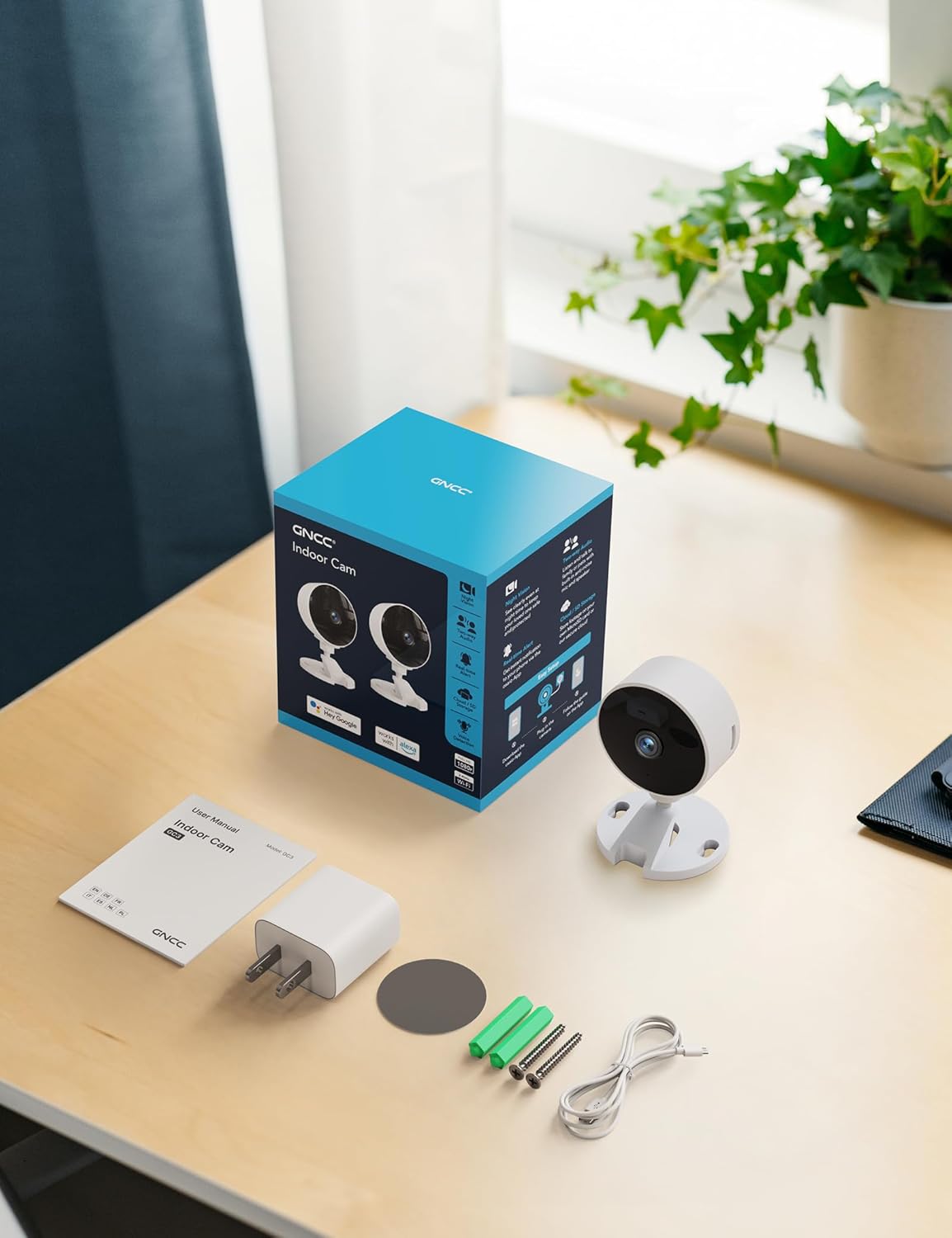
Image: All components included in the GNCC Indoor Camera package, neatly laid out on a wooden surface.
Cechy produktu
The GNCC Indoor Security Camera is equipped with several features designed to enhance your home security and monitoring experience:
- Rozdzielczość Full HD 1080P: Provides clear and detailed video monitoring.
- Widzenie w nocy do 15 m: Built-in infrared LEDs enable clear vision up to 15 meters in low-light conditions.
- Smarter AI Detection: Advanced AI (subscription required) for identifying people, pets, vehicles, and packages, reducing false alerts.
- Elastyczne opcje przechowywania: Supports local recording with a 128GB Micro SD card (not included) and offers a 14-day free cloud storage trial.
- Łatwa konfiguracja: Can be installed quickly using 3M tape or included screws for wall mounting.
- Tryb prywatności: One-tap privacy mode to disable the lens and LED for enhanced privacy.
- Dwukierunkowy dźwięk: Wbudowany mikrofon i głośnik umożliwiające komunikację w czasie rzeczywistym.
- Inteligentna integracja: Compatible with Alexa and Google Home for voice control.
- Udostępnianie rodzinne: Allows sharing access with up to 3 users.

Image: Visual representation of the camera's core functionalities, including HD resolution, night vision, and two-way audio.
Organizować coś
1. Włączanie
- Podłącz dołączony zasilacz do portu zasilania aparatu.
- Podłącz zasilacz do standardowego gniazdka elektrycznego.
- Kamera włączy się, a kontrolka pokaże jej stan.
2. Instalacja aplikacji i utworzenie konta
- Download the official GNCC app from your smartphone's app store (iOS App Store or Google Play Store).
- Otwórz aplikację i postępuj zgodnie z instrukcjami wyświetlanymi na ekranie, aby utworzyć nowe konto lub zaloguj się, jeśli już je posiadasz.
3. Dodawanie kamery do aplikacji
- In the GNCC app, tap the "+" icon to add a new device.
- Select "Security Camera" or the specific model if prompted.
- Postępuj zgodnie z instrukcjami aplikacji, aby połączyć kamerę z siecią Wi-Fi 2.4 GHz. Note: This camera is not compatible with 5GHz Wi-Fi networks.
- You may be required to scan a QR code displayed on your phone with the camera lens or enter a code manually.
- Once connected, name your camera and assign it to a specific room or location.

Image: The GNCC camera alongside a smartphone showing the camera's live feed and app interface, demonstrating connectivity.
4. Opcje montażu
Kamera oferuje elastyczne opcje montażu:
- Umiejscowienie blatu: Simply place the camera on a flat surface like a shelf, table, or desk.
- Montaż na ścianie: Use the included 3M adhesive tape for a drill-free installation, or use the provided screws for a more permanent fixture. Ensure the mounting surface is clean and dry before applying adhesive.
Instrukcja obsługi
Na żywo View i zdalny monitoring
Once connected, you can access the live video feed from your camera anytime, anywhere, through the GNCC app.

Image: A smartphone screen showing the live feed from the GNCC camera, illustrating remote monitoring capabilities.
Dwukierunkowy dźwięk
The camera features a built-in microphone and speaker, allowing for two-way communication. Tap the microphone icon in the app to speak, and release to listen. This is ideal for communicating with family members or pets.

Image: A visual representation of the two-way audio feature, showing a child and a pet, with text bubbles indicating conversation.
Wizja nocna
The camera automatically switches to night vision mode in low-light conditions, providing clear black and white images up to 15 meters. This ensures continuous monitoring even in complete darkness.

Image: A baby sleeping in a crib, demonstrating the camera's clear night vision capabilities in a dark environment.
Wykrywanie ruchu i dźwięku
The camera can detect motion and sound, sending instant alerts to your smartphone. With an optional AI subscription, the camera can differentiate between people, pets, vehicles, and packages, reducing false alarms. You can customize motion detection zones within the app.

Image: Children and a dog triggering motion and sound detection, with example alert notifications shown.
Opcje przechowywania
Your GNCC camera supports two primary storage methods for recorded footage:
- Karta micro sd: Insert a Micro SD card (up to 128GB, not included) into the camera's slot for continuous local recording.
- Przechowywanie w chmurze: A 14-day free trial of cloud storage is included. Cloud storage provides secure, off-site backup of your recordings, accessible from anywhere.

Image: The camera with visual cues for both SD card and cloud storage, highlighting flexible recording options.
Tryb prywatności
To ensure privacy, the GNCC camera features a one-tap privacy mode within the app. Activating this mode will fully disable the camera lens and LED indicator, preventing any recording or live viewing.
Konserwacja
- Czyszczenie: Do czyszczenia obiektywu i korpusu aparatu używaj miękkiej, suchej ściereczki. Unikaj stosowania płynnych środków czyszczących i materiałów ściernych.
- Aktualizacje oprogramowania układowego: Regularly check the GNCC app for firmware updates. Keeping your camera's firmware up-to-date ensures optimal performance, security, and access to new features.
- Umieszczenie: Upewnij się, że kamera jest umieszczona w stabilnym miejscu, z dala od bezpośredniego światła słonecznego, źródeł ciepła i nadmiernej wilgoci.
Rozwiązywanie problemów
| Problem | Możliwa przyczyna / rozwiązanie |
|---|---|
| Kamera nie łączy się z siecią Wi-Fi |
|
| No video feed / Offline status |
|
| Słaba jakość wideo |
|
| Motion/Sound alerts not received |
|
| Dwukierunkowe audio nie działa |
|
Specyfikacje
| Funkcja | Szczegół |
|---|---|
| Nazwa modelu | GC3B-1P |
| Zastosowanie wewnątrz/na zewnątrz | Wnętrz |
| Rozdzielczość przechwytywania wideo | 1080p Full HD |
| Zakres noktowizora | 15 metrów |
| Technologia łączności | Bezprzewodowy (Wi-Fi) |
| Częstotliwość Wi-Fi | 2.4 GHz (niekompatybilny z 5 GHz) |
| Źródło zasilania | Elektryczny przewodowy |
| Typ kontrolera | Amazon Alexa, Google Home |
| Typ montażu | Montaż na blacie, montaż na ścianie |
| Opcje przechowywania | Karta Micro SD (do 128 GB, nie jest dołączona), przechowywanie w chmurze |
| Dwukierunkowy dźwięk | Tak |
| Wykrywanie AI | Motion, Sound (AI features require subscription) |
| Wymiary produktu | 2.56 x 2.76 x 3.54 cala |
| Waga przedmiotu | 2.24 uncji |
| Kolor | Biały |
| Zawarte komponenty | Indoor camera, Power Adapter, Instruction Manual, Mounting Screw, 2m power cord |
Gwarancja i wsparcie
GNCC products are designed for reliability and performance. For specific warranty details, please refer to the warranty card included with your product or visit the official GNCC webstrona.
If you encounter any issues or have questions regarding your GNCC 1080P Indoor Security Camera, please contact GNCC Customer Support through the following channels:
- Official GNCC Webstrona: Look for the "Support" or "Contact Us" section.
- Wsparcie e-mailowe: Refer to the contact information provided in the GNCC app or on the product packaging.
- Wsparcie w aplikacji: Some issues can be resolved directly through the help section within the GNCC application.
Please have your product model (GC3B-1P) and purchase information ready when contacting support.


