
1. Wprowadzenie
This manual provides instructions for the setup, operation, and maintenance of your Retroid Pocket Classic handheld gaming console. The Retroid Pocket Classic is a portable Android-based gaming device featuring a 3.92-inch OLED touchscreen, designed for a versatile gaming experience.

Image 1.1: Retroid Pocket Classic consoles in white and yellow.
2. Co znajduje się w pudełku
Sprawdź, czy w opakowaniu znajdują się wszystkie elementy:
- Retroid Pocket Classic Gaming Console
- Kabel ładujący (USB-C)
- Instrukcja obsługi (ten dokument)
3. Urządzenie ponadview
Familiarize yourself with the physical components and controls of your Retroid Pocket Classic.
3.1 Przód View

Obraz 3.1: Przód view of the Retroid Pocket Classic.
- 3.92-inch OLED Touchscreen: The primary display for all operations and gaming.
- Pad kierunkowy: Directional input for navigation and gameplay.
- Przyciski akcji: (A, B, X, Y or similar layout) for in-game actions.
- Przyciski Start/Wybierz: For game and system functions.
- Maskownice głośników: Wyjście audio.
3.2 Top and Back View

Obraz 3.2: Góra view showing shoulder buttons and ports.
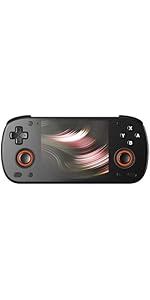
Image 3.3: Curved back design and trigger buttons.
- Guziki na ramionach (L1, R1): Znajduje się na górnej krawędzi.
- Przyciski spustowe (L2, R2): Located on the back, below the shoulder buttons.
- Port USB-C: Do ładowania i przesyłania danych.
- Gniazdo audio 3.5 mm: Do podłączenia słuchawek.
- Gniazdo kart Micro SD: Do rozszerzenia pamięci masowej.
- Przycisk zasilania: Aby włączyć/wyłączyć urządzenie lub przełączyć je w tryb uśpienia.
- Przyciski głośności: Aby dostosować wyjście audio.
3.3 Internal Components (Cooling)

Image 3.4: Integrated active cooling system.
The Retroid Pocket Classic features an integrated active cooling system designed to maintain optimal performance and manage heat during extended use.
4. Konfiguracja
4.1 Pierwsze ładowanie
Before first use, fully charge the device. Connect the provided USB-C charging cable to the console's USB-C port and the other end to a compatible USB power adapter (not included). The device has a 5000mAh battery.
4.2 Włączanie/wyłączanie
- Włączanie: Naciśnij i przytrzymaj przycisk zasilania, aż ekran się podświetli.
- Aby wyłączyć: Press and hold the Power button, then select "Power Off" from the on-screen options.
- Aby zasnąć/obudzić się: Krótko naciśnij przycisk zasilania.
4.3 Połączenie Wi-Fi
To access online features and download applications, connect to a Wi-Fi network:
- Idź do Ustawienia.
- Wybierać Sieć i internet.
- Uzyskiwać Wi-Fi i włącz go.
- Wybierz żądaną sieć z listy i wpisz hasło, jeśli zostaniesz o to poproszony.
4.4 Konfiguracja konta Google
The Retroid Pocket Classic runs Android 14 and supports the Google Play Store. To download apps and games, you will need to sign in with a Google account during the initial setup process or later via the Settings menu.
4.5 Instalacja karty Micro SD
To expand the device's storage (128GB internal), insert a Micro SD card into the designated slot. Ensure the card is inserted correctly until it clicks into place. The device supports various Micro SD card capacities.
5. Instrukcja obsługi
5.1 Nawigacja po interfejsie Androida
The device operates on Android 14. Use the touchscreen for navigation, tapping icons to open applications, swiping to scroll, and using gestures for system controls. The D-pad and action buttons can also be used for navigation within compatible applications and games.
5.2 Downloading and Installing Applications
Applications and games can be downloaded from the Google Play Store. Open the Play Store app, search for your desired content, and follow the on-screen prompts to download and install.
Note: The Retroid Pocket Classic does not come with preloaded games. Users are responsible for acquiring and installing their own game content.
5.3 Zarządzanie pamięcią masową
Do view and manage internal and external storage, go to Ustawienia > Pamięć. Here you can see storage usage and manage files. For optimal performance, ensure sufficient free space is available.
5.4 Łączność Bluetooth
The device supports Bluetooth 5.1 for connecting wireless accessories such as headphones or external controllers.
- Idź do Ustawienia.
- Wybierać Podłączone urządzenia.
- Uzyskiwać Sparuj nowe urządzenie i wybierz akcesorium z listy.
6. Konserwacja
6.1 Czyszczenie urządzenia
Use a soft, dry, lint-free cloth to clean the device's exterior. For the screen, a screen cleaner specifically designed for electronics can be used. Avoid using harsh chemicals or abrasive materials.
6.2 Pielęgnacja baterii
Aby przedłużyć żywotność baterii:
- Unikaj ekstremalnych temperatur.
- Nie należy zbyt często całkowicie rozładowywać akumulatora.
- Jeśli urządzenie nie będzie używane przez dłuższy czas, przechowuj je w stanie częściowo naładowanym.
6.3 Aktualizacje oprogramowania
Regularnie sprawdzaj dostępność aktualizacji systemu i instaluj je, aby zapewnić optymalną wydajność i bezpieczeństwo. Przejdź do Ustawienia > System > Aktualizacja systemu aby sprawdzić dostępność aktualizacji.
7. Rozwiązywanie Problemów
7.1 Urządzenie się nie włącza
- Ensure the device is sufficiently charged. Connect it to a power source for at least 30 minutes.
- Spróbuj przytrzymać przycisk zasilania przez 10–15 sekund, aby wymusić ponowne uruchomienie.
7.2 Problemy z łącznością Wi-Fi
- Sprawdź, czy Wi-Fi jest włączone w Ustawieniach.
- Uruchom ponownie router Wi-Fi.
- Forget the network and reconnect, ensuring the password is correct.
7.3 Aplikacje ulegają awarii lub zawieszają się
- Zamknij i ponownie otwórz aplikację.
- Wyczyść pamięć podręczną i dane aplikacji za pomocą Ustawienia > Aplikacje > [Nazwa aplikacji] > Pamięć masowa i pamięć podręczna.
- Upewnij się, że aplikacja jest zaktualizowana do najnowszej wersji.
- Uruchom ponownie urządzenie.
7.4 Ekran nie reaguje
- Uruchom ponownie urządzenie, przytrzymując przycisk zasilania.
- Upewnij się, że ekran jest czysty i wolny od zanieczyszczeń.
8. Specyfikacje

Image 8.1: Retroid Pocket Classic detailed specifications.
| Funkcja | Szczegół |
|---|---|
| Nazwa modelu | RP CLASSIC |
| Edytor | G1 Gen2 (8-Core Kryo CPU, 2 Performance Cores, 6 Efficiency Cores) |
| Procesor graficzny | Adreno A12 |
| BARAN | 6GB LPDDR4x @2133M |
| Składowanie | 128GB EMMC 5.1 (expandable via Micro SD card) |
| Ekran | 3.92-inch AMOLED, 1240x1080 @60fps |
| System operacyjny | Android 14 |
| Wi-Fi | Wi-Fi 5 |
| Bluetooth | Bluetooth 5.1 |
| Interfejs | USB-C / 3.5mm Audio Jack / TF Card Slot |
| Wyjście wideo | Brak |
| Bateria | 5000mAh |
| Prędkość ładowania | 27 waty |
| Wymiary | 138 × 89.8 × 26 mm (5.43 × 3.53 × 1 cala) |
| Waga | 223 g (7.9 uncji) |
9. Gwarancja i wsparcie
For warranty information and technical support, please refer to the official Retroid Pocket webOdwiedź witrynę lub skontaktuj się z działem obsługi klienta. Zachowaj dowód zakupu na wypadek reklamacji.
Online resources and community forums may also provide helpful information and troubleshooting tips.