
Wstęp
This manual provides detailed instructions for the installation, operation, and maintenance of your Ctronics 4K Hybrid Zoom 10x Outdoor WiFi Surveillance Camera, Model 930-4KD. This camera is designed for outdoor security, featuring dual lenses, 10x hybrid zoom, auto-tracking, human detection, color night vision, two-way audio, and an IP66 weatherproof rating.
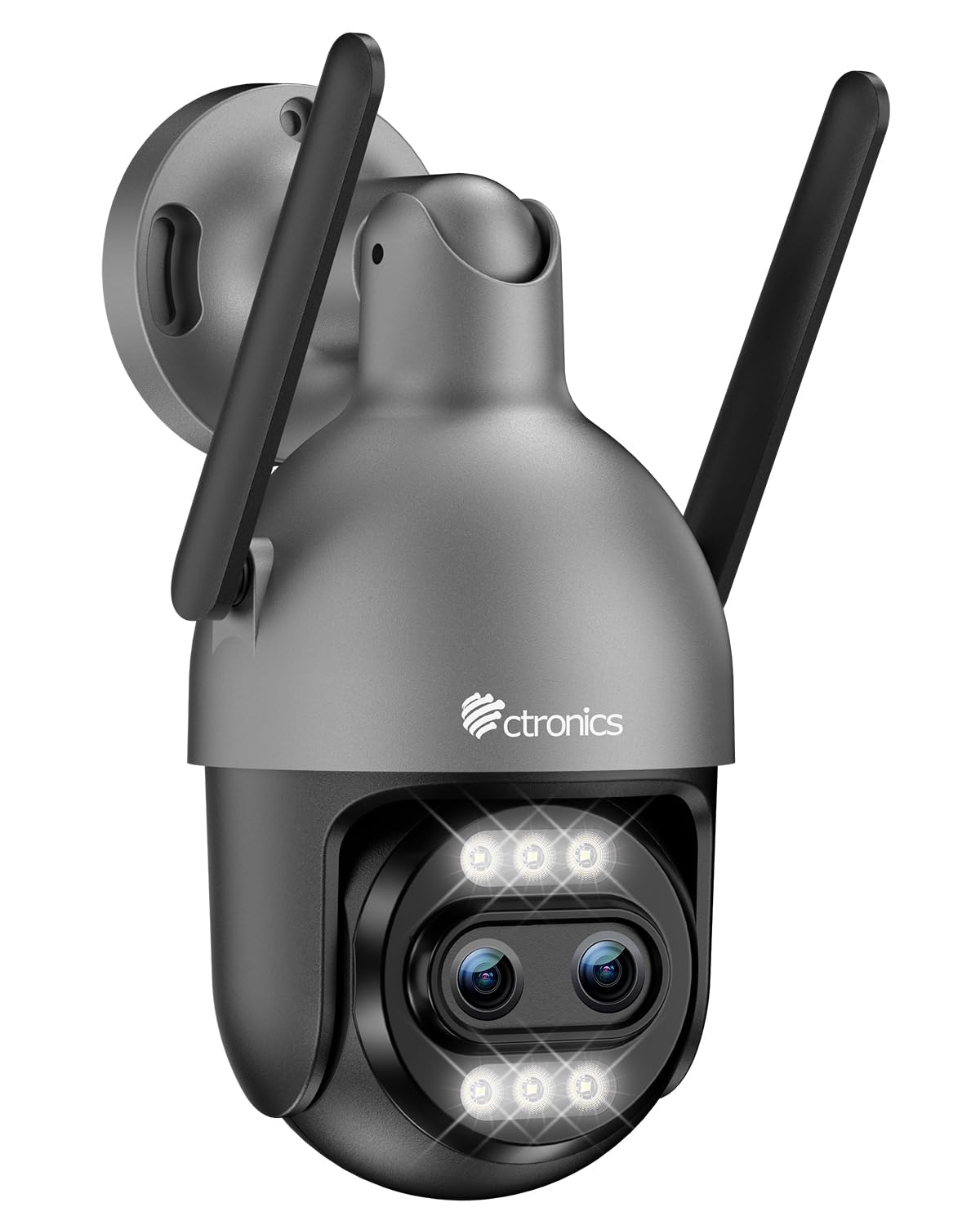
Image: Ctronics 4K Hybrid Zoom 10x Outdoor WiFi Surveillance Camera, Model 930-4KD.
1. Konfiguracja i instalacja
1.1 Zawartość opakowania
Sprawdź, czy w opakowaniu znajdują się wszystkie komponenty:
- Ctronics 4K Hybrid Zoom 10x Outdoor WiFi Surveillance Camera (Model 930-4KD)
- Zasilacz
- Śruby montażowe i kotwy
- Zestaw wodoodporny do kabla sieciowego
- Instrukcja obsługi (ten dokument)
1.2 Fizyczna instalacja
The camera is designed for outdoor use and ceiling mounting. Choose a location that provides optimal surveillance coverage and has a stable surface for mounting. Ensure the camera is within range of your Wi-Fi network or close to an Ethernet connection point.
- Mark the drilling positions on the wall or ceiling using the mounting template (if provided, otherwise use the camera base).
- Wywierć otwory i włóż kotwy ścienne.
- Secure the camera base to the surface using the provided screws.
- Adjust the camera angle as needed before final tightening.

Obraz: Byłyample of a Ctronics dual-lens PTZ camera, similar to Model 930-4KD, mounted for outdoor surveillance.
1.3 Zasilanie i połączenie sieciowe
Connect the camera to power using the provided power adapter. For network connectivity, you have two options:
- Połączenie Wi-Fi: Ensure your Wi-Fi network is 2.4GHz or 5GHz compatible. Follow the in-app instructions for Wi-Fi setup.
- Połączenie przewodowe: Connect an Ethernet cable from your router to the camera's network port. Use the waterproof kit to protect the connection if installed outdoors.
1.4 Instalacja i konfiguracja aplikacji
Download the official Ctronics Pro app from your smartphone's app store (iOS or Android). Alternatively, use the HiP2P Client software for Windows or Mac OS.
- Install the Ctronics Pro app on your smartphone or HiP2P Client on your computer.
- Zarejestruj konto i zaloguj się.
- Follow the on-screen prompts to add your camera. This typically involves scanning a QR code on the camera or manually entering its ID.
- Skonfiguruj ustawienia początkowe, takie jak strefa czasowa, preferencje nagrywania i powiadomienia o alertach.

Image: The Ctronics multi-platform software interface, showing compatibility with desktop, laptop, tablet, and smartphone devices.
2. Instrukcja obsługi
2.1 Na żywo View i nagrywanie
Once connected, access the live feed through the Ctronics Pro app or HiP2P Client. You can view real-time video, initiate manual recordings, and capture screenshots.
2.2 Funkcje zaawansowane
- 10-krotny zoom hybrydowy: Utilize the digital controls in the app to zoom in and out, combining optical and digital zoom for detailed views.
- Auto Zoom Tracking: Enable this feature to allow the camera to automatically track detected human movement and zoom in for clearer identification.
- Wykrywanie człowieka: Configure motion detection zones and sensitivity. The camera will send alerts upon detecting human shapes, reducing false alarms.
- Kolorowe widzenie nocne: The camera employs Starlight vision technology and LED lights to provide full-color video even in low-light conditions, up to 30 meters.
- Dwukierunkowy dźwięk: Use the built-in microphone and speaker to communicate with visitors or deter intruders remotely.
- Sterowanie PTZ: Pan, Tilt, and Zoom the camera remotely via the app to adjust the viewing angle and cover a 360-degree area.

Image: The Ctronics 10x Hybrid Zoom camera, highlighting its advanced optical capabilities.
2.3 Opcje przechowywania
The camera supports local recording to a Micro SD card (up to 256GB). Ensure the card is inserted correctly and formatted through the app. Cloud storage options may also be available through the Ctronics service.
3. Konserwacja
- Czyszczenie: Regularnie czyść obiektyw i obudowę aparatu miękką, miękką szmatką.amp ściereczką, aby zapewnić wysoką jakość obrazu. Nie używaj silnych środków chemicznych.
- Aktualizacje oprogramowania układowego: Check the Ctronics Pro app periodically for firmware updates. Keeping your camera's firmware updated ensures optimal performance and security.
- Zasilanie: Sprawdź, czy zasilacz i kabel nie są uszkodzone.
4. Rozwiązywanie Problemów
| Problem | Rozwiązanie |
|---|---|
| Kamera nie łączy się z siecią Wi-Fi | Ensure the camera is within Wi-Fi range. Check Wi-Fi password. Try resetting the camera and re-adding it to the app. Verify your router supports 2.4GHz/5GHz. |
| Brak obrazu lub czarny ekran | Check power connection. Ensure network connection is stable. Restart the camera and the app. |
| Alerty o wykryciu ruchu pojawiają się zbyt często/rzadko | Adjust motion detection sensitivity and detection zones in the app settings. |
| Dwukierunkowe audio nie działa | Check microphone and speaker permissions in the app. Ensure volume levels are adequate. |
| Karta SD nie nagrywa | Ensure the SD card is inserted correctly and formatted within the app. Check if the card is full or corrupted. Replace if necessary. |
5. Specyfikacje
| Funkcja | Szczegół |
|---|---|
| Nazwa modelu | 930-4KD |
| Marka | Elektronika |
| Technologia łączności | Przewodowy, Wi-Fi |
| Cechy specjalne | Two-Way Audio, Local Recording, UHD Resolution, PTZ Technology, Night Vision |
| Stosowanie | Plenerowy |
| Kompatybilne urządzenia | Komputer, laptop, smartfon, tablet |
| Źródło zasilania | Electric Cable (12 Volts) |
| Typ montażu | Montaż sufitowy |
| Kolor | Silver (argenté) |
| Współczynnik kształtu | Kopuła |
| Tworzywo | Metal |
| Tryb pracy | Dźwięk i ruch |
| Typ źródła światła | PROWADZONY |
| Effective Capture Resolution | 8 megapiksela |
| Międzynarodowa Ocena Ochrony | IP66 |
| Metoda kontroli | Aplikacja |
| Technologia bezprzewodowa | Bluetooth (for initial setup/pairing, likely) |
| Screen Capture Resolution | 4K |
| Efektywna rozdzielczość wideo | 3840.0 (likely 3840x2160 for 4K) |
| Zakres noktowizora | 30 metrów |
| Typ noktowizora | Gwiezdny |
| Wymiary (dł. x szer. x wys.) | Wymiary 15 x 15 x 15 cm |
| Format przechwytywania wideo | MP4 |
| Zoom optyczny | 6x |
| Typ fokusu | Autofokus |
| Typ powiększenia | 6x Optical Zoom + 4x Digital Zoom (10x Hybrid) |
| Technologia czujnika optycznego | CMOS |
| Typ pamięci flash | Mikro SD |
| Maksymalna obsługiwana pamięć Flash | 256 GB |
6. Gwarancja i wsparcie
For warranty information, technical support, or further assistance, please refer to the official Ctronics website or contact their customer service directly. Details are typically provided on the product packaging or the official Ctronics support page.
You can also find additional resources and FAQs on the Ctronics official webstrona: www.ctronics.com