
1. Wprowadzenie
This manual provides detailed instructions for setting up, operating, and maintaining your LEFFOT RK3518 Android 14.0 4K Ultra HD Streaming Device. Please read this manual thoroughly before use to ensure proper functionality and to maximize your entertainment experience.
Zawartość opakowania
Po rozpakowaniu sprawdź, czy znajdują się w nim wszystkie wymienione poniżej elementy:
- LEFFOT RK3518 Android 14.0 4K Ultra HD Streaming Device
- Zdalne sterowanie głosem
- Kabel HDMI
- Zasilacz (5V/2A)
- Instrukcja obsługi (ten dokument)

Image 1.1: Contents of the LEFFOT RK3518 package, including the streaming device, remote, cables, and manual.
2. Koniec produktuview
The LEFFOT RK3518 is a high-performance Android 14.0 TV Box designed to deliver a cinematic 4K streaming experience. It features a powerful Rockchip RK3518 Quad-Core A53 processor, 2GB RAM, and 16GB ROM, ensuring smooth operation and ample storage for applications. Advanced connectivity options include dual-band WiFi 6 (2.4G & 5G), Bluetooth 5.4, and USB 3.0.
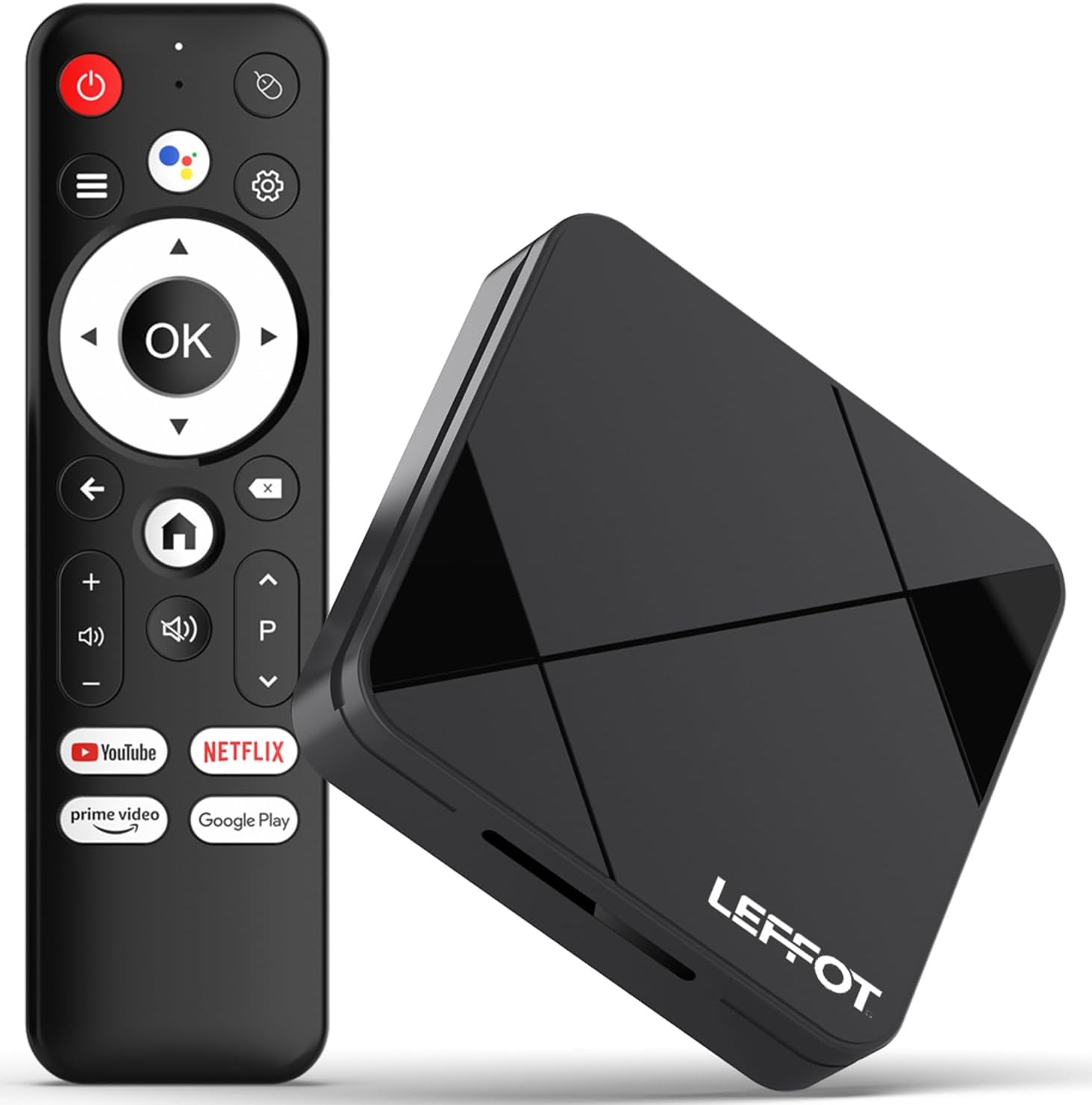
Image 2.1: The LEFFOT RK3518 streaming device and its accompanying voice remote control.
Główne cechy:
- Rozdzielczość 4K Ultra HD: Supports 4K@60fps and HDR10 for vibrant colors and sharp details.
- Wydajny procesor: Rockchip RK3518 Quad-Core A53 with Mali-450 GPU for smooth performance.
- Zaawansowana łączność: Dual-band WiFi 6 (2.4G & 5G), Bluetooth 5.4, USB 3.0, and Ethernet.
- Zdalne sterowanie głosowe: Intuitive navigation and hands-free control with built-in voice assistant.
- Ekosystem Androida 14.0: Access to thousands of apps via Google Play.
- Dublowanie ekranu: Supports AirPlay, DLNA, and WiFi Display for sharing content from mobile devices.
3. Konfiguracja
3.1 Podłączanie urządzenia
- Połącz z telewizorem: Insert one end of the provided HDMI cable into the HDMI port on the LEFFOT RK3518 device and the other end into an available HDMI input on your television.
- Podłącz do zasilania: Plug the power adapter into the DC 5V/2A port on the device, then plug the adapter into a wall outlet.
- Połącz się z Internetem (opcjonalnie):
- Połączenie przewodowe: For a stable connection, connect an Ethernet cable from your router to the Ethernet port on the device.
- Połączenie bezprzewodowe: The device supports 2.4G and 5G WiFi 6. You will configure this after initial power-on.

Image 3.1: Diagram showing the various ports on the LEFFOT RK3518 device, including TF card slot, USB, USB 3.0, AV, HDMI, Ethernet, and DC 5V/2A power input.
3.2 Kreator pierwszego uruchomienia i konfiguracji
- Włącz telewizor i wybierz odpowiednie źródło sygnału HDMI.
- The LEFFOT RK3518 device will automatically power on and display the boot-up screen.
- Follow the on-screen instructions of the Android setup wizard to:
- Wybierz swój język.
- Połącz się z siecią Wi-Fi (jeśli nie używasz Ethernetu).
- Sign in with your Google account to access Google Play Store and other services.
- Akceptuję regulamin.
3.3 Parowanie pilota
The included voice remote control is typically pre-paired. If the remote does not respond, ensure batteries are correctly inserted. If issues persist, follow these steps to re-pair:
- Upewnij się, że urządzenie jest włączone.
- Naciśnij i przytrzymaj OK przycisk i Zmniejsz głośność button simultaneously for a few seconds until a pairing indicator appears on the screen or the remote's LED flashes.
- Release the buttons. The remote should now be paired.
4. Instrukcja obsługi
4.1 Poruszanie się po interfejsie
Use the directional pad (up, down, left, right) on the remote control to navigate through menus and select items. The OK button confirms selections, and the Z powrotem button returns to the previous screen. The Dom button takes you directly to the main home screen.
4.2 Korzystanie ze sterowania głosowego
The LEFFOT RK3518 features a voice-enabled remote control for convenient hands-free operation.
- Naciśnij Asystent Google button (usually a microphone icon) on your remote.
- Speak clearly into the remote's microphone. You can ask to search for content, open applications, check weather, or control smart home devices.
- The device will process your command and display results or perform the requested action.

Image 4.1: Illustration of using the voice remote control to interact with the LEFFOT RK3518 streaming device.
4.3 Instalowanie i zarządzanie aplikacjami
Your device comes with the Google Play Store pre-installed, allowing access to a vast library of applications.
- Z ekranu głównego przejdź do Sklep Google Play icon and select it.
- Przeglądaj lub wyszukaj interesujące Cię aplikacje.
- Wybierz aplikację i wybierz Zainstalować.
- To manage installed apps, go to Ustawienia > Aplikacje.
4.4 Screen Mirroring (AirPlay, DLNA, WiFi Display)
The device supports various screen mirroring protocols to cast content from your smartphone or tablet to your TV.
- Ensure your mobile device and the LEFFOT RK3518 are connected to the same Wi-Fi network.
- On your mobile device, open the screen mirroring feature (e.g., AirPlay for iOS, Smart View/Screen Cast dla Androida).
- Select the LEFFOT RK3518 device from the list of available devices.
- Your mobile device's screen will now be mirrored on your TV.
5. Konserwacja
5.1 Czyszczenie urządzenia
To clean the exterior of the device, use a soft, dry, lint-free cloth. Do not use liquid cleaners, aerosols, or abrasive materials, as these can damage the finish or internal components.
5.2 Aktualizacje oprogramowania
The LEFFOT RK3518 may receive periodic software updates to improve performance, add features, or enhance security. It is recommended to keep your device's software up to date.
- Przejdź do Ustawienia > Preferencje urządzenia > Informacje > Aktualizacja systemu.
- If an update is available, follow the on-screen prompts to download and install it. Ensure the device remains powered on during the update process.
5.3 Zarządzanie magazynem
Periodically check the device's storage to ensure optimal performance. You can uninstall unused apps or clear cache data to free up space.
- Idź do Ustawienia > Aplikacje to manage individual applications.
- Idź do Ustawienia > Preferencje urządzenia > Pamięć Do view storage usage and manage external storage (TF card).
6. Rozwiązywanie Problemów
If you encounter issues with your LEFFOT RK3518 device, refer to the following common problems and solutions:
| Problem | Możliwa przyczyna / rozwiązanie |
|---|---|
| Brak zasilania / Urządzenie nie włącza się. | Upewnij się, że zasilacz jest prawidłowo podłączony do urządzenia i do sprawnego gniazdka elektrycznego. Spróbuj użyć innego gniazdka. |
| Brak sygnału w telewizji. | Verify the HDMI cable is securely connected to both the device and the TV. Ensure your TV is set to the correct HDMI input source. Try a different HDMI port or cable. |
| Pilot nie odpowiada. | Check the batteries in the remote control and replace if necessary. Re-pair the remote control as described in Section 3.3. |
| Problemy z połączeniem Wi-Fi. | Ensure your Wi-Fi router is on and functioning. Check Wi-Fi settings on the device (Settings > Network & Internet). Try restarting your router and the streaming device. Ensure you are within range of your Wi-Fi network. |
| Aplikacje działają wolno lub ulegają awarii. | Close unused applications. Clear the cache of problematic apps (Settings > Apps > [App Name] > Clear cache). Ensure sufficient storage space is available. Restart the device. |
| Poor video quality (not 4K). | Ensure your TV supports 4K resolution. Verify the content being streamed is 4K. Check your internet speed; 4K streaming requires a stable, high-speed connection. Ensure HDMI cable is 4K compatible. |
7. Specyfikacje
Below are the technical specifications for the LEFFOT RK3518 Android 14.0 4K Ultra HD Streaming Device:
| Funkcja | Specyfikacja |
|---|---|
| Nazwa modelu | RK3518 |
| System operacyjny | Android 14.0 |
| Edytor | Rockchip RK3518 Quad-Core A53 |
| Procesor graficzny | Mali-450 MP2 |
| BARAN | 2 GB |
| Pamięć wewnętrzna (ROM) | 16 GB (rozszerzalna za pomocą karty TF) |
| Wyjście wideo | HDMI 2.0 (4K@60fps, HDR10) |
| Łączność | 2.4G & 5G WiFi 6 (802.11 a/b/g/n/ac/ax), Bluetooth 5.4, 100M Ethernet |
| Porty | HDMI, USB 3.0, USB 2.0, LAN, TF Card Slot, AV, DC 5V/2A |
| Obsługiwane usługi internetowe | Netflix, Prime Video, YouTube, and more via Google Play |
| Wymiary | 3.2 x 3.2 x 0.67 cala (ok. 90 x 90 x 18.8 mm) |
| Waga | 3.25 uncji |
8. Gwarancja i wsparcie
8.1 Informacje o gwarancji
Your LEFFOT RK3518 Android 14.0 4K Ultra HD Streaming Device is covered by a manufacturer's warranty against defects in materials and workmanship. The specific terms and duration of the warranty may vary by region and retailer. Please retain your proof of purchase for warranty claims.
8.2 Obsługa klienta
For technical assistance, troubleshooting beyond this manual, or warranty inquiries, please contact LEFFOT customer support through the retailer where the product was purchased or refer to the official LEFFOT webwitryna do informacji kontaktowych.