
1. Wprowadzenie
This manual provides comprehensive instructions for the installation, operation, and maintenance of your UNITOPSCI 10.1-inch Android Car Stereo. This unit is specifically designed for Honda Accord 9th Generation 2.0L models manufactured between 2013 and 2017. Please read this manual thoroughly before using the product to ensure proper functionality and safety.
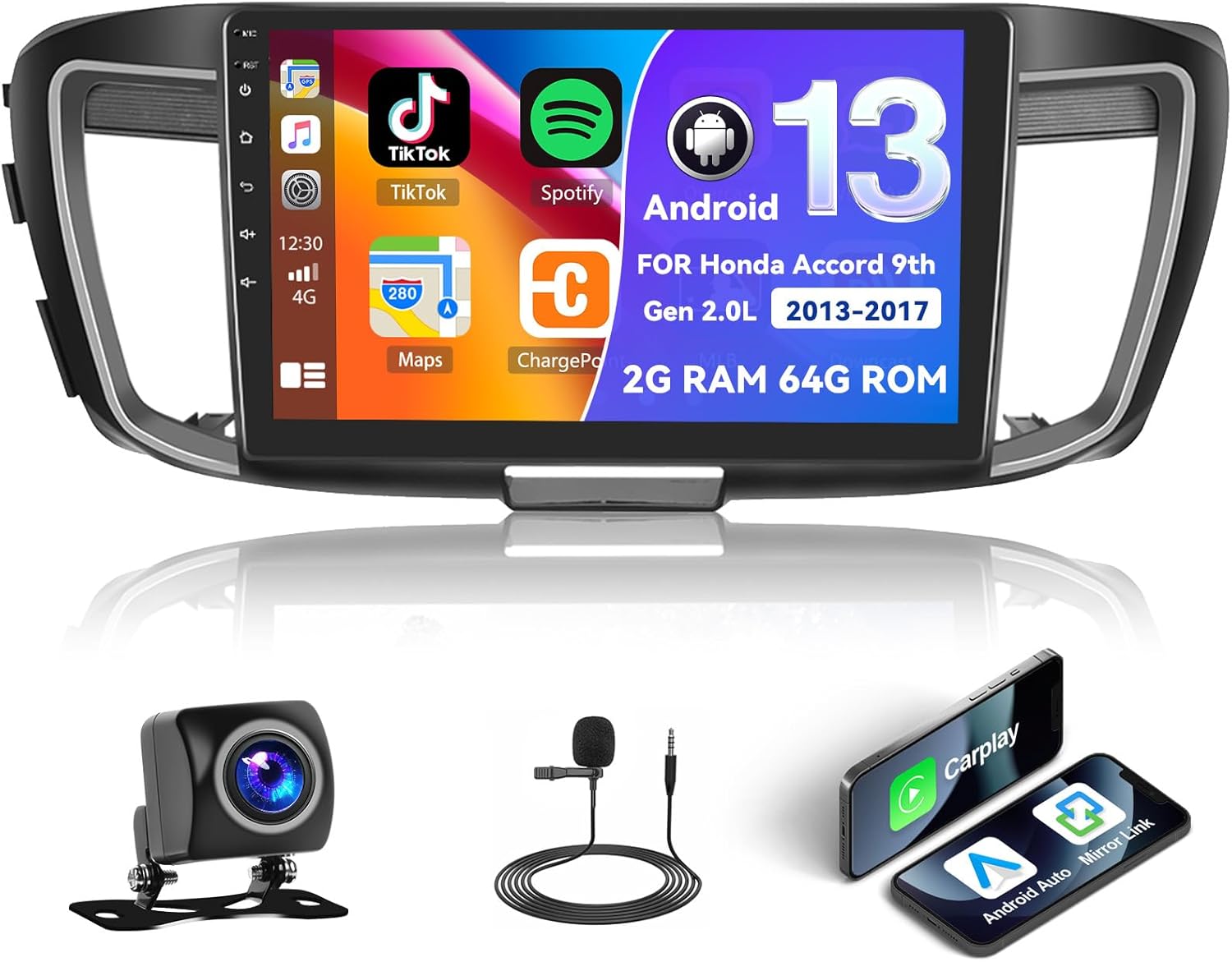
Figure 1.1: UNITOPSCI Android Car Stereo with backup camera, microphone, and smartphone mirroring icons.
2. Informacje dotyczące bezpieczeństwa
- Do not operate the system in a way that distracts you from driving safely. Always prioritize road safety.
- Aby zapobiec zwarciom i uszkodzeniom, należy upewnić się, że wszystkie przewody są prawidłowo podłączone.
- Unikaj wystawiania urządzenia na działanie ekstremalnych temperatur, długotrwałego bezpośredniego światła słonecznego i nadmiernej wilgoci.
- Aby zagwarantować prawidłowe okablowanie i funkcjonalność, zaleca się zlecenie montażu profesjonaliście.
- Utrzymuj głośność na poziomie pozwalającym usłyszeć dźwięki dochodzące z zewnątrz z ruchu ulicznego.
3. Koniec produktuview
3.1 Główne cechy
- 10.1-inch Touchscreen Display (1024*600 resolution)
- System operacyjny Android (2 GB RAM + 64 GB ROM)
- Wireless/Wired Apple CarPlay and Android Auto
- Dual Mirror Link for Android/iOS phones
- Built-in GPS Navigation with offline map support (HERE WE GO preloaded)
- Łączność WiFi
- Bluetooth with A2DP/Hands-Free/Phone Book functions
- Radio FM/RDS z 18 zaprogramowanymi stacjami
- Backup Camera Input with automatic display switching
- Obsługa sterowania z kierownicy (SWC)
- Funkcjonalność podzielonego ekranu
- Built-in Equalizer System
- Multiple UI Themes (26 options)
3.2 Zawartość opakowania
- UNITOPSCI Android Car Stereo Unit
- Wiązki przewodów
- Antena GPS
- Kable USB (podwójny interfejs USB)
- Mikrofon zewnętrzny
- Kamera cofania
- Instrukcja obsługi (ten dokument)
4. Konfiguracja i instalacja
4.1 Sprawdzenie zgodności
This car stereo is compatible with Honda Accord 9th Generation 2.0L models from 2013 to 2017 (basic version). It is not compatible with high-end versions that include a large OEM screen or navigation system. Please verify your vehicle's center console and compare it with the provided installation frame images to ensure compatibility.

Figure 4.1: Dashboard compatibility for Honda Accord 9th Gen (2013-2017) 2.0L low-end version. Note: Not suitable for models with existing OEM Navi Screen.
4.2 Kroki instalacji
- Przygotowanie: Odłącz akumulator pojazdu, aby zapobiec uszkodzeniom elektrycznym.
- Remove OEM Unit: Ostrożnie zdejmij istniejące radio samochodowe i listwę wykończeniową deski rozdzielczej. Szczegółowe instrukcje znajdziesz w instrukcji serwisowej pojazdu.
- Podłącz okablowanie: Connect the provided wiring harness to the car stereo and the vehicle's existing wiring. Ensure all connections are secure. Connect the GPS antenna, external microphone, and backup camera cables.
- Funkcjonalność testu: Before fully reassembling the dashboard, temporarily connect the battery and power on the unit to test basic functions like power, audio, and display.
- Bezpieczna jednostka: Mount the new car stereo into the dashboard opening and secure it with screws.
- Ponowny montaż: Zamontuj ponownie wszystkie elementy wykończeniowe deski rozdzielczej.
- Ostateczne połączenie: Podłącz ponownie akumulator pojazdu.
Notatka: If your vehicle has an OEM Radio with a Center Navi Screen, additional wiring kits may be required. Contact customer support for assistance.
5. Instrukcja obsługi
5.1 Włączanie/wyłączanie zasilania
The unit will typically power on automatically when the vehicle's ignition is turned on. To manually power off or restart, press and hold the power button on the unit or use the software controls.
5.2 Bezprzewodowy CarPlay i Android Auto
This unit supports both wireless and wired Apple CarPlay and Android Auto. Connect your smartphone via Bluetooth/WiFi for wireless functionality or use a USB cable for a wired connection. Once connected, you can access phone calls, navigation, music, and other compatible apps directly from the stereo's touchscreen.

Figure 5.1: Wireless CarPlay, Android Auto, and Mirror Link interfaces.
5.3 Nawigacja GPS
The stereo has built-in GPS and supports both online and offline navigation. The HERE WE GO map application is preloaded. To use offline maps, download the necessary map data via a WiFi connection. For online navigation, ensure the unit is connected to WiFi or a mobile hotspot.

Figure 5.2: GPS Navigation interface and WiFi connection options.
5.4 Bluetooth i radio FM/RDS
Bluetooth: Pair your smartphone via Bluetooth for hands-free calling, music streaming (A2DP), and automatic phone book download. This enhances safety by allowing you to manage calls without holding your phone.
Radio FM/RDS: Access FM radio stations with 18 preset options. The RDS (Radio Data System) feature displays station information where available. Use the tuner to find news, music, and sports broadcasts.

Figure 5.3: FM/RDS Radio, Bluetooth interface, and Equalizer settings.
5.5 Łącze lustrzane
The Mirror Link function allows you to display your Android or iOS phone's screen directly onto the 10.1-inch head unit. This can be achieved via a wired or wireless connection, enabling you to view videos or maps from your phone on the larger screen.
5.6 Sterowanie z kierownicy (SWC)
The unit supports your vehicle's existing steering wheel controls. This allows you to adjust volume, change tracks, answer calls, and switch modes without taking your hands off the steering wheel, improving driving safety and convenience. The system includes a learning function for SWC configuration.
5.7 Backup Camera Input
When the vehicle is shifted into reverse gear, the stereo automatically displays the view from the connected AHD backup camera on the 10.1-inch screen. This assists with safe parking and maneuvering.

Figure 5.4: Steering Wheel Control interface and backup camera view z wytycznymi.
5.8 Split Screen & UI Themes
Podzielony ekran: The split-screen feature allows you to run two applications side-by-side on the display, for example, navigation on one side and music playback on the other.
Motywy interfejsu użytkownika: The Android radio offers 26 different user interface themes. You can customize the look of your desktop by long-pressing the main interface and selecting your preferred theme.

Figure 5.5: Split screen view i byłyamples of different UI desktop themes.
6. Konserwacja
- Czyszczenie: Do czyszczenia ekranu i urządzenia używaj miękkiej, suchej ściereczki. Unikaj środków czyszczących o właściwościach ściernych i rozpuszczalników.
- Aktualizacje oprogramowania: Periodically check for available software updates to ensure optimal performance and access to new features.
- Temperatura: Do not leave the unit in direct sunlight for extended periods, especially in hot weather, as this can affect its lifespan.
7. Rozwiązywanie Problemów
| Problem | Możliwa przyczyna | Rozwiązanie |
|---|---|---|
| Urządzenie nie włącza się | Nieprawidłowe okablowanie, przepalony bezpiecznik, problem z akumulatorem pojazdu | Sprawdź połączenia elektryczne, sprawdź bezpieczniki pojazdu i upewnij się, że akumulator jest naładowany. |
| Brak dźwięku | Zbyt niska głośność, nieprawidłowe ustawienia dźwięku, problem z okablowaniem głośników | Zwiększ głośność, sprawdź ustawienia wyjścia audio, zweryfikuj połączenia głośników. |
| Utracony lub niedokładny sygnał GPS | Antena GPS zablokowana lub odłączona, słaby zasięg satelitarny | Upewnij się, że antena GPS jest prawidłowo zainstalowana i ma zapewnioną przejrzystość. view nieba. Sprawdź połączenie antenowe. |
| Problemy z połączeniem Bluetooth | Device not paired, Bluetooth off on phone or stereo | Upewnij się, że Bluetooth jest włączony na obu urządzeniach. Sparuj urządzenie ponownie. |
| Ekran dotykowy nie reaguje | Tymczasowa usterka oprogramowania | Restart the unit. If issue persists, perform a factory reset (Factory setting keyword: 000000). |
If you encounter issues not listed here or if troubleshooting steps do not resolve the problem, please contact UNITOPSCI customer support.
8. Specyfikacje
| Funkcja | Specyfikacja |
|---|---|
| System | Android |
| Zestaw układów scalonych | 8227L-DEMO |
| Rozmiar ekranu | 10.1 cali |
| Pamięć (RAM+ROM) | 2 GB pamięci RAM + 64 GB pamięci ROM |
| Rozdzielczość ekranu | 1024*600 |
| Układ radiowy | MT6625 |
| Moc wyjściowa | 4*45W |
| Temperatura pracy | -20°C do 75°C (-4°F do 167°F) |
| Moc Ampukład scalony | TDA7388 |
| Pasmo radiowe | UKF/RDS |
| Wyjście wideo | Wsparcie |
| Mikrofon zewnętrzny | Wsparcie |
| Podziel ekran | Wsparcie |
| Mapy | Wbudowane mapy offline (do pobrania danych wymagany jest dostęp do Internetu) |
| Wi-Fi | Wsparcie |
| USB | Podwójny interfejs USB |
| Obsługa formatu audio | APE/FLAC/WAV/MP3/WMA itp. |
| Obsługa formatu wideo | MKV/RMVB/AVI/MP4/MDV itp. |
| Obsługa formatu obrazu | PNG/JPEG/JPG/GIF/WBMP/BNP itd. |
| Słowo kluczowe ustawień fabrycznych | 000000 |
| Języki | Chiński/angielski/francuski/włoski/koreański/japoński/arabski/hiszpański/portugalski/rosyjski/turecki/wietnamski/hebrajski/polski/niemiecki |
| Waga przedmiotu | 3.08 funta |
| Wymiary opakowania | 17.13 x 7.8 x 4.06 cala |
9. Gwarancja i wsparcie
Your UNITOPSCI Android Car Stereo comes with a 12-month warranty. Replacement is available within 24 months for qualifying issues. We offer lifetime after-sales consultation and technical support.
W przypadku pytań, chęci uzyskania pomocy technicznej lub złożenia reklamacji prosimy o kontakt:
- E-mail: UNITOPSCI@126.com

Figure 9.1: UNITOPSCI Customer Support Contact Information.