
1. Wprowadzenie
Dziękujemy za zakupasing the BESTISAN Wave Base Soundbar. This soundbar is designed to enhance your audio experience for televisions, home theater systems, gaming consoles, and projectors. It features multiple connectivity options including Bluetooth, HDMI-ARC, Optical, AUX, and USB, providing versatile audio playback. This manual provides detailed instructions for proper setup, operation, and maintenance of your soundbar.
2. Zawartość opakowania
Proszę dokładnie sprawdzić przesyłkę, aby mieć pewność, że wszystkie przedmioty znajdują się w niej i są w dobrym stanie.
- BESTISAN Wave Base Soundbar
- Zdalne sterowanie
- Zasilacz
- Kabel optyczny
- 3.5mm to 3.5mm Audio Cable (AUX Cable)
- Instrukcja obsługi (Szybki przewodnik)

Figure 2.1: Soundbar and Included Accessories
3. Koniec produktuview
Sterowanie soundbarem 3.1
The soundbar features intuitive controls located on the side panel for easy access.
- Przycisk zasilania: Naciśnij, aby włączyć lub wyłączyć soundbar.
- Ściszanie (-): Zmniejsz poziom głośności.
- Zwiększanie głośności (+): Zwiększ poziom głośności.
- Przycisk wejścia/trybu: Press to cycle through input sources (Bluetooth, AUX, Optical, HDMI-ARC, USB).
3.2 Połączenia panelu tylnego
The rear panel provides various ports for connecting to your audio sources.
- DC IN: Podłącz tutaj zasilacz.
- WYJŚCIE SUB: Wyjście na zewnętrzny subwoofer (jeśli dotyczy).
- WEJŚCIE AUX: 3.5mm audio input for connecting devices with an AUX cable.
- USB: Do odtwarzania z dysku USB.
- OPTYCZNY: Optical audio input for digital audio connection.
- HDMI (ARC): HDMI Audio Return Channel input for connecting to compatible TVs.

Rysunek 3.1: Połączenia na panelu tylnym
3.3 Funkcje zdalnego sterowania
Dołączony pilot zdalnego sterowania zapewnia pełną funkcjonalność soundbara.
- Przycisk zasilania: Włącza/wyłącza soundbar.
- Przycisk wyciszenia: Wycisza lub włącza dźwięk.
- Zwiększanie/zmniejszanie głośności: Reguluje główną głośność.
- Play/Pause/Next/Previous: Media playback controls (for Bluetooth/USB modes).
- Input Mode Buttons (BT, AUX, OPT, HDMI ARC, USB): Directly select input sources.
- Sound Mode Buttons (MUSIC, MOVIE, DIALOG): Select preset equalizer modes.
- TREB+/TREB-: Dostosuj poziom wysokich tonów.
- BAS+/BAS-: Dostosuj poziom basów.
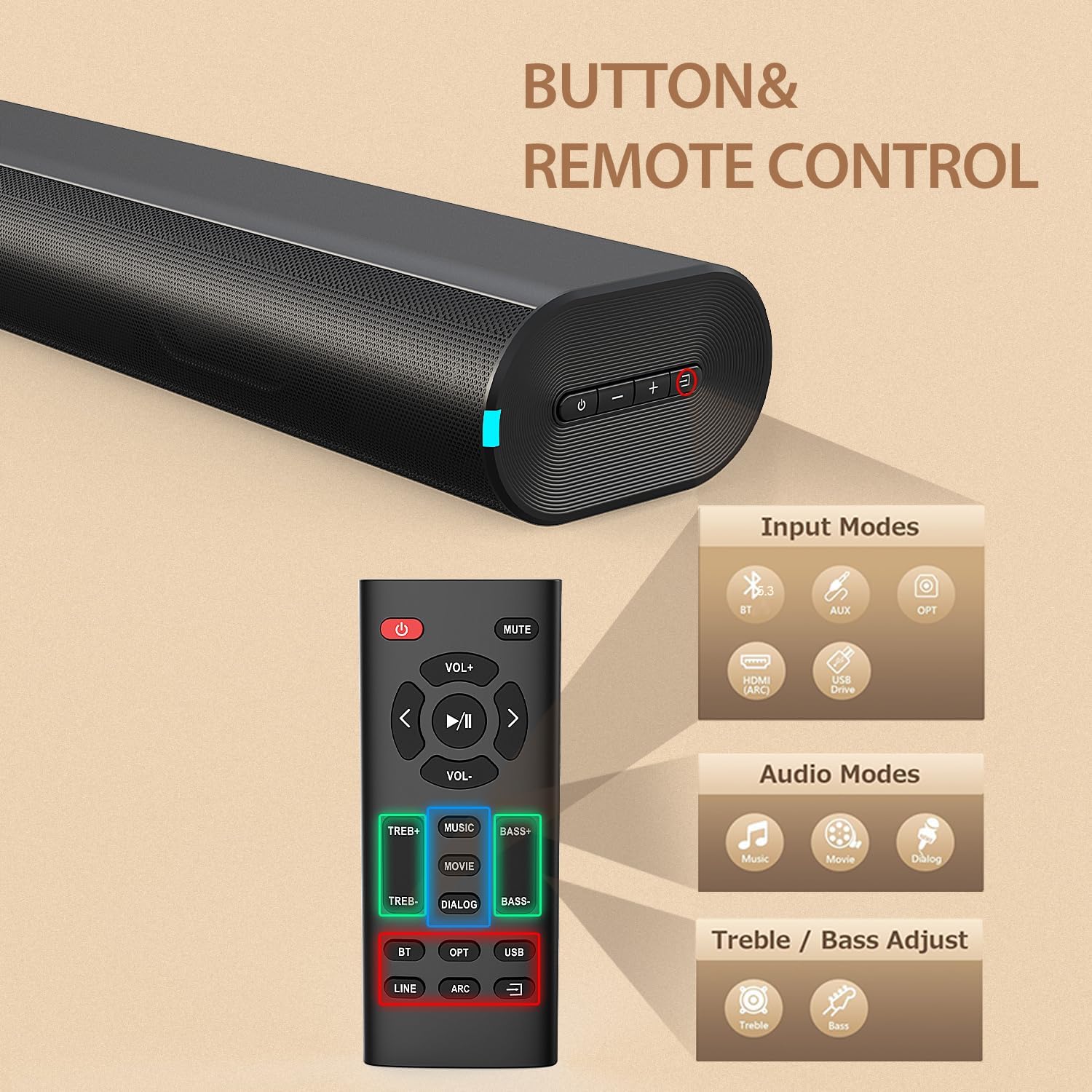
Figure 3.2: Soundbar Controls and Remote Control
4. Konfiguracja
4.1 Połączenie zasilania
- Podłącz zasilacz do portu DC IN z tyłu soundbara.
- Plug the other end of the power adapter into a wall outlet (AC 110V).
- The soundbar will enter standby mode, indicated by an LED light.
4.2 Connecting to Your TV or Device
Choose one of the following connection methods based on your device's available ports:
Połączenie HDMI ARC
- Connect one end of an HDMI cable (not included) to the HDMI (ARC) port on the soundbar.
- Podłącz drugi koniec do portu HDMI ARC w telewizorze.
- Upewnij się, że funkcja HDMI ARC jest włączona w ustawieniach telewizora.
- Select HDMI ARC input on the soundbar using the remote or the soundbar's input button.
Połączenie optyczne
- Connect the included optical cable to the OPTICAL port on the soundbar.
- Connect the other end to the Optical Digital Audio Out port on your television or device.
- Select OPTICAL input on the soundbar using the remote or the soundbar's input button.
Połączenie AUX
- Connect the included 3.5mm audio cable to the AUX IN port on the soundbar.
- Connect the other end to the 3.5mm headphone jack or audio output on your device.
- Select AUX input on the soundbar using the remote or the soundbar's input button.
Parowanie Bluetooth
- Włącz głośnik soundbar.
- Press the 'BT' button on the remote or the input button on the soundbar until the Bluetooth indicator light flashes.
- Na swoim urządzeniu mobilnym włącz Bluetooth i wyszukaj dostępne urządzenia.
- Select "BESTISAN SE12-01" from the list.
- Po sparowaniu kontrolka Bluetooth przestanie migać i będzie świecić światłem ciągłym.
Odtwarzanie USB
- Insert a USB drive (FAT32 format) containing audio files do portu USB w soundbarze.
- Press the 'USB' button on the remote or cycle through inputs on the soundbar until USB mode is selected.
- Soundbar automatycznie rozpocznie odtwarzanie dźwięku filez dysku USB.
5. Instrukcja obsługi
5.1 Włączanie/wyłączanie zasilania
Naciśnij przycisk zasilania na soundbarze lub pilocie, aby włączyć lub wyłączyć urządzenie.
5.2 Wybór wejścia
Press the Input/Mode button on the soundbar or the corresponding input button (BT, AUX, OPT, HDMI ARC, USB) on the remote control to switch between audio sources.
5.3 Regulacja głośności
Use the Volume Up (+) or Volume Down (-) buttons on the soundbar or remote control to adjust the audio volume.
5.4 Tryby dźwięku (EQ)
The soundbar offers three preset equalizer modes to optimize audio for different content types. Press the corresponding button on the remote control to select:
- Tryb MUZYCZNY: Idealne do słuchania muzyki, zapewniają zrównoważony dźwięk.
- MOVIE Mode: Enhances cinematic sound effects and dialogue for movies.
- DIALOG Mode (News Mode): Optimizes vocal clarity, suitable for news, podcasts, or TV shows with heavy dialogue.

Figure 5.1: Sound Modes
5.5 Regulacja tonów wysokich i niskich
Use the TREB+/TREB- and BASS+/BASS- buttons on the remote control to fine-tune the treble and bass levels according to your preference.
6. Konserwacja
Aby zapewnić długą żywotność i optymalną wydajność soundbara, należy przestrzegać poniższych wskazówek dotyczących konserwacji:
- Czyszczenie: Use a soft, dry cloth to wipe the surface of the soundbar. Do not use liquid cleaners, abrasive cleaners, or sprays, as they may damage the finish or internal components.
- Umieszczenie: Place the soundbar on a stable, flat surface. Avoid placing it in direct sunlight, near heat sources, or in areas with high humidity or dust.
- Wentylacja: Zapewnij odpowiednią wentylację wokół soundbara, aby zapobiec przegrzaniu. Nie blokuj otworów wentylacyjnych.
- Przewód zasilający: Regularnie sprawdzaj przewód zasilający pod kątem uszkodzeń. W przypadku uszkodzenia, zaprzestań użytkowania i skontaktuj się z obsługą klienta.
7. Rozwiązywanie Problemów
Jeśli masz problemy z soundbarem, zapoznaj się z poniższą tabelą, w której znajdziesz informacje na temat typowych problemów i ich rozwiązań.
| Problem | Możliwa przyczyna | Rozwiązanie |
|---|---|---|
| Brak zasilania | Przewód zasilający nie jest podłączony; gniazdko elektryczne nie jest aktywne | Ensure power cord is securely connected to the soundbar and a working power outlet. |
| Brak dźwięku | Wybrano nieprawidłowe wejście; Głośność jest zbyt niska; Kable nie są prawidłowo podłączone | Select the correct input source. Increase volume. Check all audio cables are securely connected. Ensure TV audio output is set correctly. |
| Parowanie Bluetooth nie powiodło się | Soundbar nie jest w trybie parowania; Urządzenie jest za daleko; Zakłócenia | Ensure soundbar is in Bluetooth pairing mode (flashing LED). Move device closer to soundbar. Turn off other Bluetooth devices. |
| Zniekształcenie dźwięku | Zbyt wysoka głośność; słaba jakość źródła dźwięku | Reduce volume. Try a different audio source or cable. |
| Pilot nie działa | Baterie są rozładowane; przeszkoda między pilotem a soundbarem | Replace remote control batteries. Ensure no obstructions are blocking the remote's signal to the soundbar. |
8. Specyfikacje
Technical specifications for the BESTISAN Wave Base Soundbar (Model SE12-01).
| Funkcja | Szczegół |
|---|---|
| Numer modelu | SE12-01 |
| Marka | BYŁ |
| Typ głośnika | Soundbar |
| Technologia łączności | Bluetooth, HDMI (ARC), optyczne, AUX, USB |
| Wersja Bluetooth | V5.3 |
| Zasięg Bluetooth | Do 30 stóp (10 metrów) |
| Tryb wyjścia audio | Stereo (2.0-kanałowy) |
| Maksymalna moc wyjściowa głośnika | 60 watów |
| Odpowiedź częstotliwościowa | 20 KHz (Upper limit, typical for soundbars) |
| Stosunek sygnału do szumu | 80dB |
| Wejście Voltage | 110 wolty |
| Wymiary produktu (Gł. x Szer. x Wys.) | 3.74" x 21.85" x 2.36" |
| Waga przedmiotu | 2.64 funtów |
| Tworzywo | Akrylonitryl-butadien-styren (ABS), metal |
| Typ montażu | Uchwyt na blat |
| Metoda kontroli | Przycisk, pilot |
9. Gwarancja i wsparcie
9.1 Gwarancja na produkt
This BESTISAN Wave Base Soundbar is covered by a Limited Manufacturer Warranty. Please refer to the warranty card included in your package or contact the manufacturer for specific terms and conditions regarding warranty coverage.
9.2 Obsługa klienta
For technical assistance, troubleshooting beyond this manual, or warranty inquiries, please contact BESTISAN customer support. Contact information can typically be found on the manufacturer's official webstronie lub na opakowaniu Twojego produktu.