
voijump M681
voijump Professional Wireless Microphone Instruction Manual
Model: M681
1. Wprowadzenie
Thank you for choosing the voijump Professional Wireless Microphone. This compact and versatile lavalier microphone system is designed to deliver broadcast-quality audio for content creators, vloggers, podcasters, and anyone needing clear sound for video recording, interviews, and live streaming. Featuring instant plug-and-play functionality, intelligent noise reduction, and broad compatibility with iPhone, iPad, and Android devices, this system ensures high-quality audio capture with ease.
2. Co znajduje się w pudełku
Sprawdź zawartość paczki, aby upewnić się, że znajdują się w niej wszystkie elementy:
- 2 Mini Mic Wireless Microphones
- 1 Receiver (Lightning & USB-C)
- 1 Type-C to Lightning Adapter
- 2 High-Density Sponge Tips
- 2 Deadcat Windshields
- Kabel ładujący USB 1
- 1 Instrukcja obsługi

Image: All components included in the voijump Professional Wireless Microphone package.
Video: An unboxing of the voijump Professional Wireless Microphone, demonstrating the contents and initial impressions.
3. Koniec produktuview
The voijump wireless microphone system consists of two mini microphones (transmitters) and one receiver. Each component is designed for ease of use and portability.

Image: The compact and portable design of the voijump wireless microphones.

Image: Dimensions and weight of the mini microphone, emphasizing its lightweight nature.
Microphone (Transmitter) Features:
- Osłony mikrofonu: (Furry deadcat or sponge tips) Reduces wind noise and plosives.
- Port ładowania USB: Do ładowania mikrofonu.
- Klips mikrofonowy: Do przymocowania do ubrania.
- Przycisk zasilania: To turn the microphone on/off.
- Wskaźnik mikrofonu: Pokazuje stan zasilania i połączenia.
Funkcje odbiornika:
- Złącze urządzenia: USB-C or Lightning (depending on the adapter used) to connect to your phone/device.
- Port ładowania telefonu: Allows charging of your phone/device while the receiver is connected.
4. Konfiguracja
The voijump wireless microphone system is designed for instant plug-and-play operation, requiring no Bluetooth pairing or app installation.
- Podłącz odbiornik: Plug the receiver directly into the charging port of your smartphone, tablet, or laptop. Use the appropriate adapter (USB-C or Lightning) for your device.
- Power On the Microphone(s): Press and hold the power button on each mini microphone you intend to use. The microphone indicator light will turn green, indicating it is powered on and ready to connect.
- Automatyczne połączenie: The microphone(s) will automatically connect to the receiver within approximately 1.3 seconds. The indicator light on the microphone will remain solid green once connected.
- Rozpocznij nagrywanie: Open your device's camera or recording app and begin recording. The audio will now be captured by the wireless microphone(s).
Uwaga dla użytkowników Androida: Before using the microphone, please ensure the "OTG" function is enabled on your Android device. This setting is usually found in your device's system settings under 'Connected devices' or 'USB preferences'.
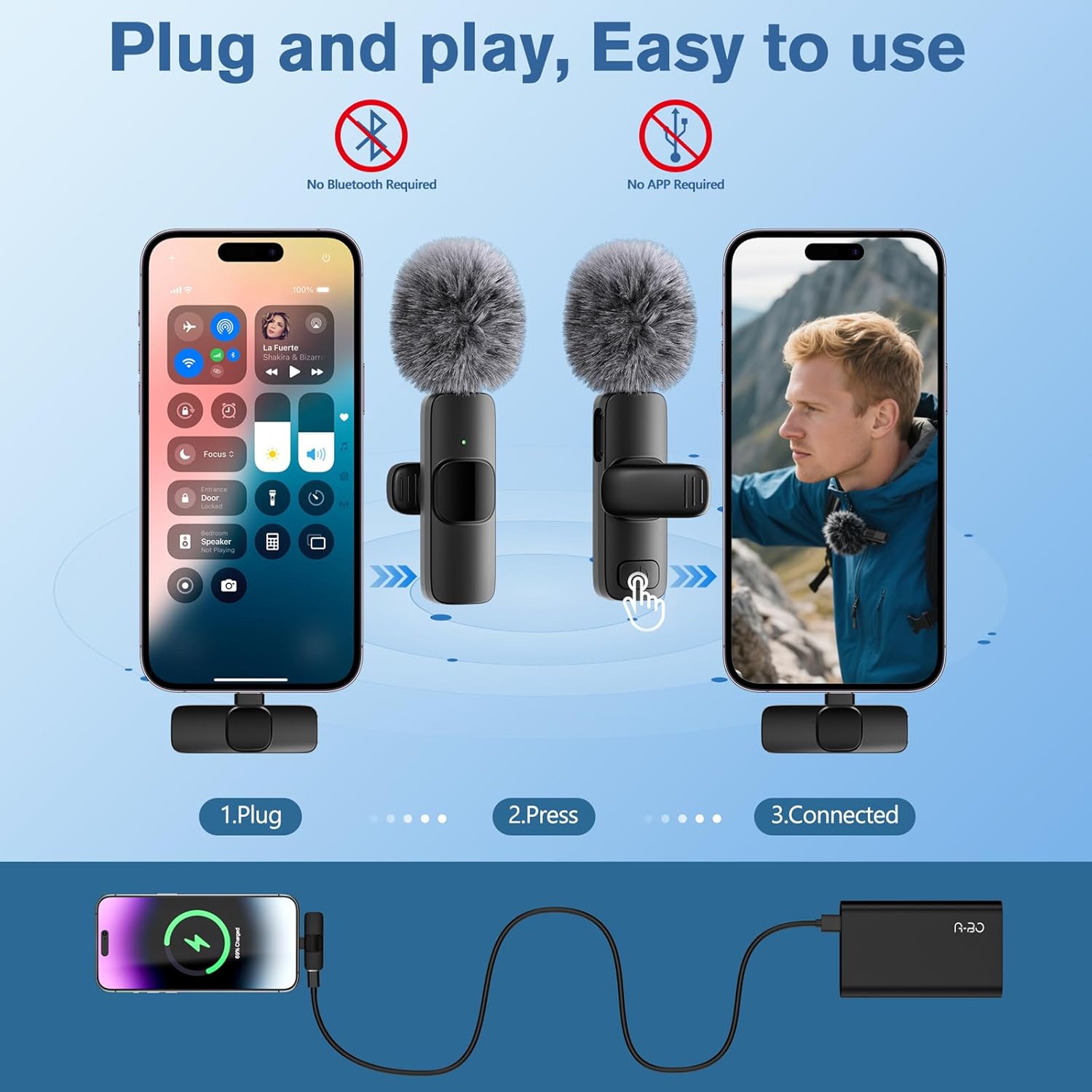
Image: Visual guide for the simple plug-and-play setup process.
Video: A short demonstration of the microphone's plug-and-play functionality, showing immediate readiness for use.
5. Instrukcja obsługi
Funkcja wyciszenia:
During recording, a short press of the microphone's power button will toggle the mute function. The indicator light will change to a flashing green when muted and solid green when unmuted.
Ładowanie podczas nagrywania:
The receiver features a pass-through charging port, allowing you to charge your smartphone or tablet simultaneously while recording. This ensures uninterrupted creative sessions.
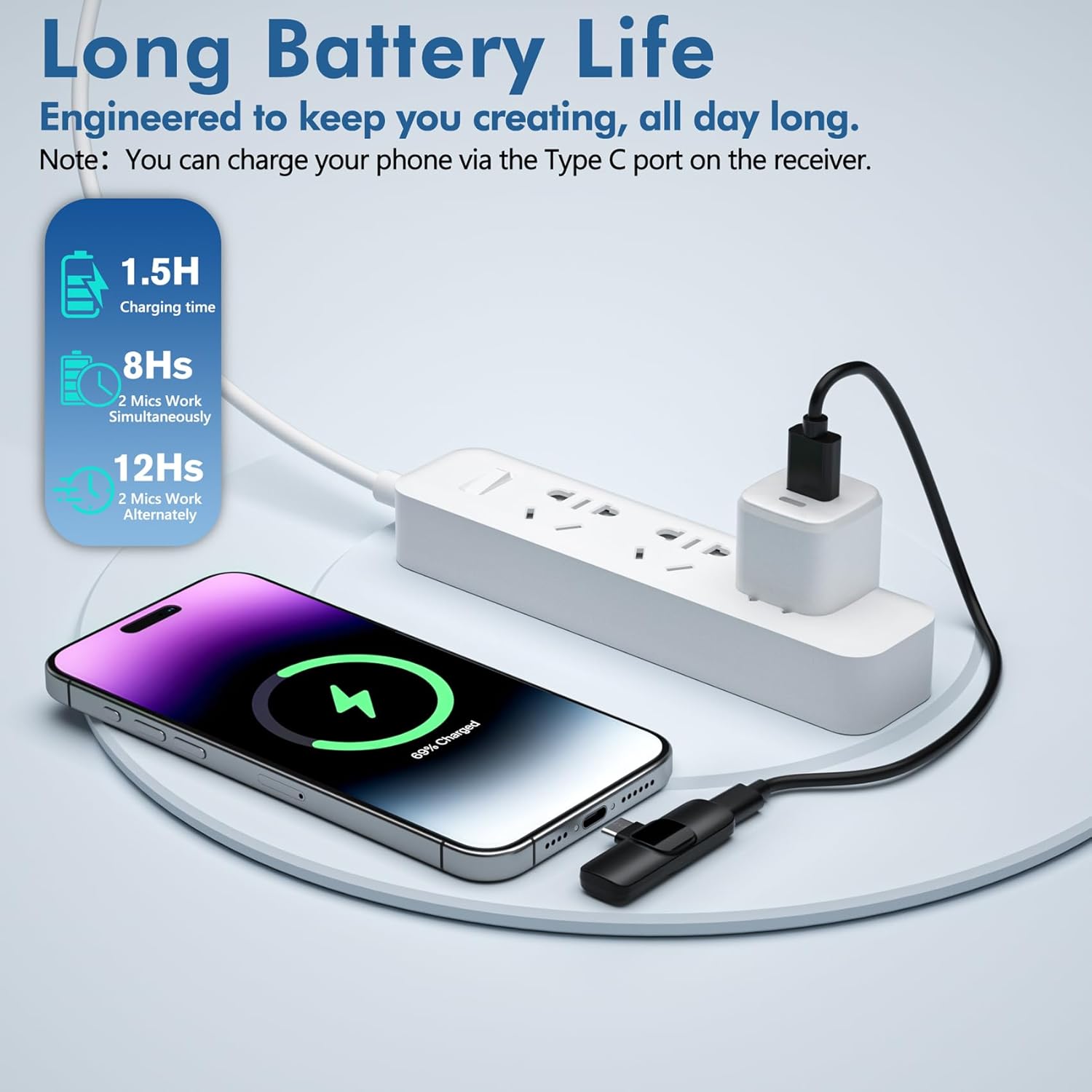
Image: Illustrates charging a phone via the receiver's port during recording.
Ładowanie mikrofonu:
To charge the mini microphones, use the provided USB charging cable. Connect the cable to the microphone's USB charging port and a power source. The indicator light will show charging status.

Image: Details on battery life and charging time for the microphones.
6. Zgodność
The voijump Professional Wireless Microphone system is broadly compatible with a variety of devices:
- iPhone’y: All iPhones with Lightning or USB-C ports (e.g., iPhone 7/Plus, 8/Plus, X/XR/XS/XS Max, 11/Pro/Pro Max, 12/Mini/Pro/Pro Max, 13/Mini/Pro/Pro Max, 14/Plus/Pro/Pro Max, 15/Plus/Pro/Pro Max, 16/Pro/Pro Max).
- iPady: iPad mini series, iPad series, iPad Air series.
- Urządzenia z systemem Android: Smartphones and tablets with USB-C ports. (Remember to enable OTG function if required by your device).
- Laptopy: Compatible with laptops featuring USB-C ports.

Image: Demonstrates compatibility with various iPhone and Android devices.

Image: Detailed compatibility list for iPhone and iPad models, with a note for Android OTG function.
7. Główne cechy
- Profesjonalna jakość dźwięku: Delivers broadcast-quality 48kHz/24-bit audio.
- Omnidirectional Sound & Noise Reduction: Equipped with an upgraded intelligent AI chip and 360° omnidirectional pickup mode. Includes high-density anti-spray sponge and windproof deadcat windshields to cut plosives and wind interference for crystal-clear indoor/outdoor recordings.
- Extended Range & Long Battery Life: Features 2.4GHz wireless transmission technology, providing a 66ft (20 meters) barrier-free effective distance. The rechargeable microphones last for 12 hours in single-mic mode or 8 hours in dual-mic sessions.
- Lekkie i wytrzymałe: Made of high-quality materials, weighing less than an ounce, making it extremely portable and suitable for everyday use.

Image: Demonstrates the active noise cancellation technology for clear sound quality.

Image: Highlights the intelligent noise reduction features.

Image: Illustrates the 66ft wireless reception range in an outdoor setting.
Wideo: Film promocyjny pokazującyasing the features and benefits of the voijump wireless microphone system.
8. Konserwacja
- Czyszczenie: Use a soft, dry cloth to clean the microphone and receiver. Do not use liquid cleaners or aerosols.
- Składowanie: Przechowywać urządzenie w chłodnym i suchym miejscu, z dala od bezpośredniego światła słonecznego i ekstremalnych temperatur.
- Szyby przednie: The sponge tips and deadcat windshields can be gently cleaned with mild soap and water, then air-dried completely before re-use.
9. Rozwiązywanie Problemów
| Problem | Możliwa przyczyna | Rozwiązanie |
|---|---|---|
| Brak dźwięku lub słaba jakość dźwięku | Microphone not powered on; Receiver not properly connected; Android OTG function disabled; Device audio input not set to external microphone. | Ensure microphone is powered on (solid green light). Re-plug the receiver firmly into your device. For Android, enable OTG in settings. Check your recording app's settings to ensure external microphone input is selected. |
| Szum statyczny lub interferencyjny | Environmental interference; Microphone too far from source; Loose connection. | Ensure you are within the 66ft operating range. Check for strong electromagnetic interference sources. Ensure the receiver is securely plugged in. Use the appropriate windshield (deadcat for outdoor, foam for indoor) to minimize noise. |
| Mikrofon nie łączy się | Microphone not powered on; Receiver not recognized by device. | Press and hold the microphone power button until the green light appears. Try unplugging and re-plugging the receiver. Restart your recording device. |
| Krótki czas pracy baterii | Microphone not fully charged; Using dual microphones for extended periods. | Ensure microphones are fully charged before use (approx. 1.5 hours). Note that dual-mic usage provides 8 hours, while single-mic usage provides 12 hours. |
10. Specyfikacje
| Funkcja | Szczegół |
|---|---|
| Nazwa modelu | Wireless Microphones (M681) |
| Współczynnik kształtu mikrofonu | Lavalier |
| Technologia łączności | Bezprzewodowe (2.4 GHz) |
| Typ złącza | Lightning, USB typu C |
| Wzór biegunowy | Wielokierunkowy |
| Stosunek sygnału do szumu | 78dB |
| Waga przedmiotu | 2.4 ounces (for the system) |
| Wymiary produktu | 0.39 x 0.59 x 2.17 inches (per microphone) |
| Źródło zasilania | Zasilany bateryjnie |
| Żywotność baterii | Up to 12 hours (single mic), 8 hours (dual mic) |
| Zasięg bezprzewodowej | Do 66 stóp (20 metrów) |
| Tworzywo | Plastikowy |
| Cechy specjalne | 1-Touch Recording, Battery Indicator Light, Clip, Lightweight, Noise Reduction |
11. Gwarancja i wsparcie
For warranty information, technical support, or any inquiries regarding your voijump Professional Wireless Microphone, please refer to the manufacturer's official website or contact their customer service directly. Details can typically be found in the packaging or on the product page where you made your purchase.
Ask a question about this manual
Ask about setup, troubleshooting, compatibility, parts, safety, or missing instructions. Manuals+ will review the question and use this page’s manual context to help answer it.