
1. Wprowadzenie
The eppfun Conference Speaker is a portable audio device designed for clear and efficient communication in various settings, from home offices to conference rooms. Featuring advanced noise and echo cancellation, 360° omnidirectional microphone pickup, and versatile connectivity options, this speaker ensures high-quality audio for all participants.
Its compact design and long battery life make it an ideal solution for teleworking, travel, and on-the-go meetings. This manual provides detailed instructions for setting up, operating, and maintaining your conference speaker.

2. Co znajduje się w pudełku
Upon unpacking your eppfun Conference Speaker, please ensure all items are present:
- eppfun Conference Speaker
- Kabel USB-A
- Kabel USB-C
- Instrukcja obsługi (ten dokument)
3. Koniec produktuview
Familiarize yourself with the physical components of your eppfun Conference Speaker.

Przyciski sterujące:
- Zmniejszenie głośności (-) / Poprzedni utwór: Decreases volume or navigates to the previous track.
- Wyciszenie mikrofonu: Włącza/wyłącza wyciszenie mikrofonu.
- Zwiększ głośność (+) / Następny utwór: Increases volume or navigates to the next track.
- Przycisk zasilania: Press and hold to power on/off. Short press to switch modes (e.g., Bluetooth, FM if available).
- Mode (M) / Bluetooth Pairing: Naciśnij i przytrzymaj, aby przejść do trybu parowania Bluetooth.
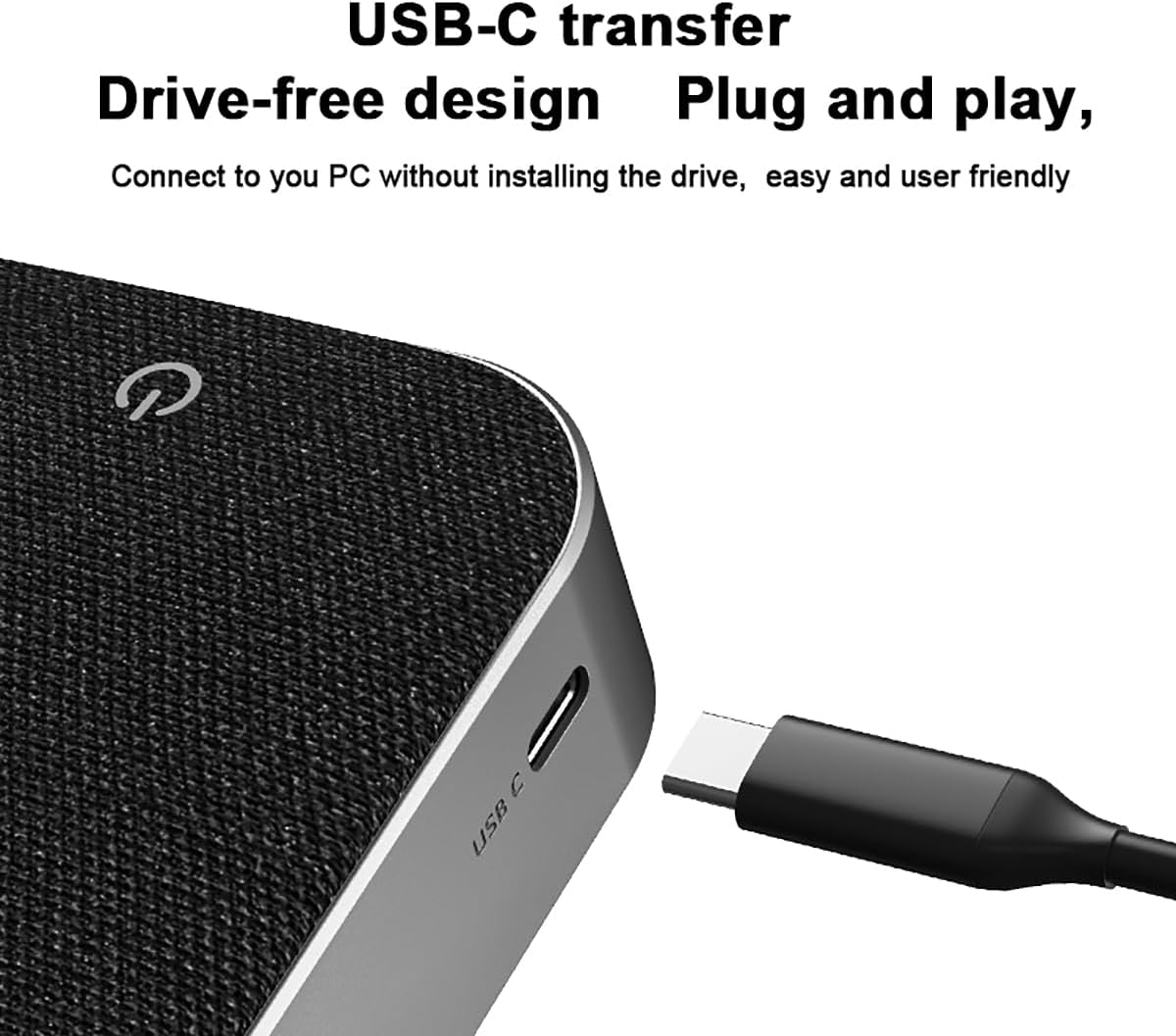
Porty i wskaźniki:
- Port USB-C: For charging and wired connection to devices.
- Wskaźnik LED: Displays power status, charging status, and Bluetooth connection status.
4. Konfiguracja
4.1 Ładowanie głośnika
Before initial use, fully charge the speaker. Connect the provided USB-C cable to the speaker's USB-C port and the other end to a USB power adapter (not included) or a computer's USB port. The LED indicator will show charging status and turn off when fully charged. A full charge provides up to 20 hours of continuous use.
4.2 Łączenie przez Bluetooth
- Power on the speaker by pressing and holding the Power button. The LED indicator will flash, indicating it's in Bluetooth pairing mode.
- Na swoim urządzeniu (smartfonie, tablecie, laptopie) włącz Bluetooth i wyszukaj dostępne urządzenia.
- Select "eppfun Speaker" (or similar name) from the list of devices.
- Po nawiązaniu połączenia dioda LED zacznie świecić światłem ciągłym i zostanie wyemitowany sygnał dźwiękowy potwierdzający połączenie.
4.3 Connecting via USB-C (Plug and Play)
For a wired connection, use the provided USB-C cable to connect the speaker directly to your computer. The speaker will be recognized automatically as an audio input/output device without requiring additional drivers.

5. Instrukcja obsługi
5.1 Włączanie/wyłączanie zasilania
- Włączanie: Naciśnij i przytrzymaj przycisk zasilania przez 2–3 sekundy.
- Wyłączone: Naciśnij i przytrzymaj przycisk zasilania przez 2–3 sekundy.
5.2 Regulacja głośności
- Zwiększ głośność: Naciśnij przycisk „+”.
- Zmniejsz głośność: Naciśnij przycisk „-”.
5.3 Wyciszanie mikrofonu
During a call or meeting, press the Microphone Mute button to mute or unmute the microphone. The LED indicator may change color or flash to indicate mute status.
5.4 Odbieranie/kończenie połączeń
When connected via Bluetooth to a smartphone, you can manage calls directly from the speaker:
- Odbierz połączenie: Krótko naciśnij przycisk zasilania.
- Zakończ połączenie: Short press the Power button during an active call.
- Odrzuć połączenie: W przypadku połączenia przychodzącego naciśnij i przytrzymaj przycisk zasilania przez 2 sekundy.
5.5 Noise and Echo Cancellation
The eppfun Conference Speaker features an integrated DSP processor for intelligent noise and echo cancellation. This function operates automatically to provide clear audio by eliminating background noise and echo during calls, ensuring smooth conversations even in noisy environments.
5.6 Multi-person Meeting Usage
With its 360° omnidirectional microphones, the speaker is designed to pick up voices from all directions within a 4-meter radius, making it suitable for small to medium-sized meeting rooms. Position the speaker centrally on the table for optimal voice pickup.

6. Konserwacja
- Czyszczenie: Do czyszczenia powierzchni głośnika należy używać miękkiej, suchej ściereczki. Nie należy używać środków czyszczących ani rozpuszczalników o działaniu ściernym.
- Składowanie: Przechowuj głośnik w chłodnym, suchym miejscu, z dala od bezpośredniego światła słonecznego i ekstremalnych temperatur.
- Pielęgnacja baterii: Aby przedłużyć żywotność baterii, unikaj częstego całkowitego rozładowywania głośnika. Ładuj go regularnie, nawet jeśli nie jest używany przez dłuższy czas.
- Narażenie na działanie wody: To urządzenie nie jest wodoodporne. Unikaj narażenia na działanie wody i wysokiej wilgotności.
7. Rozwiązywanie Problemów
7.1 Brak zasilania
- Upewnij się, że głośnik jest w pełni naładowany. Podłącz go do źródła zasilania za pomocą kabla USB-C.
- Press and hold the Power button for 3-5 seconds to ensure it's powered on correctly.
7.2 Brak dźwięku
- Sprawdź poziom głośności głośnika i podłączonego urządzenia.
- Ensure the speaker is correctly connected via Bluetooth or USB-C. Re-pair or reconnect if necessary.
- Sprawdź, czy na komputerze lub smartfonie wybrano właściwe urządzenie wyjściowe audio.
7.3 Problemy z połączeniem Bluetooth
- Sprawdź, czy głośnik jest w trybie parowania (dioda LED miga).
- Wyłącz i ponownie włącz Bluetooth w swoim urządzeniu.
- Move the speaker closer to your device to ensure it's within the 10-meter range.
- Clear the speaker from your device's Bluetooth history and attempt to re-pair.
7.4 Mikrofon nie działa
- Ensure the microphone is not muted (check the mute button and LED indicator).
- Verify that the eppfun speaker is selected as the input device in your meeting software (e.g., Zoom, Teams) or system audio settings.
- Check for any physical obstructions blocking the microphone grilles.
8. Specyfikacje
| Funkcja | Specyfikacja |
|---|---|
| Numer modelu | 717382572574 |
| Marka | śmiech |
| Technologia łączności | Bluetooth, USB typu C |
| Typ głośnika | Portable Conference Speaker |
| Mikrofony | Mikrofony wielokierunkowe 4 |
| Cechy specjalne | Built-in Microphone, Portable, Noise Cancellation, Echo Cancellation |
| Maksymalna moc wyjściowa głośnika | 4 watów |
| Odpowiedź częstotliwościowa | 20 kHz |
| Tryb wyjścia audio | Mononukleoza |
| Średnia żywotność baterii | Do 20 godzin |
| Kompatybilne urządzenia | Smartphone, Tablet, Laptop, Desktop Computer |
| Wymiary (pakiet) | Wymiary 21.9 x 14.8 x 5 cm |
| Waga (opakowanie) | 350 gramów |
| Kolor | Szary |
9. Gwarancja i wsparcie
The eppfun Conference Speaker comes with a standard manufacturer's warranty. For specific warranty terms, duration, and to register your product, please refer to the official eppfun webodwiedź witrynę lub skontaktuj się bezpośrednio z działem obsługi klienta.
If you encounter any issues not covered in this manual or require further assistance, please visit the eppfun support page or contact their customer service team. Keep your purchase receipt and product model number (717382572574) handy for faster service.