
1. Wprowadzenie
Thank you for choosing the Devoko Electric Height Adjustable Desk. This manual provides detailed instructions for assembly, operation, and maintenance to ensure optimal performance and longevity of your desk. Please read this manual thoroughly before use and retain it for future reference.

Image 1.1: Devoko Electric Height Adjustable Desk (White, 160x80 cm) in a home office environment.
2. Informacje dotyczące bezpieczeństwa
- Przed użyciem upewnij się, że wszystkie elementy są bezpiecznie zamocowane.
- Podczas pracy urządzenia należy trzymać dzieci i zwierzęta z dala od biurka.
- Nie należy umieszczać żadnych płynów bezpośrednio na panelu sterowania ani w pobliżu podzespołów elektrycznych.
- Avoid overloading the desk. The maximum load capacity is 70 kg.
- Przed przystąpieniem do czyszczenia lub wykonywania prac konserwacyjnych należy odłączyć zasilanie.
- Używaj wyłącznie dołączonego zasilacza.
3. Zawartość opakowania
Verify that all parts are present and undamaged. If any parts are missing or damaged, please contact customer support.
- Desk tabletop (160x80 cm, white)
- Electric lifting frame (double beam support)
- Control panel with LED display and USB-A port
- Zasilacz i kable
- Fabric drawer (removable, 35x22x10.5 cm)
- Cable management box
- Zaczep na słuchawki
- Sprzęt i narzędzia montażowe
- Instrukcja obsługi
4. Instalacja i montaż
Assembly is designed to be straightforward with pre-drilled holes. It typically takes approximately 35 minutes.
- Rozpakuj komponenty: Ostrożnie wyjmij wszystkie części z opakowania.
- Złóż ramę: Attach the electric lifting frame components according to the included diagram. Ensure the double beam support is correctly installed for maximum stability.
- Zamontuj blat stołu: Secure the tabletop to the assembled frame using the provided screws and pre-drilled holes.
- Zainstaluj akcesoria:
- Attach the control panel to your preferred side (left or right).
- Install the fabric drawer underneath the tabletop.
- Mount the headphone hook.
- Position the cable management box as desired.
- Podłącz zasilanie: Plug the power adapter into the desk and then into a wall outlet.

Image 4.1: Simple assembly process with pre-drilled holes, estimated at 35 minutes.

Image 4.2: The desk offers two mounting options for the control panel and accessories, allowing for left or right-hand setup.
5. Instrukcja obsługi
5.1 Panel sterowania ponadview

Image 5.1: The intuitive control panel features an LED display, up/down buttons, two memory presets, a function button, a USB-A charging port, and a sit/stand reminder.
- Wyświetlacz LED: Pokazuje aktualną wysokość biurka w centymetrach.
- Przyciski w górę/w dół: Press and hold to adjust the desk height upwards or downwards.
- Ustawienia pamięci (1, 2):
- To save a height: Adjust the desk to your desired height, then press the 'M' button followed by '1' or '2'. The display will confirm the setting.
- To recall a height: Press the '1' or '2' button to automatically move the desk to the saved position.
- Port ładowania USB-A: Provides convenient charging for your devices.
- Sit/Stand Reminder: The desk can be programmed to remind you to change positions. Refer to the full manual for detailed programming instructions.
5.2 Height Adjustment Demonstration
Video 5.2: Demonstration of the electric height adjustment feature, showcasing smooth and quiet operation from sitting to standing positions.
The desk features a powerful motor with a lifting speed of 13 mm/s and a noise level of ≤ 50dB, ensuring smooth and quiet transitions between heights.

Image 5.3: Smooth and fluid lifting mechanism with a powerful motor.
6. Funkcje i korzyści
- Inteligentna kontrola: 6 functional buttons, 2 height presets, USB port, and postural reminder for easy and intuitive use.
- Professional Structure: Extra-large 65mm lifting frame with reinforced metal guides, tested for 50,000 cycles. 15mm thick tabletop with a maximum load of 70kg.
- AmpObszar roboczy: 160x80 cm desk with a removable fabric drawer (35x22x10.5 cm), cable organizer, and hook, ideal for a tidy workspace.
- Cicha praca: Optimized motor with noise below 55dB, suitable for quiet environments.
- Wszechstronny projekt: Can be used as a standing desk, folding table, or PC desk, adapting to work, study, and entertainment needs.

Image 6.1: The desk boasts a robust load capacity of up to 70 kg.

Image 6.2: Integrated features like a fabric drawer and headphone hook enhance functionality.

Image 6.3: Ergonomic and functional accessories for an organized workspace.

Image 6.4: Double beam support for enhanced stability and durability.

Image 6.5: Effective cable management system helps maintain a clean and tidy workspace.
7. Konserwacja
- Czyszczenie: Przetrzyj powierzchnię biurka miękką,amp ściereczką. Unikaj środków czyszczących o działaniu ściernym i silnych środków chemicznych.
- Kontrola: Okresowo sprawdzaj wszystkie śruby i połączenia, aby mieć pewność, że są dobrze dokręcone.
- Zarządzanie kablami: Ensure cables are neatly organized and not pinched by moving parts.
- Pielęgnacja silnika: Silnik elektryczny nie wymaga konserwacji. Nie należy go otwierać ani smarować.
8. Rozwiązywanie Problemów
| Problem | Możliwa przyczyna | Rozwiązanie |
|---|---|---|
| Biurko się nie porusza. | Odłączony kabel zasilający, przeciążenie, błąd silnika. | Sprawdź połączenia zasilania. Zmniejsz ciężar na biurku. Odłącz urządzenie na 10 sekund i podłącz ponownie, aby zresetować. |
| Biurko porusza się nierównomiernie lub wydaje nietypowe dźwięki. | Loose connections; obstruction; uneven weight distribution. | Sprawdź wszystkie śruby i połączenia. Usuń wszelkie przeszkody. Równomiernie rozłóż ciężar. |
| Ustawienia pamięci nie działają. | Ustawienia predefiniowane nie zostały zapisane prawidłowo. | Re-save the desired height by pressing 'M' then '1' or '2'. |
| Port USB nie ładuje. | Device not compatible; cable issue; power issue. | Ensure device is compatible. Try a different USB cable. Check if desk has power. |
9. Specyfikacje
| Funkcja | Szczegół |
|---|---|
| Marka | Devoko |
| Model | 0790 |
| Kolor | Biały |
| Wymiary produktu | 160 x 80 x 73-118 cm (Length x Width x Height) |
| Tworzywo | Wood (Tabletop), Metal (Frame) |
| Cechy specjalne | Height Adjustable, Multifunction, Memory Presets, USB Port, Cable Management |
| Waga przedmiotu | 24.7 kilogramów |
| Maksymalna ładowność | 70 kilogramów |
| Prędkość podnoszenia | 13 mm/s |
| Poziom hałasu | ≤ 50dB |
| Liczba szuflad | 1 (fabric, removable) |
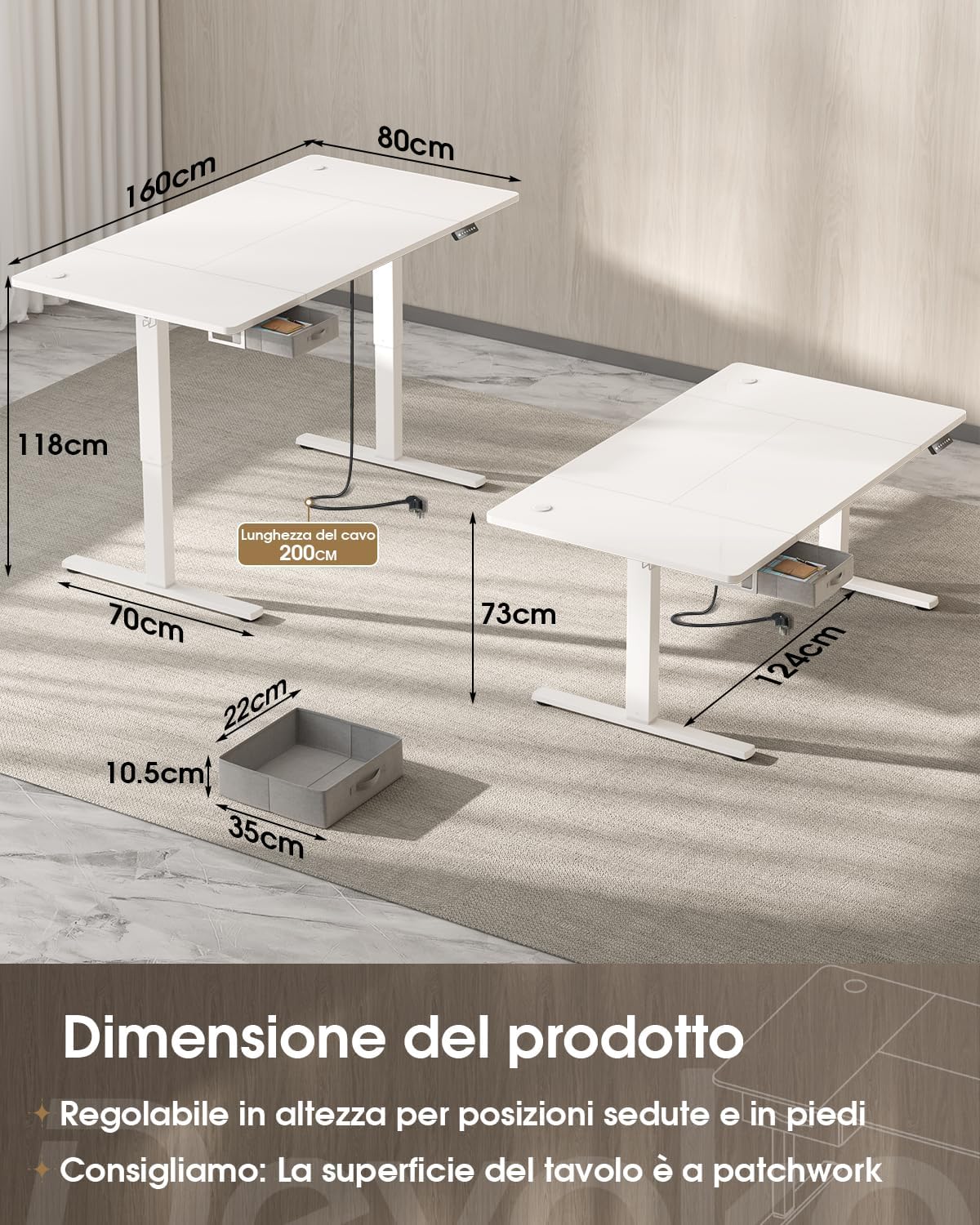
Image 9.1: Product dimensions and height adjustment range.

Image 9.2: Drawer dimensions and load capacity details.
10. Gwarancja i wsparcie
10.1 Informacje o gwarancji
This Devoko product is covered by a standard manufacturer's warranty. Please refer to the warranty card included in your package for specific terms and conditions, or visit the official Devoko website for more details. Keep your proof of purchase for warranty claims.
10.2 Obsługa klienta
For any questions, technical assistance, or warranty claims, please contact Devoko customer support through the retailer where you purchased the product or visit the official Devoko webstrona:
- Wsparcie online: Odwiedź sklep Devoko na Amazon
- E-mail: Zapoznaj się z opakowaniem produktu lub oficjalnym webodwiedź naszą stronę, aby uzyskać najnowszy adres e-mail kontaktowy.