
1. Wprowadzenie
Thank you for choosing the Devoko Electric Height-Adjustable Standing Desk. This manual provides detailed instructions for the assembly, operation, and maintenance of your new desk. Please read this manual thoroughly before use to ensure proper function and safety. Keep this manual for future reference.
2. Ostrzeżenia dotyczące bezpieczeństwa
- Limit wagowy: Do not overload the desk. The maximum load capacity is 70 kilogramów. Exceeding this limit may cause damage to the desk or personal injury.
- Bezpieczeństwo elektryczne: Use the integrated USB-A charging port with caution to avoid electrical hazards. Ensure cables are properly managed to prevent tripping or damage.
- Dzieci i zwierzęta: Aby zapobiec wypadkom, trzymaj dzieci i zwierzęta domowe z dala od biurka podczas pracy.
- Luz: Podczas regulacji wysokości biurka należy upewnić się, że nie ma żadnych przeszkód nad nim ani pod nim.
- Źródło zasilania: Connect the desk only to a grounded power outlet.
- Konserwacja: Do not attempt to disassemble or repair the motor or control system yourself. Contact customer support for assistance.
3. Zawartość opakowania
Please verify that all components are present before beginning assembly. If any parts are missing or damaged, contact Devoko customer support.
- Desktop sections (4 parts, 15mm high-quality particle board)
- Desk frame (2 steel beams, 2 T-shaped legs)
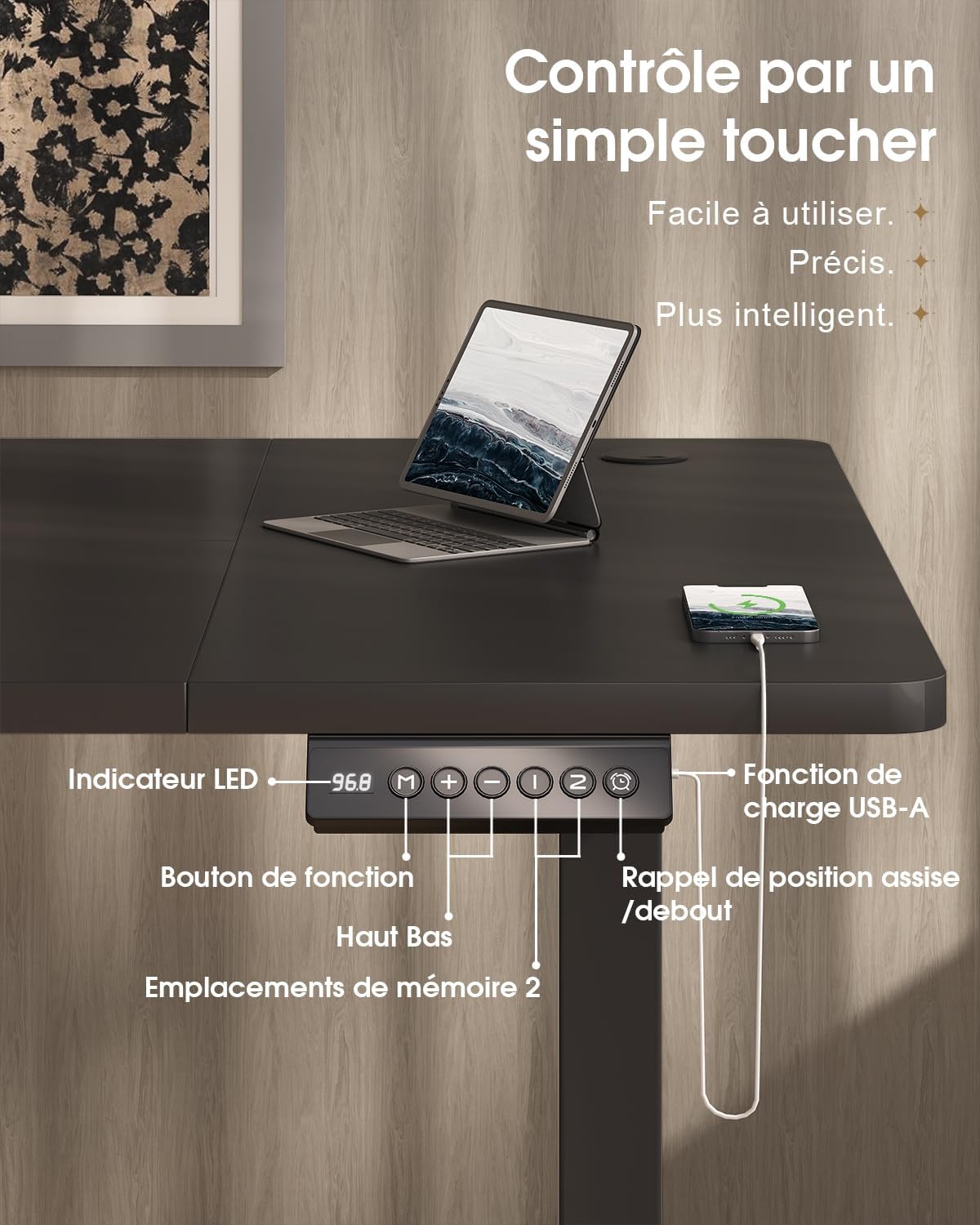
- Control panel with LED display and USB-A port
- Motor and power supply
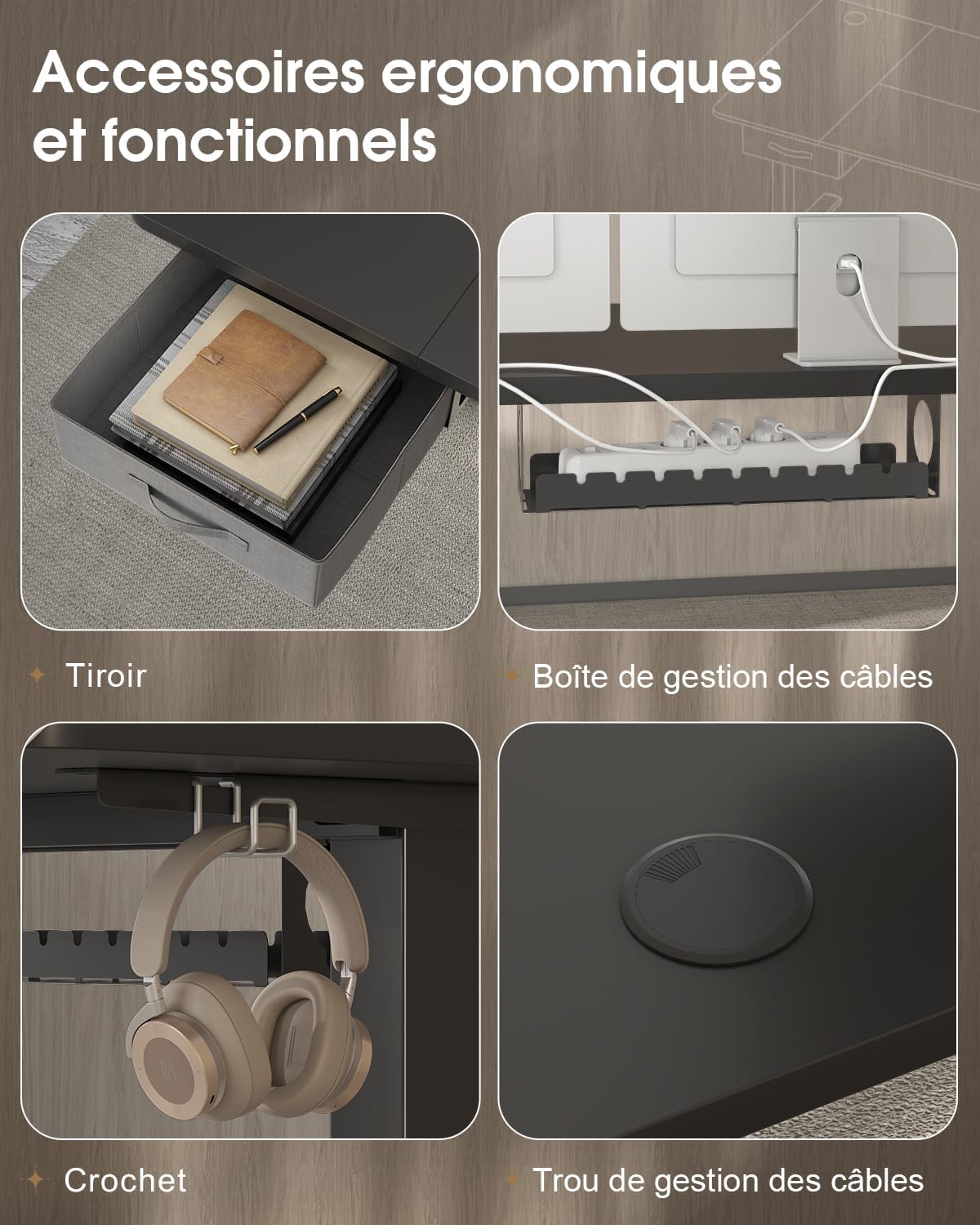
- Fabric drawer (35x22x10.5 cm)
- Zaczep na słuchawki
- Taca do zarządzania kablami
- Przelotka kablowa
- Sprzęt i narzędzia montażowe
- Instrukcja obsługi
4. Instalacja i montaż
The desktop is divided into 4 sections of 15mm high-quality particle board, which simplifies the assembly process. Follow the included graphical instructions for a smooth setup.
- Rozpakuj komponenty: Ostrożnie wyjmij wszystkie części z opakowania i połóż je na czystej, miękkiej powierzchni, aby zapobiec zarysowaniom.
- Złóż ramę: Attach the two T-shaped legs to the steel beams. Ensure all screws are tightened securely. The frame features a robust double-beam construction (65x45 mm cold-rolled steel alloy) for enhanced stability.
- Dołącz sekcje pulpitu: Connect the four desktop sections together and then secure them to the assembled frame using the provided hardware.
- Zainstaluj Panel sterowania: Mount the control panel to the underside of the desk in an easily accessible location.
- Connect Motor and Power: Connect the motor to the control panel and then plug the power supply into the control panel.
- Zainstaluj akcesoria: Attach the fabric drawer, headphone hook, cable management tray, and cable grommet as desired.


5. Instrukcja obsługi
5.1 Panel sterowania ponadview
The desk features an intuitive control panel with an LED display for easy height adjustment and memory functions.

5.2 Regulacja wysokości
- Przyciski w górę/w dół: Press and hold the 'Up' or 'Down' arrow buttons on the control panel to raise or lower the desk to your desired height. The LED display will show the current height.
- Zakres wysokości: The desk can be adjusted smoothly and quietly between 73 cm (sitting height) and 118 cm (standing height).
5.3 Ustawienia pamięci
The control panel allows you to save two preferred height settings for quick adjustments.
- Ustaw pozycję pamięci: Dostosuj wysokość biurka do swoich potrzeb, korzystając z przycisków „W górę” i „W dół”.
- Press the 'M' (Memory) button. The LED display will flash.
- Within 3 seconds, press either '1' or '2' to save the current height to that memory position. The LED display will confirm the setting.
- Przypomnij sobie pozycję z pamięci: Wystarczy nacisnąć przycisk „1” lub „2”, aby biurko automatycznie przesunęło się na zapisaną wysokość.
5.4 port ładowania USB-A
A convenient USB-A charging port is integrated into the control panel. Connect your compatible devices, such as smartphones or tablets, for charging. Ensure your device's charging cable is compatible with a USB-A port.
6. Funkcje
The Devoko Electric Height-Adjustable Standing Desk is designed with several ergonomic and functional features to enhance your workspace.
- Elektryczna regulacja wysokości: Smooth and quiet (less than 50 dB) motor allows for effortless transitions between sitting and standing positions.
- Solidna konstrukcja: Features a double-beam frame made of 65x45 mm cold-rolled steel alloy, providing exceptional stability and a load capacity of up to 70 kg. All metal parts are powder-coated for durability.
- Zintegrowana szuflada: A fabric drawer (35x22x10.5 cm) is included for convenient storage of office supplies, helping to keep your desktop clutter-free.
- Haczyk na słuchawki: A side-mounted hook provides a dedicated spot for your headphones, keeping them within reach and off the desk surface.
- System zarządzania kablami: Includes a cable management tray and a cable grommet to organize and conceal power cords and other cables, maintaining a tidy and safe workspace.
- Port ładowania USB-A: Built-in port on the control panel for easy charging of your electronic devices.

7. Konserwacja
Regular maintenance will help prolong the life and performance of your Devoko standing desk.
- Czyszczenie: Przetrzyj powierzchnię biurka i ramę miękką szmatką.amp szmatką. Unikaj stosowania silnych środków chemicznych lub ściernych środków czyszczących, które mogłyby uszkodzić wykończenie.
- Sprawdź połączenia: Okresowo sprawdzaj dokręcenie wszystkich śrub i nakrętek. W razie potrzeby dokręć je.
- Zarządzanie kablami: Ensure cables are neatly organized and not pinched or strained, especially during height adjustments.
- Pielęgnacja silnika: Avoid spilling liquids on the motor or control panel. If the desk is not used for an extended period, unplug it from the power outlet.
8. Rozwiązywanie Problemów
If you encounter any issues with your desk, refer to the following common problems and solutions. If the problem persists, contact customer support.
| Problem | Możliwa przyczyna | Rozwiązanie |
|---|---|---|
| Biurko nie porusza się i nie reaguje na polecenia. | Power cable disconnected; motor cable disconnected; overload. | Check if the power cable is securely plugged into the wall outlet and the desk. Ensure the motor cable is connected. Reduce the load on the desk if it exceeds 70 kg. |
| Biurko porusza się nierównomiernie lub wydaje nietypowe dźwięki. | Luźne połączenia; nierównomierny rozkład ciężaru. | Check and tighten all assembly screws. Redistribute weight evenly on the desktop. |
| Wyświetlacz LED pokazuje kod błędu. | System malfunction; sensor error. | Unplug the desk from the power outlet for 10 minutes, then plug it back in to reset the system. If the error persists, contact customer support. |
| USB-A charging port not working. | Cable issue; device incompatibility. | Try a different USB cable or device. Ensure the desk is powered on. |
9. Specyfikacje
| Funkcja | Specyfikacja |
|---|---|
| Marka | Devoko |
| Numer modelu | 0790 |
| Kolor | Czarny |
| Materiał na biurko | Płyta wiórowa |
| Materiał ramy | Steel alloy (65x45 mm cold-rolled steel) |
| Wymiary produktu (dł. x szer. x wys.) | 180 cm x 80 cm x (73-118 cm) |
| Zakres regulacji wysokości | od 73 cm do 118 cm |
| Nośność | 70 kilogramów |
| Poziom hałasu | Mniej niż 50 dB |
| Cechy specjalne | Electric height adjustment, Integrated USB-A port, Cable management, Ergonomic design, 2 Memory presets, Drawer, Headphone hook |
| Waga przedmiotu | 30.8 kilogramów |
| Kraj pochodzenia | Chiny |
10. Gwarancja i wsparcie
For warranty information or technical support, please refer to the purchase documentation or contact Devoko customer service. Keep your proof of purchase for any warranty claims.
You can visit the official Devoko store for more information: Sklep Devoko