1. Wprowadzenie
The Generic RHT20 is an environmental test equipment designed for accurately measuring and logging humidity and temperature data. This datalogger features an integrated LCD for real-time display of readings and provides reliable data collection for various applications. This manual provides essential information for the proper setup, operation, maintenance, and troubleshooting of your RHT20 device.
2. Informacje dotyczące bezpieczeństwa
- Przed przystąpieniem do użytkowania urządzenia należy uważnie przeczytać wszystkie instrukcje.
- Nie wystawiaj urządzenia na działanie ekstremalnych temperatur, bezpośredniego światła słonecznego i wysokiej wilgotności.
- Unikaj upuszczania urządzenia i narażania go na silne uderzenia.
- Nie próbuj otwierać ani modyfikować urządzenia. Wszelkie prace serwisowe zlecaj wykwalifikowanemu personelowi.
- Zutylizuj baterie zgodnie z lokalnymi przepisami.
3. Zawartość opakowania
Sprawdź, czy wszystkie przedmioty znajdują się na miejscu i są w dobrym stanie po rozpakowaniu:
- RHT20 Humidity & Temperature Datalogger Unit
- Instrukcja obsługi
- USB Cable (for data transfer and power, if applicable)
- Płyta CD z oprogramowaniem (jeśli dotyczy)
4. Urządzenie ponadview
Familiarize yourself with the components of your RHT20 datalogger:
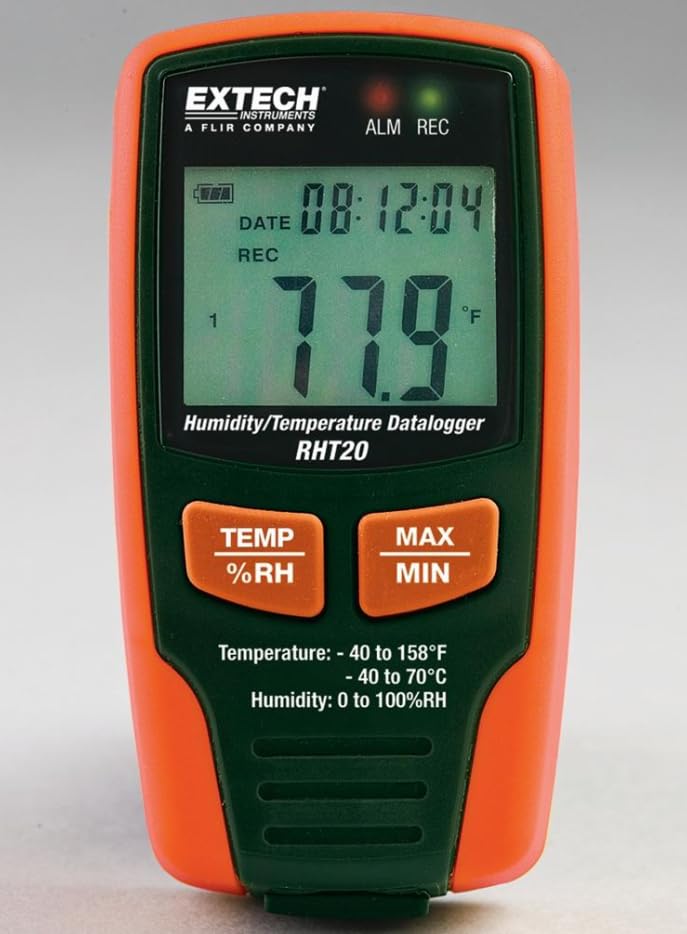
Rysunek 1: Przód view of the RHT20 Datalogger. This image displays the device's main body, featuring a prominent LCD screen for displaying real-time humidity and temperature readings, along with control buttons located below the screen.
4.1. składniki
- Wyświetlacz LCD: Shows current temperature, humidity, battery status, and logging indicators.
- Przycisk TRYB: Cycles through display modes or menu options.
- Przycisk SET: Umożliwia wejście do menu ustawień lub potwierdzenie wyboru.
- Przycisk START/STOP: Initiates or terminates data logging.
- Port USB: For connecting to a computer for data download and configuration.
- Transduktor: Integrated humidity and temperature sensor (typically located at the top or side).
- Komora baterii: Znajduje się z tyłu urządzenia.
5. Konfiguracja
5.1. Instalacja baterii
- Locate the battery compartment cover on the back of the RHT20.
- Slide or unscrew the cover to open it.
- Insert the required batteries (e.g., AAA batteries) observing the correct polarity (+/-) as indicated inside the compartment.
- Dokładnie załóż pokrywę komory baterii.
5.2. Włączanie/wyłączanie zasilania
- Włączanie: Naciśnij i przytrzymaj START/STOP button for approximately 3 seconds until the LCD illuminates.
- Aby wyłączyć: Naciśnij i przytrzymaj START/STOP button for approximately 3 seconds until the LCD turns off.
5.3. Instalacja oprogramowania (opcjonalnie)
If your application requires advanced configuration or data analysis, install the provided software (if applicable) on your computer by following the on-screen instructions from the installation CD or downloaded file.
6. Instrukcja obsługi
6.1. Pomiar podstawowy
Upon powering on, the RHT20 will immediately display the current ambient temperature and humidity readings on the LCD. Ensure the device is placed in the environment you wish to monitor.
6.2. Konfiguracja ustawień
To adjust settings such as logging interval, alarm thresholds, or time/date:
- Naciśnij i przytrzymaj USTAWIĆ aby wejść do menu ustawień.
- Użyj TRYB button to navigate through different parameters.
- Użyj USTAWIĆ button to select a parameter and adjust its value.
- Naciskać TRYB to confirm the value and move to the next setting, or press START/STOP aby wyjść z menu ustawień.
6.3. Rozpoczęcie rejestrowania danych
To begin recording data:
- Ensure the device is powered on and configured as desired.
- Naciśnij START/STOP button briefly. A logging indicator (e.g., a blinking REC icon) will appear on the LCD, confirming that data logging has started.
6.4. Zatrzymywanie rejestrowania danych
To cease recording data:
- Naciśnij START/STOP button briefly. The logging indicator will disappear from the LCD, indicating that data logging has stopped.
6.5. Pobieranie danych
To retrieve logged data:
- Connect the RHT20 to your computer using the provided USB cable.
- Launch the RHT20 software (if applicable).
- Follow the software's instructions to download and analyze the recorded data.
7. Konserwacja
7.1. Czyszczenie
- Przetrzyj urządzenie miękką, suchą ściereczką.
- Nie należy używać środków czyszczących o działaniu ściernym, rozpuszczalników ani silnych środków chemicznych.
- Ensure no liquid enters the sensor area or USB port.
7.2. Przechowywanie
- Jeśli urządzenie nie będzie używane przez dłuższy czas, należy wyjąć baterie, aby zapobiec ich wyciekowi.
- Przechowuj urządzenie w chłodnym i suchym miejscu, z dala od bezpośredniego światła słonecznego i ekstremalnych temperatur.
8. Rozwiązywanie Problemów
- Urządzenie się nie włącza: Sprawdź instalację baterii i upewnij się, że są nowe.
- Nieprawidłowe odczyty: Ensure the sensor is clean and unobstructed. Allow the device to stabilize in the environment for a few minutes.
- Dane nie są rejestrowane: Verify that logging was initiated correctly (check for the logging indicator on the LCD). Ensure sufficient memory is available.
- Nie można połączyć się z komputerem: Check USB cable connection. Ensure software drivers are installed correctly. Try a different USB port.
9. Specyfikacje
| Specyfikacja | Wartość |
|---|---|
| Marka | Ogólny |
| Model | RHT20 |
| Waga przedmiotu | 7 funta (ok. 3.17 kg) |
| Producent | Wydobycie |
| ASIN | B0FB7Y8MPX |
| Data pierwszej dostępności | 29 maja 2025 r. |
10. Gwarancja i wsparcie
Aby uzyskać informacje dotyczące gwarancji, wsparcia technicznego lub serwisu, zapoznaj się z dokumentacją dołączoną do zakupu lub skontaktuj się bezpośrednio z producentem. Zachowaj dowód zakupu na wypadek roszczeń gwarancyjnych.


