
1. Wprowadzenie
Dziękujemy za zakupasing the GTRACING DL004 L-Shaped Gaming Desk. This manual provides detailed instructions for assembly, operation, maintenance, and troubleshooting to ensure optimal use and longevity of your desk. Please read this manual thoroughly before assembly and retain it for future reference.
2. Informacje dotyczące bezpieczeństwa
- Aby zapobiec porysowaniu, zawsze montuj biurko na miękkiej i czystej powierzchni.
- Przed użyciem upewnij się, że wszystkie śruby i elementy mocujące są solidnie dokręcone. Regularnie sprawdzaj i dokręcaj w razie potrzeby.
- Do not overload the desk or shelves beyond the specified weight capacity (80 kg).
- Aby uniknąć ryzyka zadławienia, trzymaj małe części i materiały opakowaniowe poza zasięgiem dzieci.
- Avoid using power tools for assembly unless explicitly instructed, as they may overtighten screws and damage components. A manual wrench is recommended.
- The desk features rounded corners (fillet design) for safety, but exercise caution to prevent injury.
3. Zawartość opakowania
Przed rozpoczęciem montażu należy sprawdzić, czy wszystkie elementy są obecne:
- L-shaped Desktop Panels (A, B)
- Metal Frame Components (D, E, F, G, H)
- Półki magazynowe
- Kalesony
- Regulowana podstawa monitora
- Cable Management Grommet
- Zaczep na słuchawki
- Stabilizer Rods (J)
- Sprzęt montażowy (śruby, klucz imbusowy)
- Power Outlet Strip (if included with your model)
4. Instrukcje konfiguracji
4.1 Notatki przed montażem
For a smooth assembly process, please watch the following video for helpful tips. It is recommended to use a manual wrench instead of a power drill to avoid damaging the desk components.
Video: Assembly Tips. This video provides general advice for assembling furniture, including the recommendation to use a manual wrench instead of a power drill to prevent damage.
4.2 Etapy montażu
- Attach Feet to Frame Components: Secure the feet to frame parts D, E, and F. Ensure they are firmly attached.
- Podłącz panele stacjonarne: Join desktop panel A and side desktop panel B. Use the provided wooden dowels and ensure a tight fit to minimize gaps.
- Attach Frame G: Secure frame G to the underside of the connected desktop panels. Tighten screws to approximately 70% to allow for adjustments. Do not use a power drill.
- Attach Frame H: Secure frame H to the underside of the desktop panels. Ensure the four vertical screws and two horizontal screws are tightened to about 70%. The two outermost horizontal holes are not used.
- Montaż półek bocznych: Attach the side shelves to the frame. Ensure the holes on the surface of the shelf board are facing downwards. Tighten screws to approximately 70%.
- Install Stabilizer Rods (J): Attach the stabilizer rods (J) to the designated points on the frame to enhance stability.
- Montaż podstawki pod monitor: Attach the monitor stand to the desktop. Ensure the cylindrical posts are installed vertically and do not overtighten the screws (95% tightness is sufficient). If you prefer more desktop space, the monitor stand can be left unattached for easy movement.
- Install Cable Management Grommet: Insert the cable management grommet into the designated hole on the desktop.
- Montaż listwy zasilającej: If your model includes a power outlet strip, attach it to the side of the monitor stand or desktop using the provided screws.
- Zamontuj haczyk na słuchawki: Zamocuj haczyk na słuchawki z boku biurka.
Video: L-shaped Desk Detailed Introduction. This video provides a detailed overview of the desk's features and assembly process.
Video: Assembly Skills. This video demonstrates various assembly techniques applicable to the desk.
5. Instrukcja obsługi
5.1 Adjustable Monitor Stand
The monitor stand is designed for ergonomic comfort. Its height can be adjusted to suit your preference, promoting a comfortable posture during use. For maximum desktop space, the monitor stand can be removed or repositioned as needed.
5.2 Półki i szuflady do przechowywania
The desk features a removable storage shelf on the right side, providing convenient access to essential items. Two fabric drawers offer additional storage for accessories, helping to keep your workspace tidy. The side panels of the desk include anti-drop panels and rounded corners for safety, preventing items from falling and reducing the risk of injury.
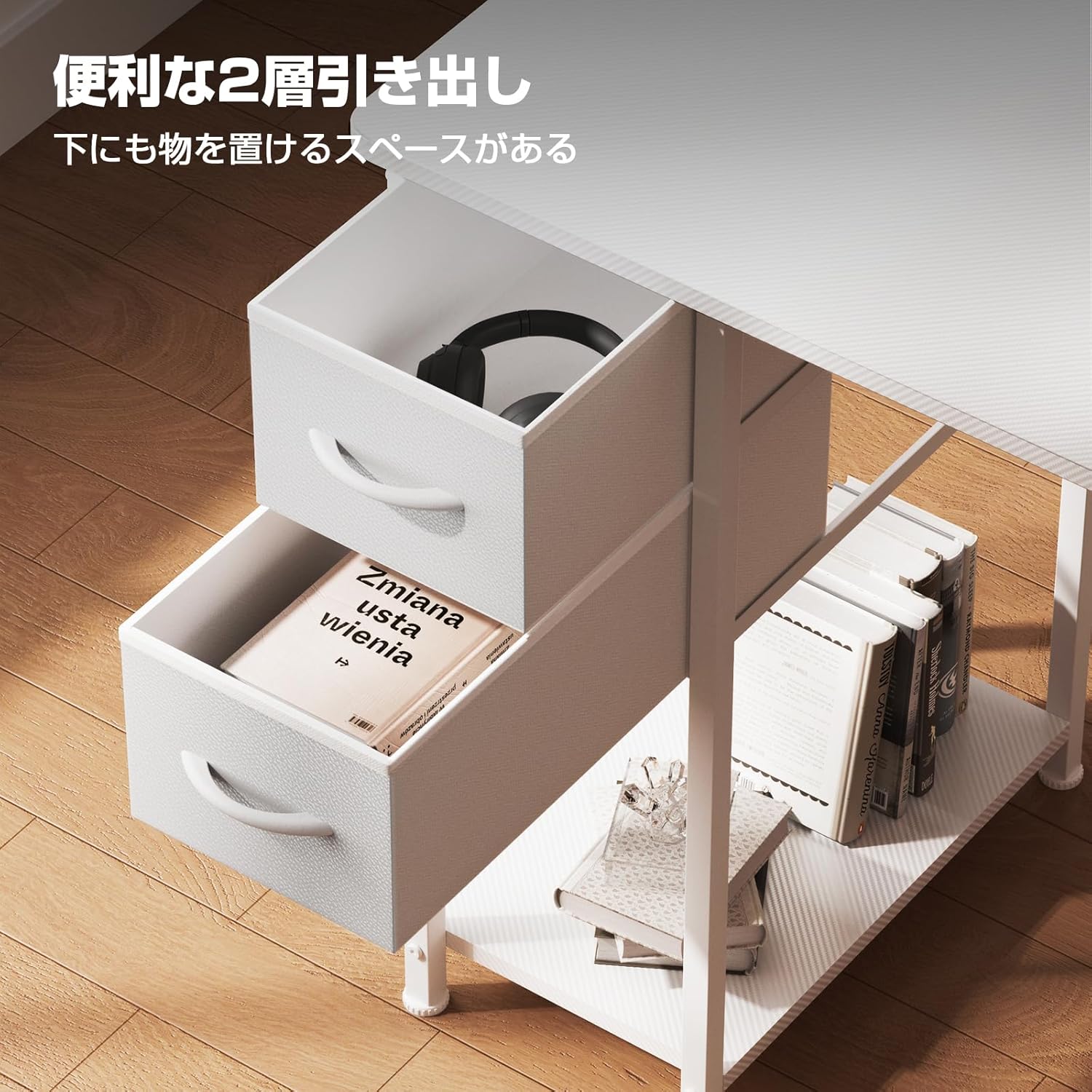
Image: Two convenient fabric drawers for storage, located on the left side of the desk.
5.3 Zarządzanie kablami
The integrated cable management grommet helps organize your wires, keeping your desktop neat and free from clutter. Utilize the included power outlet strip for easy access to charging ports for your devices.
Video: L-shaped Gaming Desk Detailed Video. This video highlights the various features and functionalities of the desk, including storage and cable management.
6. Konserwacja
- Czyszczenie: Przetrzyj powierzchnię biurka miękką,amp cloth. Avoid abrasive cleaners or harsh chemicals that may damage the carbon fiber finish.
- Kontrola: Okresowo sprawdzaj wszystkie śruby i połączenia, aby upewnić się, że są dobrze dokręcone. Dokręć je ponownie, jeśli wykryjesz jakiekolwiek luzy.
- Ochrona: Avoid placing extremely hot or cold items directly on the desk surface. Use coasters or protective pads as needed.
- Rozkład masy: Distribute weight evenly across the desktop and shelves to prevent stress on any single point.
7. Rozwiązywanie Problemów
| Problem | Możliwa przyczyna | Rozwiązanie |
|---|---|---|
| Biurko jest chwiejne | Luźne śruby lub nierówna podłoga. | Check and tighten all assembly screws. Adjust the leveling feet on the bottom of the desk to stabilize it on uneven surfaces. |
| Części nie są wyrównane podczas montażu | Incorrect orientation of parts or screws not fully loosened. | Review the assembly instructions carefully. Ensure all parts are oriented correctly. Loosen screws slightly to allow for adjustment, then re-tighten. |
| Szuflady nie przesuwają się płynnie | Obstruction or improper installation. | Check for any items obstructing the drawer's path. Ensure the drawers are inserted correctly into their slots. |
8. Specyfikacje
| Funkcja | Szczegół |
|---|---|
| Marka | ŚLEDZENIE GTR |
| Model | DL004 |
| Kolor | Biały |
| Wymiary (dł. x szer. x wys.) | Wymiary 130 x 48 x 74 cm |
| Waga produktu | 10 kilogramów |
| Nośność | 80 kilogramów |
| Tworzywo | Metal (Base), Carbon Fiber Finish (Desktop) |
| Cechy | Adjustable height monitor stand, Removable storage shelf, Cable management, Rounded corners |
| Wymagany montaż | Tak |
9. Gwarancja i wsparcie
The GTRACING DL004 L-Shaped Gaming Desk comes with a 12-month manufacturer's quality guarantee from the date of purchase. This warranty covers initial defects and any subsequent issues that may arise under normal use. Spare parts are stocked in warehouses in Tokyo and Osaka, Japan, and can be delivered as early as the next day for replacement.
For any questions, concerns, or warranty claims, please contact GTRACING customer support through the retailer where you purchased the product. Please have your purchase receipt and product model number ready when contacting support.


