
1. Wprowadzenie
This manual provides detailed instructions for the safe and effective use of your OLIGHT Perun 3 Mini rechargeable headlamp and OLIGHT Oclip Pro EDC flashlight. Please read this manual thoroughly before operation and retain it for future reference.

Image: The OLIGHT Perun 3 Mini headlamp attached to its elastic headband, ready for use.
2. Zawartość opakowania
- OLIGHT Perun 3 Mini Headlamp
- Latarka EDC OLIGHT Oclip Pro
- Headband with quick-detach bracket
- Magnetyczny kabel ładujący
- Instrukcja obsługi (ten dokument)
3. Konfiguracja
3.1. Perun 3 Mini Headlamp
- Attaching to Headband: Insert the Perun 3 Mini into the quick-detach bracket on the headband. Ensure it clicks securely into place.
- Regulacja opaski na głowę: Adjust the elastic straps for a comfortable and secure fit on your head.
- Użycie przenośne: The quick-detach bracket allows for easy removal of the Perun 3 Mini for handheld operation. Press the release button on the bracket to detach.
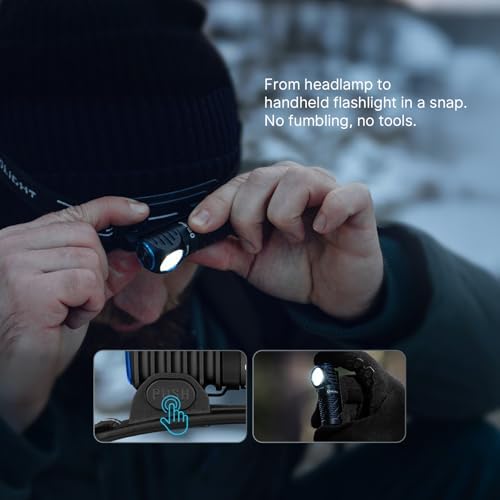
Image: Transitioning the Perun 3 Mini from headlamp to handheld flashlight by pressing the release button on the bracket.
3.2. Oclip Pro EDC Flashlight
- Odblokowanie: Before first use, press and hold the main button for approximately 1 second to unlock the Oclip Pro. A visual indicator may confirm unlocking.
- Obrzynek: Use the integrated clip to attach the Oclip Pro to clothing, gear, or other suitable surfaces.
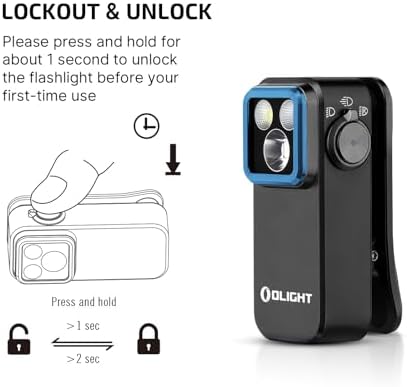
Image: Instructions for unlocking the Oclip Pro by pressing and holding the button for 1 second.
4. Instrukcja obsługi
4.1. Perun 3 Mini Headlamp
The Perun 3 Mini features multiple white light modes and red light modes for various applications.
- Tryby światła białego: Offers 5 different white light output levels, including a Moonlight mode for extended use.
- Tryby światła czerwonego: Provides 3 red light modes, suitable for preserving night vision or as an emergency signal.
- Przełączanie trybu: Refer to the device's specific button press sequences for cycling through modes (e.g., single press, double press, press and hold).

Image: The Perun 3 Mini in use, demonstrating both white light for general tasks and red light for night vision preservation.
4.2. Oclip Pro EDC Flashlight
The Oclip Pro offers three distinct lighting solutions controlled by a user-friendly interface.
- Lighting Solutions:
- Iluminacja: For wide area illumination (up to 500 lumens).
- Reflektor: For focused, long-range illumination (up to 120-meter range).
- Czerwone światło: For night vision preservation or signaling (40/4 lumens).
- Interfejs użytkownika: Modes are switched by toggling the selector.
- Wskaźnik baterii: A battery indicator located in the center of the switch displays the current battery level.

Image: Visual representation of the Oclip Pro's floodlight for daily routines, spotlight for focused tasks, and red light for night vision.
5. Konserwacja
5.1. Ładowanie
Both the Perun 3 Mini and Oclip Pro are rechargeable. Use the provided magnetic charging cable to recharge the devices. Connect the magnetic charging end to the flashlight's charging port and the USB end to a compatible power source.
The Perun 3 Mini's rechargeable battery offers up to 10 days of continuous use in Moonlight mode, reducing the frequency of recharging.
5.2. Czyszczenie i przechowywanie
- Czyszczenie: Przetrzyj urządzenia miękką ściereczką.amp cloth to remove dirt or debris. Do not use abrasive cleaners or solvents.
- Składowanie: Store the flashlights in a cool, dry place away from direct sunlight and extreme temperatures. For long-term storage, ensure the battery is partially charged (e.g., 50%) to prolong battery life.
6. Rozwiązywanie Problemów
- Światło się nie włącza:
- Sprawdź poziom naładowania akumulatora i naładuj go, jeśli to konieczne.
- Ensure the device is unlocked (refer to Setup section for Oclip Pro).
- Verify proper connection if using the Perun 3 Mini with the headband bracket.
- Moc światła przyciemnionego:
- Bateria może być słaba; naładuj urządzenie.
- Lens may be dirty; clean according to maintenance instructions.
- Przegrzanie urządzenia:
- High output modes can generate heat. If the device becomes excessively hot, switch to a lower mode or turn it off to cool down.
7. Specyfikacje
7.1. OLIGHT Perun 3 Mini Headlamp
- Maksymalna wydajność: Do 920 lumenów
- Odległość wiązki: Do 133 metrów
- Tryby oświetlenia: 5 white light modes, 3 red light modes
- Battery Life (Moonlight Mode): Do 10 dni
- Kapitałka: Lightweight with breathable holes, anti-sweat strip, reflective material. Quick-detach bracket.

Image: Key specifications of the Perun 3 Mini, highlighting its compact size, lumen output, and beam distance.
7.2. OLIGHT Oclip Pro EDC Flashlight
- Floodlight Output: Do 500 lumenów
- Spotlight Range: Do 120 metrów
- Red Light Output: 40/4 lumenów
- Clip Durability: 10,000-open-close-cycle tested
- Interfejs użytkownika: Toggle selector for mode switching, integrated battery indicator.

Obraz: Różne views of the Oclip Pro, showcasinze względu na swój design i kompaktowy rozmiar.

Image: The Oclip Pro emphasizing its versatile lighting options and the robust, tested clip mechanism.
8. Gwarancja i wsparcie
For detailed warranty information, please refer to the official OLIGHT website or contact OLIGHT customer service. OLIGHT products typically come with a manufacturer's warranty covering defects in materials and workmanship.
Aby uzyskać dalszą pomoc, wsparcie techniczne lub view other OLIGHT products, please visit the official OLIGHT store: