
Wstęp
This manual provides detailed instructions for the installation, operation, and maintenance of the SENSORWORX SWX-852-2-WH Wireless Remote Light Switch. This device is designed to provide manual control of wirelessly controlled lighting systems, acting as a companion switch to compatible SENSORWORX wireless load controllers.
The SWX-852-2-WH is a line-powered wall station that simplifies multi-way switching configurations by reducing wiring complexity and installation time. It communicates wirelessly using an encrypted 915 MHz proprietary protocol, offering reliable operation within specified ranges.
Informacje dotyczące bezpieczeństwa
OSTRZEŻENIE: Ryzyko porażenia prądem. Nieprawidłowa instalacja może prowadzić do poważnych obrażeń ciała lub śmierci.
- Always turn off power at the circuit breaker or fuse box before installing, servicing, or removing the device.
- Instalację musi wykonać wykwalifikowany elektryk, zgodnie ze wszystkimi krajowymi i lokalnymi przepisami elektrycznymi.
- Nie należy używać tego urządzenia, gdy obciążenie przekracza jego określone parametry.
- Upewnij się, że wszystkie połączenia przewodów są solidne i właściwie zaizolowane.
- Urządzenie przeznaczone jest wyłącznie do użytku wewnątrz pomieszczeń.
Zawartość opakowania
Przed rozpoczęciem instalacji sprawdź, czy wszystkie komponenty są obecne:
- SENSORWORX SWX-852-2-WH Wall Switch Sensor
- Przewody drutowe
- Śruby montażowe
- Drut nakrętki
- Instrukcja obsługi (ten dokument)
Specyfikacje
| Funkcja | Specyfikacja |
|---|---|
| Model | SWX-852-2-WH |
| Tryb działania | WŁ-WYŁ |
| Obecna ocena | 1 Amps |
| Objętość operacyjnatage | 120-277V (Line Powered) |
| Typ kontaktu | Single Pole Single Throw (SPST) |
| Typ złącza | Fałda |
| Typ przełącznika | Sensor (Remote) |
| Terminal | Przewody drutowe |
| Tworzywo | Plastic (Housing), Silver (Contact) |
| Wymiary (dł. x szer. x wys.) | 1.39 x 1.68 x 2.74 cala |
| Typ montażu | Surface Mount (in standard wallbox) |
| Typ obwodu | 1-way, 3-way, 4-way (with compatible controllers) |
| Temperatura pracy | od 32°F do 122°F (od 0°C do 50°C) |
| Wilgotność | 0-95% bez kondensacji |
| Protokół bezprzewodowy | Encrypted 915 MHz Proprietary |
| Zasięg bezprzewodowej | ~80 feet line of sight, ~40 feet through obstructions |
| Certyfikaty | UL Listed, RoHS Compliant, BAA Compliant, BABA Compliant, TAA Compliant |
| Waga przedmiotu | 3.88 uncji |
Konfiguracja i instalacja
The SENSORWORX SWX-852-2-WH is designed for straightforward installation in a standard single-gang wallbox, requiring less than 1 inch of mounting depth.
1. Okablowanie
- Wyłącz zasilanie: Before starting, ensure power to the circuit is OFF at the circuit breaker.
- Zidentyfikuj przewody: The SWX-852-2-WH is line-powered and requires connection to line (hot) and neutral wires. It does not directly switch the load.
- Podłącz przewody: Use the provided wire nuts to connect the switch's wire leads to the corresponding building wiring (Line, Neutral). Consult local electrical codes for proper wiring practices.
- Zamontuj przełącznik: Carefully place the switch into the wallbox, ensuring wires are not pinched. Secure the switch to the wallbox using the provided mounting screws.
- Install wallplate: Attach a standard decorative wallplate (not included) over the switch.
- Przywróć zasilanie: Włącz ponownie zasilanie za pomocą wyłącznika obwodu.
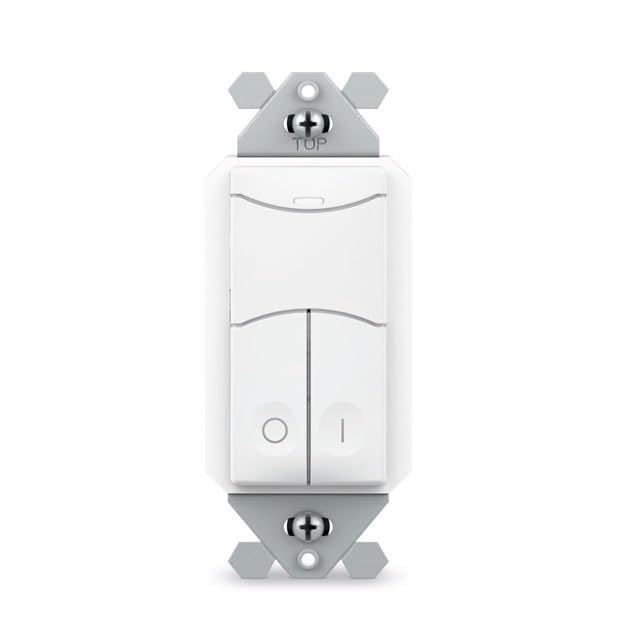
Image: SENSORWORX SWX-852-2-WH Wireless Remote Light Switch. This image shows the front view of the white wall switch, illustrating its compact design for easy installation.
2. Pairing with Wireless Controller
The SWX-852-2-WH must be paired with a compatible SENSORWORX wireless load controller (e.g., SWX-950 series power pack, SWX-851 wireless wall switch, or SWX-874-ELV dimmer) to function. The pairing process is quick and typically takes approximately 3 seconds per device.
- Upewnij się, że zasilanie jest włączone for both the SWX-852-2-WH and the target wireless load controller.
- Rozpocznij tryb parowania on the wireless load controller according to its specific instructions. This usually involves pressing and holding a button on the controller.
- Activate pairing on SWX-852-2-WH: Press and hold the designated button on the SWX-852-2-WH (refer to the specific button layout on your device) until an indicator light confirms pairing mode.
- Potwierdź parowanie: Both devices should provide visual feedback (e.g., LED flashes) to indicate successful pairing. Refer to the controller's manual for specific confirmation signals.
For multi-way switching, additional SWX-852-2-WH units can be paired to the same wireless load controller.
Instrukcja obsługi
Once installed and paired, the SWX-852-2-WH operates as a remote control for the linked SENSORWORX wireless load controller.
- Sterowanie włączaniem/wyłączaniem: Press the top button to turn the connected lights ON. Press the bottom button to turn the connected lights OFF.
- Dimming Control (if paired with a dimmer): If paired with a compatible SENSORWORX wireless dimmer (e.g., SWX-874-ELV), the buttons may also provide dimming functionality. Typically, holding the ON button will brighten lights, and holding the OFF button will dim lights. Refer to the dimmer's manual for specific dimming operations.
- Sterowanie wielokierunkowe: In multi-way setups, any paired SWX-852-2-WH switch can control the same lighting load.
Konserwacja
The SENSORWORX SWX-852-2-WH is designed for long-term, maintenance-free operation. Follow these guidelines for optimal performance:
- Czyszczenie: To clean the surface of the switch, use a soft, damp ściereczką. Nie używaj środków czyszczących o działaniu ściernym, rozpuszczalników ani silnych środków chemicznych, ponieważ mogą one uszkodzić wykończenie.
- Brak części nadających się do samodzielnej naprawy przez użytkownika: Wewnątrz przełącznika nie ma żadnych części, które mogłyby zostać naprawione przez użytkownika. Nie należy otwierać ani naprawiać urządzenia.
- Warunki środowiskowe: Aby zapobiec uszkodzeniom, należy upewnić się, że środowisko pracy mieści się w określonym zakresie temperatury i wilgotności.
Rozwiązywanie problemów
If you experience issues with your SENSORWORX SWX-852-2-WH, consult the following troubleshooting guide:
| Problem | Możliwa przyczyna | Rozwiązanie |
|---|---|---|
| Switch does not respond to presses. | Brak zasilania przełącznika. Not properly paired with a controller. Controller is out of range or powered off. | Verify power at the circuit breaker and wiring connections. Re-attempt the pairing process with the wireless load controller. Ensure the wireless load controller is powered on and within range (~40 feet through obstructions). |
| Lights do not turn ON/OFF or dim correctly. | Nieprawidłowe parowanie. Incompatible controller. Ingerencja. | Confirm successful pairing with the correct SENSORWORX wireless load controller. Ensure the controller is compatible with the SWX-852-2-WH and supports the desired functionality (e.g., dimming). Minimize sources of wireless interference (e.g., large metal objects, other 900 MHz devices). |
| Praca przerywana. | Słaby sygnał bezprzewodowy. Czynniki środowiskowe. | Relocate the wireless load controller or the SWX-852-2-WH to improve signal strength. Ensure no new obstructions have been introduced. Check for extreme temperatures or humidity outside of specified operating conditions. |
If troubleshooting steps do not resolve the issue, please contact SENSORWORX customer support.
Gwarancja i wsparcie
The SENSORWORX SWX-852-2-WH Wireless Remote Light Switch comes with a 5-letnia gwarancja from the date of purchase, covering defects in materials and workmanship under normal use. This warranty is valid only for products purchased from authorized SENSORWORX distributors.
For technical support, warranty claims, or further assistance, please visit the official SENSORWORX website or contact their customer service department. Please have your product model number (SWX-852-2-WH) and proof of purchase available when contacting support.
SENSORWORX products are proudly Made in the USA and comply with UL, RoHS, BAA, BABA, and TAA standards, ensuring high quality and reliability.