
1. Informacje dotyczące bezpieczeństwa
Please read all instructions carefully before installation and use. Improper installation or operation may cause damage to the device or vehicle, and may void the warranty. Always prioritize safe driving practices. Do not operate the device in a way that distracts you from the road.
- Zalecana profesjonalna instalacja: Ze względu na złożoność instalacji elektrycznej w samochodzie, zaleca się zlecenie montażu profesjonaliście.
- Zasilanie: Upewnij się, że urządzenie jest podłączone do źródła zasilania 12 V DC z ujemnym biegunem uziemienia.
- Okablowanie: Double-check all wiring connections before powering on the unit to prevent short circuits or damage.
- Temperatura pracy: Unikaj wystawiania urządzenia na działanie ekstremalnych temperatur lub bezpośredniego światła słonecznego przez dłuższy czas.
2. Koniec produktuview
The JOYING JY-TT158N4 is a 9-inch Android car stereo designed for Toyota Land Cruiser Prado 120 and Lexus GX470 models from 2004-2009. It features a high-resolution touchscreen, integrated CarPlay and Android Auto, a physical volume knob, and robust hardware for an enhanced in-car experience.

Rycina 2.1: Przód view of the JOYING JY-TT158N4 car stereo.
Główne cechy:
- Zgodność pojazdu: Specifically designed for Toyota Land Cruiser Prado 120 & Lexus GX470 (2004-2009), compatible with JBL amplifier and factory steering wheel controls.
- Szybki rozruch: Quick startup, entering the user interface in approximately 2 seconds after the initial boot.
- Wyjście audio: Optical Fiber and Coaxial Digital Output for high-quality sound with external ampwężownice.
- Wbudowany moduł 4G: Supports SIM card for internet access (data only, no calls/SMS).
- Nawigacja GPS: Precise GPS with included antenna, supporting offline maps and synchronization with phone map data via CarPlay/Android Auto.
- CarPlay i Android Auto: Built-in support for seamless smartphone integration via USB or Bluetooth.
- Spersonalizowane ustawienia: Customizable car boot logos, wallpapers, and button colors.
- Układ chłodzenia: Dual heat sink design with automatic fan control to prevent overheating.
3. Co znajduje się w pudełku
W skład pakietu wchodzą następujące elementy:
- 9" radio unit (x1)
- Single Din Cage (x1)
- Left & Right Bracket (x1)
- Antena WiFi (x1)
- Antena GPS (x1)
- Antena 4G (x2)
- Mikrofon zewnętrzny (x1)
- Kabel USB (x2)
- Kabel AR (x1)
- Taśma ekranująca (x1)
- Kabel zasilający (x1)
- Instrukcja obsługi (x1)

Rysunek 3.1: Wizualna reprezentacja uwzględnionych komponentów.
4. Instalacja
The JOYING JY-TT158N4 is designed for plug-and-play installation in compatible Toyota Land Cruiser Prado 120 and Lexus GX470 models (2004-2009). No cutting of factory cables is required. Ensure the vehicle's power is disconnected before beginning installation.
4.1. Sprawdzenie zgodności pojazdu
Verify that your vehicle's dashboard matches the compatible models to ensure proper fitment.
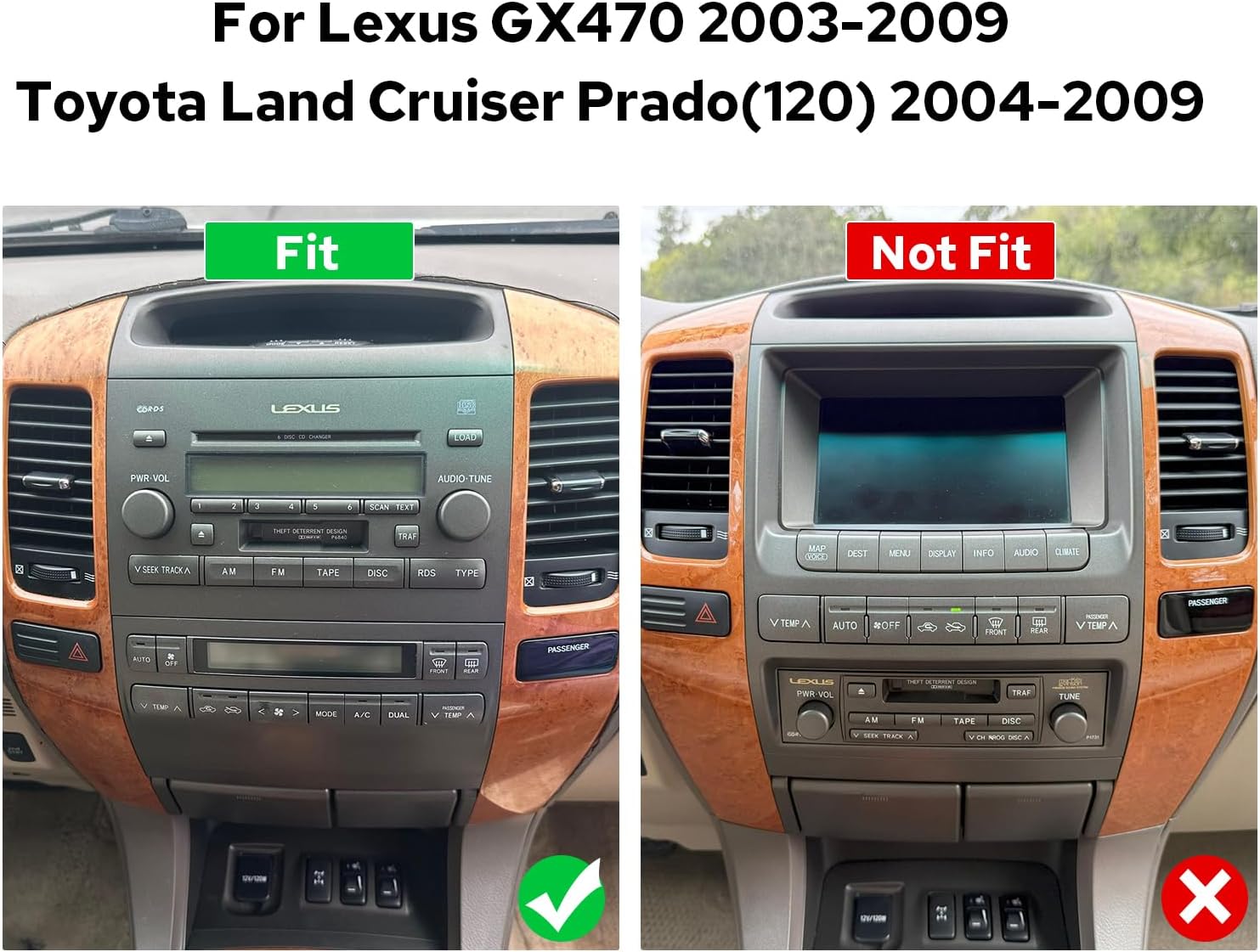
Figure 4.1: Comparison of compatible and incompatible dashboards.
4.2. Połączenia okablowania
Connect the provided cables to the corresponding ports on the car stereo and your vehicle's wiring harness. Ensure all connections are secure.

Rysunek 4.2: Tył view of the car stereo with various ports and connections.
4.3. AR Camera Connection
For connecting AR (Augmented Reality) front and reverse cameras, follow the specific wiring instructions. This typically involves connecting the camera's power cable and video input to the head unit.
Video 4.1: Detailed guide on connecting AR (Front and Reverse) cameras to the head unit.
5. Konfiguracja początkowa
5.1. Pierwsze uruchomienie
The first boot-up may take 30-40 seconds. Subsequent startups will be faster, typically within 2 seconds.
5.2. Parowanie Bluetooth
To enable hands-free calling and audio streaming, pair your smartphone via Bluetooth. Navigate to the Bluetooth settings on the car stereo and your phone, then select 'Car BTo' or a similar device name to connect.
Video 5.1: Demonstration of Bluetooth pairing and CarPlay/Android Auto connection.
5.3. CarPlay & Android Auto Connection
Connect your mobile phone to the car radio via USB cable or Bluetooth to use CarPlay or Android Auto. This allows access to navigation, phone calls, and music on the larger screen.

Figure 5.1: Display showing CarPlay and Android Auto interfaces.
6. Instrukcja obsługi
6.1. Nawigacja interfejsu użytkownika
The system features an intuitive Android interface. Swipe left or right to access different home screens and applications. Tap icons to launch apps like Radio, Music, Video, Navigation, and Settings.

Figure 6.1: Car stereo displaying the main user interface with various application icons.
6.2. Audio and Equalizer Settings
Adjust audio settings and utilize the 48-band graphic equalizer (TDA7851 DSP chip) for optimal sound quality. Preset EQ modes are available, or you can customize your own.

Figure 6.2: Illustration of high-quality sound features and equalizer interface.
6.3. Sterowanie głosowe
Utilize voice commands to control various functions, enhancing driving intelligence and security. This allows for hands-free operation of features like radio, navigation, and calls.
Video 6.1: Demonstration of voice control features, including opening FM radio and hands-free calling.
6.4. Funkcjonalność podwójnego ekranu
The system supports dual-screen operation, allowing two applications to run simultaneously. For exampnp. możesz mieć nawigację po jednej stronie i odtwarzanie muzyki po drugiej.
Video 6.2: Shows dual screen functionality with FM radio and phone dialer running concurrently.
6.5. Wyjście HDMI
The unit features an HDMI output, allowing you to send uncompressed audio and video signals to external displays, such as headrest monitors, for passenger entertainment.
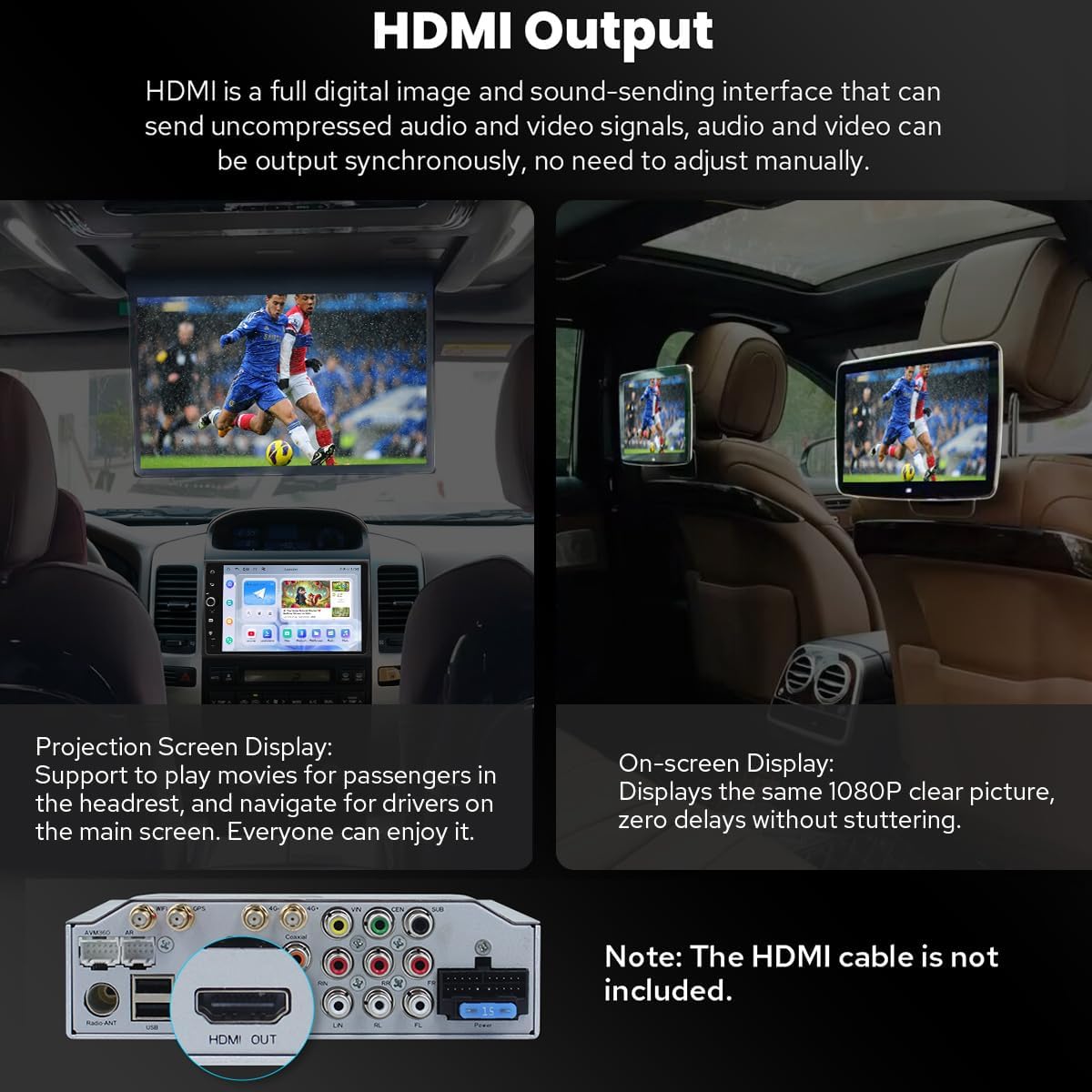
Figure 6.3: Diagram illustrating HDMI output connection to external screens.
7. Dodatkowe funkcje
7.1. Personalized Settings
Customize your car stereo experience with changeable button colors, car boot logos, and a variety of wallpapers.
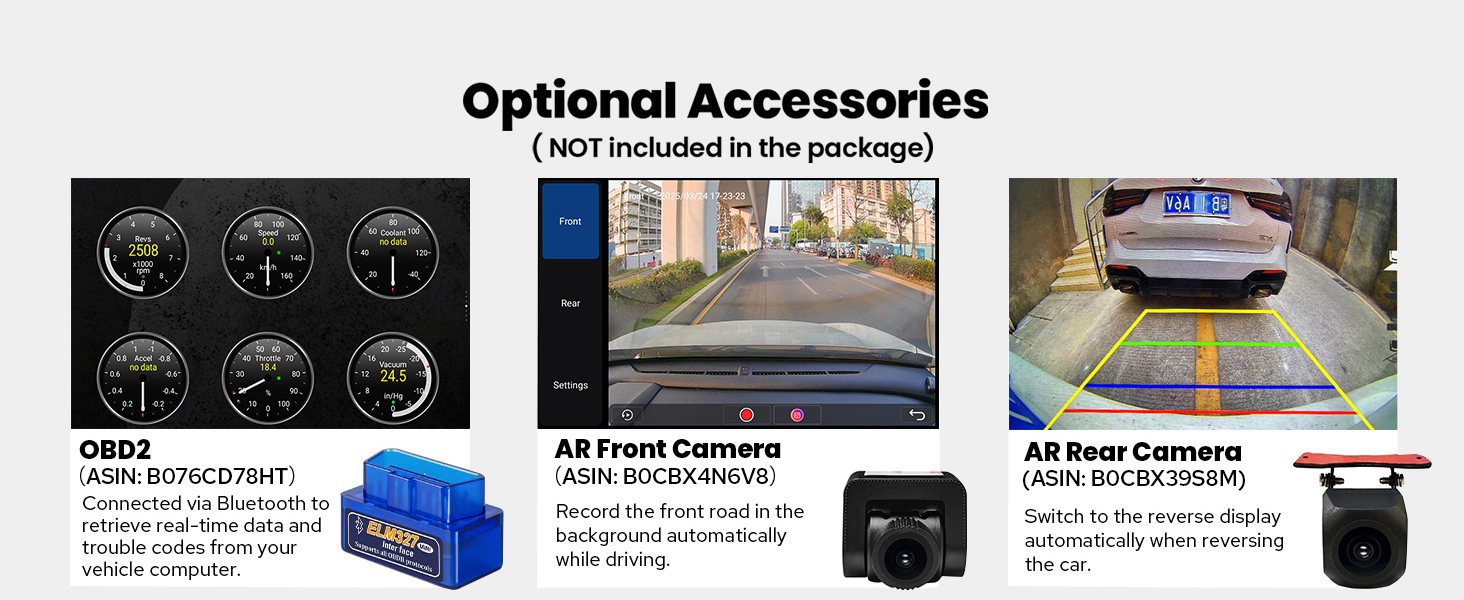
Figure 7.1: Options for customizing UI elements like button colors and wallpapers.
7.2. Łączność
The unit offers enhanced connectivity with upgraded WiFi signal via an independent antenna for stable and fast internet access, and a built-in 4G module for SIM card data.

Figure 7.2: Illustration of the independent WiFi antenna for improved signal.
7.3. Układ chłodzenia
A dual heat sink design ensures superior heat dissipation and improved temperature control, enhancing performance stability. The fan automatically activates if the CPU temperature or radio volume exceeds a set warning value.

Figure 7.3: Diagram showing the dual heat sink design and fan control interface.
7.4. Akcesoria opcjonalne
Enhance your experience with optional accessories such as OBD2 scanners, AR front cameras, and AR rear cameras (sold separately).

Rysunek 7.4: Koniecview of optional accessories for the car stereo.
8. Specyfikacje
| Funkcja | Szczegół |
|---|---|
| Numer modelu przedmiotu | JY-TT158N4 |
| Rozmiar wyświetlacza | 9 cali |
| System operacyjny | Android |
| Cechy specjalne | Bluetooth, Touchscreen, Built-in 4G Module, Optical Fiber and Coaxial Digital Output, Fast Boot, GPS Navigation, CarPlay, Android Auto |
| Technologia łączności | Bluetooth, Ethernet, USB, Wi-Fi |
| Tryb wyjścia audio | Stereofoniczny |
| Typ mapy | North America (Offline maps supported) |
| Waga przedmiotu | 6 funta |
| Wymiary opakowania | 13 x 9 x 8 cala |
9. Konserwacja
- Czyszczenie: Do czyszczenia ekranu i obudowy używaj miękkiej, suchej ściereczki. Unikaj środków czyszczących o działaniu ściernym i rozpuszczalników.
- Aktualizacje oprogramowania: Okresowo sprawdzaj dostępność aktualizacji oprogramowania, aby zapewnić optymalną wydajność i dostęp do nowych funkcji.
- Temperatura: Nie wystawiaj urządzenia na działanie ekstremalnych temperatur.
10. Rozwiązywanie Problemów
- Brak zasilania: Sprawdź wszystkie połączenia zasilania i upewnij się, że zapłon pojazdu jest włączony. Sprawdź bezpieczniki.
- Brak dźwięku: Check speaker connections, volume levels, and audio settings (e.g., equalizer, balance). Ensure external amplifiers are powered on if used.
- Problemy z połączeniem Bluetooth: Upewnij się, że Bluetooth jest włączony zarówno w zestawie stereo, jak i w telefonie. Spróbuj rozparować i ponownie sparować urządzenia.
- Brak połączenia CarPlay/Android Auto: Ensure your phone's operating system is up to date. Try a different USB cable. Verify USB debugging settings for Android Auto if connecting via USB.
- Utrata sygnału GPS: Upewnij się, że antena GPS jest prawidłowo zainstalowana i ma zapewnioną przejrzystość. view nieba.
11. Gwarancja i wsparcie
Ten produkt jest dostarczany z 2-letnia gwarancja. For technical support, troubleshooting assistance, or warranty claims, please contact JOYING customer service through your purchase platform or the official JOYING webstrona.