
RADOŚĆ JY-HT145N4
JOYING Car Radio Instruction Manual
Model: JY-HT145N4 for Honda Civic 2016-2021
1. Wprowadzenie
This manual provides comprehensive instructions for the installation, operation, maintenance, and troubleshooting of your JOYING Android 13 Car Stereo. Please read this manual thoroughly before using the product to ensure proper functionality and to maximize your user experience.

Image 1.1: The JOYING Car Radio displaying its CarPlay interface, showcasing the large 9-inch screen and integrated controls.
2. Konfiguracja i instalacja
The JOYING Car Radio is designed for a plug-and-play installation in Honda Civic models from 2016 to 2021. It supports factory features such as the reverse camera, steering wheel controls, and USB ports, utilizing the supplied necessary cables.
2.1 Supported Factory Features
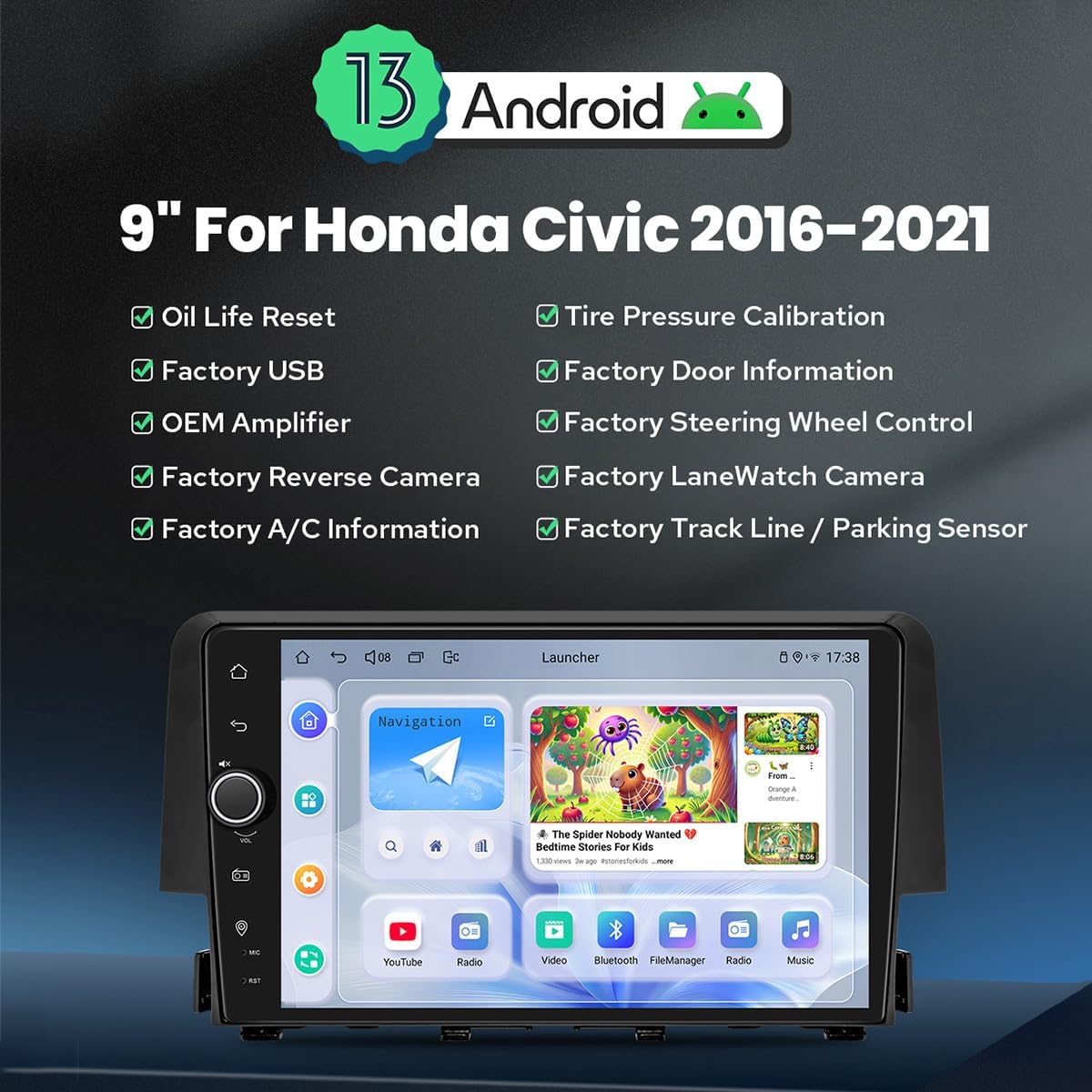
Obraz 2.1: Koniecview of Android 13 features and supported factory integrations for Honda Civic 2016-2021, including Oil Life Reset, Factory USB, OEM Amplifier, Factory Reverse Camera, Factory A/C Information, Tire Pressure Calibration, Factory Door Information, Factory Steering Wheel Control, Factory LaneWatch Camera, and Factory Track Line / Parking Sensor.
2.2 Wybór wiązki przewodów
This model offers three different wiring harnesses (A, B, C) to ensure compatibility with various factory radio configurations. It is crucial to select the correct harness for your vehicle. If unsure, please consult a photo of your factory radio's rear connections.

Image 2.2: A guide illustrating the three different wiring harnesses (A, B, C) and their corresponding factory radio connections. Choose 'Wire Harness A' for specific factory radios, 'Wire Harness B' for another type, and 'Wire Harness C' for a third type, which includes a power amplifier interfejs.
2.3 Factory-Look Integration
The head unit is designed to seamlessly integrate into your Honda Civic's dashboard, maintaining a factory-like appearance.

Image 2.3: Demonstrates the factory-look style of the head unit when installed in a car dashboard, with smaller images showing successful installation in various Honda Civic dashboard configurations.
3. Instrukcja obsługi
3.1 Fast Boot
After the initial boot-up (approximately 30-40 seconds), the system will start up instantly and enter the user interface within 2 seconds upon turning the car key.
3.2 Funkcje audio
The unit features a TDA7851 DSP Chip, a 48-Band Graphic Equalizer, and 4x50W Max Output Power for high-quality sound. It also provides Optical Fiber and Coaxial Digital Outputs for direct connection to external amplifiers, ensuring ultimate sound quality.

Image 3.1: Illustrates the high-quality sound capabilities, highlighting the TDA7851 DSP Chip, 48-Band Graphic Equalizer, and 4x50W Max Output Power. It also shows the various audio outputs including 4 Audio Outputs, 1 SUB Output, Fiber Optical Output, SPDIF Coaxial Output, and Center Channel Output, supporting aftermarket ampwężownice.
3.3 Connectivity: 4G, Carplay & Android Auto
The built-in 4G module allows internet access by inserting a SIM card (note: cannot make phone calls or send SMS). The unit supports FDD-LTE and TDD-LTE bands. Built-in Carplay and Android Auto enable seamless integration with your mobile phone via USB cable or Bluetooth, allowing access to navigation, phone calls, and music on the larger screen.

Image 3.2: Demonstrates the built-in Carplay and Android Auto features, showing how a mobile phone can connect via USB or Bluetooth to display phone apps on the car radio's screen for navigation, calls, and music.
3.4 Nawigacja GPS
Equipped with precise GPS engines and antennas for accurate positioning and faster real-time navigation. Supports offline maps where data can be downloaded and saved to the stereo. Mobile phone map data can also be synchronized via Carplay/Android Auto.
3.5 Wielozadaniowość na podzielonym ekranie
The unit supports split-screen functionality, allowing you to run two applications simultaneously, such as navigation and video playback.

Image 3.3: Illustrates the split-screen multitasking feature, showing steps to activate it: 1. Tap the recent apps icon. 2. Find the app to run in split-screen, click the app icon to bring up the split-screen button, and tap it. 3. The first app selected will display on the left side, then choose the second app in recent apps.
3.6 Ustawienia spersonalizowane
Customize your experience with features like changeable car boot logos, customizable wallpapers, adjustable screen brightness, and changeable button colors.

Image 3.4: Shows various personalized setting options including Car Boot Logo, Customizable Wallpapers, Adjustable Screen Brightness, and Changeable Button Color, allowing users to tailor the interface to their preferences.
3.7 Inne funkcje
The unit includes additional functionalities such as AM/FM Radio, Hands-free Calling, Picture-in-Picture (PiP), 3 USB Ports, Micro SD Card Slot, and a 4G SIM Card Slot.

Image 3.5: Displays icons representing other key features of the car radio: Fast Boot, GPS Navigation, AM/FM Radio, Hands-free Call, Picture-in-Picture, 3 USB Ports, Micro SD Card Slot, and 4G SIM Card Slot.
4. Konserwacja
4.1 Układ chłodzenia
The unit features an upgraded dual heat sink design for superior heat dissipation, improved temperature control, and enhanced performance stability. A fan will automatically activate if the CPU temperature or radio volume exceeds a set warning value to prevent overheating.

Image 4.1: Illustrates the upgraded cooling system with a dual heat sink design and a fan, explaining how it helps dissipate heat and maintain stable performance by automatically activating when CPU temperature or volume exceeds a set threshold.
4.2 WiFi Signal
An independent WiFi antenna ensures stable signal quality and provides fast and smooth internet access, supporting 802.11a/b/g/n/AC standards across 2.4GHz/5GHz spectral bands.

Image 4.2: Highlights the upgraded WiFi signal capabilities, featuring an independent WiFi antenna for stable signal quality and fast internet access, supporting 802.11a/b/g/n/AC standards and 2.4GHz/5GHz bands.
5. Rozwiązywanie Problemów
If you encounter any issues with your JOYING Car Radio, please refer to the following general troubleshooting steps:
- Brak zasilania: Sprawdź wszystkie połączenia zasilania i bezpieczniki. Upewnij się, że zapłon samochodu jest włączony.
- Brak dźwięku: Verify speaker connections. Check volume levels and audio output settings. Ensure external amplifiers are powered on if used.
- Problemy z sygnałem GPS: Upewnij się, że antena GPS jest prawidłowo zainstalowana i ma zapewnioną przejrzystość. view nieba.
- Brak reakcji ekranu dotykowego: Spróbuj ponownie uruchomić urządzenie. Jeśli problem będzie się powtarzał, konieczne może być przywrócenie ustawień fabrycznych (patrz menu ustawień).
- Problemy z łącznością Bluetooth: Upewnij się, że Bluetooth jest włączony zarówno w urządzeniu, jak i w Twoim urządzeniu. Spróbuj rozparować i sparować urządzenia ponownie.
For more detailed troubleshooting or persistent issues, please contact JOYING customer support.
6. Specyfikacje
| Funkcja | Specyfikacja |
|---|---|
| Numer modelu | JY-HT145N4 |
| Rozmiar wyświetlacza | 9 cali |
| System operacyjny | Android 13 |
| Pojemność pamięci masowej | 64 GB |
| Waga przedmiotu | 6 funta |
| Wymiary opakowania | 13 x 9 x 8 cala |
| Technologia łączności | Bluetooth, Wi-Fi, USB, Ethernet |
| Cechy specjalne | Touchscreen, Bluetooth, GPS, 4G Module, Carplay, Android Auto, Split-screen |
| Tryb wyjścia audio | Stereo, Optical Fiber, Coaxial Digital |
| Kraj pochodzenia | Chiny |
6.1 Size and Rear Ports

Image 6.1: Displays the dimensions of the 9-inch radio unit and a detailed view of its rear ports, including connections for camera, WiFi, GPS, 4G, USB, optical, and audio outputs.
7. Zawartość opakowania
W opakowaniu produktu znajdują się następujące elementy:
- 9" radio x1
- Single Din Cage x1
- Left & Right Bracket x1
- Antena Wi-Fi x1
- Antena GPS x1
- Antena 4G x2
- Zewnętrzny mikrofon x1
- Kabel USB x2
- Kabel AR x1
- Taśma ekranująca x1
- Kabel zasilający x1
- Instrukcja obsługi x1
Image 7.1: Visual representation of the items included in the package, such as the radio unit, single DIN cage, mounting brackets, various antennas, external microphone, USB cables, AR cable, screen ribbon cable, power cable, and user manual.
8. Akcesoria opcjonalne
Enhance your JOYING Car Radio experience with these optional accessories (not included in the standard package):
- OBD2 (ASIN: B076CD78HT): Connects via Bluetooth to retrieve real-time data and trouble codes from your vehicle computer.
- Przednia kamera AR (ASIN: B0CBX4N6V8): Podczas jazdy automatycznie nagrywa drogę przed samochodem.
- Tylna kamera AR (ASIN: B0CBX39S8M): Automatyczne przełączanie na bieg wsteczny podczas cofania samochodu.
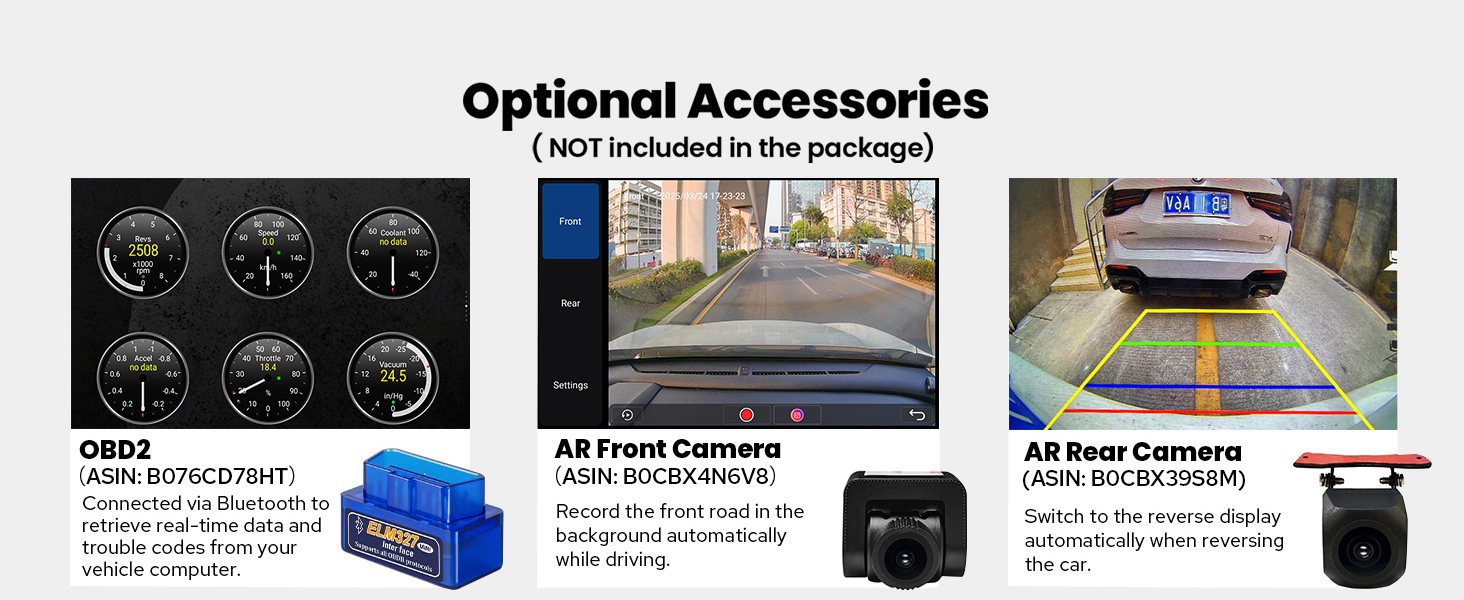
Image 8.1: Shows optional accessories available for purchase, including an OBD2 scanner, an AR Front Camera, and an AR Rear Camera, with brief descriptions of their functions.
9. Gwarancja i wsparcie
Your JOYING Car Radio comes with a 2-letnia gwarancja od daty zakupu. Niniejsza gwarancja obejmuje wady produkcyjne i zapewnia, że produkt spełnia określone standardy wydajności.
For technical support, warranty claims, or any inquiries, please visit the official JOYING Store or contact their customer service through the platform where you purchased the product.
JOYING Store Link: https://www.amazon.com/stores/JOYINGAndroidCarStereo/page/571C1208-4291-4DEC-85CC-AD53925CD824
Ask a question about this manual
Ask about setup, troubleshooting, compatibility, parts, safety, or missing instructions. Manuals+ will review the question and use this page’s manual context to help answer it.