
1. Koniec produktuview
The JOYING JY-HT145N4 is an Android 13 car stereo head unit designed specifically for Honda Civic models from 2016 to 2021. This 9-inch unit integrates advanced features such as wireless Apple CarPlay and Android Auto, GPS navigation, Bluetooth 5.0, and a physical volume knob for enhanced user experience. It supports various factory features of your Honda Civic, including the reverse camera, steering wheel controls, USB ports, and amplifier, ensuring a seamless upgrade.
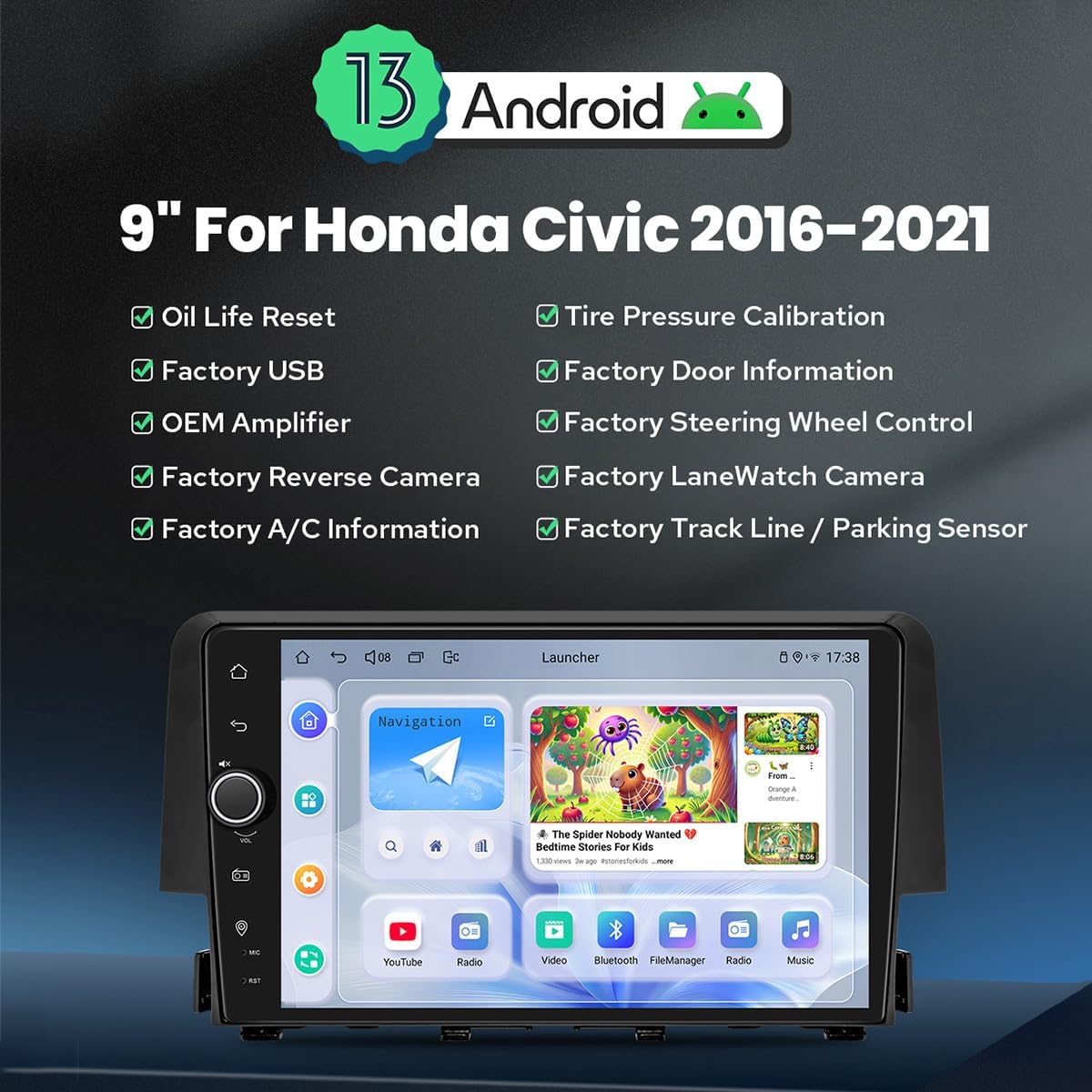
Obraz 1.1: Przód view of the JOYING Android 13 Car Stereo, highlighting key features like Android 13 OS, 9-inch display, and compatibility with various factory vehicle functions.
Główne cechy:
- System operacyjny Android 13: Zapewnia nowoczesny i responsywny interfejs użytkownika.
- 9-Inch High-Definition Display: Offers clear visuals for navigation and media.
- Bezprzewodowy Apple CarPlay i Android Auto: Bezproblemowa integracja ze smartfonem umożliwiająca nawigację, wykonywanie połączeń i słuchanie muzyki.
- Nawigacja GPS: Precise positioning with support for offline maps and real-time navigation.
- Bluetooth 5.0: For stable hands-free calling and audio streaming.
- Wbudowany moduł 4G: Allows direct internet access via a SIM card (data only).
- Wyjście cyfrowe światłowodowe i koncentryczne: For high-fidelity audio output to external ampwężownice.
- Instalacja Plug & Play: Designed for easy installation with included wiring harnesses, supporting factory features like reverse camera, steering wheel controls, and ampliyfikator.
2. Konfiguracja i instalacja
This section provides guidance for installing your JOYING car stereo. It is designed for a plug-and-play experience, but professional installation is recommended if you are unfamiliar with car audio systems.
2.1 Wybór wiązki przewodów
The correct wiring harness is crucial for proper functionality. Please identify your vehicle's original radio type to select the appropriate harness (A, B, or C).

Image 2.1: Guide for selecting the correct wiring harness based on your Honda Civic's original radio configuration.
- Wire Harness A: For OEM radios with a small screen.
- Wire Harness B: For OEM radios with a large screen.
- Wire Harness C: For OEM radios with a factory amplifier (includes power amplifier interface).
Ensure you select the harness that matches your vehicle's specifications to avoid installation issues.
2.2 CAN Bus Setting
Since your Honda Civic is equipped with a CAN bus system, you must set the communication protocol switch on the back of the head unit to the 'CAN' position. This ensures proper communication with your vehicle's systems, including steering wheel controls and factory cameras.

Image 2.2: Location of the CAN bus switch on the rear of the head unit. Ensure it is set to 'CAN' for correct vehicle integration.
2.3 Zawartość opakowania
Przed rozpoczęciem instalacji sprawdź, czy w pakiecie znajdują się wszystkie komponenty:
- 9" Radio Head Unit (1)
- Single Din Cage (1)
- Left & Right Brackets (1 pair)
- WiFi Antenna (1)
- Antena GPS (1)
- 4G Antennas (2)
- Mikrofon zewnętrzny (1)
- Kable USB (2)
- AR Cable (1)
- Screen Ribbon Cable (1)
- Kabel zasilający (1)
- Instrukcja obsługi (1)

Image 2.3: Visual representation of the included components in the JOYING car stereo package.
2.4 Optional Accessories (Not Included)
Enhance your experience with these optional accessories:
- Skaner OBD2: Łączy się przez Bluetooth, umożliwiając pobieranie danych o pojeździe w czasie rzeczywistym i kodów diagnostycznych.
- Przednia kamera AR: Records the road ahead automatically while driving.
- Tylna kamera AR: Zapewnia wyraźny view behind the vehicle, automatically switching when reversing.

Obraz 2.4: Examples of optional accessories like OBD2, AR Front Camera, and AR Rear Camera.
3. Instrukcja obsługi
This section covers the primary functions and features of your JOYING car stereo.
3.1 Fast Boot
After the initial boot-up (which may take 30-40 seconds), the system will start almost instantly (within 2 seconds) when you turn on your vehicle, allowing quick access to the user interface.
3.2 Nawigacja GPS
The unit features precise GPS navigation with an included GPS antenna for improved satellite signal reception. It supports offline maps, allowing you to download map data for specific regions and use navigation without an internet connection. You can also synchronize mobile phone map data via Apple CarPlay or Android Auto.
3.3 Built-in 4G Module
Insert a SIM card into the designated slot to enable internet access directly from the head unit. This module supports data services but cannot be used for phone calls or SMS messages. Supported bands include FDD-LTE: B2/B4/B5/B7/B12/B13/B14/B17/B25/B26/B38/B66/B71 and TDD-LTE: B41.
3.4 Wyjście audio
The unit features Optical Fiber and Coaxial Digital Outputs. If your external amplifier supports these inputs, you can achieve superior sound quality directly from the head unit.

Image 3.1: Illustrates the audio capabilities, including the TDA7851 DSP chip, 48-band graphic equalizer, 4x50W output, and support for aftermarket amplifiers via various outputs.
3.5 Apple CarPlay i Android Auto
Connect your smartphone via USB cable or Bluetooth to utilize Apple CarPlay or Android Auto. This allows you to access navigation, make phone calls, send messages, and listen to music through the head unit's display.

Image 3.2: Depicts the user interfaces for Apple CarPlay and Android Auto on the head unit's screen.
3.6 Wielozadaniowość na podzielonym ekranie
Funkcja podzielonego ekranu pozwala na jednoczesne uruchamianie dwóch aplikacji na jednym ekranie. Na przykładampno, możesz view navigation on one side and a media player on the other. To activate, tap the recent apps icon, then select the split-screen function for a compatible app.

Image 3.3: Visual guide on how to activate and use the split-screen multitasking feature.
3.7 wyjście HDMI
The HDMI output provides a full digital image and sound interface, allowing synchronous output of audio and video signals to external displays, such as headrest monitors. This enables passengers to watch movies while the driver uses the main screen for navigation. Notatka: Kabel HDMI nie jest dołączony.
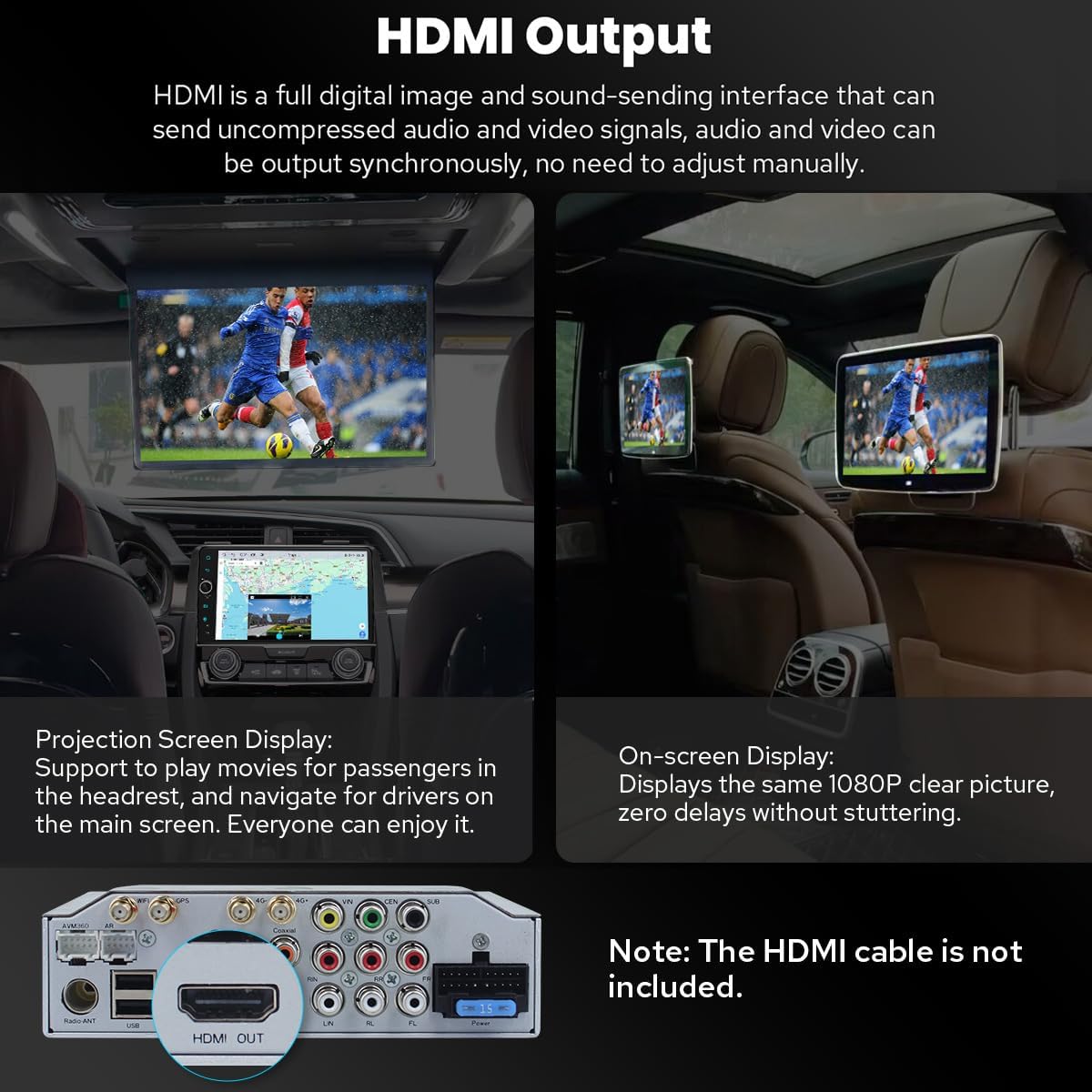
Image 3.4: Demonstrates the HDMI output functionality for connecting to rear seat entertainment systems.
3.8 Ustawienia spersonalizowane
Customize your head unit experience with various settings:
- Car Boot Logo: Select a custom logo to display when the unit starts.
- Customizable Wallpapers: Personalize the background of your home screen.
- Changeable Button Color: Adjust the color of the physical buttons to match your vehicle's interior lighting.
- Regulowana jasność ekranu: Optimize display visibility for different lighting conditions.

Obraz 3.5: Koniecview of personalized settings including boot logo, wallpapers, button color, and screen brightness adjustment.
3.9 Inne funkcje
- Radio AM/FM: Uzyskaj dostęp do lokalnych stacji radiowych.
- Rozmowa w trybie głośnomówiącym: Make and receive calls safely via Bluetooth.
- Obraz w obrazie: Display a small video window over other applications.
- 3 porty USB: For connecting external devices, charging, or media playback.
- Gniazdo kart Micro SD: For additional storage or media.
- Gniazdo karty SIM 4G: For mobile data connectivity.

Image 3.6: Icons representing additional features such as Fast Boot, GPS Navigation, AM/FM Radio, Hands-free Call, Picture-in-Picture, 3 USB Ports, Micro SD Card Slot, and 4G SIM Card Slot.
4. Konserwacja
Proper maintenance ensures the longevity and optimal performance of your JOYING car stereo.
4.1 Układ chłodzenia
The unit features an upgraded dual heat sink design for superior heat dissipation and improved temperature control, enhancing performance stability. A built-in fan automatically activates when the CPU temperature or radio volume exceeds a set warning value, preventing overheating.
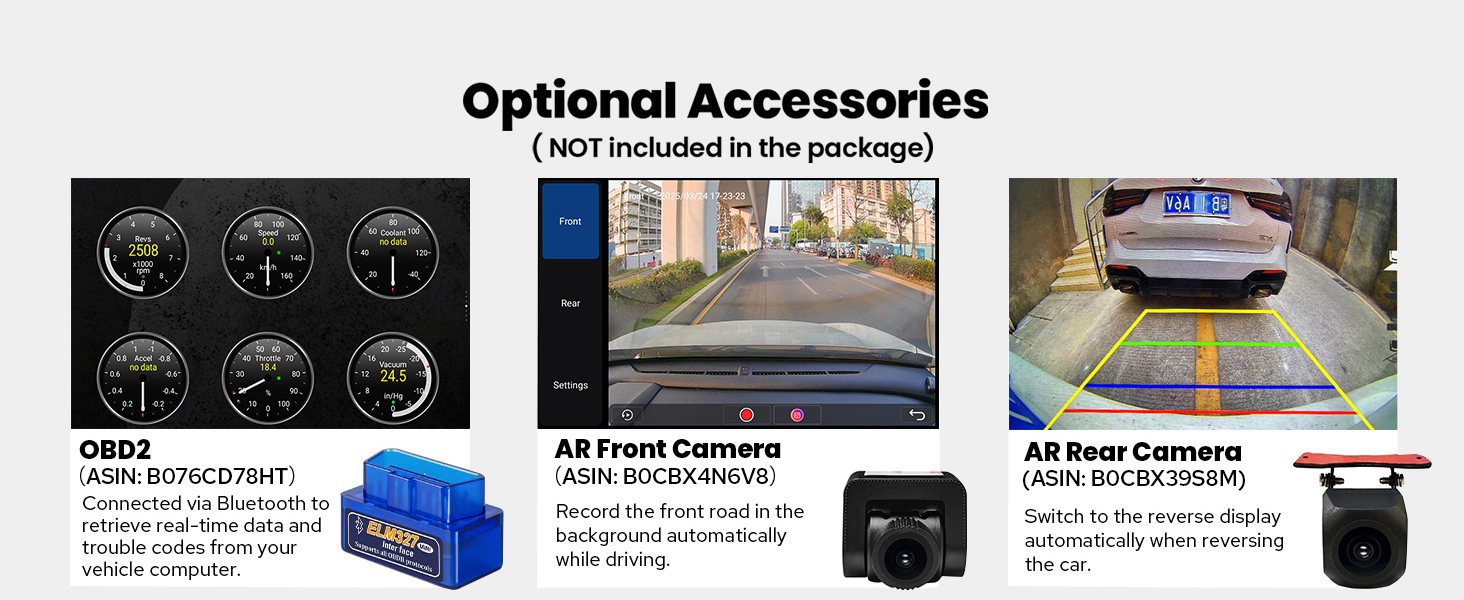
Image 4.1: Diagram illustrating the dual heat sink design and fan control for optimized cooling.
4.2 WiFi Signal
An independent WiFi antenna ensures stable signal quality and provides fast, smooth internet access. The unit supports 802.11a/b/g/n/AC standards across 2.4GHz and 5GHz spectral bands.

Image 4.2: Shows the independent WiFi antenna and its connection point on the rear of the unit, highlighting improved signal.
4.3 Ogólna opieka
- Czyszczenie: Do czyszczenia ekranu i obudowy używaj miękkiej, suchej ściereczki. Unikaj środków czyszczących o działaniu ściernym i rozpuszczalników.
- Temperatura: Unikaj wystawiania urządzenia na działanie ekstremalnych temperatur, zarówno wysokich, jak i niskich, przez dłuższy czas.
- Znajomości: Okresowo sprawdzaj wszystkie połączenia kablowe, aby mieć pewność, że są bezpieczne.
5. Rozwiązywanie Problemów
W tej sekcji omówiono często spotykane problemy i zaproponowano możliwe rozwiązania.
5.1 Typowe problemy i rozwiązania
- Brak zasilania/urządzenie się nie włącza:
Rozwiązanie: Check all power connections. Ensure the vehicle's ignition is on. Verify the fuse in the power cable is intact. - Brak dźwięku:
Rozwiązanie: Check speaker connections. Ensure the volume is not muted or set too low. If using an external amplifier, verify its power and connections. - Kamera cofania nie jest wyświetlana:
Rozwiązanie: Confirm the camera is correctly wired to the head unit's reverse input. Check the camera settings in the unit's menu to ensure the correct camera type is selected. Verify the CAN bus switch is set to 'CAN'. - Sterowanie na kierownicy nie działa:
Rozwiązanie: Ensure the CAN bus switch on the back of the unit is set to 'CAN'. Check the steering wheel control settings in the unit's menu for proper configuration. - Microphone Issues (Low Volume/Unclear Audio):
Rozwiązanie: Ensure the external microphone is securely connected and positioned correctly. Adjust microphone sensitivity settings in the unit's audio menu. - Android Auto/CarPlay Connection Issues:
Rozwiązanie: Ensure your phone's software is up to date. Try a different USB cable. Restart both the phone and the head unit. For wireless connections, ensure Bluetooth and Wi-Fi are enabled on your phone. - AC Controls Not Functioning Correctly:
Rozwiązanie: This issue can sometimes occur with aftermarket units. Double-check all wiring related to the AC system. Consult the vehicle's specific wiring diagram or contact support if the issue persists. - Unit Freezes or Becomes Unresponsive:
Rozwiązanie: Perform a soft reset by pressing the reset button (usually a small pinhole) or by turning off the vehicle and restarting it. If the issue persists, a factory reset may be necessary (note: this will erase all user data).
5.2 Ogólne wskazówki dotyczące rozwiązywania problemów
- Sprawdź połączenia: Always ensure all cables are securely connected.
- Restart the Unit: Często proste ponowne uruchomienie może rozwiązać drobne problemy z oprogramowaniem.
- Skorzystaj z zasobów online: JOYING's official website or user forums may offer additional troubleshooting guides.
- Skontaktuj się z pomocą techniczną: If you cannot resolve an issue, refer to the Warranty & Support section for assistance.
6. Specyfikacje
Detailed technical specifications for the JOYING JY-HT145N4 car stereo.
| Funkcja | Specyfikacja |
|---|---|
| Marka | RADOŚĆ |
| Nazwa modelu | HT145N4 |
| System operacyjny | Android 13 |
| Rozmiar ekranu | 9 cali |
| Typ wyświetlacza | PROWADZONY |
| Typ ekranu dotykowego | Pojemnościowy |
| Pojemność pamięci masowej | 64 GB |
| Technologia łączności | Bluetooth, Ethernet, USB, Wi-Fi |
| Protokół łączności | Bluetooth, WiFi |
| Wersja Bluetooth | 5.0 |
| Obsługiwany system nawigacji satelitarnej | BeiDou, GLONASS, GPS |
| Typ mapy | North America (Offline maps supported) |
| Tryb wyjścia audio | Stereofoniczny |
| Cechy specjalne | Bluetooth, Touchscreen, Carplay, Android Auto, Mirror Link, GPS Navigation, Volume Knob, Built-in 4G Module, Optical Fiber/Coaxial Digital Output |
| Typ montażu | Montaż na desce rozdzielczej |
| Kompatybilne urządzenia | Aparat, smartfon |
| Waga przedmiotu | 6 funtów |
7. Gwarancja i wsparcie
7.1 Gwarancja na produkt
The JOYING JY-HT145N4 car stereo comes with a 2-letnia gwarancja od daty zakupu. Niniejsza gwarancja obejmuje wady produkcyjne i usterki powstałe w wyniku normalnego użytkowania. Prosimy zachować dowód zakupu na wypadek roszczeń gwarancyjnych.
7.2 Obsługa klienta
For technical assistance, troubleshooting, or warranty inquiries, please contact JOYING customer support. It is recommended to reach out to the Amazon seller support for this product directly for the most responsive and helpful assistance. When contacting support, please provide your product model number (JY-HT145N4), purchase date, and a detailed description of the issue.
You can often find contact information for the seller through your Amazon order history.